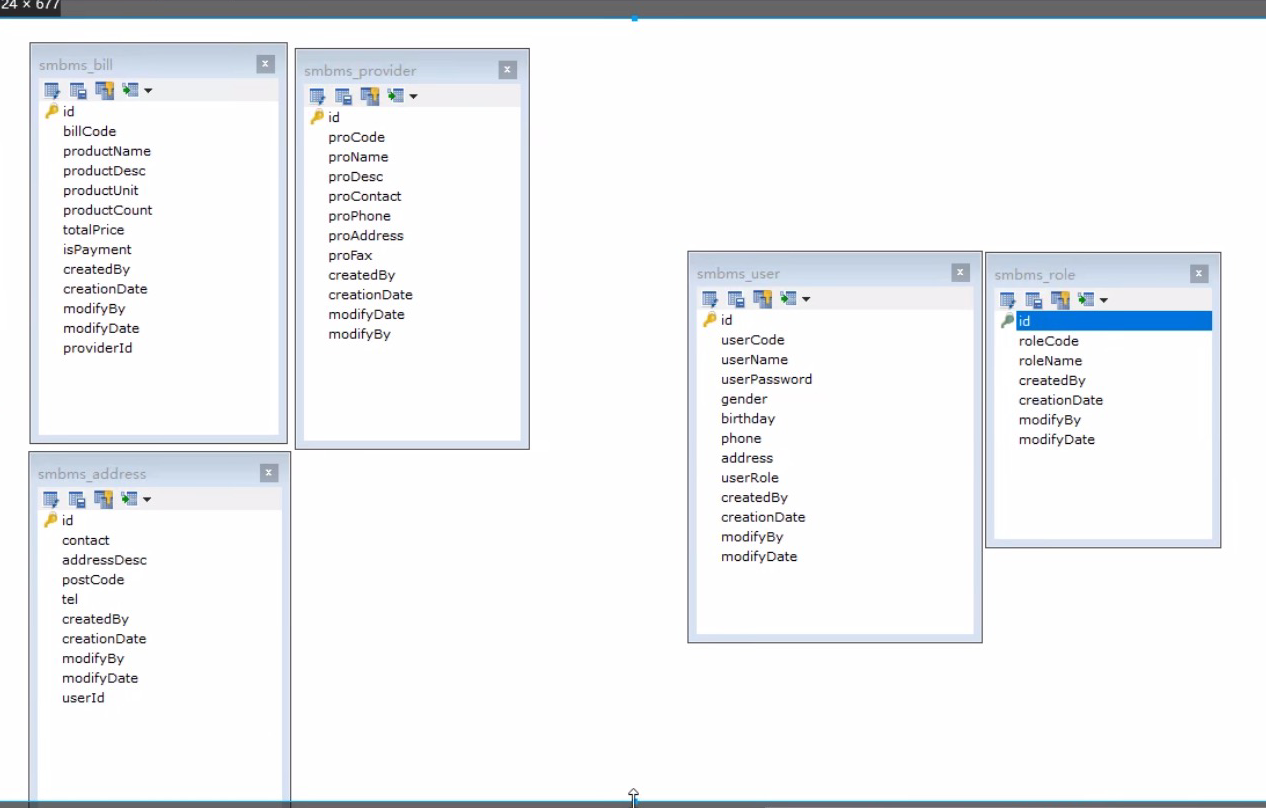
SMBMS

SMBMS


数据库:


项目如何搭建?

考虑使用不使用Maven? 使用的话要依赖,不使用要导jar包

项目搭建准备工作


  1. 搭建一个maven web项目

  2. 配置tomcat

  3. 测试项目是否能够跑起来

  4. 导入项目中会遇到的jar包;

    jsp、Servlet、mysql驱动、jstl、stand.......

  5. 创建项目包结构

  6. 编写实体类;

    ORM映射:表-类映射

  7. 编写基础公共类

    1. 数据库配置文件

      driver=com.mysql.jdbc.Driver
      url="jdbc:mysql://localhost:3306/smbms?useUnicode=true&characterEncoding=utf8&useSSL=true"
      username=root
      password=123456
      1. 编写数据库的公共类

            //静态代码块,类加载的时候就初始化了
           static {
               Properties properties = new Properties();
               //通过类加载器读取对应的资源
               InputStream is = BaseDao.class.getClassLoader().getResourceAsStream("db.properties");
               try {
                   properties.load(is);

              } catch (IOException e) {
                   e.printStackTrace();
              }

               driver = properties.getProperty("driver");
               url = properties.getProperty("url");
               username = properties.getProperty("username");
               password = properties.getProperty("password");
          }

           //获取数据库的连接
           public static Connection getConnection(){
               Connection connection = null;
               try {
                   Class.forName(driver);
                   connection = DriverManager.getConnection(url, username, password);

              } catch (Exception e) {
                   e.printStackTrace();
              }
               return connection;
          }
           //编写查询公共类
           public static ResultSet exexute(Connection connection,String sql,Object[] params,ResultSet resultSet,PreparedStatement preparedStatement ) throws SQLException {
             //预编译的sql,在后面直接执行就可以了
               preparedStatement = connection.prepareStatement(sql);
               for (int i = 0; i < params.length; i++) {
                   //setObject,占位符从1开始,但是我们的数组是从0开始!
                   preparedStatement.setObject(i + 1, params[i]);
              }
               resultSet = preparedStatement.executeQuery(sql);
               return resultSet;
          }

           //编写增删改公共方法
           public static int exexute(Connection connection,String sql,Object[] params,PreparedStatement preparedStatement ) throws SQLException {
               preparedStatement = connection.prepareStatement(sql);
               for (int i = 0; i < params.length; i++) {
                   //setObject,占位符从1开始,但是我们的数组是从0开始!
                   preparedStatement.setObject(i+1,params[i]);
              }
               int updateRows = preparedStatement.executeUpdate(sql);
               return  updateRows;
          }
           //释放资源
           public static boolean closeResource(Connection connection,PreparedStatement preparedStatement,ResultSet resultSet){

               boolean flag = true;
               if (resultSet != null){
                   try {
                       resultSet.close();
                       //GC回收
                       resultSet = null;
                  } catch (SQLException throwables) {
                       throwables.printStackTrace();
                       flag = false;
                  }
              }
               if (preparedStatement != null){
                   try {
                       preparedStatement.close();
                       //GC回收
                       preparedStatement = null;
                  } catch (SQLException throwables) {
                       throwables.printStackTrace();
                       flag = false;
                  }
              }
               if (connection!= null){
                   try {
                       connection.close();
                       //GC回收
                       connection = null;
                  } catch (SQLException throwables) {
                       throwables.printStackTrace();
                       flag = false;
                  }
              }
               return flag;
          }
        }
        1. 编写字符编码过滤器

  8. 导入静态资源

登录功能实现


  1. 编写前端页面

  2. 设置首页

    <!--    设置欢迎页面-->
       <welcome-file-list>
           <welcome-file>login.jsp</welcome-file>
       </welcome-file-list>


  3.  

posted @ 2021-10-16 17:10  敲代码的体育生  阅读(107)  评论(0)    收藏  举报