
自定义view 设置FrameLayout最大宽度比,view最大宽度比
预计:
FrameLayout为父布局,自定义view为子view,可设定frameLayout的最大宽度比,当frameLayout超过这个比例得出的尺寸时,将等于这个尺寸
public class MyView extends View {

    /**
     * 最大宽度比例:0~1.0
     * 当MyView宽度超过父容器的宽度时,MyView宽度为 父容器宽度 * maxWidthRation
     */
    private float maxWidthRation;

    /**
     * 最大高度比例:0~1.0
     * 当MyView高度超过父容器的高度时,MyView高度为 父容器高度 * maxWidthRation
     */
    private float maxHeightRation;

    public MyView(Context context, @Nullable AttributeSet attrs) {
        super(context, attrs);
        TypedArray typedArray = context.obtainStyledAttributes(attrs,R.styleable.MyView);
        maxWidthRation = typedArray.getFloat(R.styleable.MyView_maxWidthRation, 0f);
        maxHeightRation = typedArray.getFloat(R.styleable.MyView_maxHeightRation, 0f);
        typedArray.recycle();
    }

    public MyView(Context context, @Nullable AttributeSet attrs, int defStyleAttr) {
        super(context, attrs, defStyleAttr);

    }


    @Override
    protected void onMeasure(int widthMeasureSpec, int heightMeasureSpec) {
        if (maxWidthRation > 0){
            int width = MeasureSpec.getSize(widthMeasureSpec);
            int widthMode = MeasureSpec.getMode(widthMeasureSpec);
            int parentWidth = ((View)getParent()).getMeasuredWidth();
            int maxWidth = (int) (maxWidthRation * parentWidth);

            if (width > maxWidth && maxWidth > 0){
                widthMeasureSpec = MeasureSpec.makeMeasureSpec(maxWidth, widthMode);
            }
        }

        if (maxHeightRation > 0){
            int height = MeasureSpec.getSize(heightMeasureSpec);
            int heightMode = MeasureSpec.getMode(heightMeasureSpec);
            int parentHeight = ((View)getParent()).getMeasuredHeight();
            int maxHeight = (int) (maxHeightRation * parentHeight);

            if (height > maxHeight && maxHeight > 0){
                heightMeasureSpec = MeasureSpec.makeMeasureSpec(maxHeight, heightMode);
            }
        }
        setMeasuredDimension(widthMeasureSpec, heightMeasureSpec);
    }
}
对应属性:
    <declare-styleable name="MyView">
        <attr name="maxWidthRation" format="float"/>
        <attr name="maxHeightRation" format="float"/>
    </declare-styleable>
public class MyLayout extends FrameLayout {

    /**
     * 最大宽度比例:0~1.0
     * 当MyLayout宽度超过父容器的宽度时,MyLayout宽度为 父容器宽度 * maxWidthRation
     */
    private float maxWidthRation;

    /**
     * 最大高度比例:0~1.0
     * 当MyLayout高度超过父容器的高度时,MyLayout高度为 父容器高度 * maxWidthRation
     */
    private float maxHeightRation;


    public MyLayout(@NonNull Context context, @Nullable AttributeSet attrs, int defStyleAttr) {
        super(context, attrs, defStyleAttr);
    }

    @RequiresApi(api = Build.VERSION_CODES.LOLLIPOP)
    public MyLayout(@NonNull Context context, @Nullable AttributeSet attrs, int defStyleAttr, int defStyleRes) {
        super(context, attrs, defStyleAttr, defStyleRes);
    }


    public MyLayout(@NonNull Context context) {
        super(context);
    }

    public MyLayout(@NonNull Context context, @Nullable AttributeSet attrs) {
        super(context, attrs);
        TypedArray typedArray = context.obtainStyledAttributes(attrs,R.styleable.MyLayout);
        maxWidthRation = typedArray.getFloat(R.styleable.MyLayout_maxWidthRation2, 0f);
        maxHeightRation = typedArray.getFloat(R.styleable.MyLayout_maxHeightRation2, 0f);
        typedArray.recycle();
    }


    @Override
    protected void onMeasure(int widthMeasureSpec, int heightMeasureSpec) {
        int width = MeasureSpec.getSize(widthMeasureSpec);
        int widthMode = MeasureSpec.getMode(widthMeasureSpec);

        int height = MeasureSpec.getSize(heightMeasureSpec);
        int heightMode = MeasureSpec.getMode(heightMeasureSpec);

        int parentWidth = ((View)getParent()).getMeasuredWidth();
        int parentHeight = ((View)getParent()).getMeasuredHeight();

        //计算出最大尺寸
        int maxWidth = (int) (maxWidthRation * parentWidth);
        int maxHeight = (int) (maxHeightRation * parentHeight);

        //当使用宽度比,且最大宽度值有效时使用
        if (maxWidthRation > 0 && width > maxWidth && maxWidth > 0){
            widthMeasureSpec = MeasureSpec.makeMeasureSpec(maxWidth, widthMode);
            //先保存一次尺寸(不保存的话,根据测试结果,子view获取的将还是MyLayout原来的宽度)
            setMeasuredDimension(widthMeasureSpec, heightMeasureSpec);
        }

        if (maxHeightRation > 0 && height > maxHeight && maxHeight > 0){
            heightMeasureSpec = MeasureSpec.makeMeasureSpec(maxHeight, heightMode);
            setMeasuredDimension(widthMeasureSpec, heightMeasureSpec);
        }

        super.onMeasure(widthMeasureSpec, heightMeasureSpec);
    }
}
对应属性:
<declare-styleable name="MyLayout">
        <attr name="maxWidthRation2" format="float"/>
        <attr name="maxHeightRation2" format="float"/>
    </declare-styleable>
使用:
<?xml version="1.0" encoding="utf-8"?>
<LinearLayout xmlns:android="http://schemas.android.com/apk/res/android"
    xmlns:app="http://schemas.android.com/apk/res-auto"
    xmlns:tools="http://schemas.android.com/tools"
    android:layout_width="match_parent"
    android:layout_height="match_parent"
    android:orientation="vertical"
    tools:context=".MainActivity">

   <com.example.testxx.MyLayout
       android:layout_width="4000dp"
       android:layout_height="2000dp"
       android:background="@color/colorAccent"
       app:maxWidthRation2="0.5"
       app:maxHeightRation2="0.5">

       <com.example.testxx.MyView
           android:layout_width="6000dp"
           android:layout_height="6000dp"
           android:background="@color/colorPrimary"
           app:maxWidthRation="0.5"
           app:maxHeightRation="0.3"
           />

   </com.example.testxx.MyLayout>

    <com.example.testxx.MyView
        android:layout_width="6000dp"
        android:layout_height="6000dp"
        android:layout_marginTop="30dp"
        android:background="@color/colorPrimary"
        app:maxWidthRation="0.5"
        app:maxHeightRation="0.3"
        />

</LinearLayout>
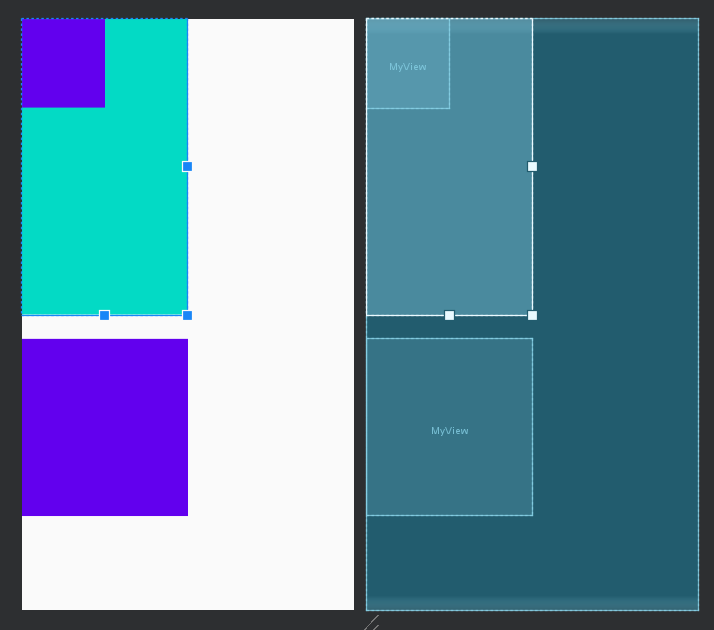
效果图:

 浙公网安备 33010602011771号