
全栈开发之小程序 网快速笔记,复习springboot 假期复习一套课程
第六章登陆与注册 本章主要内容如下
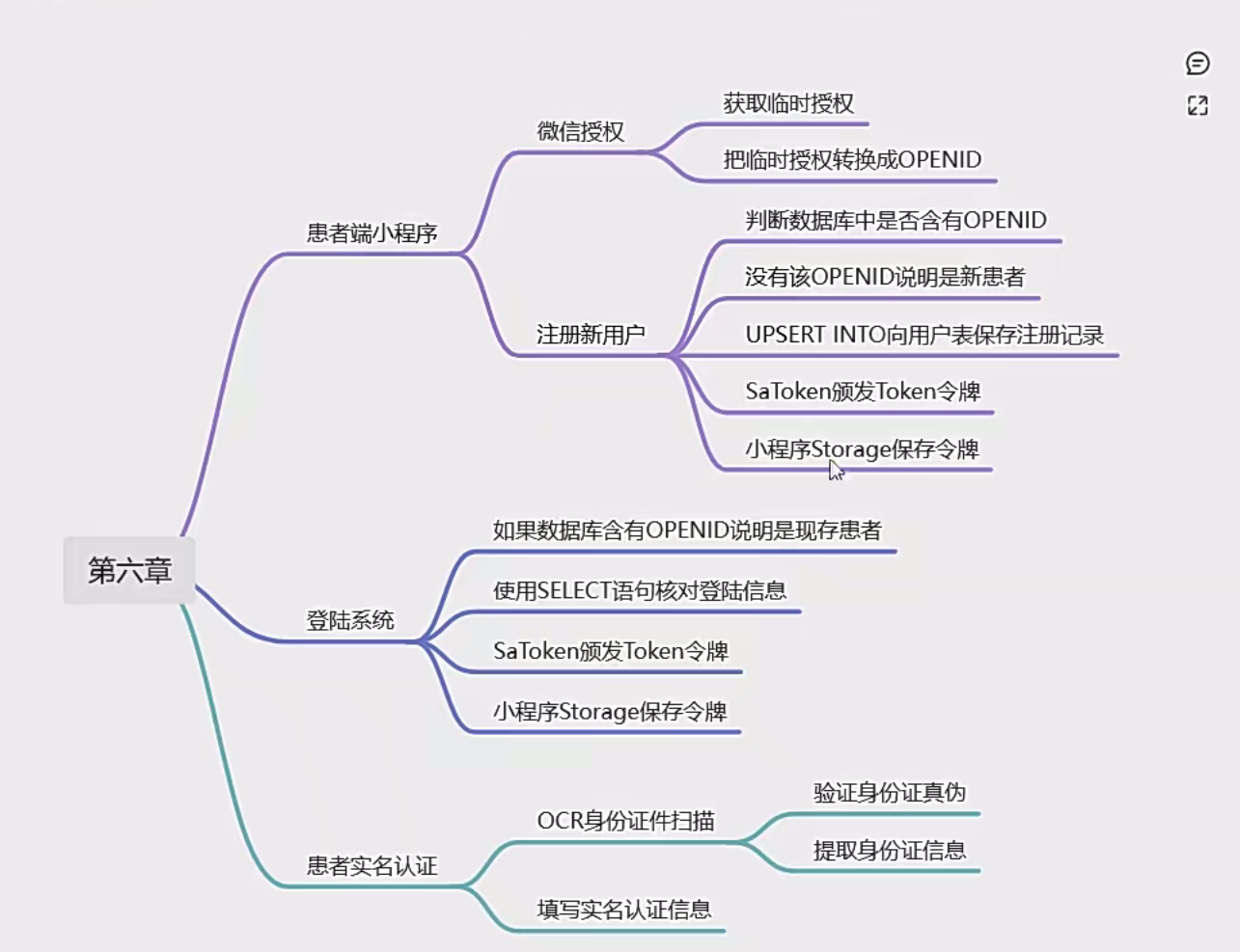
登陆注册相关

<?xml version="1.0" encoding="UTF-8"?>
<!DOCTYPE mapper
        PUBLIC "-//mybatis.org//DTD Mapper 3.0//EN"
        "http://mybatis.org/dtd/mybatis-3-mapper.dtd">

<mapper namespace="com.example.hospital.patient.wx.api.db.dao.UserDao">

    <!-- 添加患者账户 -->
    <insert id="insertPatient" parameterType="com.example.hospital.patient.wx.api.db.pojo.UserEntity">
        UPSERT INTO HOSPITAL.PATIENT_USER (
            id,
            open_id,
            nickname,
            photo,
            sex,
            status,
            create_time
        ) VALUES (
            NEXT VALUE FOR HOSPITAL.PATIENT_USER_SEQUENCE,
            #{openId},
            #{nickname},
            #{photo},
            #{sex},
            #{status},
            CURRENT_TIMESTAMP
        )
    </insert>

    <!-- 检查用户是否已注册 -->
    <select id="searchAlreadyRegistered" parameterType="String" resultType="Integer">
        SELECT id
        FROM HOSPITAL.PATIENT_USER
        WHERE open_id = #{openId}
        LIMIT 1
    </select>

    <!-- 患者登录 -->
    <select id="patientLogin" parameterType="map" resultType="com.example.hospital.patient.wx.api.db.pojo.UserEntity">
        SELECT
            id,
            open_id,
            nickname,
            photo,
            sex,
            status,
            create_time
        FROM HOSPITAL.PATIENT_USER
        WHERE open_id = #{openId} AND password = #{password}
    </select>

</mapper>
以下是在com.example.hospital.patient.wx.api.db.dao.UserDao接口中声明相关DAO方法的代码:
public interface UserDao {

    /**
     * 插入用户实体对象到数据库中
     * @param entity 要插入的用户实体
     * @return 受影响的行数
     */
    @Transactional
    int insert(UserEntity entity);

    /**
     * 根据openId查询是否已经注册过
     * @param openId 用户的唯一标识openId
     * @return 如果已经注册返回对应的用户ID,如果未注册返回null
     */
    Integer searchAlreadyRegistered(String openId);
}
服务层代吗
@Service
public class UserServiceImpl implements UserService {

    @Value("${wechat.app - id}")
    private String appId;

    @Value("${wechat.app - secret}")
    private String appSecret;

    @Resource
    private UserDao userDao;

    @Resource
    private UserInfoCardDao userInfoCardDao;

    @Override
    public HashMap<String, Object> loginOrRegister(String code, String nickname, String photo, String sex) {
        // 用临时授权兑换openId
        String openId = this.getOpenId(code);
        HashMap<String, Object> map = new HashMap<>();
        // 是否为已注册用户
        Integer id = userDao.searchAlreadyRegistered(openId);
        if (id == null) {
            UserEntity entity = new UserEntity();
            entity.setOpenId(openId);
            entity.setNickname(nickname);
            entity.setPhoto(photo);
            entity.setSex(sex);
            userDao.insert(entity);
            map.put("success", true);
            map.put("message", "注册成功");
            map.put("userId", entity.getId());
        } else {
            map.put("success", true);
            map.put("message", "登录成功");
            map.put("userId", id);
        }
        return map;
    }

    private String getOpenId(String code) {
        // 这里应该是调用微信相关接口,根据code获取openId的逻辑
        // 例如使用http请求调用微信的API,这里只是模拟返回一个openId
        return "mockOpenId";
    }
}
以下是截图
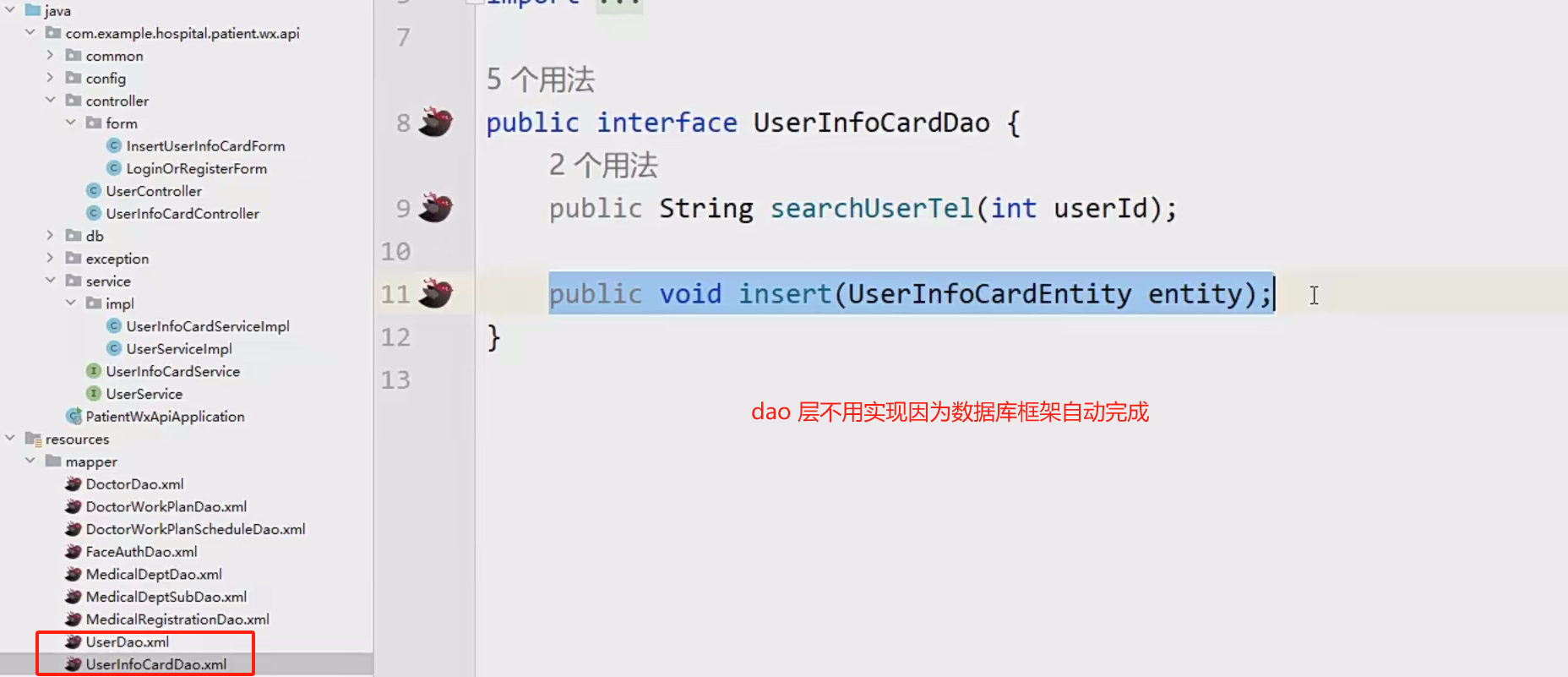
然后服务层,和实现

控制层

效果二

导航布局

点击跳转


弹出层

日期弹窗

表单示列

以下 是绑定方法

以下是关表单验证的代码。
// 定义 nextHandle 方法,用于处理表单字段的验证
nextHandle: function() {
    // 使用 'that' 来保存当前上下文,以便在回调函数中使用
    let that = this;

    // 初始化验证状态为 true
    that.validate = true;

    // 验证 'name' 字段
    that.$refs.form1.validateField('name', function(errors) {
        // 调用通用的验证处理函数,传入当前上下文和错误信息
        that.validateFieldHandle(that, errors);
    });

    // 验证 'pid' 字段
    that.$refs.form1.validateField('pid', function(errors) {
        that.validateFieldHandle(that, errors);
    });

    // 验证 'tel' 字段
    that.$refs.form1.validateField('tel', function(errors) {
        that.validateFieldHandle(that, errors);
    });

    // 验证 'sex' 字段
    that.$refs.form1.validateField('sex', function(errors) {
        that.validateFieldHandle(that, errors);
    });

    // 验证 'birthday' 字段
    that.$refs.form1.validateField('birthday', function(errors) {
        that.validateFieldHandle(that, errors);
    });

    // 由于以上验证是异步进行的,使用 setTimeout 来等待所有验证完成
    setTimeout(function() {
        // 如果有任何验证失败,显示错误提示并阻止后续操作
        if (!that.validate) {
            uni.showToast({
                title: '数据不正确',
                icon: 'none' // 显示无图标的提示
            });
            return;
        }

        // 如果所有验证通过,显示信息面板
        that.showInfoPanel = true;
    }, 500); // 等待 500 毫秒以确保所有异步验证完成
},

// 定义 validateFieldHandle 方法,用于处理单个字段的验证结果
validateFieldHandle: function(ref, errors) {
    // 如果当前字段有错误,设置验证状态为 false
    if (errors.length > 0) {
        ref.validate = false;
    }
}
点击多选


submitHandle: async function () {
    let that = this;

    const modalOpts = {
        title: '提示消息',
        content: that.flag === 'insert' ? '确定创建就诊卡?' : '确定更新就诊卡信息?'
    };

    const resp = await uni.showModal(modalOpts);
    if (resp.confirm) {
        try {
            let data = that.dataForm;
            const url = that.flag === 'insert' ? that.api.insertUserInfoCard : that.api.updateUserInfoCard;
            const res = await that.uthat.ajax(url, 'POST', data);
            uni.showToast({
                icon: 'success',
                title: that.flag === 'insert' ? '就诊卡创建成功' : '就诊卡更新成功'
            });
            setTimeout(() => {
                uni.switchTab({ url: "/pages/mine/mine" });
            }, 1000);
        } catch (error) {
            uni.showToast({
                icon: 'none',
                title: '操作失败,请重试'
            });
        }
    }
}


 浙公网安备 33010602011771号