

用 html5 css javascript写的普通计算机
首先给大家展示一下效果图
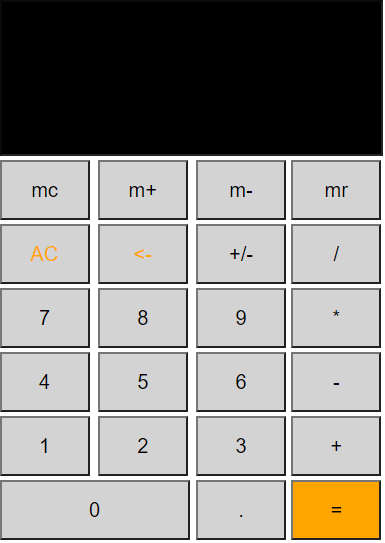
其中第一行操作不明白的朋友请自行查阅
废话不多说 直接上代码 下面是这个普通计算器的详细代码 需要自取
<!DOCTYPE html>
<html lang="en">
<head>
  <meta charset="UTF-8">
  <meta http-equiv="X-UA-Compatible" content="IE=edge">
  <meta name="viewport" content="width=device-width, initial-scale=1.0">
  <title>Document</title>
  <style >
    table{

      margin: 90px auto;
    }

    .screen{
      width: 375px;
      height: 150px;
      background-color: black;
      color: rgb(252, 250, 250);
      font-size: 20px;
      text-align:right;
    }
    .bt{
      width: 90px;
      height: 60px;
      font-size: 20px;
      background-color : lightgray;
      text-align: center;
    }
  </style>
</head>
<body>
<!-- 先把主要页面画出来 画的时候主要用了表格和输入框 -->
  <table>
  <tr >
    这里首先先占四个格  应用colspan调整  然后记得禁用哦
    <td colspan="4"><input type="text" id="screen" class="screen" disabled></td>
  </tr>
  <tr>
    <td>
      <input class="bt" type="button" value="mc" >
    </td>
    <td>
      <input class="bt" type="button" value="m+" >
    </td>
    <td>
      <input  class="bt" type="button" value="m-" >
    </td>
    <td>
      <input class="bt"  type="button" value="mr" >
    </td>
  </tr>
  <tr>
    <td>
      <input class="bt" type="button" value="AC" style="color: orange;" >
    </td>
    <td>
      <input class="bt" type="button" value="<-" style="color: orange;" >
    </td>
    <td>
      <input class="bt" type="button" value="+/-" >
    </td>
    <td>
      <input class="bt" type="button" value="/" >
    </td>
  </tr>
  <tr>
    <td>
      <input class="bt" type="button" value="7"  >
    </td>
    <td>
      <input class="bt" type="button" value="8"  >
    </td>
    <td>
      <input class="bt" type="button" value="9" >
    </td>
    <td>
      <input  class="bt" type="button" value="*" >
    </td>
  </tr>
  <tr>
    <td>
      <input class="bt" type="button" value="4"  >
    </td>
    <td>
      <input class="bt" type="button" value="5"  >
    </td>
    <td>
      <input class="bt" type="button" value="6" >
    </td>
    <td>
      <input class="bt" type="button" value="-" >
    </td>
  </tr>
  <tr>
    <td>
      <input class="bt" type="button" value="1"  >
    </td>
    <td>
      <input  class="bt" type="button" value="2"  >
    </td>
    <td>
      <input class="bt" type="button" value="3" >
    </td>
    <td>
      <input class="bt" type="button" value="+" >
    </td>
  </tr>
  <tr>
    <td colspan="2">
      <input class="bt" type="button" value="0" style="width: 190px;"  >
    </td>
    <td>
      <input class="bt" type="button" value="."  >
    </td>
    <td>
      <input  class="bt" type="button" value="="  style="background-color: orange;">
    </td>

  </tr>
</table>

<script>
  // 下面就是最重要的部分了  主要还是应用了if else 和对一些逻辑的理解从而形成嵌套使用
window.onload=function(){
let result=document.querySelector('.screen')
let btn=document.getElementsByClassName('bt')
let num=' '
for(var i=0;i<btn.length;i++){//给所有的btn都绑定点击事件
  btn[i].onclick=function(){
    // console.log(this.value);
    if(this.value=="AC"){

      result.value=''
    }
    else if(this.value=="="){
      result.value=eval(result.value)  //通过eval方法来计算
    }
    else if(this.value=="<-"){
      result.value=result.value.substr(0,result.value.length-1);//这里使用了substr方法 这个方法的作用是 在字符串中取从一个起点到终点之间的值
    }
    else if(result.value==""&&this.value=="."){
      result.value="0."
    }
    else if(this.value=="m+"){
      if(num==' '&&result.value!==''){
        num=result.value
        result.value=''
      }
      else{
         result.value=parseInt(num)+parseInt(result.value)//这里要转换成数字型  因为存放时我们采取了字符型  要不然就成字符串拼接了
         num=" "
      }
    }
    else if(this.value=="m-"){
      if(num==' '&&result.value!==''){
        num=result.value
        result.value=''
      }
      else{
         result.value=parseInt(num)-parseInt(result.value)//与上面+同理
         num=" "
      }
    }else if(this.value=="mr"){
      result.value=parseInt(num)
    }
    else if(this.value=="mc"){
    num=' '
    result.value=''
    }
    else if(this.value=="+/-"){
      result.value=-result.value
    }
    else{
      result.value+=this.value//除了上述按钮  点击其他按钮都会进行拼接
    }
  }

}
}
</script>
</body>
</html>

 浙公网安备 33010602011771号