

PowerShell脚本提取vue页面文本
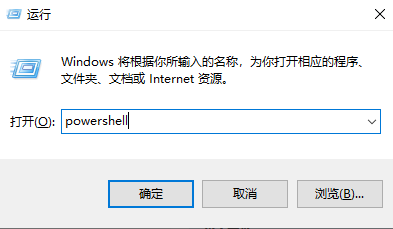
1、打开PowerShell
编写PowerShell脚本特别注意:
新建 TXT 文件本身不会导致报错,但文件编码、字符格式(全角 / 半角)、特殊隐形字符会干扰 PowerShell 解析脚本,所以新建txt文件要另存为选择文件编码;
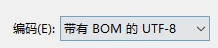
修改txt文件的编码步骤:
1.打开extract-vue-i18n.ps1文件(记事本);
2.点击「文件」→「另存为」;
3.在 “编码” 下拉框选择"带有BOM的UTF-8",覆盖保存文件;
2.新建extract_config.json文件编写配置
注意实际运行的json文件中不能有后面//的注释,把注释删掉
{
  "search_dir": "D:\\文件目录\\项目\\src\\views\\files", // 要扫描的 Vue 文件目录
  "output_file": "./i18n/zh-CN.json", // 输出文件路径
  "skip_dir": "node_modules,dist,build", // 跳过的目录
  "file_pattern": "*.vue", // 文件匹配模式
  "encoding": "UTF8", // 文件编码
  "verbose": true // 是否显示详细信息
}
保存文件时需要重新另存为选择"带有BOM的UTF-8"编码;
3.新建脚本文件extract-vue-i18n.ps1
脚本:
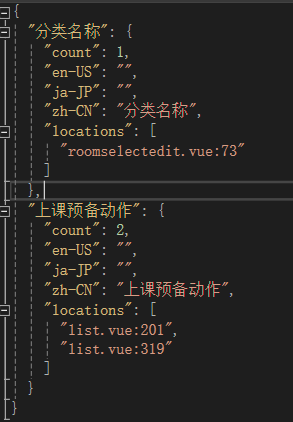
脚本一执行效果:提炼出来文本效果
{
 "要翻译的内容":  {
    "(要翻译内容一共出现几次)":  1,
    "en-US":  "翻译后的英文",
    "ja-JP":  "翻译后的日文",
    "zh-CN":  "翻译的文本",
    "(要翻译的内容所在位置信息)":  [
          "该翻译内容所在vue页面名:(这里的需要目前不知道是什么)"
          ]
    },
}


# extract-vue-i18n.ps1
# Vue 文件国际化提取脚本
# 功能:从 Vue 文件中提取中文字符串,跳过注释,用于国际化处理

param(
    [string]$ConfigPath = "./extract_config.json"
)

# 设置控制台编码
$OutputEncoding = [System.Text.Encoding]::UTF8
[Console]::OutputEncoding = [System.Text.Encoding]::UTF8

# ANSI 颜色定义
$ESC = [char]27
$COLOR_RESET = "$ESC[0m"
$COLOR_RED = "$ESC[91m"
$COLOR_GREEN = "$ESC[92m"
$COLOR_YELLOW = "$ESC[93m"
$COLOR_CYAN = "$ESC[96m"
$COLOR_MAGENTA = "$ESC[95m"

# 加载配置
function Load-Config {
    param([string]$ConfigPath)

    Write-Host "$COLOR_CYAN[INFO]$COLOR_RESET 加载配置文件: $ConfigPath" -ForegroundColor Cyan

    if (-not (Test-Path $ConfigPath)) {
        Write-Host "$COLOR_RED[ERROR]$COLOR_RESET 未找到配置文件: $ConfigPath" -ForegroundColor Red
        exit 1
    }

    try {
        $config = Get-Content $ConfigPath -Encoding UTF8 | ConvertFrom-Json
        Write-Host "$COLOR_GREEN[SUCCESS]$COLOR_RESET 配置文件加载成功" -ForegroundColor Green
        return $config
    } catch {
        Write-Host "$COLOR_RED[ERROR]$COLOR_RESET 配置文件格式错误: $_" -ForegroundColor Red
        exit 1
    }
}

# 验证配置
function Validate-Config {
    param($config)

    $requiredFields = @("search_dir", "output_file", "file_pattern")
    $missingFields = @()

    foreach ($field in $requiredFields) {
        if (-not $config.$field) {
            $missingFields += $field
        }
    }

    if ($missingFields.Count -gt 0) {
        Write-Host "$COLOR_RED[ERROR]$COLOR_RESET 配置文件中缺少必要字段: $($missingFields -join ', ')" -ForegroundColor Red
        exit 1
    }

    # 设置默认值
    if (-not $config.encoding) { $config.encoding = "UTF8" }
    if (-not $config.verbose) { $config.verbose = $true }

    Write-Host "$COLOR_GREEN[CONFIG]$COLOR_RESET 搜索目录: $($config.search_dir)" -ForegroundColor Green
    Write-Host "$COLOR_GREEN[CONFIG]$COLOR_RESET 输出文件: $($config.output_file)" -ForegroundColor Green
    Write-Host "$COLOR_GREEN[CONFIG]$COLOR_RESET 文件模式: $($config.file_pattern)" -ForegroundColor Green

    return $config
}

# 获取要扫描的文件列表
function Get-FileList {
    param($config)

    $searchPath = $config.search_dir
    $pattern = $config.file_pattern

    Write-Host "$COLOR_CYAN[INFO]$COLOR_RESET 开始扫描目录: $searchPath" -ForegroundColor Cyan

    if (-not (Test-Path $searchPath)) {
        Write-Host "$COLOR_RED[ERROR]$COLOR_RESET 搜索目录不存在: $searchPath" -ForegroundColor Red
        exit 1
    }

    # 获取跳过的目录
    $skipDirs = @()
    if ($config.skip_dir) {
        $skipDirs = $config.skip_dir.Split(',', [StringSplitOptions]::RemoveEmptyEntries) |
            ForEach-Object { $_.Trim() }
    }

    # 递归获取所有 Vue 文件
    $allFiles = Get-ChildItem -Path $searchPath -Filter $pattern -Recurse -File

    # 过滤跳过的目录
    $files = @()
    $skippedFiles = 0

    foreach ($file in $allFiles) {
        $shouldSkip = $false

        foreach ($skipDir in $skipDirs) {
            if (-not [string]::IsNullOrWhiteSpace($skipDir)) {
                if ($file.FullName -like "*\$skipDir\*") {
                    $shouldSkip = $true
                    $skippedFiles++
                    if ($config.verbose) {
                        Write-Host "$COLOR_YELLOW[SKIP]$COLOR_RESET 跳过目录: $skipDir -> $($file.Name)" -ForegroundColor DarkYellow
                    }
                    break
                }
            }
        }

        if (-not $shouldSkip) {
            $files += $file
        }
    }

    Write-Host "$COLOR_GREEN[FOUND]$COLOR_RESET 找到 $($files.Count) 个 Vue 文件" -ForegroundColor Green
    if ($skippedFiles -gt 0) {
        Write-Host "$COLOR_YELLOW[SKIP]$COLOR_RESET 跳过了 $skippedFiles 个文件" -ForegroundColor Yellow
    }

    return $files
}

# 从 Vue 文件中提取中文字符串
function Extract-ChineseFromVue {
    param(
        [System.IO.FileInfo]$File,
        [hashtable]$FoundStrings,
        [bool]$Verbose
    )

    $fileName = $File.Name
    $fullPath = $File.FullName

    try {
        # 读取文件内容
        $content = Get-Content $fullPath -Encoding UTF8 -Raw

        # 状态机变量
        $inComment = $false
        $inScriptComment = $false
        $inStyle = $false
        $inTemplate = $false
        $inScript = $false
        $currentLine = 0

        # 按行处理
        $lines = $content -split "`n"

        foreach ($line in $lines) {
            $currentLine++
            $trimmed = $line.Trim()

            # 跳过空行
            if ([string]::IsNullOrWhiteSpace($trimmed)) { continue }

            # 1. 检测 <!-- 注释开始
            if ($trimmed -match '^\s*<!--' -and $trimmed -notmatch '-->') {
                $inComment = $true
                if ($Verbose) {
                    Write-Host "$COLOR_MAGENTA[COMMENT]$COLOR_RESET $fileName`:$currentLine 进入 HTML 注释" -ForegroundColor Magenta
                }
                continue
            }

            # 2. 检测 --> 注释结束
            if ($inComment -and $trimmed -match '-->') {
                $inComment = $false
                if ($Verbose) {
                    Write-Host "$COLOR_MAGENTA[COMMENT]$COLOR_RESET $fileName`:$currentLine 退出 HTML 注释" -ForegroundColor Magenta
                }
                continue
            }

            # 3. 如果在注释中,跳过
            if ($inComment) { continue }

            # 4. 检测 <template> 开始
            if ($trimmed -match '^\s*<template\b') {
                $inTemplate = $true
                continue
            }

            # 5. 检测 </template> 结束
            if ($trimmed -match '^\s*</template>') {
                $inTemplate = $false
                continue
            }

            # 6. 检测 <script> 开始
            if ($trimmed -match '^\s*<script\b') {
                $inScript = $true
                continue
            }

            # 7. 检测 </script> 结束
            if ($trimmed -match '^\s*</script>') {
                $inScript = $false
                $inScriptComment = $false
                continue
            }

            # 8. 检测 <style> 开始
            if ($trimmed -match '^\s*<style\b') {
                $inStyle = $true
                continue
            }

            # 9. 检测 </style> 结束
            if ($trimmed -match '^\s*</style>') {
                $inStyle = $false
                continue
            }

            # 10. 如果在 style 中,跳过
            if ($inStyle) { continue }

            # 11. 处理 template 中的内容
            if ($inTemplate) {
                # 跳过 template 中的 <!-- 单行注释 -->
                if ($trimmed -match '^\s*<!--.*-->') { continue }

                # 跳过 v-html 等指令中的内容
                if ($trimmed -match 'v-html\s*=') { continue }
                if ($trimmed -match 'v-text\s*=') { continue }

                # 提取模板中的中文
                Extract-ChineseFromLine $line $fileName $currentLine $FoundStrings $Verbose
            }

            # 12. 处理 script 中的内容
            if ($inScript) {
                # 跳过 JavaScript 注释
                if ($trimmed.StartsWith("//")) { continue }
                if ($trimmed.StartsWith("/*")) {
                    $inScriptComment = $true
                    continue
                }
                if ($trimmed.EndsWith("*/")) {
                    $inScriptComment = $false
                    continue
                }
                if ($inScriptComment) { continue }

                # 跳过 #region 注释
                if ($trimmed.StartsWith("#region")) { continue }
                if ($trimmed.StartsWith("#endregion")) { continue }

                # 提取 script 中的中文(字符串字面量)
                Extract-ChineseFromScript $line $fileName $currentLine $FoundStrings $Verbose
            }
        }

        # 额外处理:从属性中提取中文
        Extract-ChineseFromAttributes $content $fileName $FoundStrings $Verbose

    } catch {
        Write-Host "$COLOR_RED[ERROR]$COLOR_RESET 处理文件时出错: $fileName - $_" -ForegroundColor Red
    }

    return $FoundStrings
}

# 从一行中提取中文字符
function Extract-ChineseFromLine {
    param(
        [string]$Line,
        [string]$FileName,
        [int]$LineNumber,
        [hashtable]$FoundStrings,
        [bool]$Verbose
    )

    # 匹配模板中的中文文本
    $patterns = @(
        # 匹配 >中文< 或 > 中文 <
        '(?<=>)[^<>]*?[\u4e00-\u9fa5][^<>]*?(?=<)',
        # 匹配属性值中的中文: title="中文" placeholder="请输入中文"
        '(?<=\=\")[^\"]*?[\u4e00-\u9fa5][^\"]*?(?=\")',
        # 匹配 {{ }} 中的中文
        '(?<=\{\{)[^\}]*?[\u4e00-\u9fa5][^\}]*?(?=\}\})'
    )

    foreach ($pattern in $patterns) {
        $matches = [regex]::Matches($Line, $pattern)
        foreach ($match in $matches) {
            $text = $match.Value.Trim()
            if (-not [string]::IsNullOrWhiteSpace($text)) {
                Add-ToStringTable $text $FileName $LineNumber $FoundStrings $Verbose
            }
        }
    }
}

# 从 script 中提取中文字符
function Extract-ChineseFromScript {
    param(
        [string]$Line,
        [string]$FileName,
        [int]$LineNumber,
        [hashtable]$FoundStrings,
        [bool]$Verbose
    )

    # 匹配 JavaScript 字符串字面量中的中文
    $patterns = @(
        # 双引号字符串
        '"(?<content>[^"\\]*(?:\\.[^"\\]*)*?[\u4e00-\u9fa5][^"\\]*(?:\\.[^"\\]*)*?)"',
        # 单引号字符串
        "'(?<content>[^'\\]*(?:\\.[^'\\]*)*?[\u4e00-\u9fa5][^'\\]*(?:\\.[^'\\]*)*?)'",
        # 模板字符串
        '`(?<content>[^`\\]*(?:\\.[^`\\]*)*?[\u4e00-\u9fa5][^`\\]*(?:\\.[^`\\]*)*?)`'
    )

    foreach ($pattern in $patterns) {
        $matches = [regex]::Matches($Line, $pattern)
        foreach ($match in $matches) {
            if ($match.Groups["content"].Success) {
                $text = $match.Groups["content"].Value
                # 处理转义字符
                $text = $text -replace '\\"', '"' -replace "\\'", "'" -replace '\\\\', '\'
                if (-not [string]::IsNullOrWhiteSpace($text)) {
                    Add-ToStringTable $text $FileName $LineNumber $FoundStrings $Verbose
                }
            }
        }
    }
}

# 从 HTML 属性中提取中文
function Extract-ChineseFromAttributes {
    param(
        [string]$Content,
        [string]$FileName,
        [hashtable]$FoundStrings,
        [bool]$Verbose
    )

    # 匹配特定属性中的中文
    $attrPatterns = @(
        'placeholder\s*=\s*["'']([^"'']*?[\u4e00-\u9fa5][^"'']*?)["'']',
        'title\s*=\s*["'']([^"'']*?[\u4e00-\u9fa5][^"'']*?)["'']',
        'label\s*=\s*["'']([^"'']*?[\u4e00-\u9fa5][^"'']*?)["'']',
        'aria-label\s*=\s*["'']([^"'']*?[\u4e00-\u9fa5][^"'']*?)["'']',
        ':label\s*=\s*["'']([^"'']*?[\u4e00-\u9fa5][^"'']*?)["'']',
        ':placeholder\s*=\s*["'']([^"'']*?[\u4e00-\u9fa5][^"'']*?)["'']'
    )

    $lineNumber = 0
    $lines = $Content -split "`n"

    foreach ($line in $lines) {
        $lineNumber++
        foreach ($pattern in $attrPatterns) {
            $matches = [regex]::Matches($line, $pattern, [System.Text.RegularExpressions.RegexOptions]::IgnoreCase)
            foreach ($match in $matches) {
                if ($match.Groups.Count -gt 1) {
                    $text = $match.Groups[1].Value
                    if (-not [string]::IsNullOrWhiteSpace($text)) {
                        Add-ToStringTable $text $FileName $lineNumber $FoundStrings $Verbose
                    }
                }
            }
        }
    }
}

# 添加到字符串表
function Add-ToStringTable {
    param(
        [string]$Text,
        [string]$FileName,
        [int]$LineNumber,
        [hashtable]$FoundStrings,
        [bool]$Verbose
    )

    $cleanText = $Text.Trim()

    # 跳过太短的文本(可能不是有意义的翻译)
    if ($cleanText.Length -lt 2) { return }

    # 跳过纯数字或符号
    if ($cleanText -match '^[\d\s\p{P}]+$') { return }

    # 跳过 URL、文件路径等
    if ($cleanText -match '^(https?|ftp|file)://|^[a-zA-Z]:\\|^\.?\.?/') { return }

    # 跳过 CSS 类名、ID
    if ($cleanText -match '^[.#]') { return }

    # 去重
    if (-not $FoundStrings.ContainsKey($cleanText)) {
        $FoundStrings[$cleanText] = @{
            files = @("${FileName}:${LineNumber}")
            count = 1
        }

        if ($Verbose) {
            Write-Host "$COLOR_GREEN[FOUND]$COLOR_RESET $FileName`:$LineNumber" -NoNewline
            Write-Host " -> " -NoNewline
            Write-Host "`"$cleanText`"" -ForegroundColor Cyan
        }
    } else {
        # 如果已存在,添加新的位置
        $existing = $FoundStrings[$cleanText]
        $existing.count++
        $location = "${FileName}:${LineNumber}"
        if ($location -notin $existing.files) {
            $existing.files += $location
        }
    }
}

# 生成输出文件
function Generate-OutputFile {
    param(
        [hashtable]$FoundStrings,
        [string]$OutputPath,
        [bool]$Verbose
    )

    # 确保输出目录存在
    $outputDir = Split-Path $OutputPath -Parent
    if (-not (Test-Path $outputDir)) {
        New-Item -ItemType Directory -Path $outputDir -Force | Out-Null
        Write-Host "$COLOR_CYAN[INFO]$COLOR_RESET 创建输出目录: $outputDir" -ForegroundColor Cyan
    }

    # 按字母顺序排序
    $sortedKeys = $FoundStrings.Keys | Sort-Object

    # 生成 JSON 结构
    $i18nData = @{}
    $index = 1

    foreach ($key in $sortedKeys) {
        # 生成翻译键(自动生成或使用原文本)
        $translationKey = Generate-TranslationKey $key $index

        $i18nData[$translationKey] = @{
            "zh-CN" = $key
            "en-US" = ""  # 留空,用于后续翻译
            "ja-JP" = ""
            "locations" = $FoundStrings[$key].files
            "count" = $FoundStrings[$key].count
        }
        $index++
    }

    # 转换为 JSON
    $json = $i18nData | ConvertTo-Json -Depth 10

    # 写入文件
    try {
        Set-Content -Path $OutputPath -Value $json -Encoding UTF8
        Write-Host "$COLOR_GREEN[SUCCESS]$COLOR_RESET 已保存到: $OutputPath" -ForegroundColor Green
    } catch {
        Write-Host "$COLOR_RED[ERROR]$COLOR_RESET 写入文件失败: $_" -ForegroundColor Red
        exit 1
    }

    return $sortedKeys.Count
}

# 生成翻译键
function Generate-TranslationKey {
    param(
        [string]$Text,
        [int]$Index
    )

    # 移除特殊字符,用下划线连接
    $key = $Text -replace '[^\w\u4e00-\u9fa5]+', '_'  # 保留中文字符
    $key = $key -replace '^_+|_+$', ''  # 移除首尾下划线
    $key = $key -replace '_+', '_'  # 合并多个下划线

    # 如果处理后为空,使用索引
    if ([string]::IsNullOrWhiteSpace($key)) {
        $key = "key_$Index"
    }

    # 确保键不以数字开头
    if ($key -match '^\d') {
        $key = "key_$key"
    }

    return $key.ToLower()
}

# 显示统计信息
function Show-Statistics {
    param(
        [int]$TotalFiles,
        [int]$TotalStrings,
        [string]$OutputFile
    )

    Write-Host "`n$COLOR_CYAN========================================$COLOR_RESET" -ForegroundColor Cyan
    Write-Host "$COLOR_GREEN✓ 提取完成!$COLOR_RESET" -ForegroundColor Green
    Write-Host "$COLOR_YELLOW✓ 处理文件数: $COLOR_RESET$TotalFiles" -ForegroundColor Yellow
    Write-Host "$COLOR_GREEN✓ 找到中文字符串: $COLOR_RESET$TotalStrings 个" -ForegroundColor Green
    Write-Host "$COLOR_CYAN✓ 已保存到: $COLOR_RESET$OutputFile" -ForegroundColor Cyan
    Write-Host "$COLOR_CYAN========================================$COLOR_RESET" -ForegroundColor Cyan
    Write-Host ""
}

# 主函数
function Main {
    Write-Host "$COLOR_CYAN╔══════════════════════════════════════╗$COLOR_RESET" -ForegroundColor Cyan
    Write-Host "$COLOR_CYAN║     Vue 国际化字符串提取工具         ║$COLOR_RESET" -ForegroundColor Cyan
    Write-Host "$COLOR_CYAN║     Version 1.0.0                    ║$COLOR_RESET" -ForegroundColor Cyan
    Write-Host "$COLOR_CYAN╚══════════════════════════════════════╝$COLOR_RESET" -ForegroundColor Cyan
    Write-Host ""

    # 1. 加载配置
    $config = Load-Config $ConfigPath
    $config = Validate-Config $config

    # 2. 获取文件列表
    $files = Get-FileList $config

    if ($files.Count -eq 0) {
        Write-Host "$COLOR_YELLOW[WARN]$COLOR_RESET 没有找到要处理的 Vue 文件" -ForegroundColor Yellow
        exit 0
    }

    # 3. 提取中文
    $foundStrings = @{}
    $processedFiles = 0
    $startTime = Get-Date

    foreach ($file in $files) {
        $processedFiles++
        $fileName = $file.Name

        if ($config.verbose) {
            Write-Host "$COLOR_CYAN[PROCESSING]$COLOR_RESET ($processedFiles/$($files.Count)) $fileName" -ForegroundColor Cyan
        } else {
            Write-Progress -Activity "正在处理 Vue 文件" -Status "$fileName ($processedFiles/$($files.Count))" -PercentComplete (($processedFiles / $files.Count) * 100)
        }

        $foundStrings = Extract-ChineseFromVue -File $file -FoundStrings $foundStrings -Verbose $config.verbose
    }

    if (-not $config.verbose) {
        Write-Progress -Activity "正在处理 Vue 文件" -Completed
    }

    $endTime = Get-Date
    $duration = $endTime - $startTime

    # 4. 生成输出文件
    $totalStrings = Generate-OutputFile -FoundStrings $foundStrings -OutputPath $config.output_file -Verbose $config.verbose

    # 5. 显示统计信息
    Show-Statistics -TotalFiles $files.Count -TotalStrings $totalStrings -OutputFile $config.output_file

    # 6. 处理时间
    Write-Host "$COLOR_MAGENTA[TIME]$COLOR_RESET 处理耗时: $($duration.TotalSeconds.ToString('0.00')) 秒" -ForegroundColor Magenta
    Write-Host ""

    # 7. 显示示例
    if ($totalStrings -gt 0) {
        Write-Host "${COLOR_YELLOW}示例输出:${COLOR_RESET}" -ForegroundColor Yellow

        $sampleKeys = $foundStrings.Keys | Select-Object -First 3
        foreach ($key in $sampleKeys) {
            Write-Host "  - $key" -ForegroundColor Gray
        }

        if ($totalStrings -gt 3) {
            Write-Host "  ... 还有 $($totalStrings - 3) 个字符串" -ForegroundColor DarkGray
        }
    }
}

# 运行主函数
try {
    Main
} catch {
    Write-Host "$COLOR_RED[FATAL ERROR]$COLOR_RESET $_" -ForegroundColor Red
    Write-Host "$COLOR_REDStack Trace:$COLOR_RESET" -ForegroundColor Red
    Write-Host $_.ScriptStackTrace -ForegroundColor Red
    exit 1
}
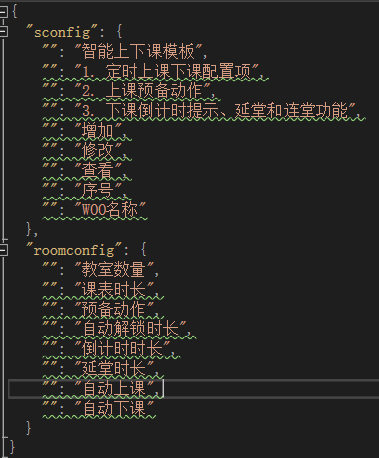
脚本二执行效果:提炼出来文本效果
会根据当前vue页面所在文件夹生成对象,
对象名为所在文件夹名,对象内容为键值对,其中
{
"vue页面所在文件夹名": {
   "要翻译内容键值key(不用语言包键值key一致)": "要翻译内容value",
 },
}
# extract-vue-i18n.ps1
# Vue 文件国际化提取脚本
# 功能:1.汇总同一文件夹下所有Vue文件的中文字符串 2.过滤特殊符号/序号 3.生成重复空键的指定JSON格式

param(
    [string]$ConfigPath = "./extract_config.json"
)

# 设置控制台编码
$OutputEncoding = [System.Text.Encoding]::UTF8
[Console]::OutputEncoding = [System.Text.Encoding]::UTF8

# ANSI 颜色定义
$ESC = [char]27
$COLOR_RESET = "$ESC[0m"
$COLOR_RED = "$ESC[91m"
$COLOR_GREEN = "$ESC[92m"
$COLOR_YELLOW = "$ESC[93m"
$COLOR_CYAN = "$ESC[96m"
$COLOR_MAGENTA = "$ESC[95m"

# 获取脚本所在目录
$ScriptDir = $PSScriptRoot
Write-Host "$COLOR_CYAN[INFO]$COLOR_RESET 脚本所在目录: $ScriptDir" -ForegroundColor Cyan

# 加载配置
function Load-Config {
    param([string]$ConfigPath)

    # 处理配置文件路径(如果是相对路径,基于脚本目录)
    if (-not [System.IO.Path]::IsPathRooted($ConfigPath)) {
        $ConfigPath = Join-Path -Path $ScriptDir -ChildPath $ConfigPath
    }

    Write-Host "$COLOR_CYAN[INFO]$COLOR_RESET 加载配置文件: $ConfigPath" -ForegroundColor Cyan

    if (-not (Test-Path $ConfigPath)) {
        Write-Host "$COLOR_RED[ERROR]$COLOR_RESET 未找到配置文件: $ConfigPath" -ForegroundColor Red
        exit 1
    }

    try {
        $config = Get-Content $ConfigPath -Encoding UTF8 | ConvertFrom-Json
        Write-Host "$COLOR_GREEN[SUCCESS]$COLOR_RESET 配置文件加载成功" -ForegroundColor Green
        return $config
    } catch {
        Write-Host "$COLOR_RED[ERROR]$COLOR_RESET 配置文件格式错误: $_" -ForegroundColor Red
        exit 1
    }
}

# 验证配置(移除search_dir的强制校验)
function Validate-Config {
    param($config)

    # 移除search_dir,只校验必要的字段
    $requiredFields = @("output_file", "file_pattern")
    $missingFields = @()

    foreach ($field in $requiredFields) {
        if (-not $config.$field) {
            $missingFields += $field
        }
    }

    if ($missingFields.Count -gt 0) {
        Write-Host "$COLOR_RED[ERROR]$COLOR_RESET 配置文件中缺少必要字段: $($missingFields -join ', ')" -ForegroundColor Red
        exit 1
    }

    # 设置默认值
    if (-not $config.encoding) { $config.encoding = "UTF8" }
    if (-not $config.verbose) { $config.verbose = $true }
    # 给skip_dir设置默认空值,避免后续报错
    if (-not $config.skip_dir) { $config.skip_dir = "" }

    # 核心:强制输出文件路径基于脚本目录
    if (-not [System.IO.Path]::IsPathRooted($config.output_file)) {
        $config.output_file = Join-Path -Path $ScriptDir -ChildPath $config.output_file
    }

    # 兼容处理:如果配置里仍有search_dir,就用它;否则默认用脚本所在目录
    if ($config.search_dir) {
        # 处理search_dir的相对路径(基于脚本目录)
        if (-not [System.IO.Path]::IsPathRooted($config.search_dir)) {
            $config.search_dir = Join-Path -Path $ScriptDir -ChildPath $config.search_dir
        }
        Write-Host "$COLOR_GREEN[CONFIG]$COLOR_RESET 搜索目录: $($config.search_dir)" -ForegroundColor Green
    } else {
        $config.search_dir = $ScriptDir
        Write-Host "$COLOR_YELLOW[CONFIG]$COLOR_RESET 未配置search_dir,默认使用脚本目录: $ScriptDir" -ForegroundColor Yellow
    }

    Write-Host "$COLOR_GREEN[CONFIG]$COLOR_RESET 输出文件: $($config.output_file)" -ForegroundColor Green
    Write-Host "$COLOR_GREEN[CONFIG]$COLOR_RESET 文件模式: $($config.file_pattern)" -ForegroundColor Green
    Write-Host "$COLOR_GREEN[CONFIG]$COLOR_RESET 跳过目录: $($config.skip_dir)" -ForegroundColor Green

    return $config
}

# 获取要扫描的文件列表
function Get-FileList {
    param($config)

    $searchPath = $config.search_dir
    $pattern = $config.file_pattern

    Write-Host "$COLOR_CYAN[INFO]$COLOR_RESET 开始扫描目录: $searchPath" -ForegroundColor Cyan

    if (-not (Test-Path $searchPath)) {
        Write-Host "$COLOR_RED[ERROR]$COLOR_RESET 搜索目录不存在: $searchPath" -ForegroundColor Red
        exit 1
    }

    # 获取跳过的目录
    $skipDirs = @()
    if ($config.skip_dir) {
        $skipDirs = $config.skip_dir.Split(',', [StringSplitOptions]::RemoveEmptyEntries) |
            ForEach-Object { $_.Trim() }
    }

    # 递归获取所有 Vue 文件
    $allFiles = Get-ChildItem -Path $searchPath -Filter $pattern -Recurse -File

    # 过滤跳过的目录
    $files = @()
    $skippedFiles = 0

    foreach ($file in $allFiles) {
        $shouldSkip = $false

        foreach ($skipDir in $skipDirs) {
            if (-not [string]::IsNullOrWhiteSpace($skipDir)) {
                if ($file.FullName -like "*\$skipDir\*") {
                    $shouldSkip = $true
                    $skippedFiles++
                    if ($config.verbose) {
                        Write-Host "$COLOR_YELLOW[SKIP]$COLOR_RESET 跳过目录: $skipDir -> $($file.Name)" -ForegroundColor DarkYellow
                    }
                    break
                }
            }
        }

        if (-not $shouldSkip) {
            $files += $file
        }
    }

    Write-Host "$COLOR_GREEN[FOUND]$COLOR_RESET 找到 $($files.Count) 个 Vue 文件" -ForegroundColor Green
    if ($skippedFiles -gt 0) {
        Write-Host "$COLOR_YELLOW[SKIP]$COLOR_RESET 跳过了 $skippedFiles 个文件" -ForegroundColor Yellow
    }

    return $files
}

# 新增:清理文本(移除数字、序号、特殊符号,只保留核心中文)--(20260115,先取消了不清理文本)
function Clean-Text {
    param([string]$Text)
    $cleaned = $Text
    # 1. 移除开头的数字+符号(如 2. / 3、 / ① / 1) 等)
    #$cleaned = $cleaned  -replace '^[\d\u2460-\u24FF\u3007\u3220-\u3229\u002E\u3002\u002C\u3001\u003B\u301B\u003A\u3010\u0021\uFF01\u003F\uFF1F\u0028\uFF08\u0029\uFF09\u005B\u3014\u005D\u3015\u007B\uFF5B\u007D\uFF5D\u0020\u3000]+', ''

    # 2. 移除所有非中文字符(只保留中文、中文标点)
    #$cleaned = $cleaned -replace '[^\u4e00-\u9fa5\u3000-\u303F\uFF00-\uFFEF]', ''

    # 3. 移除首尾空白/标点
    #$cleaned = $cleaned.Trim().Trim('。,、;:!?()【】{}""''''《》〈〉·…—~¥')

    return $cleaned
}

# 从 Vue 文件中提取中文字符串
function Extract-ChineseFromVue {
    param(
        [System.IO.FileInfo]$File,
        [hashtable]$FoundStrings,
        [bool]$Verbose
    )

    $fileName = $File.Name
    $fullPath = $File.FullName
    # 获取当前文件所在的文件夹名
    $folderName = $File.Directory.Name

    try {
        # 读取文件内容
        $content = Get-Content $fullPath -Encoding UTF8 -Raw

        # 状态机变量
        $inComment = $false
        $inScriptComment = $false
        $inStyle = $false
        $inTemplate = $false
        $inScript = $false
        $currentLine = 0

        # 按行处理
        $lines = $content -split "`n"

        foreach ($line in $lines) {
            $currentLine++
            $trimmed = $line.Trim()

            # 跳过空行
            if ([string]::IsNullOrWhiteSpace($trimmed)) { continue }

            # 1. 检测 <!-- 注释开始
            if ($trimmed -match '^\s*<!--' -and $trimmed -notmatch '-->') {
                $inComment = $true
                if ($Verbose) {
                    Write-Host "$COLOR_MAGENTA[COMMENT]$COLOR_RESET $fileName`:$currentLine 进入 HTML 注释" -ForegroundColor Magenta
                }
                continue
            }

            # 2. 检测 --> 注释结束
            if ($inComment -and $trimmed -match '-->') {
                $inComment = $false
                if ($Verbose) {
                    Write-Host "$COLOR_MAGENTA[COMMENT]$COLOR_RESET $fileName`:$currentLine 退出 HTML 注释" -ForegroundColor Magenta
                }
                continue
            }

            # 3. 如果在注释中,跳过
            if ($inComment) { continue }

            # 4. 检测 <template> 开始
            if ($trimmed -match '^\s*<template\b') {
                $inTemplate = $true
                continue
            }

            # 5. 检测 </template> 结束
            if ($trimmed -match '^\s*</template>') {
                $inTemplate = $false
                continue
            }

            # 6. 检测 <script> 开始
            if ($trimmed -match '^\s*<script\b') {
                $inScript = $true
                continue
            }

            # 7. 检测 </script> 结束
            if ($trimmed -match '^\s*</script>') {
                $inScript = $false
                $inScriptComment = $false
                continue
            }

            # 8. 检测 <style> 开始
            if ($trimmed -match '^\s*<style\b') {
                $inStyle = $true
                continue
            }

            # 9. 检测 </style> 结束
            if ($trimmed -match '^\s*</style>') {
                $inStyle = $false
                continue
            }

            # 10. 如果在 style 中,跳过
            if ($inStyle) { continue }

            # 11. 处理 template 中的内容
            if ($inTemplate) {
                # 跳过 template 中的 <!-- 单行注释 -->
                if ($trimmed -match '^\s*<!--.*-->') { continue }

                # 跳过 v-html 等指令中的内容
                if ($trimmed -match 'v-html\s*=') { continue }
                if ($trimmed -match 'v-text\s*=') { continue }

                # 提取模板中的中文,传入文件夹名
                Extract-ChineseFromLine $line $fileName $folderName $currentLine $FoundStrings $Verbose
            }

            # 12. 处理 script 中的内容
            if ($inScript) {
                # 跳过 JavaScript 注释
                if ($trimmed.StartsWith("//")) { continue }
                if ($trimmed.StartsWith("/*")) {
                    $inScriptComment = $true
                    continue
                }
                if ($trimmed.EndsWith("*/")) {
                    $inScriptComment = $false
                    continue
                }
                if ($inScriptComment) { continue }

                # 跳过 #region 注释
                if ($trimmed.StartsWith("#region")) { continue }
                if ($trimmed.StartsWith("#endregion")) { continue }

                # 提取 script 中的中文(字符串字面量),传入文件夹名
                Extract-ChineseFromScript $line $fileName $folderName $currentLine $FoundStrings $Verbose
            }
        }

        # 额外处理:从属性中提取中文,传入文件夹名
        Extract-ChineseFromAttributes $content $fileName $folderName $FoundStrings $Verbose

    } catch {
        Write-Host "$COLOR_RED[ERROR]$COLOR_RESET 处理文件时出错: $fileName - $_" -ForegroundColor Red
    }

    return $FoundStrings
}

# 从一行中提取中文字符
function Extract-ChineseFromLine {
    param(
        [string]$Line,
        [string]$FileName,
        [string]$FolderName,
        [int]$LineNumber,
        [hashtable]$FoundStrings,
        [bool]$Verbose
    )

    # 匹配模板中的中文文本
    $patterns = @(
        # 匹配 >中文< 或 > 中文 <
        '(?<=>)[^<>]*?[\u4e00-\u9fa5][^<>]*?(?=<)',
        # 匹配属性值中的中文: title="中文" placeholder="请输入中文"
        '(?<=\=\")[^\"]*?[\u4e00-\u9fa5][^\"]*?(?=\")',
        # 匹配 {{ }} 中的中文
        '(?<=\{\{)[^\}]*?[\u4e00-\u9fa5][^\}]*?(?=\}\})'
    )

    foreach ($pattern in $patterns) {
        $matches = [regex]::Matches($Line, $pattern)
        foreach ($match in $matches) {
            $text = $match.Value.Trim()
            if (-not [string]::IsNullOrWhiteSpace($text)) {
                Add-ToStringTable $text $FileName $FolderName $LineNumber $FoundStrings $Verbose
            }
        }
    }
}

# 从 script 中提取中文字符
function Extract-ChineseFromScript {
    param(
        [string]$Line,
        [string]$FileName,
        [string]$FolderName,
        [int]$LineNumber,
        [hashtable]$FoundStrings,
        [bool]$Verbose
    )

    # 匹配 JavaScript 字符串字面量中的中文
    $patterns = @(
        # 双引号字符串
        '"(?<content>[^"\\]*(?:\\.[^"\\]*)*?[\u4e00-\u9fa5][^"\\]*(?:\\.[^"\\]*)*?)"',
        # 单引号字符串
        "'(?<content>[^'\\]*(?:\\.[^'\\]*)*?[\u4e00-\u9fa5][^'\\]*(?:\\.[^'\\]*)*?)'",
        # 模板字符串
        '`(?<content>[^`\\]*(?:\\.[^`\\]*)*?[\u4e00-\u9fa5][^`\\]*(?:\\.[^`\\]*)*?)`'
    )

    foreach ($pattern in $patterns) {
        $matches = [regex]::Matches($Line, $pattern)
        foreach ($match in $matches) {
            if ($match.Groups["content"].Success) {
                $text = $match.Groups["content"].Value
                # 处理转义字符
                $text = $text -replace '\\"', '"' -replace "\\'", "'" -replace '\\\\', '\'
                if (-not [string]::IsNullOrWhiteSpace($text)) {
                    Add-ToStringTable $text $FileName $FolderName $LineNumber $FoundStrings $Verbose
                }
            }
        }
    }
}

# 从 HTML 属性中提取中文
function Extract-ChineseFromAttributes {
    param(
        [string]$Content,
        [string]$FileName,
        [string]$FolderName,
        [hashtable]$FoundStrings,
        [bool]$Verbose
    )

    # 匹配特定属性中的中文
    $attrPatterns = @(
        'placeholder\s*=\s*["'']([^"'']*?[\u4e00-\u9fa5][^"'']*?)["'']',
        'title\s*=\s*["'']([^"'']*?[\u4e00-\u9fa5][^"'']*?)["'']',
        'label\s*=\s*["'']([^"'']*?[\u4e00-\u9fa5][^"'']*?)["'']',
        'aria-label\s*=\s*["'']([^"'']*?[\u4e00-\u9fa5][^"'']*?)["'']',
        ':label\s*=\s*["'']([^"'']*?[\u4e00-\u9fa5][^"'']*?)["'']',
        ':placeholder\s*=\s*["'']([^"'']*?[\u4e00-\u9fa5][^"'']*?)["'']'
    )

    $lineNumber = 0
    $lines = $Content -split "`n"

    foreach ($line in $lines) {
        $lineNumber++
        foreach ($pattern in $attrPatterns) {
            $matches = [regex]::Matches($line, $pattern, [System.Text.RegularExpressions.RegexOptions]::IgnoreCase)
            foreach ($match in $matches) {
                if ($match.Groups.Count -gt 1) {
                    $text = $match.Groups[1].Value
                    if (-not [string]::IsNullOrWhiteSpace($text)) {
                        Add-ToStringTable $text $FileName $FolderName $lineNumber $FoundStrings $Verbose
                    }
                }
            }
        }
    }
}

# 修改:1.汇总同一文件夹所有文本 2.调用清理函数过滤特殊内容
function Add-ToStringTable {
    param(
        [string]$Text,
        [string]$FileName,
        [string]$FolderName,
        [int]$LineNumber,
        [hashtable]$FoundStrings,
        [bool]$Verbose
    )

    # 第一步:清理文本(移除数字、序号、特殊符号)
    $cleanText = Clean-Text $Text

    # 跳过清理后无意义的文本
    if ([string]::IsNullOrWhiteSpace($cleanText) -or $cleanText.Length -lt 2) { return }

    # 跳过纯数字或符号(清理后理论上不会有,但做兜底)
    if ($cleanText -match '^[\d\s\p{P}]+$') { return }

    # 第二步:初始化文件夹对应的数组(汇总同一文件夹所有文本)
    if (-not $FoundStrings.ContainsKey($FolderName)) {
        $FoundStrings[$FolderName] = @()
    }

    # 第三步:去重后添加到数组(确保同一文件夹下文本不重复、且汇总所有文件的内容)
    if ($cleanText -notin $FoundStrings[$FolderName]) {
        $FoundStrings[$FolderName] += $cleanText

        if ($Verbose) {
            Write-Host "$COLOR_GREEN[FOUND]$COLOR_RESET $FolderName\$FileName`:$LineNumber" -NoNewline
            Write-Host " -> 原始: `"$Text`" -> 清理后: `"$cleanText`"" -ForegroundColor Cyan
        }
    }
}

# 核心修改:生成你指定的「重复空键」格式,且汇总所有文本
function Generate-OutputFile {
    param(
        [hashtable]$FoundStrings,
        [string]$OutputPath,
        [bool]$Verbose
    )

    # 确保输出目录存在(此时OutputPath已基于脚本目录)
    $outputDir = Split-Path $OutputPath -Parent
    if (-not (Test-Path $outputDir)) {
        New-Item -ItemType Directory -Path $outputDir -Force | Out-Null
        Write-Host "$COLOR_CYAN[INFO]$COLOR_RESET 创建输出目录: $outputDir" -ForegroundColor Cyan
    }

    # 按文件夹名排序
    $sortedFolders = $FoundStrings.Keys | Sort-Object

    # 手动拼接JSON字符串(绕过PowerShell自动处理重复键的逻辑)
    $jsonLines = @()
    $jsonLines += "{"

    foreach ($folder in $sortedFolders) {
        $textList = $FoundStrings[$folder]
        # 添加文件夹名开头
        $jsonLines += "  `"$folder`": {"
        # 为每个文本添加空键行
        foreach ($text in $textList) {
            $jsonLines += "    `"`": `"$text`","
        }
        # 移除最后一行的逗号,添加文件夹结尾
        if ($jsonLines[-1].EndsWith(",")) {
            $jsonLines[-1] = $jsonLines[-1].TrimEnd(",")
        }
        $jsonLines += "  },"
    }

    # 移除最后一个文件夹的逗号,添加整体结尾
    if ($jsonLines[-1].EndsWith(",")) {
        $jsonLines[-1] = $jsonLines[-1].TrimEnd(",")
    }
    $jsonLines += "}"

    # 合并所有行,形成最终JSON
    $jsonContent = $jsonLines -join "`n"

    # 写入文件(确保UTF8编码,中文正常)
    try {
        [System.IO.File]::WriteAllText($OutputPath, $jsonContent, [System.Text.Encoding]::UTF8)
        Write-Host "$COLOR_GREEN[SUCCESS]$COLOR_RESET 已保存到: $OutputPath" -ForegroundColor Green
    } catch {
        Write-Host "$COLOR_RED[ERROR]$COLOR_RESET 写入文件失败: $_" -ForegroundColor Red
        exit 1
    }

    # 统计总字符串数
    $totalStrings = 0
    foreach ($folder in $FoundStrings.Keys) {
        $totalStrings += $FoundStrings[$folder].Count
    }
    return $totalStrings
}

# 生成翻译键:保留原函数(备用)
function Generate-TranslationKey {
    param(
        [string]$Text,
        [int]$Index
    )

    # 移除特殊字符,用下划线连接
    $key = $Text -replace '[^\w\u4e00-\u9fa5]+', '_'  # 保留中文字符
    $key = $key -replace '^_+|_+$', ''  # 移除首尾下划线
    $key = $key -replace '_+', '_'  # 合并多个下划线

    # 如果处理后为空,使用索引
    if ([string]::IsNullOrWhiteSpace($key)) {
        $key = "key_$Index"
    }

    # 确保键不以数字开头
    if ($key -match '^\d') {
        $key = "key_$key"
    }

    return $key.ToLower()
}

# 显示统计信息
function Show-Statistics {
    param(
        [int]$TotalFiles,
        [int]$TotalStrings,
        [string]$OutputFile
    )

    Write-Host "`n$COLOR_CYAN========================================$COLOR_RESET" -ForegroundColor Cyan
    Write-Host "$COLOR_GREEN✓ 提取完成!$COLOR_RESET" -ForegroundColor Green
    Write-Host "$COLOR_YELLOW✓ 处理文件数: $COLOR_RESET$TotalFiles" -ForegroundColor Yellow
    Write-Host "$COLOR_GREEN✓ 找到中文字符串: $COLOR_RESET$TotalStrings 个" -ForegroundColor Green
    Write-Host "$COLOR_CYAN✓ 已保存到: $COLOR_RESET$OutputFile" -ForegroundColor Cyan
    Write-Host "$COLOR_CYAN========================================$COLOR_RESET" -ForegroundColor Cyan
    Write-Host ""
}

# 主函数
function Main {
    Write-Host "$COLOR_CYAN╔══════════════════════════════════════╗$COLOR_RESET" -ForegroundColor Cyan
    Write-Host "$COLOR_CYAN║     Vue 国际化字符串提取工具         ║$COLOR_RESET" -ForegroundColor Cyan
    Write-Host "$COLOR_CYAN║     Version 1.0.0                    ║$COLOR_RESET" -ForegroundColor Cyan
    Write-Host "$COLOR_CYAN╚══════════════════════════════════════╝$COLOR_RESET" -ForegroundColor Cyan
    Write-Host ""

    # 1. 加载配置
    $config = Load-Config $ConfigPath
    $config = Validate-Config $config

    # 2. 获取文件列表
    $files = Get-FileList $config

    if ($files.Count -eq 0) {
        Write-Host "$COLOR_YELLOW[WARN]$COLOR_RESET 没有找到要处理的 Vue 文件" -ForegroundColor Yellow
        exit 0
    }

    # 3. 提取中文
    $foundStrings = @{}
    $processedFiles = 0
    $startTime = Get-Date

    foreach ($file in $files) {
        $processedFiles++
        $fileName = $file.Name

        if ($config.verbose) {
            Write-Host "$COLOR_CYAN[PROCESSING]$COLOR_RESET ($processedFiles/$($files.Count)) $fileName" -ForegroundColor Cyan
        } else {
            Write-Progress -Activity "正在处理 Vue 文件" -Status "$fileName ($processedFiles/$($files.Count))" -PercentComplete (($processedFiles / $files.Count) * 100)
        }

        $foundStrings = Extract-ChineseFromVue -File $file -FoundStrings $foundStrings -Verbose $config.verbose
    }

    if (-not $config.verbose) {
        Write-Progress -Activity "正在处理 Vue 文件" -Completed
    }

    $endTime = Get-Date
    $duration = $endTime - $startTime

    # 4. 生成输出文件
    $totalStrings = Generate-OutputFile -FoundStrings $foundStrings -OutputPath $config.output_file -Verbose $config.verbose

    # 5. 显示统计信息
    Show-Statistics -TotalFiles $files.Count -TotalStrings $totalStrings -OutputFile $config.output_file

    # 6. 处理时间
    Write-Host "$COLOR_MAGENTA[TIME]$COLOR_RESET 处理耗时: $($duration.TotalSeconds.ToString('0.00')) 秒" -ForegroundColor Magenta
    Write-Host ""

    # 7. 显示示例
    if ($totalStrings -gt 0) {
        Write-Host "${COLOR_YELLOW}示例输出:${COLOR_RESET}" -ForegroundColor Yellow

        $firstFolder = $foundStrings.Keys | Select-Object -First 1
        $sampleTexts = $foundStrings[$firstFolder] | Select-Object -First 3
        Write-Host "  `"$firstFolder`": { " -ForegroundColor Gray
        foreach ($text in $sampleTexts) {
            Write-Host "    `"\`": `"$text`", " -ForegroundColor Gray
        }
        if ($foundStrings[$firstFolder].Count -gt 3) {
            Write-Host "    ..." -ForegroundColor DarkGray
        }
        Write-Host "  }" -ForegroundColor Gray
    }
}

# 运行主函数
try {
    Main
} catch {
    Write-Host "$COLOR_RED[FATAL ERROR]$COLOR_RESET $_" -ForegroundColor Red
    Write-Host "$COLOR_REDStack Trace:$COLOR_RESET" -ForegroundColor Red
    Write-Host $_.ScriptStackTrace -ForegroundColor Red
    exit 1
}
保存文件时需要重新另存为选择"带有BOM的UTF-8"编码;
4.执行脚本文件
1.打开PowerShell
Win+R,输入Powershell
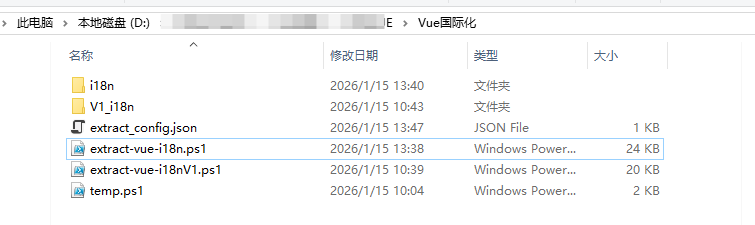
2.进入脚本所在目录
cd D:\文件\VUE项目\Vue国际化
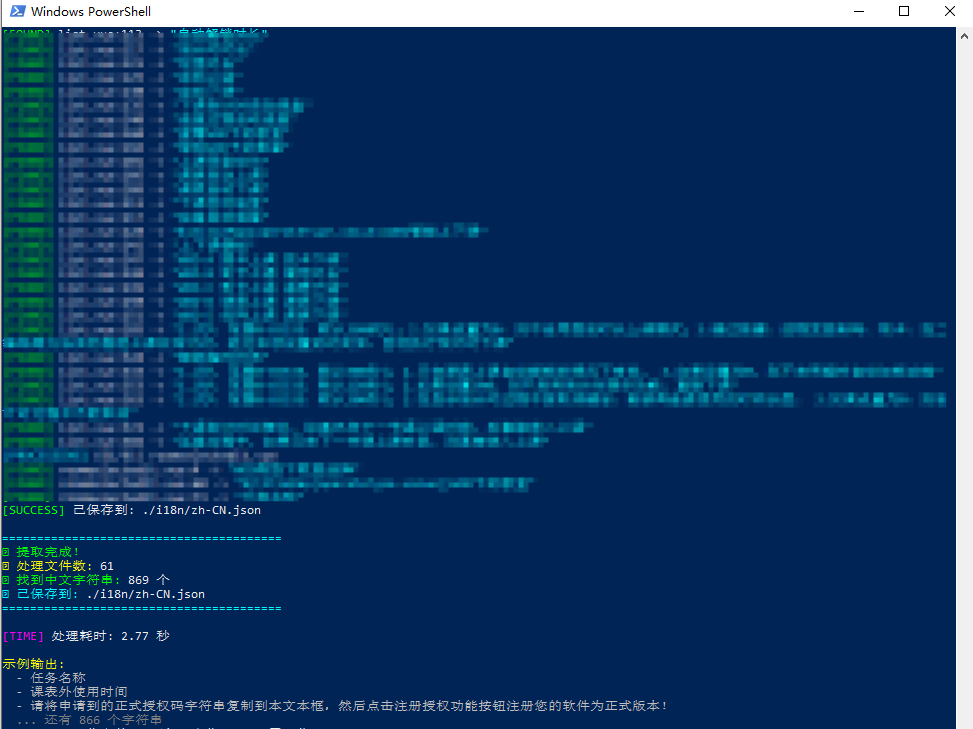
3.执行脚本
./extract-vue-i18nV1.ps1

执行成功!
本文来自博客园,作者:じ逐梦,转载请注明原文链接:https://www.cnblogs.com/ZhuMeng-Chao/p/19486254

 浙公网安备 33010602011771号