
线程处理
线程分为前台线程和后台线程,一个进程里至少要有一个前台线程若干后台线程,如果前台线程结束了,意味着进程也就退出了;
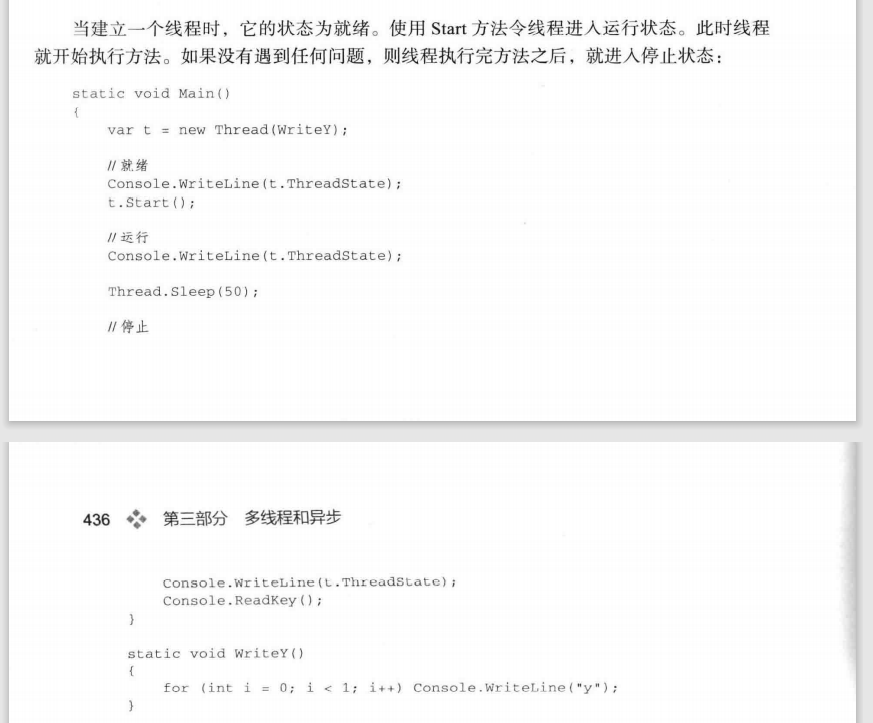
线程主要有4种状态:Unstarted、Running、WaitSleepJoin(阻塞)、Stopped(停止)
c# Thread.Abort()和Thread.ResetAbort()的使用
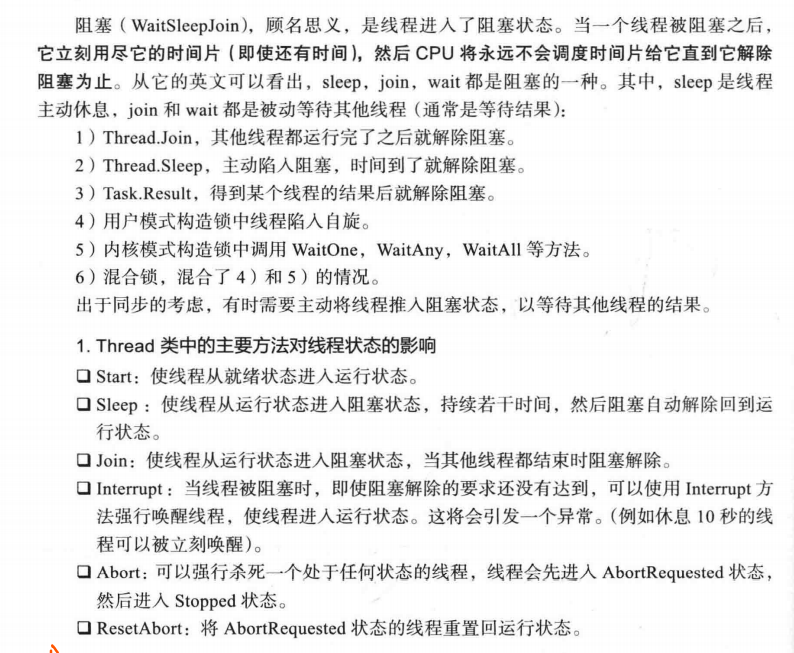
Thread类的Abort()方法用于终止正在运行的线程(.net core中Abort()方法虽然存在,但是调用它会引发PlatformNotSupportedException的异常提示)。它可以强行终止线程,而不管线程是否是sleep中。
执行了Abort()后,被终止的线程就会继续运行catch{}finally{}块中代码,因为是强行终止,catch块之后的语句则不再运行。除非在catch语句中执行Thread.ResetAbort()这个静态方法。
先举例没有ResetAbort()的情况:
<span style="font-size:14px;">using System;
using System.Threading;
namespace AbortAndResetabortExp
{
    class Program
    {
        static void Main(string[] args)
        {
            Thread t = new Thread(DoWork);
            t.Name = "八戒";
            t.Start();
            Thread.Sleep(10000);
            Console.WriteLine("悟空:八戒,该起床了");
            t.Abort();
        }
        static void DoWork()
        {
            try
            {
                while (true)
                {
                    Console.WriteLine(Thread.CurrentThread.Name + ":呼呼~~~~~");
                    Thread.Sleep(1000);
                }
            }
            catch (ThreadAbortException e)
            {
                Console.WriteLine(Thread.CurrentThread.Name + ":还早呢,我还要再睡会");
                Thread.ResetAbort();
            }
            for (int i = 0; i < 10; i++)
            {
                Console.WriteLine(Thread.CurrentThread.Name + ":呼呼~~~~~");
                Thread.Sleep(1000);
            }
        }
    }
}</span>
实例中,主线程启动“八戒”线程,使其“呼呼”睡觉。10秒钟后,主线程通过调用“八戒”线程的Abort方法中止“八戒”线程,“八戒”线程的Abort方法被调用后会触发ThreadAbortException异常,“八戒”线程捕获到该异常后,使用ResetAbort方法取消中止线程的操作,因为他还没有睡够呢。
整个程序的执行结果如下图所示,从结果中可以看出,调用ResetAbort方法后,线程仍然在执行。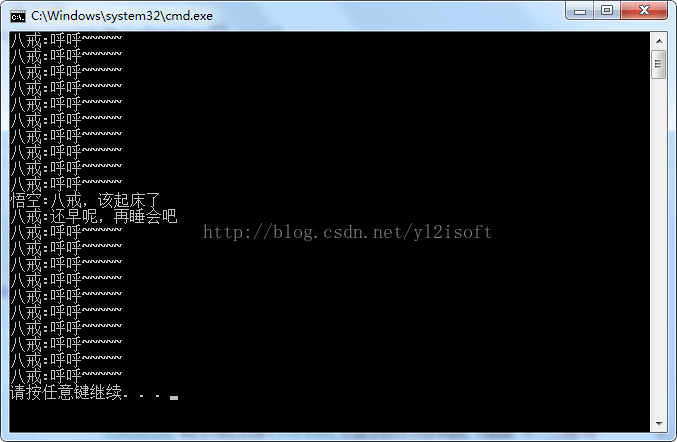
using System;
using System.Collections.Generic;
using System.Linq;
using System.Text;
using System.Threading;
using System.Threading.Tasks;

namespace ThreadDemo
{
    class Program
    {
        static void Main(string[] args)
        {
            ThreadLocalTest();
            Console.ReadKey();

        }

        // 线程局部存储区(TLS),是操作系统为线程提供的一个私密空间,其他线程不能访问;
        #region 1.使用ThreadStatic特性
        static void ThreadStaticTest()
        {
            Test.a = 100;
            Test.b = "hello";
            Console.WriteLine($"子线程未运行时,主线程中Test.a={ Test.a}");
            Console.WriteLine($"子线程未运行时,主线程中Test.b={ Test.b}");
            var worker = new Thread(go);
            worker.Start();
            worker.Join();
            //主线程中的Test.a、Test.b不会改变,因为他们是TLS变量
            Console.WriteLine($"子线程执行完成,主线程中Test.a={ Test.a}");
            Console.WriteLine($"子线程执行完成,主线程中Test.b={ Test.b}");
        }

        static void go()
        {
            Test.a = 99;
            Test.b = "world";
            Console.WriteLine($"子线程中修改了Test.a={Test.a}");
            Console.WriteLine($"子线程中修改了Test.b={Test.b}");
        }

        public class Test
        {
            [ThreadStatic]
            public static int a;//TLS 变量
            [ThreadStatic]
            public static string b;//TLS 变量
        }
        #endregion
        #region 2.使用Thread的2个方法GetData和SetData
        //如果不希望一开始就定义TLS变量,可以使用Thread的2个方法GetData和SetData,在运行的时候才将数据存进TLS中;在使用GetData和SetData时需求先申请
        //一个“数据槽”(代表TLS上的空间)。数据槽分为命名和未命名的,通过GetNamedDataSlot(数据槽名)申请访问一个命名数据槽,如果数据槽不存在会新建一个。
        //通过AllocateDataSlot方法申请一个未命名的数据槽,必须保存该方法的返回值,才能继续后面操作。
        public class TestB
        {
            public int a;
            public string b;
        }

        static void threadSlotTest()
        {
            var testB = new TestB() { a = 100, b = "hello" };
            //把a放进槽中,它的值不会被其他线程更改
            Thread.SetData(Thread.GetNamedDataSlot("slot1"), testB.a);
            Console.WriteLine($"子线程未运行时,主线程中b.a={ testB.a}");
            Console.WriteLine($"子线程未运行时,主线程中b.b={ testB.b}");
            var worker = new Thread(() => go2(testB));
            worker.Start();
            worker.Join();
            //把数据拿出来
            var data = (int)Thread.GetData(Thread.GetNamedDataSlot("slot1"));
            //a依然是100
            Console.WriteLine($"子线程执行完成,主线程中a={ data}");
            //b被修改成了world
            Console.WriteLine($"子线程执行完成,主线程中b={ testB.b}");
        }

        static void go2(TestB testB)
        {
            //子线程无法访问其他线程的数据槽,因此这句代码会报错,因为子线程的slot1中没有数据
            // var a=(int)Thread.GetData(Thread.GetNamedDataSlot("slot1"));
            testB.a = 999;
            testB.b = "world";
            Console.WriteLine($"子线程中修改了 testB.a={testB.a}");
            Console.WriteLine($"子线程中修改了 testB.b={testB.b}");
        }
        #endregion
        #region 3.ThreadLocal<T>是.netframework4.0才加入的,使用方法比getdata和setdata方便而且还消除了装箱。使用ThreadLocal<T>之后,T类型中的
        // 所有字段都会使用TLS。
        static void ThreadLocalTest()
        {
            //创建 ThreadLocal<TestB>对象并设置默认值,每个线程都将拥有一个 TestB独立的副本,对它的访问也会自动使用TLS
            var t = new ThreadLocal<TestB>(
                () =>
                {
                    return new TestB()
                    {
                        a = 100,
                        b = "hello"
                    };
                });

            Console.WriteLine($"子线程未执行时,主线程中Test.a={t.Value.a}");
            Console.WriteLine($"子线程未执行时,主线程中Test.b={ t.Value.b}");
            var worker = new Thread(()=>
            {
                go3(t);
            });
            worker.Start();
            worker.Join();
            //仍是原来的值
            Console.WriteLine($"子线程执行后,主线程中Test.a={t.Value.a}");
            Console.WriteLine($"子线程执行后,主线程中Test.b={ t.Value.b}");
        }

        static void go3(ThreadLocal<TestB> t)
        {
            Console.WriteLine($"子线程中修改前a={t.Value.a}");
            Console.WriteLine($"子线程中修改前b={t.Value.b}");
            //子线程会修改它自己的TLS 上的值
            t.Value.a = 99;
            t.Value.b = "world";
            Console.WriteLine($"子线程中修改后a={t.Value.a}");
            Console.WriteLine($"子线程中修改后b={t.Value.b}");

        }

        #endregion
    }


}

 浙公网安备 33010602011771号