
文件和文件注册表的操作
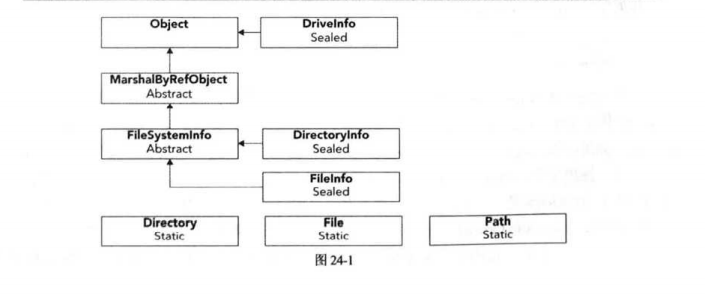
System.MarshalByRefObject:.net中用于远程操作的基对象类,它允许在应用程序域之间编组数据。其他的类都在命名空间System.IO下面;
FileSystemInfo:任何文件系统对象的基类;
FileInfo/File:文件;
DirectoryInfo/Directory:文件夹;
Path:路径;
1.FileInfo与File(DirectoryInfo/Directory)什么时候去使用?
File/Directory:使用里面静态方法来操作文件、文件夹,就搞一次就完事了,没有后续步骤了,无状态;
FileInfo/DirectoryInfo:需要实例化文件系统对象,要搞好多次,先搞这个,再搞那个,就是通过info薅住头发一顿搞;
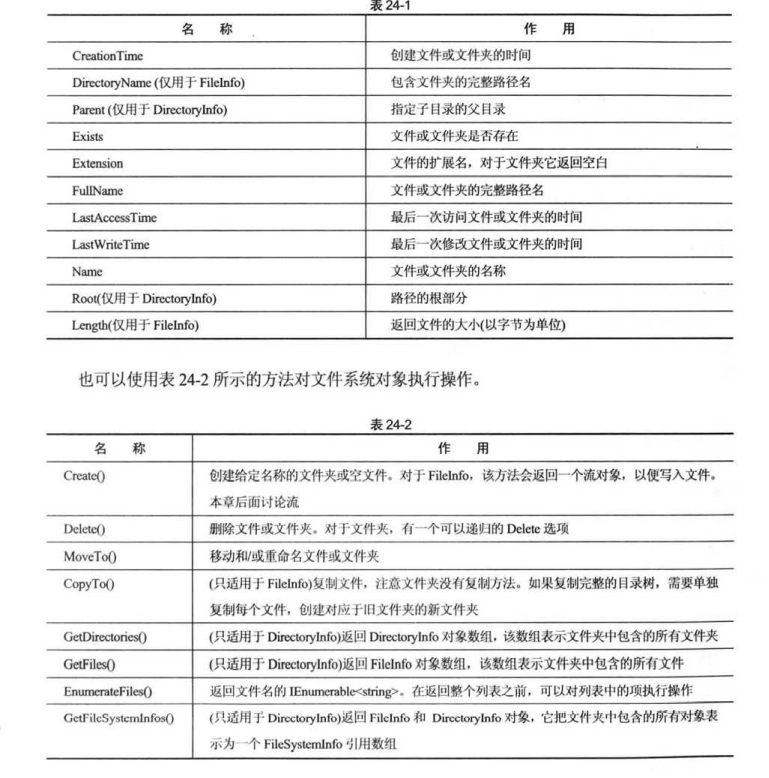
2.写入文件两种方式:File和流
File:
File.ReadAllText("");//读文本
File.ReadAllBytes("");//读二进制,返回byte[]
File.ReadAllLines("");//返回string[]
WriteAllBytes(string path, byte[] bytes);
WriteAllLines(string path, IEnumerable<string> contents);
WriteAllText(string path, string contents);
流:与流相关的类的结构层次图
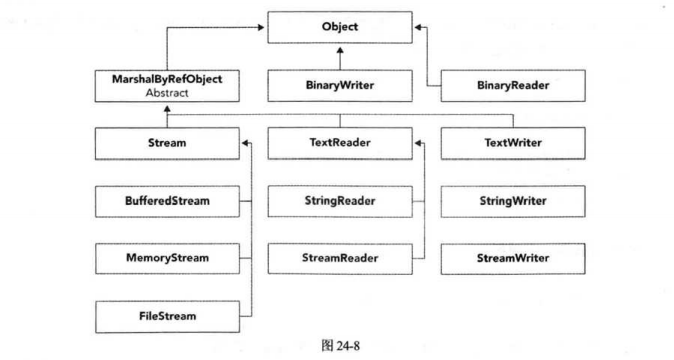
FileStream(文件流):可以读写任务文件,多数读写二进制文件中二进制数据,都是通过byte来操作的,比较古老;
StreamWriter/StreamReader:这2个就比FileStream牛逼多了,智能识别文本编码、换行啊等等的,这2个类专门用于读写文本文件的;
BinaryWriter/BinaryReader:这个哥俩充当了流和代码变量直接的桥梁,也就是BinaryWriter类提供简化将基元数据类型写入流的方法。 例如,可以使用 Write 方法将布尔值作为单字节值写入流。换句话说,没有这哥俩想把基元类型变量写入流需要一些位移够着字节的手段才能达到效果;下面是MSDN给的示例:
using System;
using System.IO;

class ConsoleApplication
{
    const string fileName = "AppSettings.dat";

    static void Main()
    {
        WriteDefaultValues();
        DisplayValues();
    }

    public static void WriteDefaultValues()
    {
        using (BinaryWriter writer = new BinaryWriter(File.Open(fileName, FileMode.Create)))
        {
            writer.Write(1.250F);
            writer.Write(@"c:\Temp");
            writer.Write(10);
            writer.Write(true);
        }
    }

    public static void DisplayValues()
    {
        float aspectRatio;
        string tempDirectory;
        int autoSaveTime;
        bool showStatusBar;

        if (File.Exists(fileName))
        {
            using (BinaryReader reader = new BinaryReader(File.Open(fileName, FileMode.Open)))
            {
                aspectRatio = reader.ReadSingle();
                tempDirectory = reader.ReadString();
                autoSaveTime = reader.ReadInt32();
                showStatusBar = reader.ReadBoolean();
            }

            Console.WriteLine("Aspect ratio set to: " + aspectRatio);
            Console.WriteLine("Temp directory is: " + tempDirectory);
            Console.WriteLine("Auto save time set to: " + autoSaveTime);
            Console.WriteLine("Show status bar: " + showStatusBar);
        }
    }
}
3.映射内存的文件
内存映射文件是利用虚拟内存把文件映射到进程的地址空间中去,在此之后进程操作文件,就像操作进程空间里的地址一样了,比如使用c语言的 memcpy等内存操作的函数。这种方法能够很好的应用在需要频繁处理一个文件或者是一个大文件的场合,这种方式处理IO效率比普通IO效率要高
共享内存是内存映射文件的一种特殊情况,内存映射的是一块内存,而非磁盘上的文件。共享内存的主语是进程(Process),操作系统默认会给每一 个进程分配一个内存空间,每一个进程只允许访问操作系统分配给它的哪一段内存,而不能访问其他进程的。而有时候需要在不同进程之间访问同一段内存,怎么办 呢?操作系统给出了创建访问共享内存的API,需要共享内存的进程可以通过这一组定义好的API来访问多个进程之间共有的内存,各个进程访问这一段内存就 像访问一个硬盘上的文件一样。而.Net 4.0中引入了System.IO. MemoryMappedFiles命名空间,这个命名空间的类对windows 共享内存相关API做了封装,使.Net程序员可以更方便的使用内存映射文件。
说白了就是多个进程共享一块内存数据,这块内存数据如果管理磁盘文件了就是持久化的,没管理就是非持久化的,待创建映射内存的进程退出共享内存便销毁了;
分2种映射共享内存:持久化的、非持久化的
非持久化:进程一如果结束,共享内存变化销毁;主要用于多进程间共享通信;
//写入的进程

 static void Main(string[] args)
        {
            long capacity = 1 << 10 << 10;

            //创建或者打开共享内存
            using (var mmf = MemoryMappedFile.CreateOrOpen("testMmf", capacity, MemoryMappedFileAccess.ReadWrite))
            {
                //通过MemoryMappedFile的CreateViewAccssor方法获得共享内存的访问器
                var viewAccessor = mmf.CreateViewAccessor(0, capacity);
                //循环写入,使在这个进程中可以向共享内存中写入不同的字符串值
                while (true)
                {
                    Console.WriteLine("请输入一行要写入共享内存的文字:");

                    string input = Console.ReadLine();

                    //向共享内存开始位置写入字符串的长度
                    viewAccessor.Write(0, input.Length);

                    //向共享内存4位置写入字符
                    viewAccessor.WriteArray<char>(4, input.ToArray(), 0, input.Length);
                }

            }

        }
方式一:读取进程
 static void Main(string[] args)
        {
            long capacity = 1 << 10 << 10;

            using (var mmf = MemoryMappedFile.OpenExisting("testMmf"))
            {
                MemoryMappedViewAccessor viewAccessor = mmf.CreateViewAccessor(0, capacity);

                //循环刷新共享内存字符串的值
                while (true)
                {
                    //读取字符长度
                    int strLength = viewAccessor.ReadInt32(0);
                    char[] charsInMMf = new char[strLength];
                    //读取字符
                    viewAccessor.ReadArray<char>(4, charsInMMf, 0, strLength);
                    Console.Clear();
                    Console.Write(charsInMMf);
                    Console.Write("\r");
                    Thread.Sleep(200);
                }
            }
        }
方式2:读取进程
    static void Main(string[] args)
        {
            long capacity = 1 << 10 << 10;
            //打开共享内存
            using (var mmf = MemoryMappedFile.OpenExisting("testMmf"))
            {
                //使用CreateViewStream方法返回stream实例
                using (var mmViewStream = mmf.CreateViewStream(0, capacity))
                {
                    //这里要制定Unicode编码否则会出问题
                    using (BinaryReader rdr = new BinaryReader(mmViewStream, Encoding.Unicode))
                    {
                        while (true)
                        {
                            mmViewStream.Seek(0, SeekOrigin.Begin);

                            int length = rdr.ReadInt32();

                            char[] chars = rdr.ReadChars(length);

                            Console.Write(chars);
                            Console.Write("\r");

                            System.Threading.Thread.Sleep(200);
                            Console.Clear();
                        }
                    }
                }
            }
        }
持久化:其实所谓的持久化就是硬盘上面关联文件了,主要用于处理大体积的文件数据,简单修改了下MSDN上面的例子
  static void Main(string[] args)
        {
            long offset = 0x10000000; // 256 megabytes
            long length = 0x20000000; // 512 megabytes

            // Create the memory-mapped file.
            using (var mmf = MemoryMappedFile.CreateFromFile(@"D:\test.data", FileMode.OpenOrCreate, "ImgA",length))
            {
                // Create a random access view, from the 256th megabyte (the offset)
                // to the 768th megabyte (the offset plus length).
                using (var accessor = mmf.CreateViewAccessor(0, length))
                {
                    int colorSize = Marshal.SizeOf(typeof(MyColor));
                    MyColor color;

                    // Make changes to the view.
                    for (long i = 0; i < length; i += colorSize)
                    {
                        accessor.Read(i, out color);
                        color.Brighten(10);
                        accessor.Write(i, ref color);
                    }
                    Console.ReadKey();
                }
            }
        }

 浙公网安备 33010602011771号