
TemplatedParent、TemplateBinding、ContentPresenter使用说明
1.TemplatedParent:获取一个对此元素的模板父级的引用。 如果此元素不是通过模板创建而成,则此属性并不相关。
啥意思呢?
说再多不如实例形象,来看下面示例代码:
这是一个简单的ContentControl,它的Content是一个按钮,然后定义了控件模板和数据模板,代码中一些关键元素有Name属性,我们在后续讨论就以Name属性的值来引用这些元素。
<Window x:Class="Windows.Window1"
        xmlns="http://schemas.microsoft.com/winfx/2006/xaml/presentation"
        xmlns:x="http://schemas.microsoft.com/winfx/2006/xaml"
        Title="Window1" Height="300" Width="300">

        <ContentControl Name="contentControl">
            <!-- 控件模板 -->
            <ContentControl.Template>

                <ControlTemplate TargetType="ContentControl">

                    <Border Name="bd1">

                        <ContentPresenter Name="cp1" ContentSource="Content"/>

                    </Border>

                </ControlTemplate>

            </ContentControl.Template>
            <!-- 数据模板 -->
            <ContentControl.ContentTemplate>
                <DataTemplate>

                    <Border Name="bd2">

                        <ContentPresenter Name="cp2" Content="{Binding}" />

                    </Border>

                </DataTemplate>
            </ContentControl.ContentTemplate>
            <!-- 逻辑孩子 -->
        <Button Name="btn" Click="Button_Click">按钮</Button>
        </ContentControl>

</Window>
using System;
using System.Collections.Generic;
using System.Linq;
using System.Text;
using System.Threading.Tasks;
using System.Windows;
using System.Windows.Controls;
using System.Windows.Data;
using System.Windows.Documents;
using System.Windows.Input;
using System.Windows.Media;
using System.Windows.Media.Imaging;
using System.Windows.Shapes;

namespace Windows
{
    /// <summary>
    /// Window1.xaml 的交互逻辑
    /// </summary>
    public partial class Window1 : Window
    {
        public Window1()
        {
            InitializeComponent();
        }

        private void Button_Click(object sender, RoutedEventArgs e)
        {

            var bd1 = (Border)contentControl.Template.FindName("bd1", contentControl);

            var cp1 = (ContentPresenter)contentControl.Template.FindName("cp1", contentControl);

            var bd2 = (Border)contentControl.ContentTemplate.FindName("bd2", cp1);

            var cp2 = (ContentPresenter)contentControl.ContentTemplate.FindName("cp2", cp1);

            PrintInfo(bd1, cp1, bd2, cp2, btn);

        }
        void PrintInfo(params FrameworkElement[] eles)
        {

            string s = "";

            foreach (var ele in eles)

                s += String.Format("{2}\r\nParent: {0}\r\nTemplatedParent: {1}\r\n\r\n", ele.Parent, ele.TemplatedParent, ele.Name);

            MessageBox.Show(s);


        }
    }
}
运行结果:
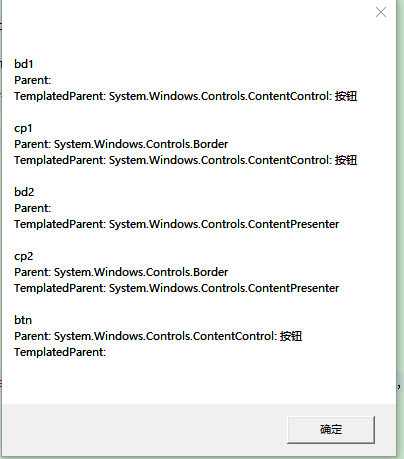
结论:(1)控件模板中元素的TemplatedParent 就是这个控件,就像b1的templatedParent就是ContentControl ;
(2)数据模板中元素的TemplatedParent就是ContentPresenter,b2、cp2的templatedParent都是ContentPresenter;
2.TenplateBinding:
 <Border Background="{TemplateBinding Background}"></Border>
 <Border  Background="{Binding Path=Background,Mode=OneWay, RelativeSource={RelativeSource TemplatedParent}}" />
上面两种写法效果是一样的,分析下面的xaml代码,Binding形式写法的数据源就是Border元素的TemplatedParent,也就是Button
 <Button Content="btn1"  Height="30" >
            <Button.Template>
                <ControlTemplate>
                    <Border  Background="{Binding Path=Background,Mode=OneWay, RelativeSource={RelativeSource TemplatedParent}}" >
                        <ContentPresenter></ContentPresenter>
                    </Border>
                </ControlTemplate>
            </Button.Template>
        </Button>
3.ContentPresenter:转载自https://www.cnblogs.com/YangMark/p/3172725.html
我們先由下面來看類層次,可知ContentControl繼承Control,ContentPresenter繼承FrameworkElement(Control也繼承FrameworkElement);
同樣的,ItemsControl繼承Control,ItemsPresenter繼承FrameworkElement.

在Control類並沒有Content屬性, 所以在這之上再寫了一個ContentControl, 使控件有Content屬性可以顯示內容, 而
ContentPresenter就是負責將Content屬性顯示出來.
接著來我們看一下實例,
實例1:不使用ContentPresenter
使用ContentPresenter
            <ContentControl Content="YangMark">
                <ContentControl.Template>
                    <ControlTemplate TargetType="ContentControl">
                        <ContentPresenter></ContentPresenter>
                    </ControlTemplate>
                </ContentControl.Template>
            </ContentControl>
輸出結果: YangMark
正確顯示Content!!
不使用ContentPresenter
            <ContentControl Content="YangMark">
                <ContentControl.Template>
                    <ControlTemplate TargetType="ContentControl">

                    </ControlTemplate>
                </ContentControl.Template>
            </ContentControl>
輸出結果:
無法顯示出Content!!
結論1:ContentPresenter通常出現在ControlTemplate內,且若不使用ContentPresenter則
Content屬性就無法正常顯示。
實例2:ContentPresenter中的ContentSource屬性
為什麼只為了顯示出Content屬性要大費周張弄出ContentPresenter呢??
我們可以先比較以下兩種代碼不同之類,
            <ContentControl Content="YangMark" ContentStringFormat="Hello!! {0}">
                <ContentControl.Template>
                    <ControlTemplate TargetType="ContentControl">
                        <ContentPresenter ContentSource="Content"></ContentPresenter>
                    </ControlTemplate>
                </ContentControl.Template>
            </ContentControl>
輸出結果:Hello!! YangMark
            <ContentControl Content="YangMark" ContentStringFormat="Hello!! {0}">
                <ContentControl.Template>
                    <ControlTemplate TargetType="ContentControl">
                        <ContentPresenter Content="{TemplateBinding Content}"></ContentPresenter>
                    </ControlTemplate>
                </ContentControl.Template>
            </ContentControl>
輸出結果:YangMark
僅出現Content屬性的內容!!
結論2:<ContentPresenter/>與<ContentPresenter ContentSource="Content"/> 意義上是相同的。
它們同時綁定了Content, ContentStringFormat, ContentTemplate和ContentTemplateSelector等內容
屬性。
若僅用Content="{TemplateBinding Content}"代表只綁定Content屬性而已,且ContentSource會失效。
實例3:ContentSource的應用
以HeaderContentControl為例,使用ContentPresenter綁定內容屬性。
            <HeaderedContentControl Header="Header" HeaderStringFormat="I'm {0}"
                                    Content="Content" ContentStringFormat="I'm {0}">
                <HeaderedContentControl.Template>
                    <ControlTemplate TargetType="HeaderedContentControl">
                        <DockPanel>

                            <ContentPresenter ContentSource="Header" DockPanel.Dock="Top"></ContentPresenter>

                            <!--等同於<ContentPresenter ContentSource="Content"/>-->
                            <ContentPresenter></ContentPresenter>

                        </DockPanel>
                    </ControlTemplate>
                </HeaderedContentControl.Template>
            </HeaderedContentControl>
輸出結果:
I'm Header
I’m Content
結論3:ContentSource若指定對象為Content是可以省略的,若不為Content(如:Header)則不能省略。
總結:
Content, ContentStringFormat, ContentTemplate和ContentTemplateSelector等屬性, 我將它們稱為內容屬性.
1. ContentPresenter的作用就是用來顯示內容屬性
2.ContentSource若指定對象為Content,則等同於<ContentPresenter/>; 若指定對象不為Content,
則必須使用ContentSource聲明指定的對象.

 浙公网安备 33010602011771号