
列表样式
1.列表样式
ItemContainerStyle
(1)单选列表:
前台xaml:
 <ListBox ItemsSource="{Binding Products}" Name="listbox"    DisplayMemberPath="Name">

        </ListBox>
后台代码:
using System;
using System.Collections.Generic;
using System.Collections.ObjectModel;
using System.ComponentModel;
using System.Linq;
using System.Text;
using System.Threading.Tasks;
using System.Windows;
using System.Windows.Controls;
using System.Windows.Data;
using System.Windows.Documents;
using System.Windows.Input;
using System.Windows.Media;
using System.Windows.Media.Imaging;
using System.Windows.Navigation;
using System.Windows.Shapes;

namespace WpfApplicationDEMO
{
    /// <summary>
    /// MainWindow.xaml 的交互逻辑
    /// </summary>
    public partial class MainWindow : Window
    {
        public MainWindow()
        {
            InitializeComponent();
            this.DataContext = new MyDateSource();
        }

        private void Button_Click(object sender, RoutedEventArgs e)
        {
          MyDateSource ds=  this.DataContext as MyDateSource;
          foreach (var pro in ds.Products.Where(p => p.IsChecked == true))
          {
              MessageBox.Show(pro.Name.ToString());
          }

        }

    }

    public class MyDateSource : INotifyPropertyChanged
    {

        Product m_SelectedItem;
        public Product SelectedItem
        {
            get { return m_SelectedItem; }
            set
            {
                m_SelectedItem = value;
                OnPropertyChanged("SelectedItem");
            }
        }
        ObservableCollection<Product> m_Products = new ObservableCollection<Product>() { new Product(), new Product() };
        public ObservableCollection<Product> Products
        {
            get { return m_Products; }
            set {
                m_Products = value;
                OnPropertyChanged("Products");
            }
        }
        public event PropertyChangedEventHandler PropertyChanged;
        void OnPropertyChanged(string propertyName)
        {
            if (PropertyChanged != null)
            {
                PropertyChanged.Invoke(this, new PropertyChangedEventArgs(propertyName));
            }
        }

      }

    public class Product : INotifyPropertyChanged
    {
        public Product()
        {
            IsChecked = false;
            Name = System.DateTime.Now.ToString() + "Name";
            Price = 0.1f;
            CreateDate = System.DateTime.Now;

        }

        bool m_IsChecked;
        public bool IsChecked
        {
            get { return m_IsChecked; }
            set
            {
                m_IsChecked = value;
                OnPropertyChanged("IsChecked");

            }
        }
        public string Name { get; set; }
        public float Price { get; set; }
        public DateTime CreateDate { get; set; }
        public event PropertyChangedEventHandler PropertyChanged;
        void OnPropertyChanged(string propertyName)
        {
            if (PropertyChanged != null)
            {
                PropertyChanged.Invoke(this, new PropertyChangedEventArgs(propertyName));
            }
        }
    }
}
样式:
   <Style x:Key="radioButtonlistStyle" TargetType="{x:Type ListBox}">
            <Setter Property="ItemContainerStyle">
                <Setter.Value>
                    <Style TargetType="{x:Type ListBoxItem}" >
                        <!--<Setter Property="IsSelected" Value="{Binding RelativeSource ={ RelativeSource Self}, Path=DataContext.IsChecked}"></Setter>-->
                        <Setter Property="IsSelected" Value="{Binding IsChecked}"></Setter>
                        <Setter Property="Margin" Value="2"></Setter>
                        <Setter Property="Template">
                            <Setter.Value>
                                <ControlTemplate TargetType="{x:Type ListBoxItem}">
                                    <RadioButton  IsChecked="{Binding IsSelected,Mode=TwoWay,RelativeSource={RelativeSource TemplatedParent}}">
                                            <ContentPresenter ></ContentPresenter>
                                    </RadioButton>

                                </ControlTemplate>
                            </Setter.Value>
                        </Setter>

                    </Style>
                </Setter.Value>
            </Setter>
        </Style>
为什么不这么写样式呢?
  <Style TargetType="{x:Type ListBox}">
            <Setter Property="ItemTemplate">
                <Setter.Value>
                    <DataTemplate>
                        <RadioButton IsChecked="{Binding IsChecked}" Content="{Binding Name}"></RadioButton>
                    </DataTemplate>
                </Setter.Value>
            </Setter>
        </Style>
原因如下:
(2)多选列表:
 <Style TargetType="{x:Type ListBox}">
            <Setter Property="ItemContainerStyle">
                <Setter.Value>
                    <Style TargetType="{x:Type ListBoxItem}">
                        <Setter Property="IsSelected" Value="{Binding IsChecked}"></Setter>
                        <Setter Property="Margin" Value="2"></Setter>
                        <Setter Property="Template">
                            <Setter.Value>
                                <ControlTemplate TargetType="{x:Type ListBoxItem}">
                                    <CheckBox Focusable="False" IsChecked="{Binding Path=IsSelected,RelativeSource={RelativeSource TemplatedParent}}">
                                        <ContentPresenter ></ContentPresenter>
                                    </CheckBox>
                                </ControlTemplate>
                            </Setter.Value>
                        </Setter>
                    </Style>
                </Setter.Value>
            </Setter>
        </Style>
<ListBox ItemsSource="{Binding Products}" Name="listbox"  SelectionMode="Multiple"   DisplayMemberPath="Name">

        </ListBox>
(3)交替条目样式:
主要靠这2个属性控制:
AlternationCount、
AlternationIndex
  <ListBox ItemsSource="{Binding Products}"  Name="listbox"  AlternationCount="2"   DisplayMemberPath="Name">
            <ListBox.ItemContainerStyle>
                <Style  TargetType="{x:Type ListBoxItem}">
                    <Setter Property="Background" Value="White" />
                    <Setter Property="Template">
                        <Setter.Value>
                            <ControlTemplate TargetType="{x:Type ListBoxItem}">
                                <Border x:Name="Bd" SnapsToDevicePixels="true" Background="{TemplateBinding Background}" BorderBrush="{TemplateBinding BorderBrush}" BorderThickness="{TemplateBinding BorderThickness}" Padding="{TemplateBinding Padding}">
                                    <ContentPresenter HorizontalAlignment="{TemplateBinding HorizontalContentAlignment}" VerticalAlignment="{TemplateBinding VerticalContentAlignment}" SnapsToDevicePixels="{TemplateBinding SnapsToDevicePixels}" x:Name="contentPresenter"/>
                                </Border>
                                <ControlTemplate.Triggers>
                                    <Trigger Property="IsMouseOver" Value="True">
                                        <Setter Property="Background" Value="Transparent"/>
                                    </Trigger>

                                    <Trigger Property="ItemsControl.AlternationIndex" Value="1">
                                        <Setter Property="Background" Value="LightBlue"></Setter>
                                    </Trigger>
                                    <Trigger Property="IsSelected" Value="True">
                                        <Setter Property="Background" Value="#1D82DA"/>
                                    </Trigger>

                                    <Trigger Property="ListBoxItem.IsSelected" Value="True">
                                        <Setter Property="Background" Value="Yellow"></Setter>
                                    </Trigger>
                                    <Trigger Property="IsEnabled" Value="false">
                                        <Setter Property="Foreground" Value="{DynamicResource {x:Static SystemColors.GrayTextBrushKey}}"/>
                                    </Trigger>
                                </ControlTemplate.Triggers>
                            </ControlTemplate>
                        </Setter.Value>
                    </Setter>
                </Style>
            </ListBox.ItemContainerStyle>
        </ListBox>
(4)依赖数据变化样式:
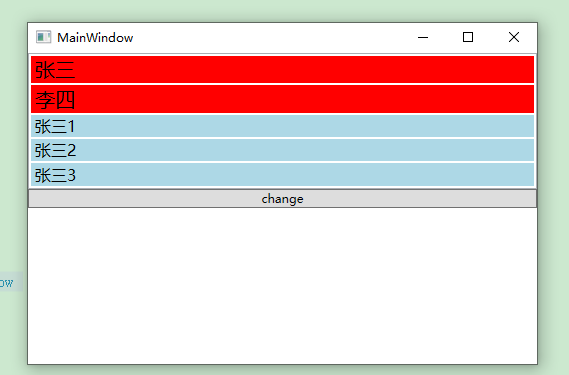
需要构建专门的继承自StyleSelector的类来检查每个数据项,并选择适合的样式;
  public class MyStyleSelector : StyleSelector
    {
        public MyStyleSelector(Style defaultStyle, Style highStyle, Dictionary<string, IList<string>> dicPropertyToHighNameAndValue)
        {
            DefaultStyle = defaultStyle;
            HighStyle = highStyle;
            DicPropertyToHighNameAndValue = dicPropertyToHighNameAndValue;

        }
        public Style DefaultStyle
        {
            get;
            set;
        }
        public Style HighStyle
        {
            get;
            set;
        }
        public Dictionary<string, IList<string>> DicPropertyToHighNameAndValue { get; private set; }
        public string PropertyToHighName
        {
            get;
            set;
        }
        public string PropertyToHighValue
        {
            get;
            set;
        }
        public override System.Windows.Style SelectStyle(object item, System.Windows.DependencyObject container)
        {
            Type type = item.GetType();
            foreach (var kv in DicPropertyToHighNameAndValue)
            {
                PropertyInfo propertyinfo = type.GetProperty(kv.Key);
                string propertyValue = propertyinfo.GetValue(item, null).ToString();
                if (kv.Value.Any(v => v == propertyValue))
                {
                    return HighStyle;
                }
                else
                {
                    return DefaultStyle;
                }

            }
            return DefaultStyle;

        }
    }
定义ViewModel基类:
  public  class StyleSelectorViewModel : INotifyPropertyChanged
    {
        public StyleSelectorViewModel()
        {
            InitData();
        }
        public StyleSelectorViewModel(Style itemDefaultStyle, Style itemHighStyle, Dictionary<string, IList<string>> dicPropertyToHigh_NameAndValue)
        {
            InitData();
            m_MyStyleSelector = new MyStyleSelector(itemDefaultStyle, itemHighStyle, dicPropertyToHigh_NameAndValue);
        }

        /// <summary>
        /// 初始化数据
        /// </summary>
        protected virtual void InitData() { }

        /// <summary>
        /// 样式选择器属性
        /// </summary>
        MyStyleSelector m_MyStyleSelector;
        public MyStyleSelector MyStyleSelector
        {
            get { return m_MyStyleSelector; }
            set
            {
                m_MyStyleSelector = value;
                OnPropertyChanged("MyStyleSelector");
            }
        }

        protected void UpdateStyleSelector(FrameworkElement element)
        {
            Type type = element.GetType();
            PropertyInfo propertyInfo = type.GetProperty("ItemContainerStyleSelector");
            propertyInfo.SetValue(element, null);
            propertyInfo.SetValue(element, MyStyleSelector);
        }

        /// <summary>
        /// 实现INotifyPropertyChanged接口,属性变化通知;
        /// </summary>
        public event PropertyChangedEventHandler PropertyChanged;
        protected virtual void OnPropertyChanged(string propertyName)
        {
            if (PropertyChanged != null)
            {
                PropertyChanged.Invoke(this, new PropertyChangedEventArgs(propertyName));
            }
        }

    }
一些辅助类:
 public class NotifyBase : INotifyPropertyChanged
    {
        public event PropertyChangedEventHandler PropertyChanged;
        protected virtual void OnPropertyChanged(string propertyName)
        {
            if (PropertyChanged != null)
            {
                PropertyChanged.Invoke(this, new PropertyChangedEventArgs(propertyName));
            }
        }
    }


  public class RelayCommand : ICommand
    {
        #region Fields

        readonly Action<object> _execute;
        readonly Predicate<object> _canExecute;

        #endregion

        #region Constructors

        public RelayCommand(Action<object> execute)
            : this(execute, null)
        {
        }

        public RelayCommand(Action<object> execute, Predicate<object> canExecute)
        {
            if (execute == null)
                throw new ArgumentNullException("execute");

            _execute = execute;
            _canExecute = canExecute;
        }

        #endregion

        #region ICommand Members

        public bool CanExecute(object parameter)
        {
            return _canExecute == null ? true : _canExecute(parameter);
        }

        // When command manager thinks the canexecute might change(e.g. focus changed), it raises RequerySuggested event.
        // The CanExecuteChanged is automatically registered by command binding, the execution logic of updating the button's
        // enabled\disabled state(value below) which is usually executed when CanExecuteChanged triggered, now is delegated to
        // RequerySuggested event, so when RequerySuggested triggered, the execution logic is being executed, and button's state gets updated.
        public event EventHandler CanExecuteChanged
        {
            add { CommandManager.RequerySuggested += value; }
            remove { CommandManager.RequerySuggested -= value; }
        }

        public void Execute(object parameter)
        {
            _execute(parameter);
        }

        #endregion
    }
数据对象类:
  public class Product : NotifyBase
    {
        string m_name;
        public string Name
        {
            get { return m_name; }
            set
            {
                m_name = value;
                OnPropertyChanged("Name");
            }
        }

        int m_age;
        public int Age
        {
            get { return m_age; }
            set
            {
                m_age = value;
                OnPropertyChanged("Age");
            }
        }
    }
ViewModel类:
    public class DataSouceViewModel : StyleSelectorViewModel
    {

        public DataSouceViewModel()
            : base()
        {

        }

        public DataSouceViewModel(Style itemDefaultStyle, Style itemHighStyle, Dictionary<string, IList<string>> dicPropertyToHigh_NameAndValue)
            : base(itemDefaultStyle, itemHighStyle, dicPropertyToHigh_NameAndValue)
        {

        }
        protected override void InitData()
        {
            m_products.Add(new Product() { Name = "张三", Age = 1 });
            m_products.Add(new Product() { Name = "李四", Age = 1 });
            m_products.Add(new Product() { Name = "张三1", Age = 1 });
            m_products.Add(new Product() { Name = "张三2", Age = 1 });
            m_products.Add(new Product() { Name = "张三3", Age = 1 });
        }

        ObservableCollection<Product> m_products = new ObservableCollection<Product>();
        public ObservableCollection<Product> Products
        {
            get { return m_products; }
            set
            {
                m_products = value;
                OnPropertyChanged("Products");
            }
        }

        private ICommand _testRelayCommand;
        public ICommand TestRelayCommand
        {
            get
            {
                if (_testRelayCommand == null)
                {
                    _testRelayCommand = new RelayCommand(new Action<object>(OnTestRelayCommandExecuted), new Predicate<object>(OnTestRelayCommandCanExecute));
                }
                return _testRelayCommand;
            }
        }

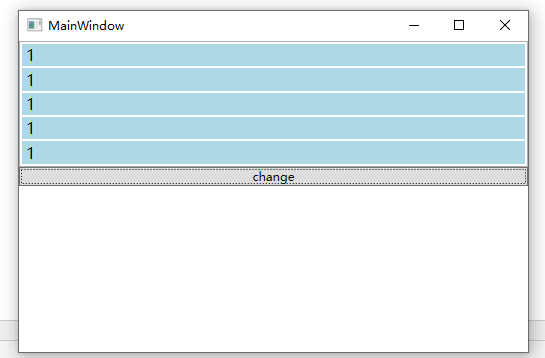
        public void OnTestRelayCommandExecuted(object para)
        {
            foreach (var p in Products)
            {
                p.Name = "1";
            }
            FrameworkElement element = para as FrameworkElement;
            UpdateStyleSelector(element);

        }
        public bool OnTestRelayCommandCanExecute(object para)
        {
            return true;
        }

    }
前台xaml:
<Window x:Class="WpfApplicationDEMO.MainWindow"
        xmlns="http://schemas.microsoft.com/winfx/2006/xaml/presentation"
        xmlns:x="http://schemas.microsoft.com/winfx/2006/xaml"
        Title="MainWindow" Height="350" Width="525"
        xmlns:local="clr-namespace:WpfApplicationDEMO"

       >
    <Window.Resources>
        <Style x:Key="ItemHighStyle" TargetType="{x:Type ListBoxItem}">
            <Setter Property="Background" Value="Red"></Setter>
            <Setter Property="FontSize" Value="20"></Setter>
        </Style>

        <Style x:Key="ItemDefaultStyle" TargetType="{x:Type ListBoxItem}">
            <Setter Property="Background" Value="LightBlue"></Setter>
            <Setter Property="FontSize" Value="16"></Setter>
        </Style>
    </Window.Resources>
    <StackPanel>
        <ListBox  Name="listbox"  AlternationCount="2"   DisplayMemberPath="Name"
                  ItemsSource="{Binding Products}"
                  ItemContainerStyleSelector="{Binding MyStyleSelector}"
                  >

        </ListBox>

        <Button Command="{Binding TestRelayCommand}" CommandParameter="{Binding ElementName=listbox}">change</Button>
    </StackPanel>
</Window>
using System;
using System.Collections.Generic;
using System.Collections.ObjectModel;
using System.ComponentModel;
using System.Linq;
using System.Text;
using System.Threading.Tasks;
using System.Windows;
using System.Windows.Controls;
using System.Windows.Data;
using System.Windows.Documents;
using System.Windows.Input;
using System.Windows.Media;
using System.Windows.Media.Imaging;
using System.Windows.Navigation;
using System.Windows.Shapes;

namespace WpfApplicationDEMO
{
    /// <summary>
    /// MainWindow.xaml 的交互逻辑
    /// </summary>
    public partial class MainWindow : Window
    {
        public MainWindow()
        {
            InitializeComponent();
            Style DefaultStyle = this.FindResource("ItemDefaultStyle") as Style;
            Style HighStyle = this.FindResource("ItemHighStyle") as Style;

            Dictionary<string, IList<string>> dic = new Dictionary<string, IList<string>>();
            List<string> lis = new List<string>() { "张三", "李四" };
            dic.Add("Name", lis);
            this.DataContext = new DataSouceViewModel(DefaultStyle, HighStyle, dic);
        }
    }

}
点击按钮后:
2.数据模板
以下2中效果一样:
  <ListBox x:Name="list">
            <ListBox.ItemTemplate>
                <DataTemplate>
                    <Border CornerRadius="5" BorderThickness="3" BorderBrush="Black">
                        <TextBlock Text="test"></TextBlock>
                    </Border>
                </DataTemplate>
            </ListBox.ItemTemplate>
        </ListBox>
 <Style TargetType="{x:Type ListBoxItem}">
                <Setter Property="ContentTemplate">
                    <Setter.Value>
                        <DataTemplate>
                            <Border CornerRadius="5" BorderThickness="3" BorderBrush="Black">
                                <TextBlock Text="test"></TextBlock>
                            </Border>
                        </DataTemplate>
                    </Setter.Value>
                </Setter>
            </Style>
数据触发器:
选中部分内容显示,否则隐藏
<Window x:Class="WpfApplicationDEMO.Window1"
        xmlns="http://schemas.microsoft.com/winfx/2006/xaml/presentation"
        xmlns:x="http://schemas.microsoft.com/winfx/2006/xaml"
          xmlns:sys="clr-namespace:System;assembly=mscorlib"
        Title="Window1" Height="300" Width="300">
    <Grid>

        <ListBox ItemsSource="{Binding Products}"  Name="listbox"  AlternationCount="2"  >
            <ListBox.ItemTemplate>
                <DataTemplate>
                    <Border BorderThickness="3" CornerRadius="5" Margin="5">
                        <StackPanel Margin="3">

                            <TextBlock Text="ModelName"></TextBlock>
                            <StackPanel>
                                <StackPanel.Style>
                                    <Style>
                                        <Style.Triggers>
                                            <DataTrigger Binding="{Binding Path=IsSelected,RelativeSource={RelativeSource Mode=FindAncestor,AncestorType={x:Type ListBoxItem}}}" Value="False">
                                                <Setter Property="StackPanel.Visibility" Value="Collapsed"></Setter>
                                            </DataTrigger>
                                        </Style.Triggers>
                                    </Style>
                                </StackPanel.Style>
                                <TextBlock Text="这是文本这是文本这是文本这是文本这是文本这是文本这是文本这是文本这是文本这是文本这是文本这是文本这是文本这是文本这是文本这是文本这是文本这是文本这是文本这是文本这是文本这是文本这是文本这是文本这是文本这是文本这是文本这是文本这是文本这是文本这是文本这是文本这是文本这是文本这是文本这是文本这是文本这是文本这是文本这是文本这是文本这是文本这是文本这是文本这是文本这是文本这是文本这是文本这是文本这是文本这是文本这是文本这是文本这是文本这是文本这是文本这是文本这是文本这是文本这是文本"
                                           TextWrapping="Wrap" MaxWidth="250" HorizontalAlignment="Left"></TextBlock>
                                <Button >Button</Button>
                            </StackPanel>
                        </StackPanel>
                    </Border>
                </DataTemplate>
            </ListBox.ItemTemplate>
        </ListBox>
    </Grid>
</Window>

 浙公网安备 33010602011771号