
数据提供类ObjectDataProvider和XMLDataProvider
ObjectDataProvider
(1)基本使用
这个ObjectDataProvider东西真的是个神奇的存在。等同于反射。只不过是写在xaml中。
例如说我要把colors中所有的颜色列举出来:
普通方法:
 //CB是combobox
            this.CB.ItemsSource = typeof(Colors).GetProperties();
使用objectdataprovider则为:
    <Window.Resources>
        <ObjectDataProvider x:Key="ODP" ObjectInstance="{x:Type Colors}" MethodName="GetProperties"/>
    </Window.Resources>
    <Grid>
        <ComboBox Height="120" x:Name="CB" ItemsSource="{Binding Source={StaticResource ODP}}"/>
    </Grid>
从编写的代码数量来说,C#要简单一点。不过对于习惯编写xaml和必须在xaml中使用时objectdataprovider要更加方便。objectdataprovider可以让方法绑定到控件,准确的说是方法的结果。
假如说有一个类,有一个方法且有两个参数此方法会返回这两个数的和。
 public class A
    {

        public int ADD(int a, int b) => a + b;

    }
<Window.Resources>
        <ObjectDataProvider x:Key="ODP"  ObjectType="{x:Type local:A}" MethodName="ADD">
            <ObjectDataProvider.MethodParameters>
                <sys:Int32>12</sys:Int32>
                <sys:Int32>12</sys:Int32>
            </ObjectDataProvider.MethodParameters>
        </ObjectDataProvider>
    </Window.Resources>
    <Grid>
        <TextBlock Text="{Binding Source={StaticResource ODP}}"/>
    </Grid>
或是
 <Window.Resources>
       <local:A x:Key="A"/>
        <ObjectDataProvider x:Key="GetAdd" ObjectInstance="{StaticResource A}"  MethodName="ADD"   >
            <ObjectDataProvider.MethodParameters>
                <sys:Int32>1</sys:Int32>
                <sys:Int32>1</sys:Int32>
            </ObjectDataProvider.MethodParameters>
        </ObjectDataProvider>
    </Window.Resources>


    <Grid>
        <TextBlock Text="{Binding Source={StaticResource GetAdd}}"/>
    </Grid>
ObjectInstance和ObjectType只有其中一个可以赋值。
ObjectType的类型是Type
ObjectInstance的类型是Object
换句话说objecttype可以使用x:type进行赋值,也只有这种方式。
objectinstance则是可以通过staticresource的方式进行绑定,绑定的也是实例化后的元素。
把类修改为:
 public class A
    {
        private int a;
        private int b;
        public A(int a,int b)
        {
            this.a = a;
            this.b = b;
        }
        public A()
        {

        }
        public int ADD(int a, int b) => a + b;

        public int ADD() => this.a + this.b;
    }
有了构造函数和重载方法。xaml中如果想要使用构造函数和重载方法则是需要这么写:
<Window.Resources>
        <ObjectDataProvider x:Key="GetAdd"  ObjectType="{x:Type local:A}" MethodName="ADD"   >
            <ObjectDataProvider.ConstructorParameters>
                <sys:Int32>3</sys:Int32>
                <sys:Int32>1</sys:Int32>
            </ObjectDataProvider.ConstructorParameters>
        </ObjectDataProvider>
    </Window.Resources>
    <Grid>
        <TextBlock Text="{Binding Source={StaticResource GetAdd}}"/>
    </Grid>
最后值得注意的是MethodParameters这个属性是不支持直接绑定的。但是却可以这么操作:
  public class A
    {
        private int a;
        private int b;
        public A(int a,int b)
        {
            this.a = a;
            this.b = b;
        }
        public A()
        {

        }
        public int ADD(int a, int b) => a + b;

        public int ADD() => this.a + this.b;

        public string ADD(string A, string B) => A + B;
    }
<Window.Resources>
        <local:A x:Key="A"/>
        <ObjectDataProvider x:Key="GetAdd"  ObjectType="{x:Type local:A}"  MethodName="ADD"   >
            <ObjectDataProvider.MethodParameters>
                <sys:String>A</sys:String>
                <sys:String>B</sys:String>
            </ObjectDataProvider.MethodParameters>
        </ObjectDataProvider>
    </Window.Resources>
    <Grid>
        <Grid.ColumnDefinitions>
            <ColumnDefinition Width="*"/>
            <ColumnDefinition Width="*"/>
            <ColumnDefinition Width="*"/>
        </Grid.ColumnDefinitions>
        <TextBox Grid.Column="0" Text="{Binding Source={StaticResource GetAdd}, Path=MethodParameters[0],UpdateSourceTrigger=PropertyChanged,BindsDirectlyToSource=True}"/>
        <TextBox Grid.Column="1" Text="{Binding Source={StaticResource GetAdd}, Path=MethodParameters[1],UpdateSourceTrigger=PropertyChanged,BindsDirectlyToSource=True}"/>
        <TextBlock Grid.Column="2" Text="{Binding Source={StaticResource GetAdd}}"/>
    </Grid>
(2)异步使用
同步如下:
<Window x:Class="WpfApplication1.MainWindow"
        xmlns="http://schemas.microsoft.com/winfx/2006/xaml/presentation"
        xmlns:x="http://schemas.microsoft.com/winfx/2006/xaml"
        xmlns:local="clr-namespace:WpfApplication1"
        xmlns:sys="clr-namespace:System;assembly=mscorlib"
        Title="MainWindow" Height="350" Width="525">
    <Window.Resources>
        <ObjectDataProvider x:Key="ODP"  ObjectType="{x:Type local:A}" MethodName="ADD" >
            <ObjectDataProvider.MethodParameters>
                <sys:Int32>12</sys:Int32>
                <sys:Int32>12</sys:Int32>
            </ObjectDataProvider.MethodParameters>
        </ObjectDataProvider>
    </Window.Resources>
    <Grid>
        <Grid.ColumnDefinitions>
            <ColumnDefinition Width="254*"/>
            <ColumnDefinition Width="263*"/>
        </Grid.ColumnDefinitions>
        <TextBlock Text="{Binding Source={StaticResource ODP}}" />
    </Grid>
</Window>
  public partial class MainWindow : Window
    {
        public MainWindow()
        {
            InitializeComponent();
        }
    }

     public class A
    {
         public int ADD(int a, int b)
         {
             Thread.Sleep(5000);
             return a + b;
         }

    }
效果是:卡了5秒窗体才会出现,同时textblock出现数值;
改成异步:只需要设置ObjectDataProvider 的IsAsynchronous="True"
 <ObjectDataProvider x:Key="ODP"  ObjectType="{x:Type local:A}" MethodName="ADD" IsAsynchronous="True" >
            <ObjectDataProvider.MethodParameters>
                <sys:Int32>12</sys:Int32>
                <sys:Int32>12</sys:Int32>
            </ObjectDataProvider.MethodParameters>
        </ObjectDataProvider>
效果:窗体立即出现,5秒后textBlock出现数值;
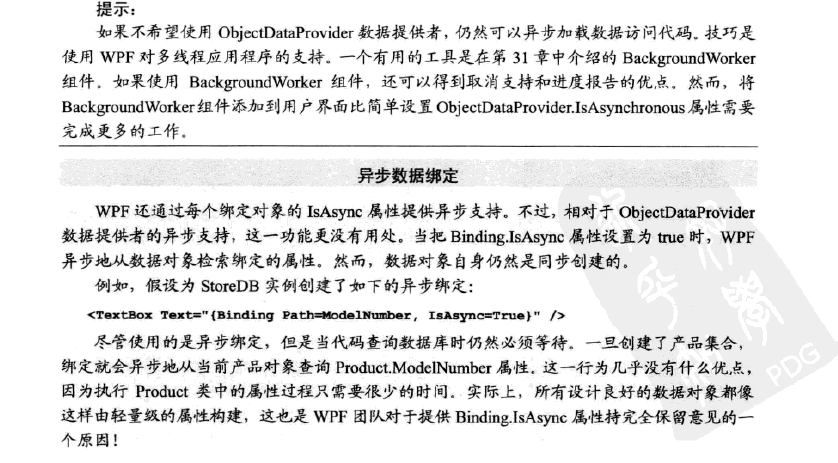
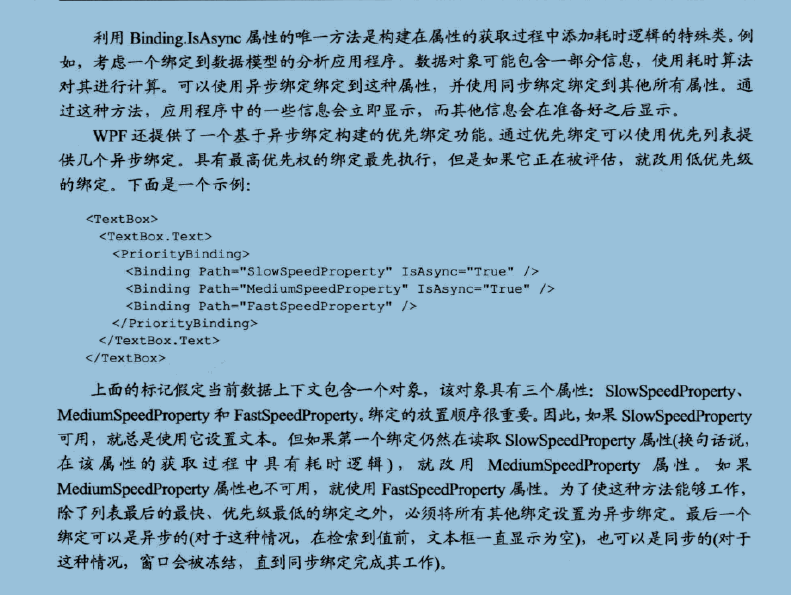
引用WPF编程宝典的部分内容:
XNLDataProvider
默认情况下XNLDataProvider是异步的加载XML内容,除非显示的设置XNLDataProvider.IsAsynchronous=false
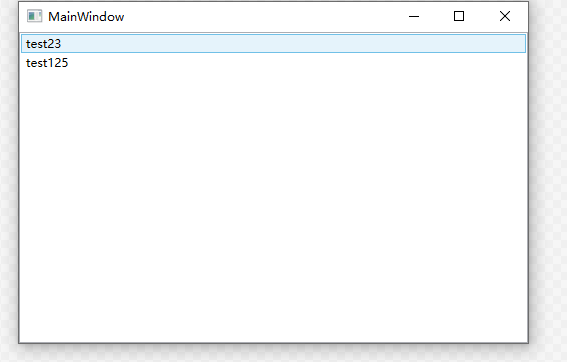
使用示例:
XMLFile1.xml
<?xml version="1.0" encoding="utf-8" ?>
<Products>
  <Product>
    <ProductID>355</ProductID>
    <Name>test</Name>
    <Age>23</Age>
  </Product>
  <Product>
    <ProductID>356</ProductID>
    <Name>test1</Name>
    <Age>25</Age>
  </Product>
</Products>
<Window x:Class="WpfApplication1.MainWindow"
        xmlns="http://schemas.microsoft.com/winfx/2006/xaml/presentation"
        xmlns:x="http://schemas.microsoft.com/winfx/2006/xaml"
        xmlns:local="clr-namespace:WpfApplication1"
        xmlns:sys="clr-namespace:System;assembly=mscorlib"
        Title="MainWindow" Height="350" Width="525">
    <Window.Resources>
        <XmlDataProvider x:Key="productsProvider" Source="XMLFile1.xml" XPath="/Products"  ></XmlDataProvider>
    </Window.Resources>
    <Grid>
        <ListBox  ItemsSource="{Binding Source={StaticResource productsProvider},XPath=Product}" >
            <ListBox.ItemTemplate>
                <DataTemplate>
                    <StackPanel Orientation="Horizontal">
                        <TextBlock Text="{Binding XPath=Name}"></TextBlock>
                        <TextBlock Text="{Binding XPath=Age}"></TextBlock>
                    </StackPanel>
                </DataTemplate>
            </ListBox.ItemTemplate>
        </ListBox>
    </Grid>
</Window>

 浙公网安备 33010602011771号