


JDK8 新特性
Java 8
现在 Java 按照周期发布,每六个月就更新一次。所谓 “小步快跑,快速迭代”
JDK8 是 Java 语言开发的一个主要版本,2014年 3月发布,是 JDK5 以来最具革命性的版本。
新特性简介:
-
速度更快 (HashMap 的数据结构更改)
-
代码更少 (Lambda 表达式)
-
Stream API
-
便于并行
-
减少空指针异常 (Optional)
-
Nashorn引擎,允许在 JVM 上运行 JS 应用
Lambda 表达式
Lambda 表达式是对象,而不是函数。
// 以前创建接口实现类的对象

public interface MyInterface {
    void testMethod();
}


class MyClass implements MyInterface{

    @Override
    public void testMethod() {
        System.out.println("重写接口");
    }
}


class Demo {
    public static void main(String[] args) {
        MyClass mc = new MyClass();
        mc.testMethod();
    }
}
// 使用匿名内部类创建对象

public interface MyInterface {
    void testMethod();
}

class Demo {
    public static void main(String[] args) {
        MyInterface ms = new MyInterface() {
            @Override
            public void testMethod() {
                System.out.println("Test");
            }
        };

        ms.testMethod();
    }
}
// 利用 Lambda 表达式

public interface MyInterface {
    void testMethod();
}

class Demo {
    public static void main(String[] args) {
        MyInterface ms = () -> System.out.println("Lambda");
        ms.testMethod();
    }
}
Lambda 本质就是 Java 中接口的一个实例,即接口的实现类的具体的对象。
语法:
-> :         箭头操作符
-> 左侧:      Lambda 形参列表 对应接口中抽象方法的形参列表
-> 右侧:      重写方法的,方法体的具体内容
// 无参,无返回值. 方法体中只有一条语句, 花括号可以省略
MyInterface my = () -> {System.out.println("PS");};
my.testMethod();

// 有一个参数, 无返回值
MyInterface my = (int x) -> System.out.println("PS" + x);
my.testMethod(12);

// 类型推断, 可以去掉参数类型
MyInterface my = (x) -> System.out.println("ps" + x);
my.testMethod(12);

// 一个参数的时候 小括号也能不写
MyInterface my = x -> System.out.println("ps" + x);
my.testMethod(12);
// 多个参数且带返回值
public interface MyInterface {
    String testMethod(int age, int num);
}

class Demo {
    public static void main(String[] args) {

        MyInterface my = (x,y) -> {
            System.out.println("Test");
            return "Hello" + "ps" + x;
        };
        System.out.println( my.testMethod(12,17));
    }
}
// 如果只剩一个 return 的时候
MyInterface my = (x,y) -> {
    return "Hello" + "ps" + x;
};


// 可以直接这样
MyInterface my = (x,y) -> "Hello" + "ps" + x;
函数式接口
Lambda 必须依赖一个接口,只有一个抽象方法的接口,称为函数式接口
@FunctionalInterface 此注解在接口中有多个抽象方法时,便会爆红。不过除了 Object 类中的抽象方法。
JDK8 中新加入了一个包 java.util.function ,这个包里面有几个常用的函数式接口:
- Consumer 消费型接口
- Function 函数型接口
- Predicate 断定型接口
- Supplier 供给型接口
这些接口功能就是,不用你再去创建新接口,按照名字的语义。直接用它的就行了,比如:
public static void main(String[] args) {

    Consumer<Double> c = new Consumer<Double>() {
        @Override
        public void accept(Double o) {
            System.out.println("accept");
        }
    };

    c.accept(1.00);
}


// 简洁一下
Consumer<Double> c = o -> System.out.println("accept");
public static void main(String[] args) {

	List<String> list = Arrays.asList("asss", "aaaa", "vvvv", "vvv");

// 简化前
//        List<String> result = filterString(list, new Predicate<String>() {
//            @Override
//            public boolean test(String o) {
//                return o.length() < 4;
//            }
//        });


// 简化后
    List<String> result = filterString(list, o -> o.length() < 4);

    System.out.println(list);
    System.out.println(result);
}

public static List<String> filterString(List<String> waitTest, Predicate<String> predicate) {
    List<String> filterList = new ArrayList<>();
    for (String item : waitTest) {
        if (predicate.test(item)) {
            filterList.add(item);
        }
    }
    return filterList;
}
方法引用
当要传递给 Lambda 体的操作,已经有实现的方法了,可以使用方法引用。
使用操作符 :: 将类(或者对象)与方法名分开。
如下三种情况使用:
// 1. 对象::实例方法名 (非静态方法)

class Student {
    String name;
    Integer age;

    public Student(String name, Integer age) {
        this.name = name;
        this.age = age;
    }

    public String getName() { return name; }

    public Integer getAge() { return age; }
}

class Demo {
    public static void main(String[] args) {
        Student student = new Student("jc", 18);

        // 第一种写法
        Supplier<String> s1 = () -> {
            return student.getName();
        };
        System.out.println(s1.get());

        // 第二种写法
        Supplier<String> s2 = () -> student.getName();
        System.out.println(s2.get());

        // 方法引用的写法
        Supplier<String> s3 = student::getName;
        System.out.println(s3.get());
    }
}
只要接口的抽象方法和具体的实现方法,参数一样、返回值一样,就可以这样用。上面代码中,student.getName() 和 Supplier 中的 get() 就满足此条件。
// 2. 类::静态方法名

// 写法一
Comparator<Integer> c1 = (x, y) -> Integer.compare(x, y);
System.out.println(c1.compare(12, 20));

// 写法二
Comparator<Integer> c2 = Integer::compareTo;
System.out.println(c2.compare(12, 20));
// 3. 类::实例方法名 (非静态方法)

// 写法一
BiPredicate<String, String> bp = (x, y) -> x.equals(y);
System.out.println(bp.test("abc", "abc"));

// 写法二
BiPredicate<String, String> bp2 = String::equals;
System.out.println(bp2.test("abc", "abc"));
这个就有点奇怪了,显然 equals() 的参数列表,与下方 test() 的明显不同。与上面的说明并不符啊。
其实 (x, y) -> ... 中第一个参数表示:调用方法的调用者
第二个参数就是调用方法的实际传入参数。只要是这种第一个参数用来调用方法的,第二个参数是传入参数的,就能使用 类::实例方法名 的方式
构造器引用
利用供给型接口,返回一个对象
class Student {
    String name;

    public Student() { }

    public Student(String name) {
        this.name = name;
    }

    @Override
    public String toString() {
        return "Student{" +
                "name='" + name + '\'' +
                '}';
    }
}

class Demo {
    public static void main(String[] args) {
		// 第一种写法
        Supplier supp = () -> new Student();
        Object stuent = supp.get();
        System.out.println(stuent);

       	// 第二种写法
        Supplier supp = Student::new;
        Object stuent = supp.get();
        System.out.println(stuent);

        // 试一个可以传参的 可以自己看下 Function 注释
        Function<String, Student> f = Student::new;
        Object o = f.apply("zhouxuan");
        System.out.println(o);
    }
}
不过需要注意的是,实现的方法的参数,和接口的方法的参数必须一至。为啥上面调用的是空构造器,因为 get() 没有参数,那构造函数也调用的是无参的。
// 最后再看个创建数组的例子

// Lambda 表达式
Function<Integer, String[]> f1 = (x) -> new String[x];
String[] r1 = f1.apply(8);
System.out.println(r1.length);

// 数组引用
Function<Integer, String[]> f2 = String[]::new;
String[] r2 = f2.apply(5);
System.out.println(r2.length);
StreamAPI
除了 Lambda,JDK8 另一个重要改变就是 StreamAPI 了。
StreamAPI 是 Java8 中处理集合的关键抽象概念,它可以指定你希望对集合进行的操作。可以进行复杂的查找、过滤、映射等操作。使用 StreamAPI 对集合数据,在 java 层面进行操作,就类似于使用 SQL 执行的数据库查询。StreamAPI 提供了一种高效且易于使用的数据处理方式。
在实际开发中,很多数据来自缓存、数据库。我们就可以使用 StreamAPI 在 Java 层面高效简单地处理这些数据。
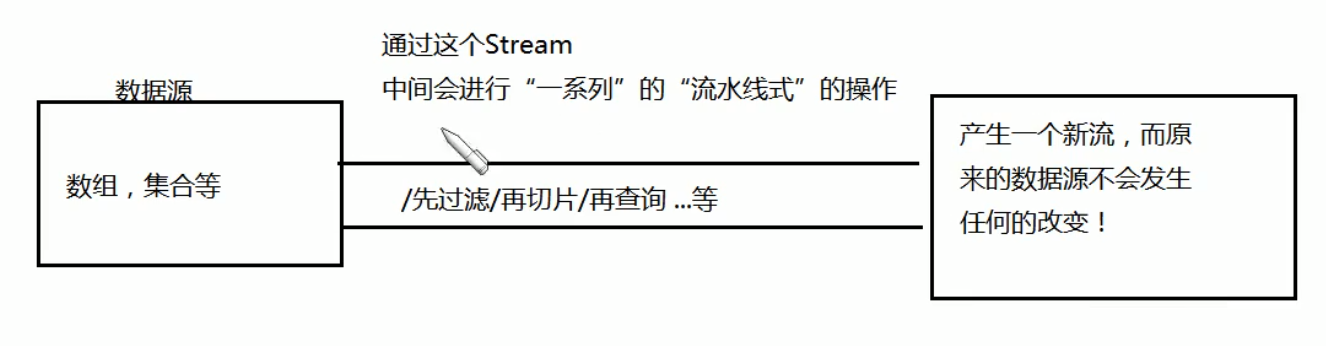
以前学习的集合,他们的增删改查,都是数据结构、内存层面的,即数据源是随之改变的。
现在的 Stream 操作,是 CPU 层面的,数据源不会随之改变。
使用的步骤:
- 先产生一个流 Stream (一个数据源获取一个流)
- 中间链式操作 (对数据源的数据进行处理)
- 产一个新流 (进行终止操作,此时去执行上一步的中间操作链,那就相当于是晚一步延迟执行)
创建 Stream 的几种方式:
        // 方式1:Collection 接口的方法
        Collection<String> col = new ArrayList<>();
        // 获取串行流
        Stream<String> s1 = col.stream();
        // 获取并行流
        Stream<String> s2 = col.parallelStream();


        // 方式2:Arrays 中的 Stream 方法
        IntStream s3 = Arrays.stream(new int[]{1, 2, 4});


        // 方式3:Stream 中的 of 方法
        Stream<String> s4 = Stream.of("aa", "cc", "dd");


        // 方式4:创建无限流 (就是每次 +2 无限加, 很神奇 执行一下就知道了)
        Stream<Integer> s5 = Stream.iterate(2, (x) -> x + 2);
        s5.forEach(System.out::println);

        // 也是创建无限流,产生无限多个
        Stream<Double> s6 = Stream.generate(() -> Math.random());
        s6.forEach(System.out::println);
StreamAPI 的中间操作
// 这是数据源 下面的都是操作这儿的
	List<Student> list = Arrays.asList(
                new Student("lili", 19),
                new Student("ffff", 20),
                new Student("lll", 21),
                new Student("tttt", 22),
                new Student("aaaa", 23),
                new Student("cccc", 24)
        );
// filter 过滤

		// 以前这么写
        Iterator<Student> it = list.iterator();
        while (it.hasNext()) {
            Student item = it.next();
            if (item.getAge() > 21) {
                System.out.println(item);
            }
        }


		// 这是现在
        // 1. 创建 Stream
        Stream<Student> s = list.stream();

        // 2. 中间操作
        Stream<Student> s1 = s.filter((x) -> x.getAge() > 21);

        // 3. 终止操作
        s1.forEach(System.out::println);


		// 再体验下链式操作
        list.stream()
            .filter((x) -> x.getAge() > 21)
            .forEach(System.out::println);
// limit, 截断(短路)
        list.stream()
                .filter((x) -> {
                    System.out.println("正在进行 " + x.getName());
                    return x.getAge() > 21;
                })
            	// 只要找到两个 满足了条件 后面就不管了
                .limit(2)
                .forEach(System.out::println);
// skip, 这个和 limit 相反
		list.stream()
                .filter((x) -> {
                    System.out.println("正在进行 " + x.getName());
                    return x.getAge() > 21;
                })
            	// 跳过前两个满足条件的
                .skip(2)
                .forEach(System.out::println);
// distinct, 去重, 但是需要重写 hashCode() 和 equals()
		list.stream()
                .distinct()
                .forEach(System.out::println);
// map, 映射   把原先的 Student 都映射成单个的名字
		list.stream()
            	// .map((x) -> x.getName())
                .map(Student::getName)
                .forEach(System.out::println);
// 例子: 输出 age > 21 的名字
		list.stream()
                .map((x) -> {
                    if (x.getAge() > 21) {
                        return x.getName();
                    }
                    return null;
                })
                .filter((x) -> x != null)
                .forEach(System.out::println);
// sorted 排序, 这里暂时新建一个 list
        List<Integer> list = Arrays.asList(1, 3, 6, 2, 8, 11);

        list.stream()
                .sorted()
                .forEach(System.out::println);
// 例子: 按照学生年龄排序
        list.stream()
                .sorted((x, y) -> x.getAge() - y.getAge())
                .forEach(System.out::println);
StreamAPI 的终止操作
// allMatch, 是不是所有 Student 的 age 都满足条件
        boolean result = list.stream()
                .allMatch((x) -> x.getAge() > 20);
        System.out.println(result);
// anyMatch, 有一个满足条件就返回 true
        boolean result = list.stream()
                .anyMatch((x) -> x.getAge() > 21);
        System.out.println(result);
// noneMatch, 都不满足条件就返回 true
		boolean result = list.stream()
                .noneMatch((x) -> x.getAge() > 100);
        System.out.println(result);
// 还有一些关于查找和匹配的
		findFirst() 返回第一个
		findAny() 返回任意一个
		count() 获取此流的元素数
		max() 获取此流中的最大元素,需要传入 Comparator
		min() 获取此流中的最小元素,需要传入 Comparator
		forEach() 对此流的每个元素执行操作
接着是规约操作,下面的代码的意思是:reduce(0,.. 这里的 0 作为初始值,初始值赋值给 (x, y) ... 中的 x, y 是每次遍历得到的 age,这样每次将 y 加进 x 中,就能得到年龄的总和了。最后使用方法引用,语法更简便。
        Integer sumAge = list.stream()
                .map(Student::getAge)
                // .reduce(0, (x, y) -> x + y);
                .reduce(0, Integer::sum);
        System.out.println(sumAge);
最后一个终止操作,收集操作。用于给 Stream 中的元素进行汇总。下面是手机所有 Student 的 name,返回一个 集合。
// List, 简单的 Demo 献给大家
		List<String> allName = list.stream()
                .map(Student::getName)
                .collect(Collectors.toList());
        System.out.println(allName);

// Set, 当然可以使用 Set, 当然 Set 是唯一的哦
        Set<String> allName = list.stream()
                .map(Student::getName)
                .collect(Collectors.toSet());
        System.out.println(allName);

// Map, 最后是 Map
        Map<String, Integer> map = list.stream()
                .collect(Collectors.toMap((k) -> k.getName(), (v) -> v.getAge()));
        System.out.println(map);

// count, 得到学生总数
        Long sum = list.stream()
                .collect(Collectors.counting());
        System.out.println(sum);

// averaging, 得到平均年龄
        Double d = list.stream()
                .collect(Collectors.averagingDouble((x) -> x.getAge()));
        System.out.println(d);

// sum, 年龄总和
        Double d = list.stream()
                .collect(Collectors.summingDouble((x) -> x.getAge()));
        System.out.println(d);

// max, 获取年龄最大的, 当然也有 minBy()
        Optional<Student> op = list.stream()
                .collect(Collectors.maxBy((x, y) -> Double.compare(x.getAge(), y.getAge())));
        System.out.println(op.get());
// 分组, 按年龄分组
		Map<Integer, List<Student>> map = list.stream()
                .collect(Collectors.groupingBy((x) -> x.getAge()));
        Set<Map.Entry<Integer, List<Student>>> entries = map.entrySet();
        for (Map.Entry<Integer, List<Student>> e : entries) {
            System.out.println(e.getKey() + "--" + e.getValue());
        }


// 分区, 满足条件的一个区 不满足条件的一个区
        Map<Boolean, List<Student>> map = list.stream()
                .collect(Collectors.partitioningBy((x) -> x.getAge() > 20));
        Set<Map.Entry<Boolean, List<Student>>> entries = map.entrySet();
        for (Map.Entry<Boolean, List<Student>> e : entries) {
            System.out.println(e.getKey() + "--" + e.getValue());
        }

// 拼接, 将所有的名字进行拼接
        String str = list.stream()
                .map((x) -> x.getName())
                .collect(Collectors.joining());
        System.out.println(str);

 浙公网安备 33010602011771号