
Java多线程-笔记
2、多线程简介
2.1、 多任务
好比一个人边吃饭边玩手机,看起来是吃饭和玩手机是一起做的,但并不是这样其实本质上来讲是一会吃饭一会看手机,同一时间做一个任务
2.2、多线程
一个线程只能给一个程序使用,如果需要第二个程序则需要创建第二个线程给程序2提供线入。
(就好比一条小道上一次只能通过一辆车,车多了就会发送拥堵效率低为了提高效率,扩建道路将道路分成一条条小道,一次性可以通过多辆车大大提高了效率)
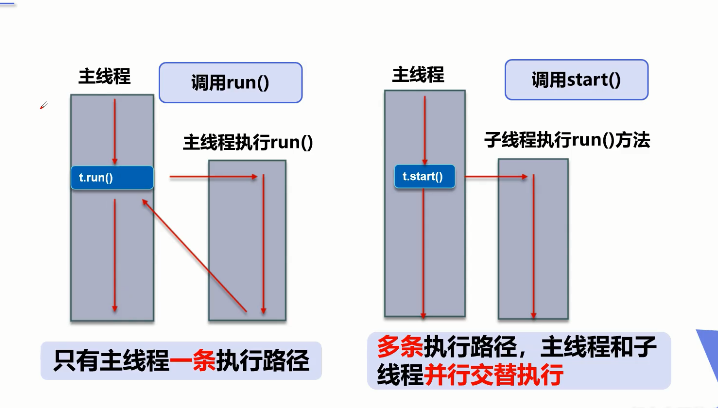
不使用和使用多线程的过程图:
2.3、进程
1)、一个进程有多个线程,如看视频可以听到使用、发弹幕、播放视频等;
2)、进程Process与线程Thread
程序执行为---进程里面有---多个线程
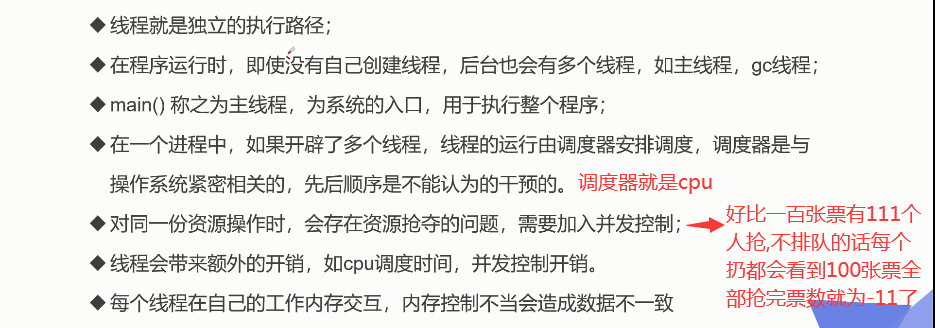
说起进程,就不得不说下程序。程序是指令和数据的有序集合,其本身没有任何运行的含义,是一个静态的概念。
- 而进程则是执行程序的一次执行过程,它是一个动态的概念。是系统资源分配的单位
- 通常在一个进程中可以包含若干个线程,当然一个进程中至少有一个线程, 不然没有存在的意义。线程是CPU调度和执行的的单位。
注意:很多多线程是模拟出来的,真正的多线程是指由多个cpu,即多核,如服务器。如果是模拟出来的多线程,即在一个cpu的情况下,在同一个时间点,cpu只能执行一个代码因为切换的很快,所以同时执行的错觉
3、线程创建
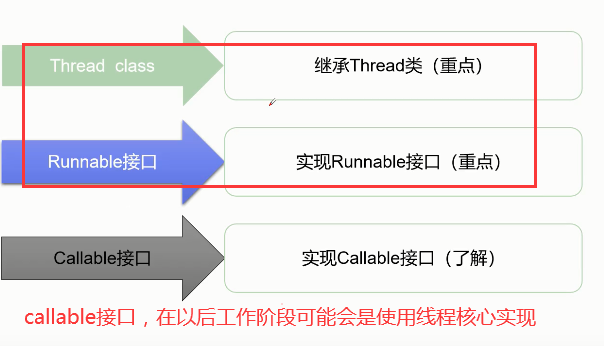
3.1、创建线程有三中方式:
1)、Thread类:
使用该类创建线程,需要让自定义的类继承该类,并重写该类的run()方法来编写线程执行体,在创建该线程对象调用start()方法启动线程 线程不一定执行,CPU调度安排
 1 //创建线程方式一:继承Thread类,重写run()方法 ,调用start开启线程
 2 //总结:注意, 线程开后不一定立即执行,由CPU调度执行
 3 public class TestThread1 extends Thread {
 4     @Override
 5     public void run() {
 6         for(int i=0;i<200;i++) {
 7             System.out.println("我在看代码=="+i);
 8         }
 9     }
10
11     public static void main(String[] args) {
12         //main线程:主线程
13         //创建一个线程对象
14         TestThread1 test=new TestThread1();
15         test.start();
16
17         for(int i=0;i<1000;i++) {
18             System.out.println("我在学习多线程=="+i);
19         }
20     }
21 }
2)、Runnable接口:
使用该接口创建线程,需要让自定义的类实现该接口,并重写run()抽象方法编写线程执行体,然后创建该实现类的对象将该实现类对象传给Thread对象调用start()方法启动线程
 1 /*创建线程方式二:实现Runnable接口,重写run()方法 ,
 2 执行线程需要丢入runnable接口实现类,调用start开启线程*/
 3 public class TestThread2 implements Runnable {
 4     @Override
 5     public void run() {
 6         for(int i=0;i<200;i++) {
 7             System.out.println("我在看代码=="+i);
 8         }
 9     }
10
11     public static void main(String[] args) {
12         //创建runndable接口的实体类对象
13         TestThread2 test2=new TestThread2();
14         //创建一个线程对象,通过线程对象来开启我们的线程(代理)
15         Thread thread=new Thread(test2);
16         thread.start();
17
18         for(int i=0;i<1000;i++) {
19             System.out.println("我在学习多线程=="+i);
20         }
21     }
22 }
3)、Callable接口:
实现该接口需要返回值(泛型),并重写call方法需要抛出异常,创建该实现类的对象(目标对象)
1、创建执行服务: ExecutorService ser =Executors.newFixedThreadPool(1);
2、提交执行: Future<Boolean> result1 = ser.submit(t1);
3、获取结果: boolean r1 = result1 .get()
4、关闭服务: ser.shutdownNow();
1 public class CallableTest implements Callable<Boolean> { 2 private String url;//网络图片路径 3 private String name;//保存文件的名称 4 5 public CallableTest() {} 6 public CallableTest(String url,String name) { 7 this.url=url; 8 this.name=name; 9 } 10 11 //下载图片的线程执行体 12 public Boolean call() { 13 Xz1 xz=new Xz1(); 14 xz.xaizai(url, name); 15 System.out.println("下载完成"+name); 16 return true; 17 } 18 19 public static void main(String[] args) throws InterruptedException, ExecutionException { 20 CallableTest t1=new CallableTest("https://i0.hdslb.com/bfs/sycp/creative_img/202002/fcf948f538729637988488be9505f0ec.jpg@1100w_484h_1c_100q.jpg","1.jpg"); 21 CallableTest t2=new CallableTest("https://i0.hdslb.com/bfs/archive/058056424b94c3ff8c1facc940f48ce3bfe423a5.jpg@1100w_484h_1c_100q.jpg","2.jpg"); 22 CallableTest t3=new CallableTest("https://i0.hdslb.com/bfs/archive/c5b8e10627f5f880f5a644cfd36260e3662a638c.jpg@1375w_605h_1c_100q.webp","3.jpg"); 23 24 //3个线程谁先下完 谁先结束线程 25 ExecutorService ser=Executors.newFixedThreadPool(3);//创建执行服务器,指定有几个服务 26 Future<Boolean> r1=ser.submit(t1);//提交执行 27 Future<Boolean> r2=ser.submit(t2); 28 Future<Boolean> r3=ser.submit(t3); 29 System.out.println("返回结果"+r1.get());//获取返回结果 30 System.out.println("返回结果"+r2.get()); 31 System.out.println("返回结果"+r3.get()); 32 ser.shutdownNow();//关闭服务 33 } 34 } 35 36 //下载器 37 class Xz1{ 38 //下载方法 39 public void xaizai(String url,String name) { 40 try { 41 //用FileUtil类中的 42 FileUtils.copyURLToFile(new URL(url), new File(name)); 43 } catch (IOException e) { 44 e.printStackTrace(); 45 System.out.println("下载方法报出异常"); 46 } 47 } 48 }
也可以用FutureTask<T>类来执行callable接口,因为该类实现了Runnable接口所以可以直接new一个Thread将该callable实现类放进去在.start()启动线程,用该类的get方法就可以获取到call方法的返回值
1 public static void main(String[] args) { 2 FutureTask<Integer> futureTask=new FutureTask<>(new MyDome()); 3 new Thread(futureTask).start(); 4 try { 5 Integer i=futureTask.get(); 6 System.out.println(i); 7 }catch(Exception e1) { 8 e1.printStackTrace(); 9 } 10 } 11 12 class MyDome implements Callable<Integer>{ 13 @Override 14 public Integer call() throws Exception { 15 System.out.println("通过FutureTask执行Callable接口"); 16 return 100; 17 } 18 }
3.2、小结:
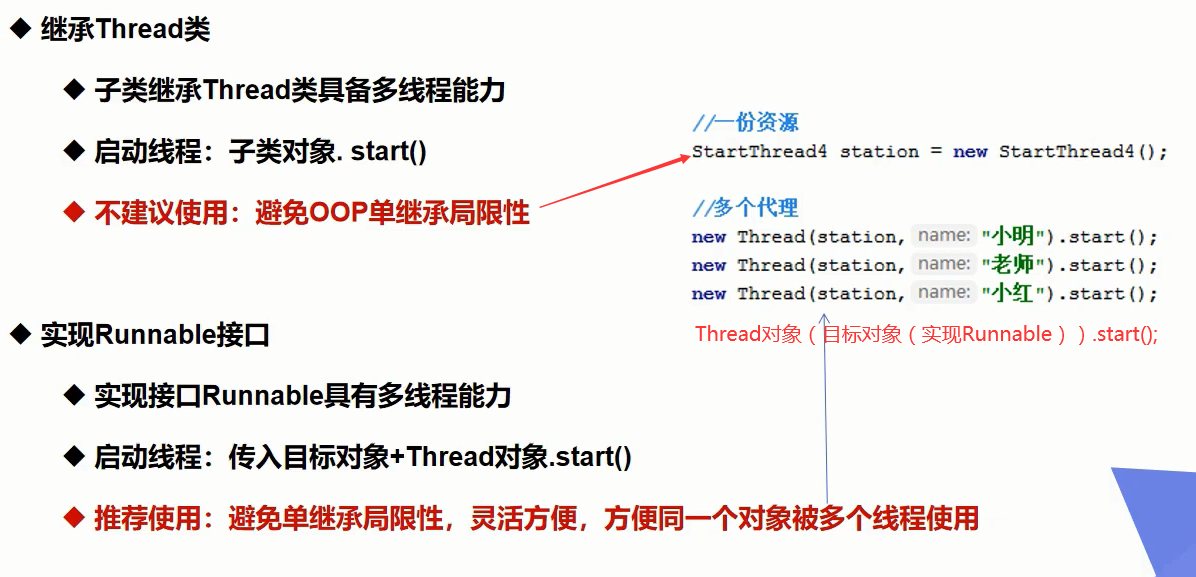
在使用多线程操作同一个资源时,线程不安全,数据紊乱
4、静态代理
代理对象与真实对象都实现同一个接口,代理对象要代理真实角色
好处:代理对象可以做到真实对象做不了的事情,真实对象专注做自己的事情
(好比结婚,你是真实角色,婚庆公司代理你帮你处理结婚的事,线程对象Thread代理了Runnble接口)
5、线程状态
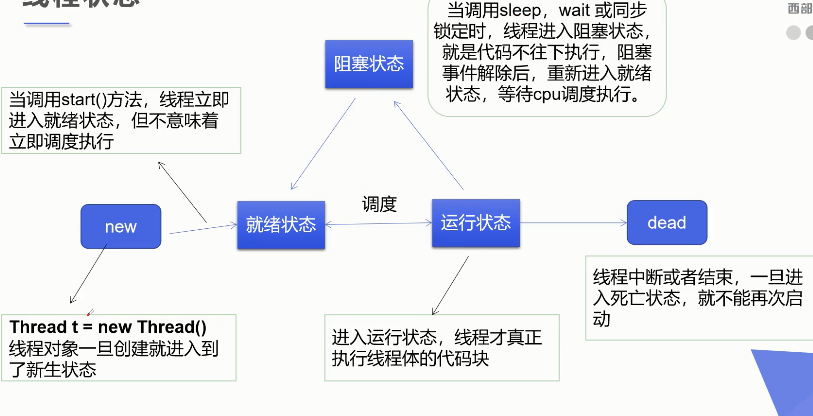
5.1、线程方法
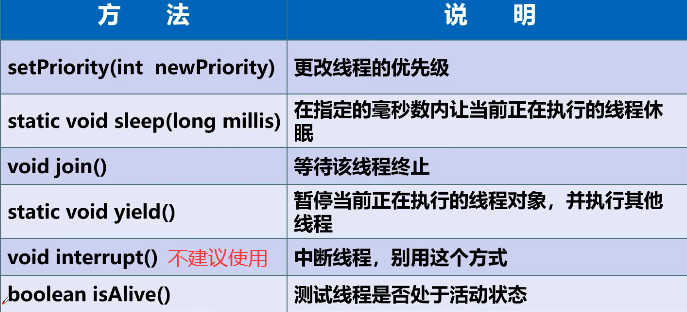
5.2、停止线程
不推荐使用线程中的方法来停止线程,stop()、destroy()这些方法都已经过时了@Deprecated。
推荐线程自己停止,利用次数,不建议死循环。
使用一个标志位终止变量flag=false,则线程终止。
1 //测试(stop) 2 //1.建议线程正常停止--->利用次数,不建议死循环。 3 //2.建议使用标志位--->设置一个标志位 4 //3.不要使用stop或者destroy等过时或者JDK不建议使用的方法 5 public class TestStop implements Runnable { 6 //1.设置一个标识位 7 private boolean flag=true; 8 9 @Override 10 public void run() { 11 int i=0; 12 //2.线程体使用该标识 13 while(flag) { 14 System.out.println("run...Thread"+i++); 15 } 16 } 17 18 //3.对外提供丰富改变标识 19 public void stop() { 20 this.flag=false; 21 } 22 23 public static void main(String[] args) { 24 TestStop stop=new TestStop(); 25 26 new Thread(stop).start(); 27 28 for(int i=0;i<1000;i++) { 29 System.out.println("main主线程"+i); 30 if(i==500) { 31 stop.stop();//调用方法改变标识 32 System.out.println("线程该结束了"); 33 } 34 } 35 } 36 }
5.3、线程休眠sleep
1、sleep (时间)指定当前线程阻塞的毫秒数;
2、sleep存在异常InterruptedException;
3、sleep时间达到后线程进入就绪状态;
4、sleep可以模拟网络延时,倒计时等。
模拟网络延时:放大问题的发生性
5、每一个对象都有一个锁,sleep不会释放锁;
 1 Thread t=new Thread(new Runnable() {
 2     @Override
 3     public void run() {
 4         try {
 5             Thread.sleep(3000);//sleep()设置该线程休眠多少毫秒
 6             System.out.println("过去了三秒");
 7         }catch(Exception e) {
 8             System.out.println("线程中断");
 9         }
10     }
11 });
12 t.start();
13 //用线程对象调用该方法,可以让线程捕捉到InteruptedExcepiton异常间接中断线程
14 t.interrupt();
5.4、线程礼让:Thread.yield()
礼让线程,让当前正在执行的线程暂停,但不阻塞,将线程从运行状态转为就绪状态,让CPU重新调度,礼让不一定成功,看CPU的心情
(a线程在执行,a礼让回到就绪状态,这是b线程或其他线程有可能会运行,但有可能还是a线程执行)
 1 //测试礼让线程
 2 //礼让不一定成功,看cpu心情
 3 public class TestYield {
 4     public static void main(String[] args) {
 5         MyYield yield=new MyYield();
 6
 7         new Thread(yield,"a").start();
 8         new Thread(yield,"b").start();
 9     }
10 }
11 class MyYield implements Runnable{
12     @Override
13     public void run() {
14         System.out.println(Thread.currentThread().getName()+"线程开始执行");
15         /* 礼让
16          * 礼让成功:a开始后面就是b开始
17          * 礼让失败:a开始还是a结束
18          */
19         Thread.yield();
20         System.out.println(Thread.currentThread().getName()+"线程结束");
21     }
22 }
5.5、线程join:线程对象.join()
Join合并线程,待此线程执行完成后,再执行其他线程,使用join的线程没有执行完时,其他线程阻塞(可以想象为插队)
 1 public class JoinTest {
 2     public static void main(String[] args) {
 3         Thread t2=new Thread(new Runnable() {
 4             public void run() {
 5                 System.out.println("我是线程B");
 6             }
 7         });
 8         Thread t1=new Thread(new Runnable() {
 9             public void run() {
10                 try {
11                     System.out.println("我是线程A");
12                     /*
13                      * 当某个线程中其他线程对象调用了join()方法时,
14                      * 所处线程会等待调用方法的线程执行完,在继续执行原线程
15                      */
16                     t2.join();
17                 } catch (InterruptedException e) {
18                     e.printStackTrace();
19                 }
20                 System.out.println("我hai是线程A");
21             }
22         });
23         t1.start();
24         t2.start();
25     }
26 }
 1 public class JoinTest {
 2     public static void main(String[] args) {
 3         Thread t2=new Thread(new Runnable() {
 4             public void run() {
 5                 System.out.println("我是线程B");
 6             }
 7         });
 8         Thread t1=new Thread(new Runnable() {
 9             public void run() {
10                 try {
11                     System.out.println("我是线程A");
12                     /*
13                      * 当某个线程中其他线程对象调用了join()方法时,
14                      * 所处线程会等待调用方法的线程执行完,在继续执行原线程
15                      */
16                     t2.join();
17                 } catch (InterruptedException e) {
18                     e.printStackTrace();
19                 }
20                 System.out.println("我hai是线程A");
21             }
22         });
23         t1.start();
24         t2.start();
25     }
26 }
1 public class JoinTest implements Runnable { 2 public void run() { 3 for(int i=0;i<500;i++) { 4 System.out.println("vip"+i); 5 } 6 } 7 public static void main(String[] args) { 8 //启动线程 9 JoinTest join=new JoinTest(); 10 Thread t=new Thread(join); 11 t.start(); 12 //主线程 13 for(int i=0;i<500;i++) { 14 if(i==200) { 15 try { 16 //很霸道的方法,主线程执行到200后,调用jion方法的线程就开始执行,直到该线程结束,主线程才继续执行 17 t.join();//插队 18 }catch (InterruptedException e) { 19 e.printStackTrace(); 20 } 21 } 22 System.out.println("main"+i); 23 } 24 } 25 } 26
5.5、线程状态观测
线程对象.getStart():获取线程现在的状态。
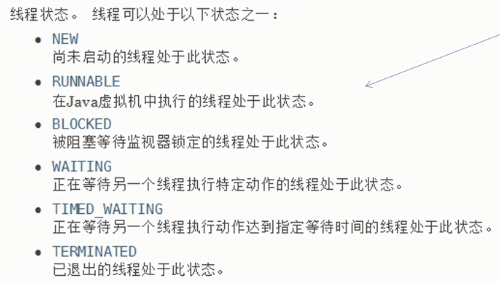
1 import java.lang.Thread.State; 2 3 public class TestStart { 4 public static void main(String[] args) throws InterruptedException { 5 Thread t=new Thread(()->{ 6 for(int i=0;i<4;i++) { 7 try { 8 Thread.sleep(1000); 9 } catch (InterruptedException e) { 10 e.printStackTrace(); 11 } 12 } 13 System.out.println("4秒后"); 14 }); 15 16 State state=t.getState();//线程当前的状态 NEW 17 System.out.println(state); 18 19 t.start(); 20 state=t.getState();//Run 21 System.out.println(state); 22 23 while(state!=Thread.State.TERMINATED) {//只要线程不终止,就一直输出阻塞状态 24 Thread.sleep(100); 25 state=t.getState(); 26 System.out.println(state); 27 } 28 } 29 }
6、线程的优先级
线程调度器按照优先级决定一个调用哪个线程来执行,线程优先级用数字表示(1~10 默认优先级为5),使用getPriority()和setPriority(int i)来获取线程的优先级和设置优先级(设置优先级要在start()方法前调用)
优先级低只是意味着获得调度的概率低,并不是优先级低的就不会被调用(性能倒置),这都是看CPU调度
1 Thread t1 = new Thread(new Runnable() { 2 public void run() { 3 for (int i = 0; i < 50; i++) { 4 System.out.println("t1" + " " + i); 5 } 6 } 7 }); 8 Thread t2 = new Thread(new Runnable() { 9 public void run() { 10 for (int i = 0; i < 50; i++) { 11 System.out.println("t2" + " " + i); 12 } 13 } 14 }); 15 Thread t3 = new Thread(new Runnable() { 16 public void run() { 17 for (int i = 0; i < 50; i++) { 18 System.out.println("t3" + " " + i); 19 } 20 } 21 }); 22 23 t3.setPriority(1); //设置线程优先级 24 t2.setPriority(2); 25 t1.setPriority(3); 26 27 t1.start(); 28 t2.start(); 29 t3.start();
7、守护线程
线程分为用户线程和守护线程(线程对象.setDaemon(true);)
虚拟机必须保证用户线程(main)执行完毕
虚拟机不用等待守护线程(如gc())执行完毕。(用户线程执行完毕,守护线程会自动关闭)
1 //测试守护线程 上帝守护你 2 public class TestDaemon { 3 public static void main(String[] args) { 4 God g=new God(); 5 You y=new You(); 6 7 Thread t=new Thread(g); 8 t.setDaemon(true);//将上帝的线程设置守护线程 9 t.start();//开启守护线程 10 11 new Thread(y).start(); 12 } 13 } 14 //上帝 15 class God implements Runnable{ 16 @Override 17 public void run() { 18 while(true) { 19 System.out.println("上帝守护你"); 20 } 21 } 22 } 23 //你 24 class You implements Runnable{ 25 26 @Override 27 public void run() { 28 for(int i=0;i<36500;i++) { 29 if(i==36499) { 30 System.out.println("======古德拜======"); 31 break; 32 } 33 System.out.println("开心的活着"); 34 } 35 } 36 37 }
8、线程同步(并发问题:多个线程使用同一资源 )
三大不安全线程案例
-
抢票
1 //不安全的抢票 不安全的线程 2 public class rob_fare implements Runnable { 3 private int piao=10;//票数 4 private boolean flag=true;//标识 5 public static void main(String[] args) { 6 rob_fare r=new rob_fare(); 7 8 /** 9 * 每个线程在自己的工作内存交互,内存控制不当会造成数据不一致 10 * 下面的3个线程买票,都看到了还有最后一张是,将票拿到直接的工作内存中,买票 11 * 在线程看来不会出问题,但程序中的数据就会出问题 12 */ 13 new Thread(r,"1").start(); 14 new Thread(r,"2").start(); 15 new Thread(r,"3").start(); 16 } 17 18 @Override 19 public void run() { 20 while(flag) { 21 try { 22 buy(); 23 } catch (InterruptedException e) { 24 // TODO Auto-generated catch block 25 e.printStackTrace(); 26 } 27 } 28 } 29 30 //synchronized方法 同步方法 锁的是this 加上synchronized就安全了 31 public void buy() throws InterruptedException { 32 if(piao<=0) { 33 flag=false; 34 return; 35 } 36 //模拟延时:放大问题的发生性 37 Thread.sleep(100); 38 System.out.println(Thread.currentThread().getName()+"抢到第"+piao--+"票"); 39 } 40 }
-
取钱
 1 //不安全的线程
 2 public class draw_money {
 3     public static void main(String[] args) {
 4         Account a=new Account(100, "过日子");
 5
 6         new Drawing(a,50,"你").start();//你取了50万,还剩50
 7         new Drawing(a,100,"你老婆").start();//因为同时取钱所以,你老婆看到的还是100万,取了100万还剩-50
 8     }
 9 }
10 class Account{
11      int money;
12      String name;
13     public Account(int money, String name) {
14         super();
15         this.money = money;
16         this.name = name;
17     }
18 }
19 class Drawing extends Thread{
20     private Account account;
21     private int qu_money;
22     private int m=0;
23
24     public Drawing(Account account, int qu_money,String name) {
25         super(name);
26         this.account = account;
27         this.qu_money = qu_money;
28     }
29
30     @Override
31     public void run() {
32         //synchronized (account) {//锁的是银行卡,因为银行卡上的钱需要改变
33             //取钱操作
34             if((account.money-qu_money)<0) {
35                 System.out.println("余额不足");
36                 return;
37             }
38             //放大问题的发生性
39             try {
40                 this.sleep(2000);
41             } catch (InterruptedException e) {
42                 // TODO Auto-generated catch block
43                 e.printStackTrace();
44             }
45             //卡里剩余的钱
46             account.money=account.money-qu_money;
47             //取钱的人剩余的钱
48             System.out.println(this.getName()+"现在有"+(m+qu_money));
49             System.out.println("卡里剩余"+account.money);
50         //}
51     }
52 }
-
集合用线程存数据
1 public class shibai_List { 2 public static void main(String[] args) { 3 List<String> list = new ArrayList<>(); 4 5 for (int i = 0; i < 10000; i++) { 6 new Thread(() -> { 7 // synchronized (list) {//同步块 锁的是list对象 8 list.add(Thread.currentThread().getName()); 9 // } 10 }).start(); 11 } 12 try { 13 Thread.sleep(3000); 14 } catch (InterruptedException e) { 15 // TODO Auto-generated catch block 16 e.printStackTrace(); 17 } 18 // 因为多个线程为list添加数据,导致有事多个线程添加数据到同一个位置,所以数据数量有误 19 System.out.println(list.size()); 20 21 // CopyOnWriteArrayList:JUC安全类型的集合 22 // CopyOnWriteArrayList<String> list=new CopyOnWriteArrayList<>(); 23 // for (int i = 0; i < 10000; i++) { 24 // new Thread(() -> { 25 // list.add("gjjgjh"); 26 // }).start(); 27 // } 28 // try { 29 // Thread.sleep(2000); 30 // } catch (InterruptedException e) { 31 // // TODO Auto-generated catch block 32 // e.printStackTrace(); 33 // } 34 // System.out.println(list.size()); 35 } 36 }
8.1、同步的概述
1)、解决并发问题,需要用线程同步。线程同步其实就是一种等待机制,多个线程同时访问一个对象时,访问的线程进入线程等待池中形成队列(排队),等待前面的线程结束,下一个线程才使用
2)、锁机制synchronized(同步的关键字):在线程中每个对象都有一把锁,当一个线程获得对象的排它锁,独占资源,其他线程必须等待,使用完后释放锁。
队列 + 锁 = 线程同步的安全;
但存在以下的问题:
1、一个线程持有锁会导致其他所有需要此锁的线程挂起;
2、在多线程竞争下,加锁,释放锁会导致比较多的上下文切换和调度延时,引起性能问题;(要安全就要牺牲性能,相反也一样)
3、如果一个优先级高的线程等待一个优先级低的线程释放锁 会导致优先级倒置,引起性能问题.
每个线程在自己的工作内存交互,内存控制不当会造成数据不一致
(好比买票,取钱。多个线程同时买票,因为都看到最后还剩一张票(将这一张票copy到自己的工作内存空间来),直接买,导致数据为负数。取钱差不多。
集合对象用线程添加数据,有会出现多个对象添加数据到同一位置。可以用同步,也可以用JUC里面的安全类型的集合CopyOnWriteArrayList解决并发问题)
8.2、同步方法
synchronized关键字:有两种用法synchronized方法 和synchronized块
1)、同步方法的synchronized 默认锁也是this(调用同步方法的类)
同步方法:public synchronized void method(int args){}
synchronized方法控制对“对象”的访问,每个对象对应一把锁每个synchronized方法都必须获取该方法的对象的锁才能执行,不然线程会阻塞。
执行过程:一但该方法执行,就独占该对象的锁,直到方法返回才释放锁,后面被阻塞的线程才能获得该锁继续执行
缺陷:若将一个大的方法申明为synchronized将会影响效率
2)、同步块:
-
同步块 :synchronized (Obj ){ }
锁的是指定需要增删改的对象,代码块中是增删改的操作
1 synchronized(变化的对象){
2     变化对象的代码
3 }
-
Obj 称之 同步监视器
-
Obj 可以是任何对象,但是推荐使用共享资源作为同步监视器
-
同步方法中无需指定同步监视器,因为同步方法的同步监视器就是this,,就是这个对象本身,或者是class (用class对象调用)
-
-
同步监视器的执行过程
-
第一个线程访问,锁定同步监视器,执行其中代码.
-
第二个线程访问,发现同步监视器被锁定,无法访问.
-
第一个线程访问完毕,解锁同步监视器.
-
第二个线程访问,发现同步监视器没有锁,然后锁定并访问
-
同步块执行的执行的过程与同步方法一样
线程休眠不要放在线程同步中,因为休眠不会释放锁,休眠完毕程序会马上再次进入同步方法,在次锁住,所以其他线程拿不到锁
8.3、死锁
多个线程互相抱有对方需要的资源,然后形成僵持
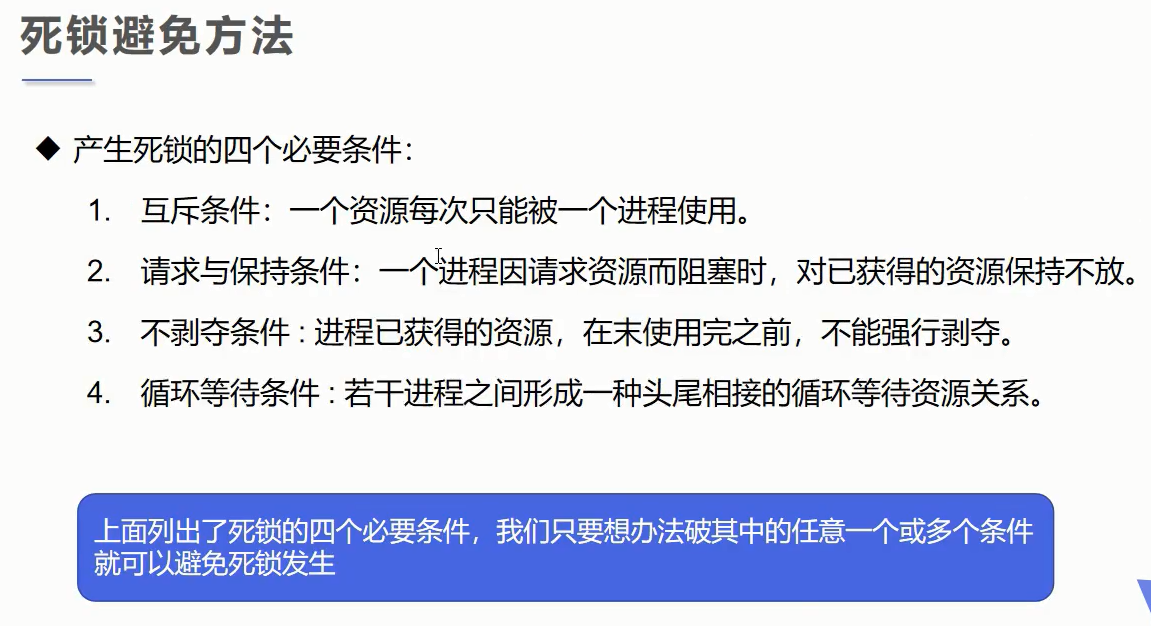
死锁案例:
1 public class si_suo { 2 public static void main(String[] args) { 3 new Thread(new Makeup(0,"灰姑娘")).start(); 4 new Thread(new Makeup(1,"白雪公主")).start(); 5 } 6 } 7 8 //口红 9 class Lipstick{} 10 //镜子 11 class Mirror{} 12 //女人 13 class Makeup implements Runnable{ 14 //需要资源只有一份,用static保证只有一份 15 static Lipstick l=new Lipstick(); 16 static Mirror m=new Mirror(); 17 18 int choice; 19 String name; 20 public Makeup(int choice, String name) { 21 this.choice = choice; 22 this.name = name; 23 } 24 @Override 25 public void run() { 26 try { 27 add(); 28 } catch (InterruptedException e) { 29 // TODO Auto-generated catch block 30 e.printStackTrace(); 31 } 32 } 33 /** 34 * 因为一个线程拿到了口红,另一个线程拿到了镜子,双方都需要对方的东西, 35 * 又因为双方无法释放锁住的对象,所以两线程僵住程序卡死 36 * 37 * 解决该问题,可以将里面同步块拿出来,这样就可以拿到对方的东西了, 38 * 因为第一个线程拿到了口红使用完后释放该锁,第二个线程刚好也释放了一个对方所需要的锁, 39 * 去拿第一个线程刚释放的锁,第一个线程去拿第二个线程刚释放的锁这样就可以解决死锁 40 */ 41 public void add() throws InterruptedException { 42 if(choice==0) { 43 synchronized (l) {//拿到口红,释放对应的锁 44 System.out.println(this.name+"拿到口红"); 45 Thread.sleep(1000); 46 // synchronized (m) {//一秒后在拿到镜子 47 // System.out.println(this.name+"在拿到镜子"); 48 // } 49 } 50 synchronized (m) {//一秒后在拿镜子,因为选择镜子的人用完镜子了释放了锁,这时就可以拿到镜子了 51 System.out.println(this.name+"在拿到镜子"); 52 } 53 }else { 54 synchronized (m) {//拿到镜子,释放对应的锁 55 System.out.println(this.name+"拿到镜子"); 56 Thread.sleep(1000); 57 // synchronized (l) {//一秒后在拿到口红 58 // System.out.println(this.name+"在拿到口红"); 59 // } 60 } 61 synchronized (l) {//一秒后在拿口红,因为选择镜子的人用完镜子了释放了锁,这时就可以拿到镜子了 62 System.out.println(this.name+"在拿到口红"); 63 } 64 } 65 } 66 }
8.4、Lock锁
1、从jdk5开始,java提供更强大的线程同步机制,通过显示的同步锁对象来实现同步(Lock)
2、java.util.concurrent.locks.Lock接口是控制多个线程对共享资源进行访问的工具。锁提供了对共享资源的独占访问,每次只能有一个线程对Lock对象加锁,线程开始访问共享资源之前应先获得lock对象(与synchronized相同)
3、ReentrantLock(可重入锁)类实现了Lock,它拥有与synchronized相同的并发性和内存语义,在实现线程安全的控制中,比较常用的是ReentrantLock, 可以显式加锁、释放锁。
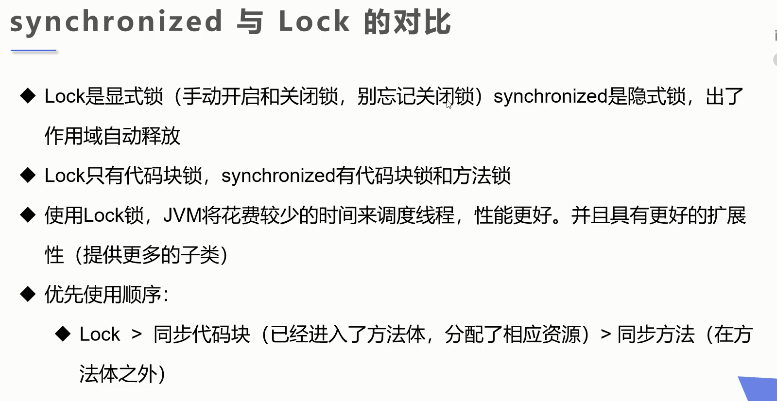
使用lock锁的案例:
 1 //不安全的抢票 不安全的线程
 2 public class Lock_suo implements Runnable {
 3     private int piao=10;//票数
 4     private boolean flag=true;//标识
 5
 6     private final ReentrantLock lock=new ReentrantLock();//定义lock锁对象
 7
 8     public static void main(String[] args) {
 9         Lock_suo r=new Lock_suo();
10
11         new Thread(r,"1").start();
12         new Thread(r,"2").start();
13         new Thread(r,"3").start();
14     }
15     @Override
16     public void run() {
17         while(flag) {
18             try {
19                 lock.lock();//加锁
20                 buy();
21             } catch (InterruptedException e) {
22                 // TODO Auto-generated catch block
23                 e.printStackTrace();
24             }finally {
25                 lock.unlock();//解锁
26             }
27         }
28     }
29
30     //synchronized方法 同步方法 锁的是this
31     public void buy() throws InterruptedException {
32         if(piao<=0) {
33             flag=false;
34             return;
35         }
36         //模拟延时:放大问题的发生性
37         Thread.sleep(100);
38         System.out.println(Thread.currentThread().getName()+"抢到第"+piao--+"票");
39     }
40 }
9、线程协作
9.1、生产者消费者模式(问题)
解决该问题可以用管程法和信号灯法。
管程法:生产者生产的数据放入缓冲区,消费者从缓冲区拿数据,案例如下:
1 public class TestPC { 2 public static void main(String[] args) { 3 Warehouse w=new Warehouse(); 4 5 6 Productor p=new Productor(w); 7 Consumer c=new Consumer(w); 8 p.start(); 9 c.start(); 10 } 11 } 12 13 //生产者 14 class Productor extends Thread{ 15 Warehouse w; 16 public Productor(Warehouse w) { 17 this.w=w; 18 } 19 @Override 20 public void run() { 21 for(int i=1;i<=100;i++) { 22 System.out.println("生产了"+i+"只鸡"); 23 w.push(new Chicken(i)); 24 } 25 } 26 } 27 //消费者 28 class Consumer extends Thread{ 29 Warehouse w; 30 public Consumer(Warehouse w) { 31 this.w=w; 32 } 33 public void run() { 34 for(int i=1;i<=100;i++) { 35 System.out.println("消费了"+w.pop().id+"只鸡"); 36 } 37 } 38 39 } 40 //产品 41 class Chicken{ 42 int id; 43 public Chicken(int id) { 44 this.id=id; 45 } 46 } 47 //缓存区 48 class Warehouse { 49 Chicken[] ch=new Chicken[10];//缓冲区大小 50 int i=0; 51 //生产者放入产品 52 public synchronized void push(Chicken c) { 53 if(ch.length==i) { 54 //通知消费者来消费,生产者等待 55 try { 56 this.wait();//因为生产者调用了该方法,所以生产者等待 57 } catch (InterruptedException e) { 58 // TODO Auto-generated catch block 59 e.printStackTrace(); 60 } 61 } 62 //如果产品没有放满,则继续放入 63 ch[i]=c; 64 i++; 65 //通知消费者消费 66 this.notifyAll();//唤醒生产者因为生产者在等待 67 } 68 //消费者消费产品 69 public synchronized Chicken pop() { 70 if(i==0) { 71 //通知生产者来生产,消费者等待 72 try { 73 this.wait();//消费者调用该方法,所以消费者等待 74 } catch (InterruptedException e) { 75 // TODO Auto-generated catch block 76 e.printStackTrace(); 77 } 78 } 79 //如果有产品则将产品拿出来 80 i--; 81 Chicken c=ch[i]; 82 83 //通知生产者生产 84 this.notifyAll();//唤醒生产者,因为生产者等待了 85 return c; 86 } 87 }
信号灯法:给个标识符,为true等待,为false唤醒
可以用一下方法来完成线程通信,案例如下:
1 public class TestPC2 { 2 public static void main(String[] args) { 3 TV tv = new TV(); 4 5 new Player(tv).start(); 6 new Watcher(tv).start(); 7 } 8 } 9 10 //生产者 演员 11 class Player extends Thread { 12 TV tv; 13 public Player(TV tv) { 14 this.tv = tv; 15 } 16 17 @Override 18 public void run() { 19 for (int i = 1; i <= 5; i++) { 20 tv.play("西游记" + i); 21 } 22 } 23 } 24 25 //消费者 观众 26 class Watcher extends Thread { 27 TV tv; 28 public Watcher(TV tv) { 29 this.tv = tv; 30 } 31 32 @Override 33 public void run() { 34 for (int i = 1; i <= 5; i++) { 35 tv.watch(); 36 } 37 } 38 } 39 40 //产品 节目 41 class TV { 42 // 演员表演 观众等待 T 43 // 观众观看 演员等待 F 44 String voice;// 表演的节目 45 boolean flag = true;//标识 46 47 public synchronized void play(String voice) { 48 if (!flag) { 49 try { 50 this.wait(); 51 } catch (InterruptedException e) { 52 // TODO Auto-generated catch block 53 e.printStackTrace(); 54 } 55 } 56 System.out.println("演员表演了" + voice); 57 this.voice = voice; 58 this.flag = false;//将标识该变,是观众不会在进入方法再次等待,而演员等待 59 this.notifyAll();//唤醒等待的观众 60 } 61 62 public synchronized void watch() { 63 if (flag) { 64 try { 65 this.wait(); 66 } catch (InterruptedException e) { 67 // TODO Auto-generated catch block 68 e.printStackTrace(); 69 } 70 } 71 System.out.println("观众观看的" + voice); 72 this.flag = true;//将标识改变,使演员不会在进入方法再次等待,而观众等待 73 this.notifyAll();//唤醒等待的演员 74 } 75 }
等待唤醒方法:
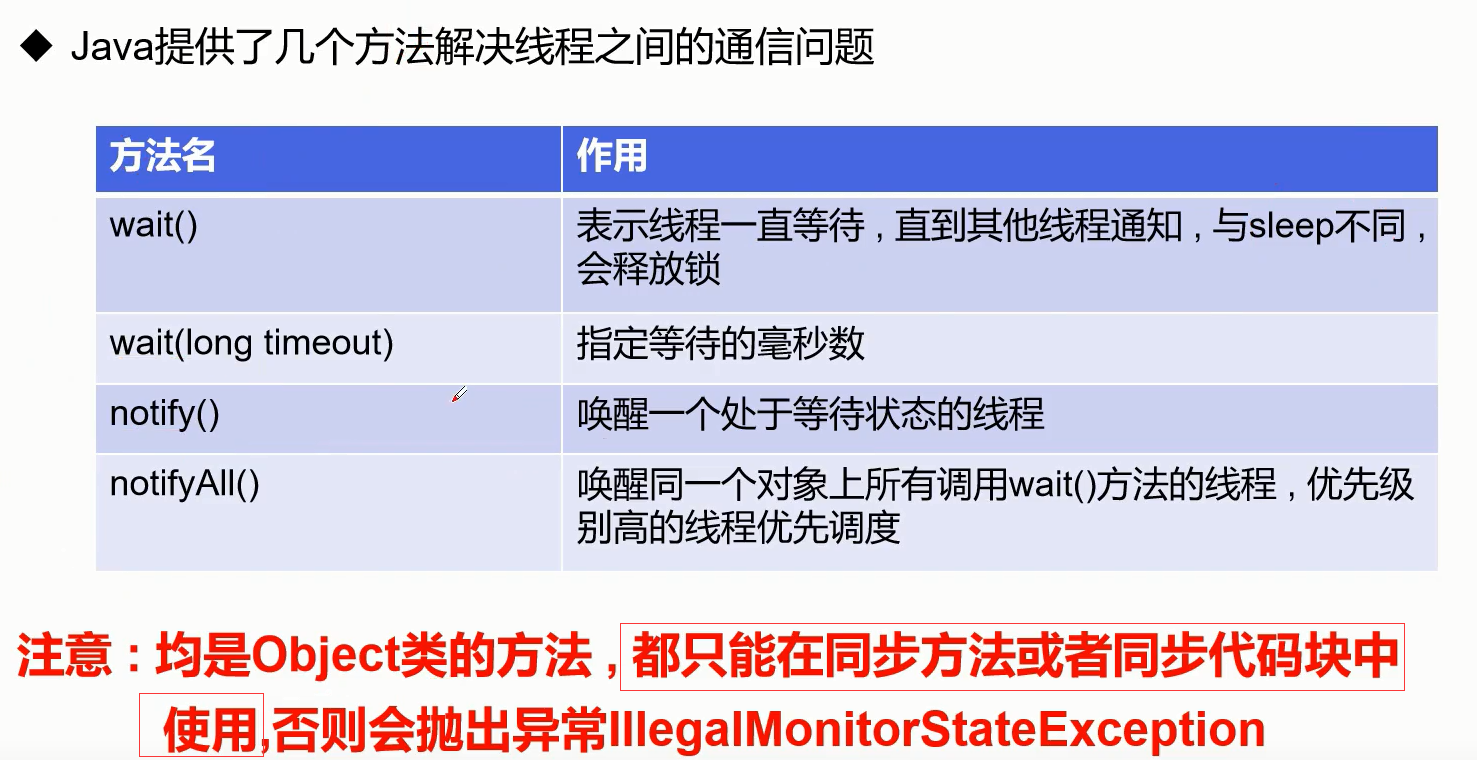
10、线程池
为什么要使用线程池:因为经常创建和销毁,使用了特别大的资源。如并发的情况下,就很影响性能。
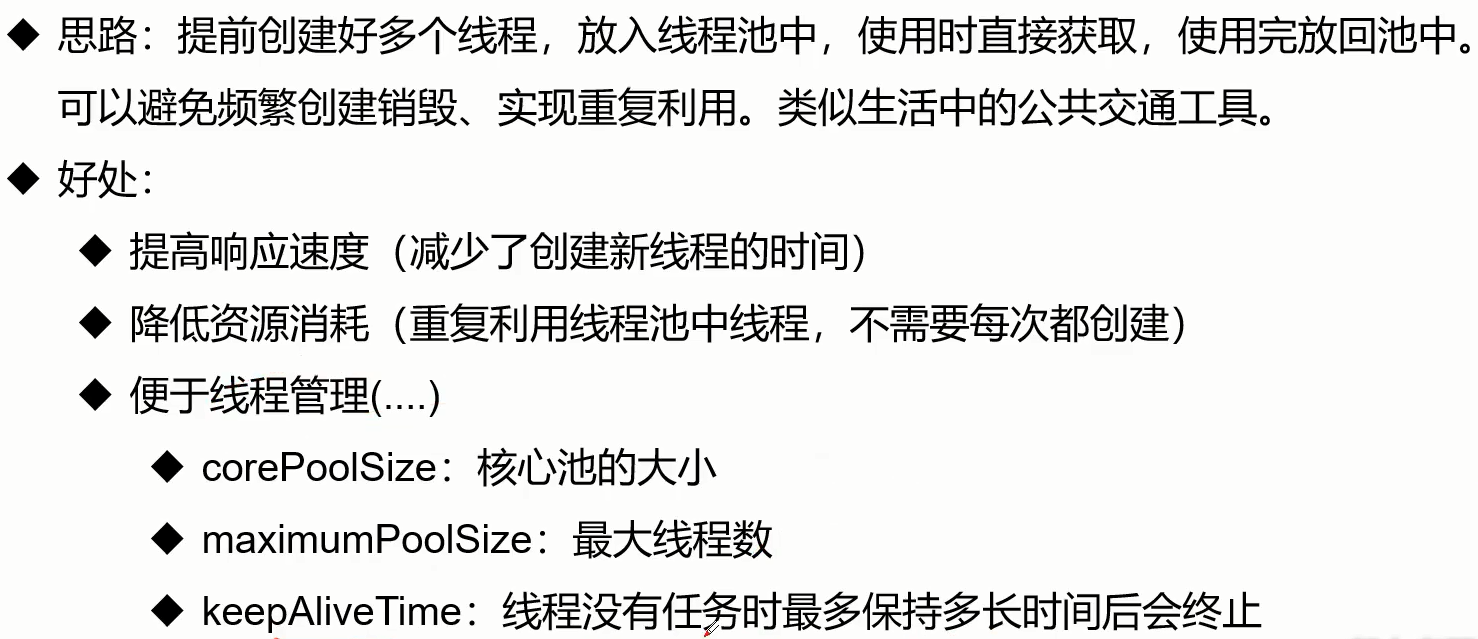
10.1、使用线程池
可以用ExecutorService接口和Executors工具类来使用线程池
1)、ExecutorService:真正的线程池接口。常见子类ThreadPoolExecutor。该接口有以下方法:
2)、Executors:线程池的工厂类,用于创建并返回不同类型的线程池
Executors . newFixedThreadPool(大小) ;:该方法是用来创建线程池并指定大小,是Executors类中创建线程池的方法
案例:
1 public class xianchengchi { 2 public static void main(String[] args) { 3 //创建服务,创建线程池 4 ExecutorService e=Executors.newFixedThreadPool(3); 5 //执行 6 e.execute(new Add()); 7 e.execute(new Add()); 8 e.execute(new Add()); 9 // e.execute(new Add());线程超出线程池大小将会输出第一个线程 10 //关闭服务 11 e.shutdown(); 12 } 13 } 14 15 class Add implements Runnable{ 16 @Override 17 public void run() { 18 System.out.println(Thread.currentThread().getName()); 19 } 20 }
C:\Users\Admin\AppData\Local\YNote\data\qq9E4A200A5CE5CE782D90480A88BC8063\7e4d3461b01e4f6ebe76423eadb9e06f\clipboard.png

 浙公网安备 33010602011771号