

vue 集成websocket
<script>
    import SockJS from  'sockjs-client';
    import  Stomp from 'stompjs';
    export default {
      name: "execution",
      data() {
        return {
          query: null,
          sqls: [],
          stompClient:'',
          timer:'',
        }
      },
      beforeRouteEnter (to, from, next) {
        next(vm => {
          vm.setData(to.query);
        });
      },
      mounted() {
        console.log("execution page");

      },
      computed: {
        ...mapGetters(["userInfo"]),
      },
      methods: {
        setData(query) {
          if(query) {
            this.query = query;
            this.initSQL();
          }
        },
        initSQL() {
          let queryList = onlineSQL.listAll;
          if(this.query.type == 2) {
            queryList = rollbackSQL.listAll;
          }
          queryList({sqlJobId: this.query.id}).then(res => {
            this.sqls = res.data.data;
          })
        },
        beginExec() {

          this.initWebSocket();
        },
        initWebSocket() {
          this.connection();
          // let that= this;
          // 断开重连机制,尝试发送消息,捕获异常发生时重连
          // this.timer = setInterval(() => {
          //   try {
          //     that.stompClient.send("test");
          //   } catch (err) {
          //     console.log("断线了: " + err);
          //     that.connection();
          //   }
          // }, 5000);
        },
        connection() {
          // 建立连接对象
          // let socket = new SockJS('http://localhost:9123/endpointWisely');

          // 定义客户端的认证信息,按需求配置
          let headers = {aa:'1111'};
          headers['Authorization'] = `Basic ${Base64.encode(`${website.clientId}:${website.clientSecret}`)}`;
          headers[website.tokenHeader] = 'bearer ' + getToken();
          headers['Tenant-Id'] = website.tenantId;
          console.log(headers);
          let socket = new SockJS('/api/imobpay-sqlinspection/endpointWisely');
          // 获取STOMP子协议的客户端对象
          this.stompClient = Stomp.over(socket);
          // 向服务器发起websocket连接

          this.stompClient.connect(headers,() => {
            this.stompClient.subscribe('/topic/getResponse', (msg) => { // 订阅服务端提供的某个topic
              console.log('广播成功')
              console.log(msg);  // msg.body存放的是服务端发送给我们的信息
            },headers);

          }, (err) => {
            // 连接发生错误时的处理函数
            console.log('失败');
            console.log(err);
          });
        },    //连接 后台
        disconnect() {
          if (this.stompClient) {
            this.stompClient.disconnect();
          }
        },  // 断开连接
      },
      beforeDestroy: function () {
        // 页面离开时断开连接,清除定时器
        this.disconnect();
        // clearInterval(this.timer);
      }
    }
</script>
由于这里发送的地址 ,后台需要认证,认证方式是在请求头中添加3个参数,具体如上。
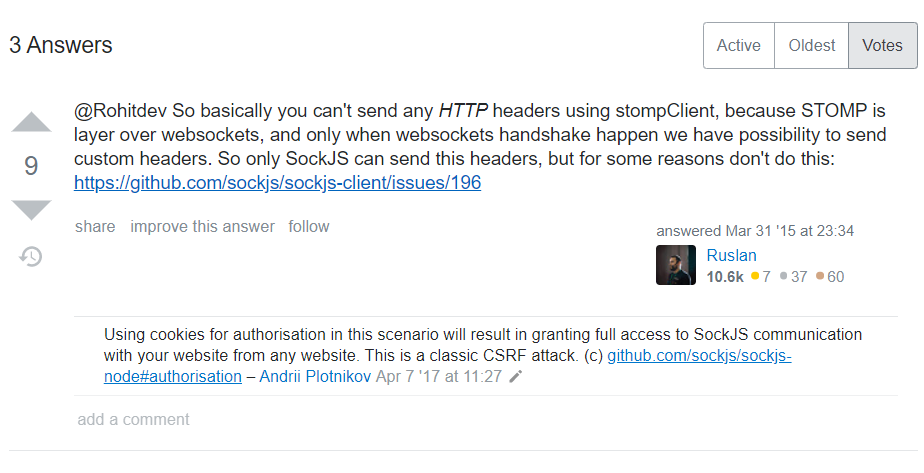
上面的写法是百度出来的90%的写法,但是!!!!! 以这种方式,在打开链接的时候,发送的http请求并不能带上请求头!!!!
以下是Google的尝试方法,我并未验证
不过另一种说法是:在websocket握手的时候无法携带请求头:
https://stackoverflow.com/questions/25486889/websocket-stomp-over-sockjs-http-custom-headers
本文来自博客园,作者:margo,转载请注明原文链接:https://www.cnblogs.com/ZMargo/articles/13364477.html

 浙公网安备 33010602011771号