- 本例程主要针对 docx 文件中的一个表格进行应用表格样式,不包含应用 word 所有的表格代码,需要更改主函数的
var currentChoosetable = selection.Tables.Item(1);,修改为遍历所有表格即可。
- 如果表格存在合并或拆分,导致不是正常的井字形表格,代码可能未适配。初步测试无法使用。
一、主函数
function 调整表格样式() {
  try {
    var selection = Selection;

    // 确保当前选中的是表格
    if (!selection.Tables.Count) {
      alert("请先选择一个表格!");
      return;
    }
    if (1 != selection.Tables.Count) {
      alert("选择的表格数量不为1,自动选择第一个表格");
    }

    var currentChoosetable = selection.Tables.Item(1);

    // 整体表格样式调整
    tableAutoFitWindow(currentChoosetable);

    // 表格样式调整
    TableStyleAdjustment(currentChoosetable);

    // 表格字体调整
    TableFontAdjustment(currentChoosetable);
  } catch (err) {
    alert("发生错误: " + err.message);
  }
}
二、整体表格样式调整
function tableAutoFitWindow(table) {
  if (!table) {
    alert("请传入一个有效的表格对象!");
    return;
  }

  try {
    table.AutoFitBehavior(wdAutoFitWindow); // 自适应窗口
    table.PreferredWidth = 100; // 设置首选宽度
    table.Rows.Alignment = wdAlignRowCenter; // 行居中对齐
  } catch (error) {
    console.error("设置表格样式时出错:", error.message);
  }

  // 设置首列的宽度为 100
  for (var i = 1; i <= table.Rows.Count; i++) {
    var row = table.Rows.Item(i);
    Selection.SetRange(row.Range.Start, row.Range.End);
    Selection.Cells.SetWidth(100, wdAdjustFirstColumn);
  }
}
三、表格样式调整
function TableStyleAdjustment(table) {
  if (!table) {
    alert("请传入一个有效的表格对象!");
    return;
  }
  // 设置对角线(删除对角线)
  table.Borders.Item(wdBorderDiagonalDown).LineStyle = wdLineStyleNone;
  table.Borders.Item(wdBorderDiagonalUp).LineStyle = wdLineStyleNone;

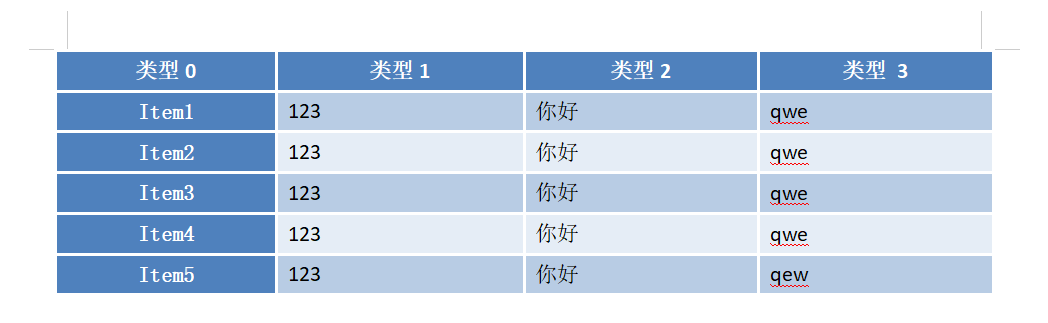
  // 设置表格边框样式:1.5磅宽度、白色边框
  table.Borders.Item(wdBorderTop).LineStyle = wdLineStyleSingle;
  table.Borders.Item(wdBorderTop).LineWidth = wdLineWidth150pt;
  table.Borders.Item(wdBorderTop).Color = wdColorWhite;

  table.Borders.Item(wdBorderBottom).LineStyle = wdLineStyleSingle;
  table.Borders.Item(wdBorderBottom).LineWidth = wdLineWidth150pt;
  table.Borders.Item(wdBorderBottom).Color = wdColorWhite;

  table.Borders.Item(wdBorderLeft).LineStyle = wdLineStyleSingle;
  table.Borders.Item(wdBorderLeft).LineWidth = wdLineWidth150pt;
  table.Borders.Item(wdBorderLeft).Color = wdColorWhite;

  table.Borders.Item(wdBorderRight).LineStyle = wdLineStyleSingle;
  table.Borders.Item(wdBorderRight).LineWidth = wdLineWidth150pt;
  table.Borders.Item(wdBorderRight).Color = wdColorWhite;

  table.Borders.Item(wdBorderHorizontal).LineStyle = wdLineStyleSingle;
  table.Borders.Item(wdBorderHorizontal).LineWidth = wdLineWidth150pt;
  table.Borders.Item(wdBorderHorizontal).Color = wdColorWhite;

  table.Borders.Item(wdBorderVertical).LineStyle = wdLineStyleSingle;
  table.Borders.Item(wdBorderVertical).LineWidth = wdLineWidth150pt;
  table.Borders.Item(wdBorderVertical).Color = wdColorWhite;

  // 设置表格背景色
  // 表格首列
  // 遍历表格中的所有cell
  for (var i = 1; i <= table.Rows.Count; i++) {
    var row = table.Rows.Item(i);
    for (var j = 1; j <= row.Cells.Count; j++) {
      var cell = row.Cells.Item(j);

      // 首行和首列颜色特殊
      if (i == 1 || j == 1) {
        cell.Shading.BackgroundPatternColor = 12419407;
      } else if (i % 2 == 0) {
        // 偶数行
        cell.Shading.BackgroundPatternColor = 14994616;
      } else if (i % 2 == 1) {
        // 奇数行
        cell.Shading.BackgroundPatternColor = 16182757;
      }

      Selection.SetRange(cell.Range.Start, cell.Range.End);
      if (i == 1 || j == 1) {
        // 首行和首列
        // 水平居中 + 垂直居中
        Selection.Cells.VerticalAlignment = wdCellAlignVerticalCenter;
        Selection.ParagraphFormat.Alignment = wdAlignParagraphCenter;
      } else {
        // 左对齐 + 垂直居中
        Selection.Cells.VerticalAlignment = wdCellAlignVerticalCenter;
        Selection.ParagraphFormat.Alignment = wdAlignParagraphJustify;
      }
    }
  }
  // 表格高度
  Selection.SetRange(table.Range.Start, table.Range.End);
  Selection.Cells.Height = 17;
}
四、表格字体调整
function TableFontAdjustment(table) {
  if (!table) {
    alert("请传入一个有效的表格对象!");
    return;
  }

  // 设置所有字体样式
  Selection.SetRange(table.Range.Start, table.Range.End);
  // 设置中文字体:宋体
  Selection.Font.Name = "宋体 (正文)";
  Selection.Font.Size = 10; // 设置中文字体大小为10号
  Selection.Font.SizeBi = 10; // 设置中文字体大小为10号
  // 设置西文字体:Times New Roman
  Selection.Font.NameAscii = "Calibri (正文)";
  Selection.Font.NameOther = "Calibri (正文)";
  Selection.Font.Color = wdColorBlack;
  Selection.Font.BoldBi = 0; // 加粗(双向字体)
  Selection.Font.Underline = wdUnderlineNone; // 下划线

  // 表格首列
  for (var i = 1; i <= table.Rows.Count; i++) {
    // 遍历表格中的所有行
    var cell = table.Rows.Item(i).Cells.Item(1);
    Selection.SetRange(cell.Range.Start, cell.Range.End);
    // 设置中文字体:宋体
    Selection.Font.Name = "宋体 (正文)";
    Selection.Font.Size = 10; // 设置中文字体大小为10号
    Selection.Font.SizeBi = 10; // 设置中文字体大小为10号
    // 单独样式
    Selection.Font.Color = wdColorWhite;
    Selection.Font.Bold = -1; // 加粗
    Selection.Font.BoldBi = -1; // 加粗(双向字体)
    Selection.Font.Underline = wdUnderlineNone; // 无下划线
  }

  // 表格首行
  var row = table.Rows.Item(1);
  // 设置行字体样式
  Selection.SetRange(row.Range.Start, row.Range.End);
  // 设置中文字体:宋体
  Selection.Font.Name = "宋体 (正文)";
  Selection.Font.NameAscii = "Calibri (正文)";
  Selection.Font.NameOther = "Calibri (正文)";
  Selection.Font.Size = 10; // 设置中文字体大小为10号
  Selection.Font.SizeBi = 10; // 设置中文字体大小为10号
  // 单独样式
  Selection.Font.Color = wdColorWhite;
  Selection.Font.Bold = -1; // 加粗
  Selection.Font.BoldBi = -1; // 加粗(双向字体)
  Selection.Font.Underline = wdUnderlineNone; // 无下划线
}
五、实现效果
效果
![]()
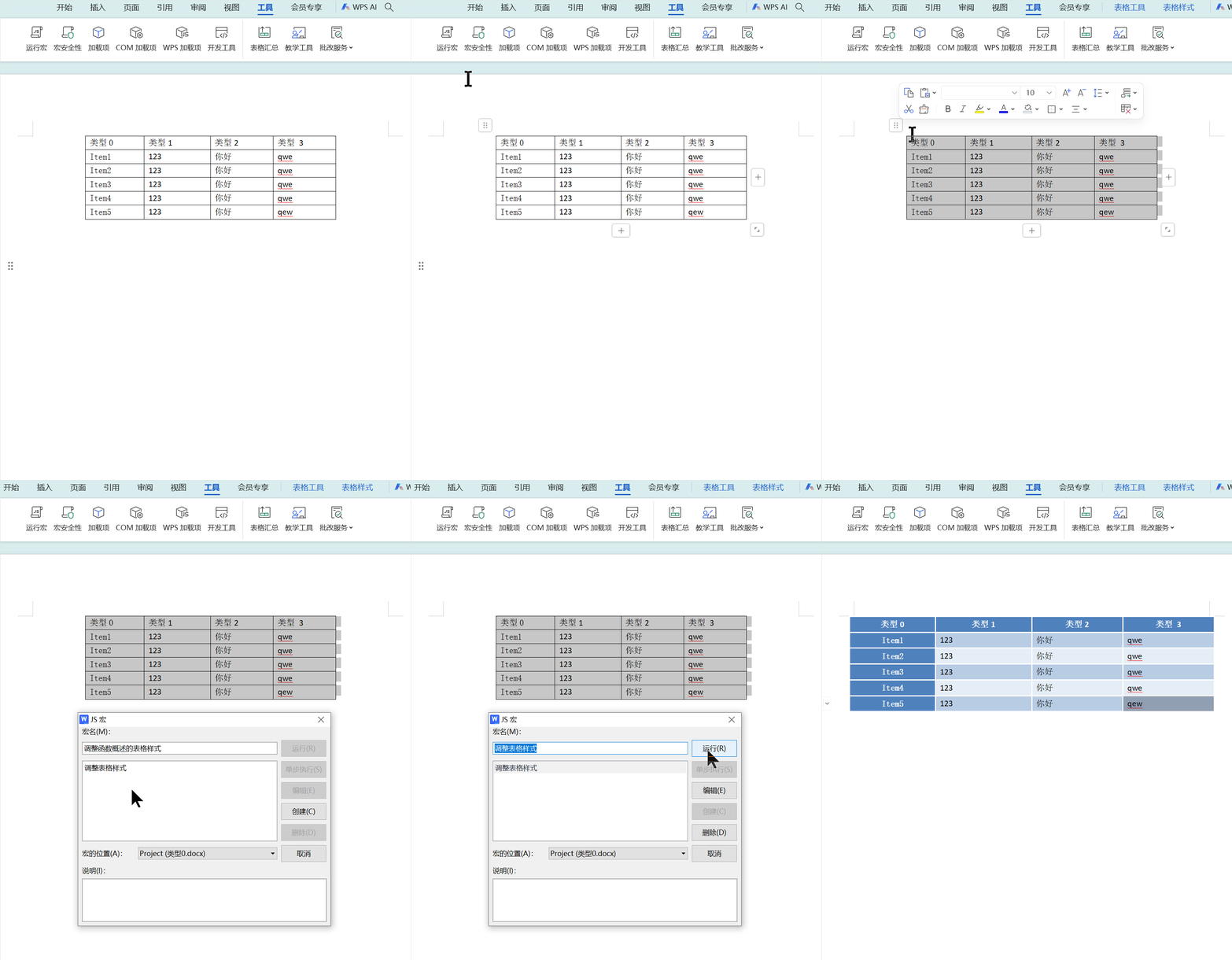
实现
![]()
六、参考
- WPS宏编辑器批量设置word中表格样式
- WPS WebOffice开放平台|开发文档
- WPS Office JS宏实现批量处理Word中的表格样式


 浙公网安备 33010602011771号