

因为在自己最近半年来一直在做Silverlight相关的项目,同时感觉移动领域的开发是很有前途的,对于微软Windows Phone的前景,个人是比较看好的。于是决定尝试WP7的开发。在仔细考虑之后,选择了数独作为自己的第一个WP7项目。
关于WP7的初学文章,如果有一定的Silverlight(WPF)基础,那么我推荐张崟翻译的WP7开发31日谈http://blog.csdn.net/porscheyin/article/details/5997208
如果是没有做过Silverlight开发的朋友,再看该文章之前,最好先阅读一点Silverlight的相关资料。
现在我们进入正题,关于数独游戏呢,相关的资料请参考http://zh.wikipedia.org/wiki/%E6%95%B0%E7%8B%AC 关于数独的算法,网上也有很多,这不是本文讨论的重点。
 首先是程序的主页面,进行游戏难度的选择。该页面名称为GameLevel.xaml,页面主要的xaml代码如下:
<!--ContentPanel - place additional content here-->
<Grid x:Name="ContentPanel" Grid.Row="1" Margin="12,0,12,0">
<StackPanel VerticalAlignment="Top">
<TextBlock Text="请选择一个等级开始游戏:" />
<Button Content="Simple" Margin="0,10,0,10" Click="OnChooseLevel" />
<Button Content="Normal" Margin="0,10,0,10" Click="OnChooseLevel"/>
<Button Content="Hard" Margin="0,10,0,10" Click="OnChooseLevel"/>
<Button Content="God" Margin="0,10,0,10" Click="OnChooseLevel" />
</StackPanel>
</Grid>
在进行UI设计的时候最好参考《UI_Design_and_Interaction_Guide_for_Windows_Phone_7_v2.0》
GameLevel.cs代码如下:
private void OnChooseLevel(object sender, RoutedEventArgs e)
{
string level = string.Empty;
switch (((Button)sender).Content.ToString())
{
case "Simple":
GameInfo.CurLevel = GameLevels.Simple;
break;
case "Normal":
GameInfo.CurLevel = GameLevels.Normal;
break;
case "Hard":
GameInfo.CurLevel = GameLevels.Hard;
break;
case "God":
GameInfo.CurLevel = GameLevels.God;
break;
default:
break;
}
NavigationService.Navigate(new Uri("/MainPage.xaml", UriKind.Relative));
}
在需要进行跨页面传值的时候,我直接将需要传到下一个页面的Level参数存入了GameInfo这个静态类中。
选择难度后,则是进行游戏的主画面:


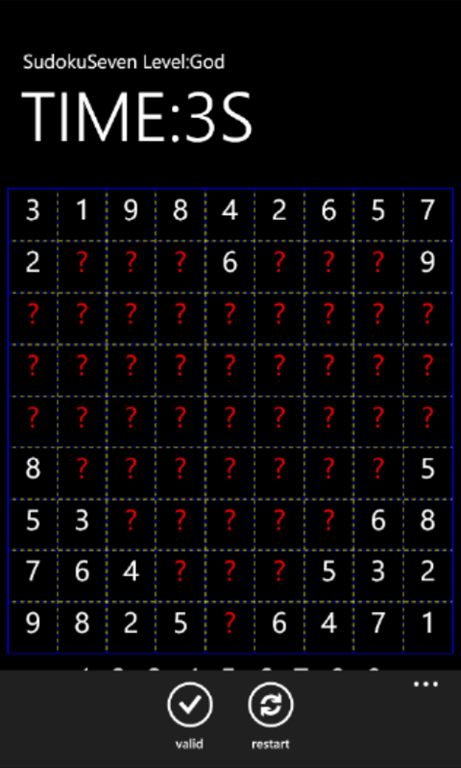
从左至右分别是Simple,Normal,Hard,God难度模式下的画面。
游戏页面的主要XAML代码MainPage.xaml
<!--LayoutRoot is the root grid where all page content is placed-->
<Grid x:Name="LayoutRoot" Background="Transparent">
<Grid.RowDefinitions>
<RowDefinition Height="Auto"/>
<RowDefinition Height="*"/>
</Grid.RowDefinitions>
<!--TitlePanel contains the name of the application and page title-->
<StackPanel x:Name="TitlePanel" Grid.Row="0" Margin="12,17,0,28">
<TextBlock x:Name="ApplicationTitle" Text="SudokuSeven" Style="{StaticResource PhoneTextNormalStyle}"/>
<TextBlock x:Name="PageTitle" Text="TIME:0S" Margin="9,-7,0,0" Style="{StaticResource PhoneTextTitle1Style}"/>
</StackPanel>
<!--ContentPanel - place additional content here-->
<Grid x:Name="ContentPanel" Grid.Row="1" Margin="5,0,5,0">
<Grid.RowDefinitions>
<RowDefinition Height="491"/>
<RowDefinition Height="116"/>
</Grid.RowDefinitions>
<Border Grid.Row="0" BorderBrush="Blue" BorderThickness="1" Margin="3">
<Grid Name="grid" Grid.Row="0" ShowGridLines="True">
<Grid.RowDefinitions>
<RowDefinition Height="0.1*"/>
<RowDefinition Height="0.1*"/>
<RowDefinition Height="0.1*"/>
<RowDefinition Height="0.1*"/>
<RowDefinition Height="0.1*"/>
<RowDefinition Height="0.1*"/>
<RowDefinition Height="0.1*"/>
<RowDefinition Height="0.1*"/>
<RowDefinition Height="0.1*"/>
</Grid.RowDefinitions>
<Grid.ColumnDefinitions>
<ColumnDefinition Width="0.1*"/>
<ColumnDefinition Width="0.1*"/>
<ColumnDefinition Width="0.1*"/>
<ColumnDefinition Width="0.1*"/>
<ColumnDefinition Width="0.1*"/>
<ColumnDefinition Width="0.1*"/>
<ColumnDefinition Width="0.1*"/>
<ColumnDefinition Width="0.1*"/>
<ColumnDefinition Width="0.1*"/>
</Grid.ColumnDefinitions>
</Grid>
</Border>
<StackPanel HorizontalAlignment="Center" Grid.Row="1" Orientation="Horizontal" Height="44" VerticalAlignment="Top">
<TextBlock Name="Num1" Text="1" Margin="10,0,10,0" FontSize="32" MouseLeftButtonDown="doSelectedNum" />
<TextBlock Name="Num2" Text="2" Margin="10,0,10,0" FontSize="32" MouseLeftButtonDown="doSelectedNum" />
<TextBlock Name="Num3" Text="3" Margin="10,0,10,0" FontSize="32" MouseLeftButtonDown="doSelectedNum" />
<TextBlock Name="Num4" Text="4" Margin="10,0,10,0" FontSize="32" MouseLeftButtonDown="doSelectedNum" />
<TextBlock Name="Num5" Text="5" Margin="10,0,10,0" FontSize="32" MouseLeftButtonDown="doSelectedNum" />
<TextBlock Name="Num6" Text="6" Margin="10,0,10,0" FontSize="32" MouseLeftButtonDown="doSelectedNum" />
<TextBlock Name="Num7" Text="7" Margin="10,0,10,0" FontSize="32" MouseLeftButtonDown="doSelectedNum" />
<TextBlock Name="Num8" Text="8" Margin="10,0,10,0" FontSize="32" MouseLeftButtonDown="doSelectedNum" />
<TextBlock Name="Num9" Text="9" Margin="10,0,10,0" FontSize="32" MouseLeftButtonDown="doSelectedNum" />
</StackPanel>
</Grid>
</Grid>
<!--Sample code showing usage of ApplicationBar-->
<phone:PhoneApplicationPage.ApplicationBar>
<shell:ApplicationBar IsVisible="True" IsMenuEnabled="True">
<shell:ApplicationBarIconButton IconUri="/icons/appbar.check.rest.png" Text="Valid" Click="OnValidate"/>
<shell:ApplicationBarIconButton IconUri="/icons/appbar.refresh.rest.png" Text="Restart" Click="OnRestart"/>
</shell:ApplicationBar>
</phone:PhoneApplicationPage.ApplicationBar>
在生成游戏的时候,本人采用的方法是将正确的数独结果,隐藏掉部分数字的方式。MainPage.cs中的主要代码如下:
初始化游戏的方法
private void InitGame()
{
this.grid.Children.Clear();
grids = new List<TextBlock>();
SudokuMath sm = new SudokuMath();
sm.Intial();
int[,] map = sm.Creat();//得到一个包含正确结果的二维数组
for (int i = 1; i <= 9; i++)
{
for (int j = 1; j <= 9; j++)
{
GridInfo gridinfo = new GridInfo() { Number = map[i, j], IsSelected = false, X = j - 1, Y = i - 1, IsHidden = false };
TextBlock numberGrid = new TextBlock() { Tag = gridinfo, FontSize = 30, TextAlignment = TextAlignment.Center, Text = map[i, j].ToString() };
numberGrid.MouseLeftButtonDown += new MouseButtonEventHandler(nubmberGrid_MouseLeftButtonDown);
numberGrid.SetValue(Grid.RowProperty, i - 1);
numberGrid.SetValue(Grid.ColumnProperty, j - 1);
this.grid.Children.Add(numberGrid);
grids.Add(numberGrid);
}
}
SetGameLevel();
seconds = 0;
timer.Interval = new TimeSpan(TimeSpan.TicksPerSecond);
timer.Start();
}
隐藏特定位置数字的方法
private void HideNumber(int x, int y)
{
TextBlock grid = FindNumberGrid(x, y);
grid.Text = unknow;
((GridInfo)grid.Tag).IsHidden = true;
grid.Foreground = grid.Foreground = new SolidColorBrush(Colors.Red);
}
private TextBlock FindNumberGrid(int x, int y)
{
foreach (TextBlock grid in grids)
{
GridInfo gridinfo = grid.Tag as GridInfo;
if (gridinfo.X == x && gridinfo.Y == y)
{
return grid;
}
}
return new TextBlock();
}
GridInfo.cs类
public class GridInfo
{
public int Number { get; set; }
public bool IsSelected { get; set; }
public int X { get; set; }
public int Y { get; set; }
public bool IsHidden { get; set; }
}
至此一个简单的WP7应用就完成了。

 浙公网安备 33010602011771号