实验:编译安装LAMP,实现多虚拟主机,一个虚拟主机blog.magedu.com 一个虚拟主机 bbb.magedu.com
环境:两台主机
一台apache+php-fpm
一台mariadb
软件版本:
apr-1.7.0.tar.bz2
apr-util-1.6.1.tar.bz2
httpd-2.4.39.tar.bz2
php-7.3.7.tar.xz
Discuz_X3.3_SC_UTF8.zip
wordpress-5.2.2.tar.gz
mariadb-10.2.25-linux-x86_64.tar.gz

1 实现mariadb
mysql>create database wordpress;
mysql>create database discuz;
mysql>grant all on wordpress.* to wordpress@'192.168.80.%' identified by 'magedu';
mysql>grant all on discuz.* to discuz@'192.168.80.%' identified by 'magedu';


2 实现编译安装httpd
#安装相关的依赖包
yum install gcc prce-devel openssl-devel expat-devel -y

#编译安装
for p in *.bz2 ;do tar xvf $p;done#解压

mv apr-1.7.0 httpd-2.4.39/srclib/apr
mv apr-util-1.6.1 httpd-2.4.39/srclib/apr-util

useradd -r -s /sbin/nologin apache
cd httpd-2.4.39/

./configure \
--prefix=/usr/local/httpd \
--enable-so \
--enable-ssl \
--enable-cgi \
--enable-rewrite \
--with-zlib \
--with-pcre \
--with-included-apr \
--enable-modules=most \
--enable-mpms-shared=all \
--with-mpm=prefork

make -j 4 && make install

环境变量和启动
echo 'PATH=/usr/local/httpd/bin:$PATH' > /etc/profile.d/httpd.sh
. /etc/profile.d/httpd.sh


#启动文件
vim /usr/lib/systemd/system/httpd.service
	[Service]
	Type=forking
	#EnvironmentFile=/etc/sysconfig/httpd
	ExecStart=/usr/local/httpd/bin/httpd $OPTIONS -k start
	ExecReload=/usr/local/httpd/bin/httpd  $OPTIONS -k graceful
	ExecStop=/bin/kill -WINCH ${MAINPID}

#配置httpd
vim /usr/local/httpd/conf/httpd.conf
LoadModule proxy_module modules/mod_proxy.so
LoadModule proxy_fcgi_module modules/mod_proxy_fcgi.so
DirectoryIndex index.php index.html
User apache
Group apache
AddType application/x-httpd-php .php
AddType application/x-httpd-php-source .phps
ProxyRequests Off

<virtualhost *:80>
	servername blog.magedu.com
	documentroot /data/wordpress
	<directory /data/wordpress>
		require all granted
	</directory>
	ProxyPassMatch ^/(.*\.php)$ fcgi://127.0.0.1:9000/data/wordpress/$1
</virtualhost>


<virtualhost *:80>
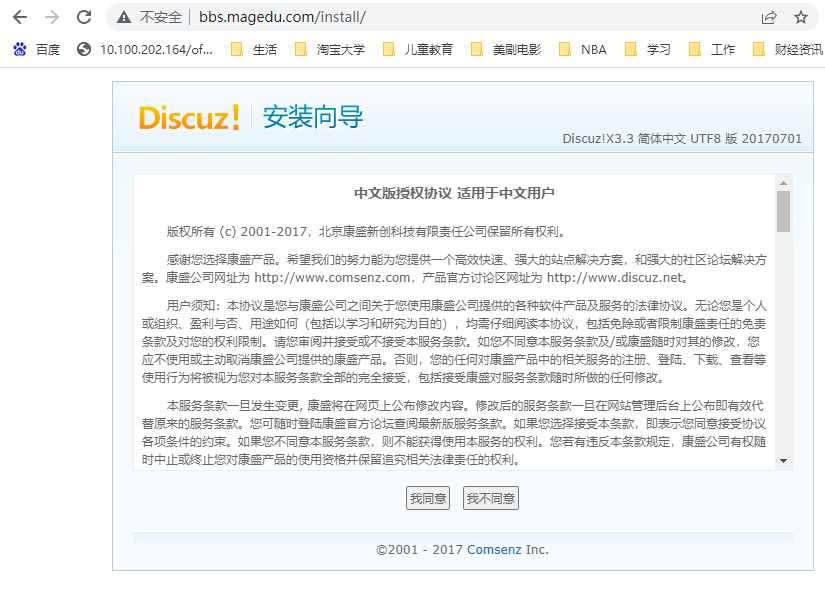
	servername bbs.magedu.com
	documentroot /data/discuz
	<directory /data/discuz>
		require all granted
	</directory>
	ProxyPassMatch ^/(.*\.php)$ fcgi://127.0.0.1:9000/data/discuz/$1
</virtualhost>


#解压两个项目
tar xvf wordpress-5.2.2-zh_CN.tar.gz  -C /data/
unzip Discuz_X3.3_SC_UTF8.zip
mv upload/*  /data/discuz/


#设置站点ACL权限,主要是用于生成wordpress/wp-config.php文件。
mkdir /data/{wordpress,discuz}
setfacl -Rm u:apache:rwx /data/{wordpress,discuz}


3 实现编译安装php 需要epel
#安装相关的依赖包
yum install libxml2-devel bzip2-devel libmcrypt-devel

#编译安装
tar xvf php-7.3.7.tar.xz
cd php-7.3.7/
./configure --prefix=/usr/local/php --enable-mysqlnd --with-mysqli=mysqlnd \
--with-pdo-mysql=mysqlnd --with-openssl --with-freetype-dir --with-jpeg-dir \
--with-png-dir --with-zlib --with-libxml-dir=/usr --with-config-file-path=/etc \
--with-config-file-scan-dir=/etc/php.d --enable-mbstring --enable-xml \
--enable-sockets --enable-fpm --enable-maintainer-zts --disable-fileinfo
make && make install

[root@localhost7e php-7.3.7]#pwd
/usr/local/src/php-7.3.7

cp php.ini-production /etc/php.ini
cp  sapi/fpm/init.d.php-fpm  /etc/init.d/php-fpm
chmod +x /etc/init.d/php-fpm

cd /usr/local/php/etc/
cp php-fpm.conf.default php-fpm.conf
cd php-fpm.d/
cp www.conf.default www.conf


#配置php-rpm配置文件(基本不用设置)
vim /etc/php-fpm.d/www.conf
user = apache
group = apache
#确保运行php-fpm进程的用户对session目录有读写权限(测试没有此文件)
mkdir /var/lib/php/session
chown apache.apache /var/lib/php/session


systemctl restart httpd
service php-fpm start


4 /etc/hosts
blog.magedu.com forum.magedu.com

5测试
![]()
![]()




 浙公网安备 33010602011771号