
ant design vue 多个Tabs 标签页 下使用 table组件滚动加载的坑 【第一个tab页可以滚动加载而切换第2 个tab不能触发】
在ant design vue 的使用中总会遇到一些坑,如标题所言,这里提供一个解决方法参考用
关键代码如下:
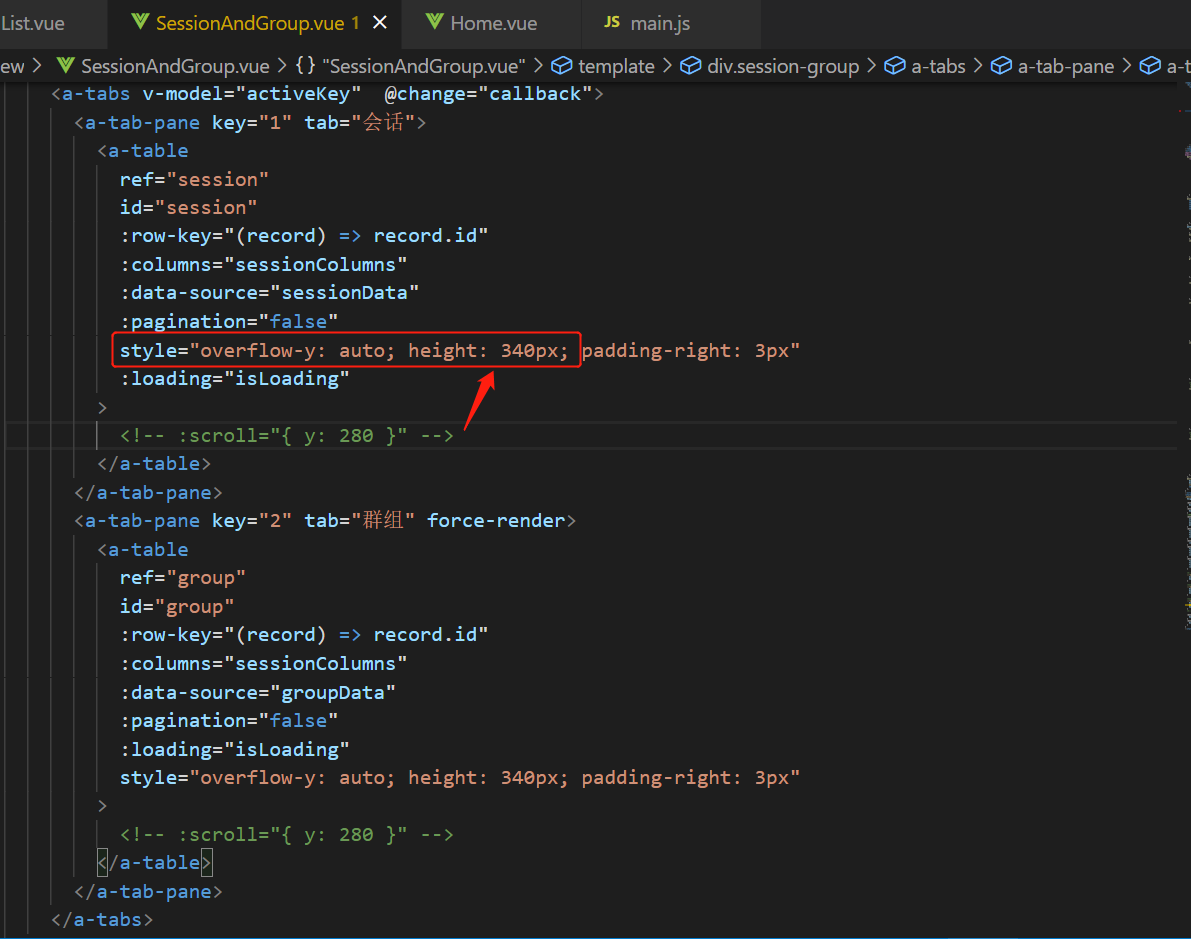
注:这里的table组件不要通过使用 ant 中封装的 scroll属性来达到超出高度显示滚动条的目的,而是自己定义一个内联样式:overflow-y:auto;height: 【某固定高度】px;
html:
js:
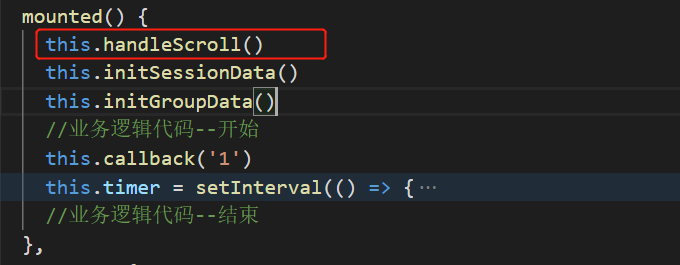
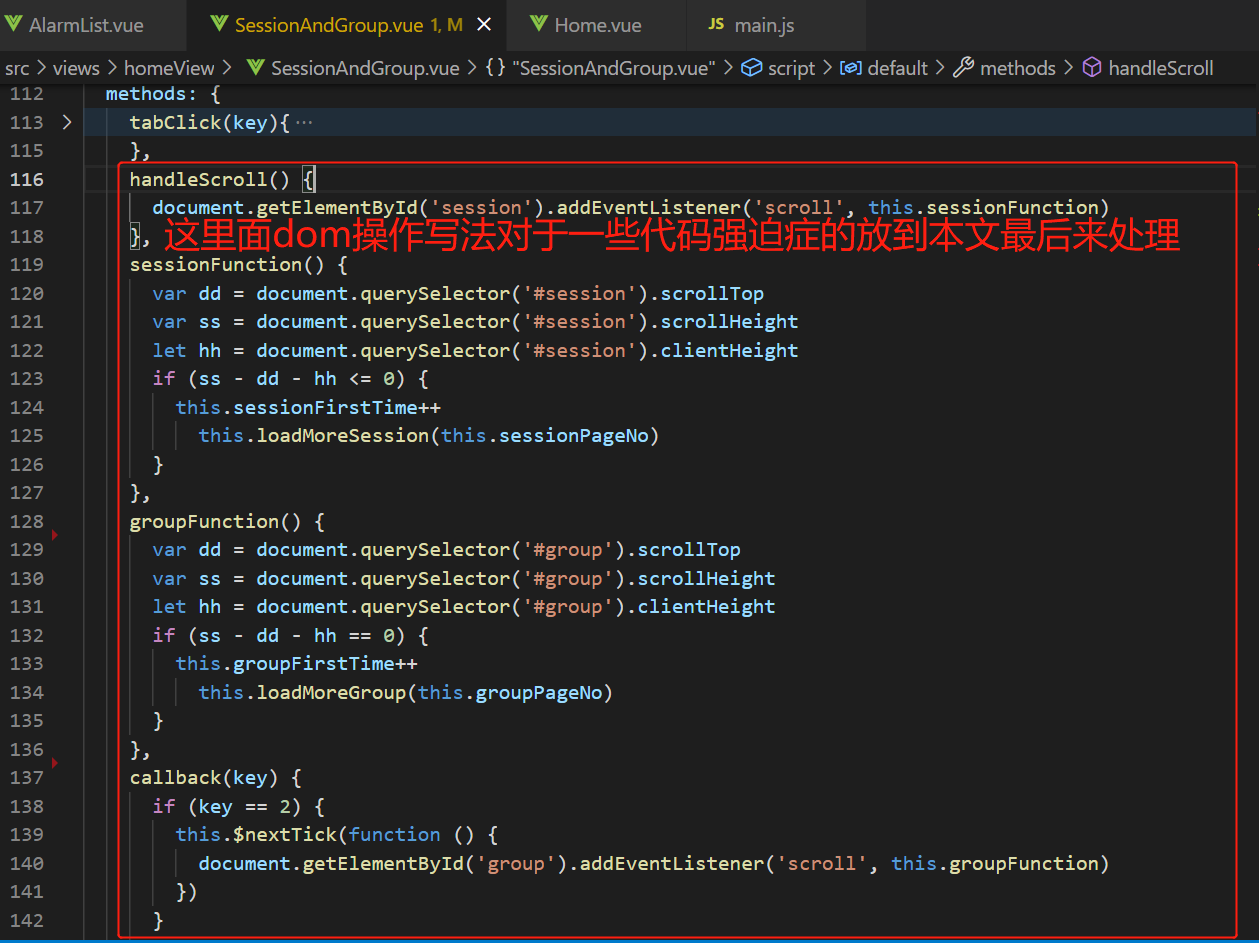
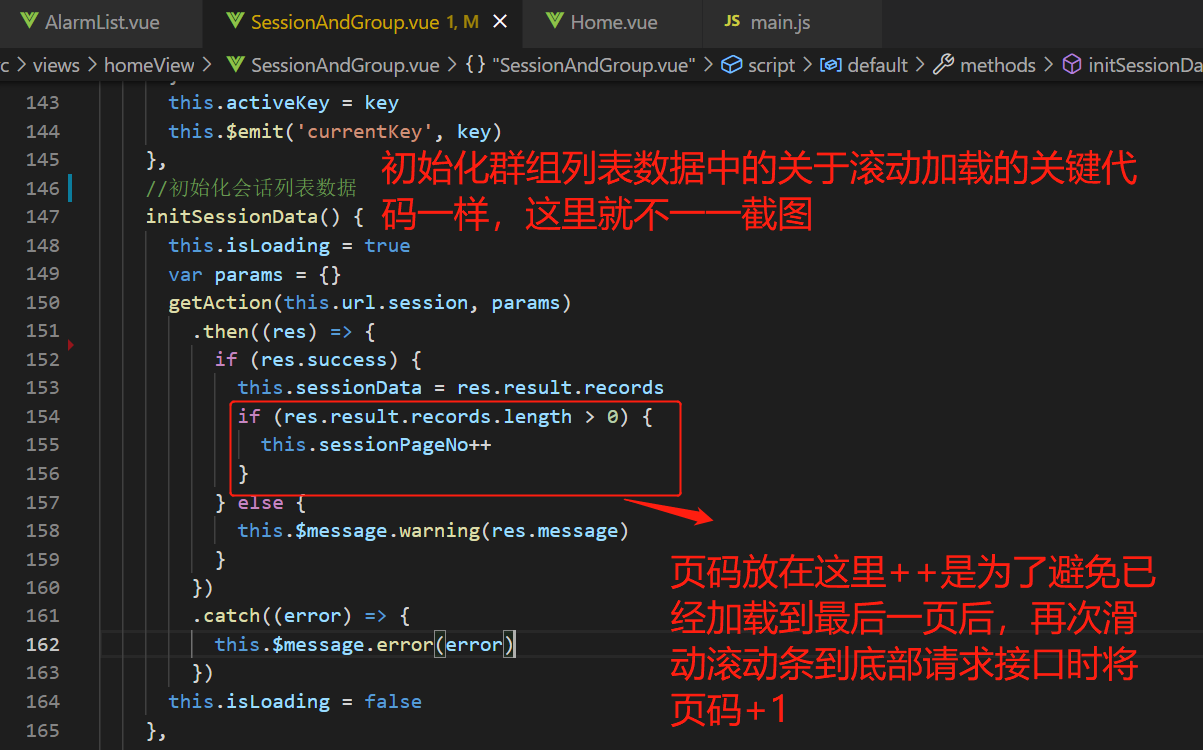
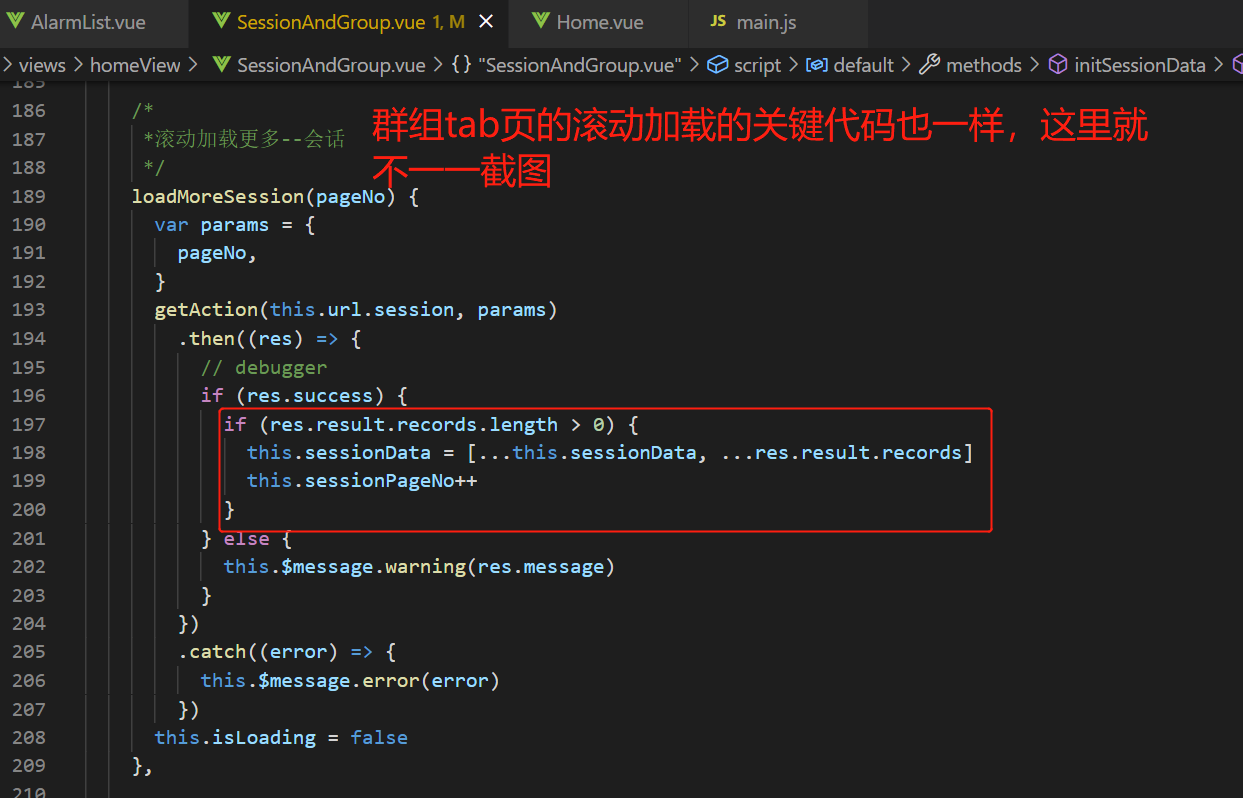
记得页面销毁前需要移除滚动

备注:下图的写法不可用
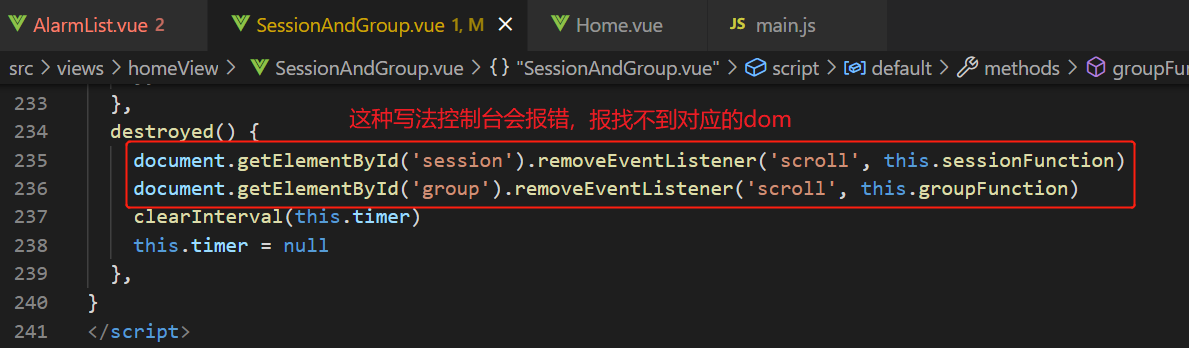
备注:ant design vue 的tab标签页的activeKey 必须是String类型,否则可能会出现初始化页面时候tab页无内容,点击后才会有内容以及上述组件中给table绑定滚动事件报错【没有这个dom】等情况
完整的组件代码如下:
<template>
  <div class="session-group">
    <a-tabs v-model="activeKey"  @change="callback">
      <a-tab-pane key="1" tab="会话">
        <a-table
          ref="session"
          id="session"
          :row-key="(record) => record.id"
          :columns="sessionColumns"
          :data-source="sessionData"
          :pagination="false"
          style="overflow-y: auto; height: 340px; padding-right: 3px"
          :loading="isLoading"
        >
        </a-table>
      </a-tab-pane>
      <a-tab-pane key="2" tab="群组" force-render>
        <a-table
          ref="group"
          id="group"
          :row-key="(record) => record.id"
          :columns="sessionColumns"
          :data-source="groupData"
          :pagination="false"
          :loading="isLoading"
          style="overflow-y: auto; height: 340px; padding-right: 3px"
        >
        </a-table>
      </a-tab-pane>
    </a-tabs>
  </div>
</template>
<script>
import { getAction } from '@api/manage'
export default {
  data() {
    return {
      activeKey: '1',
      timer: null,
      sessionFirstTime: 0, //session tab触底次数
      groupFirstTime: 0, //group  tab触底次数
      isLoading: false,
      sessionPageNo: 1,
      groupPageNo: 1,
      scrollHeight: 0,
      tableHeader: 'table-header',
      sessionColumns: [
        {
          title: '会话ID',
          dataIndex: 'id',
          key: 'id',
          scopedSlots: { customRender: 'id' },

          align: 'center',
        },
        {
          title: '机器ID',
          dataIndex: 'robotUserId',
          key: 'robotUserId',
          rowClassName: 'table-header',
          align: 'center',
        },
        {
          title: '所属平台',
          dataIndex: 'resourceType_dictText',
          key: 'resourceType_dictText',
          ellipsis: true,
          rowClassName: 'table-header',
          align: 'center',
        },
        {
          title: '会话状态',
          dataIndex: 'activeStatus_dictText',
          key: 'activeStatus_dictText',
          rowClassName: 'table-header',
          align: 'center',
          customRender: (text, row, index) => {
            if (text == '活跃') {
              return <span style="color:#2DBD6D">{text}</span>
            } else {
              return <span style="color:#F17E03">{text}</span>
            }
          },
        },
      ],
      sessionData: [],
      groupData: [],
      url: {
        session: '/robot/robotChat/getActiveSessionPlanelist',
        group: 'robot/robotChat/getActiveGroupSessionPlanelist',
      },
    }
  },
  mounted() {
    this.handleScroll()
    this.initSessionData()
    this.initGroupData()
    this.callback('1')
    this.timer = setInterval(() => {
      this.sessionPageNo = 1
      this.groupPageNo = 1
      this.sessionFirstTime = 0
      this.groupFirstTime = 0
      this.initSessionData()
      this.initGroupData()
    }, 30000)
  },
  methods: {
    tabClick(key){
      this.activeKey = key
    },
    handleScroll() {
      document.getElementById('session').addEventListener('scroll', this.sessionFunction)
    },
    sessionFunction() {
      var dd = document.querySelector('#session').scrollTop
      var ss = document.querySelector('#session').scrollHeight
      let hh = document.querySelector('#session').clientHeight
      if (ss - dd - hh <= 0) {
        this.sessionFirstTime++
          this.loadMoreSession(this.sessionPageNo)
      }
    },
    groupFunction() {
      var dd = document.querySelector('#group').scrollTop
      var ss = document.querySelector('#group').scrollHeight
      let hh = document.querySelector('#group').clientHeight
      if (ss - dd - hh == 0) {
        this.groupFirstTime++
          this.loadMoreGroup(this.groupPageNo)
      }
    },


    callback(key) {
      if (key == 2) {
        this.$nextTick(function () {
          document.getElementById('group').addEventListener('scroll', this.groupFunction)
        })
      }
      this.activeKey = key
      this.$emit('currentKey', key)
    },

    initSessionData() {
      this.isLoading = true
      var params = {}
      getAction(this.url.session, params)
        .then((res) => {
          // debugger
          if (res.success) {
            this.sessionData = res.result.records
            if (res.result.records.length > 0) {
              this.sessionPageNo++
            }
          } else {
            this.$message.warning(res.message)
          }
        })
        .catch((error) => {
          this.$message.error(error)
        })
      this.isLoading = false
    },
    initGroupData() {
      this.isLoading = true
      let obj = { isGroup: 1 }
      getAction(this.url.group, obj)
        .then((res) => {
          if (res.success) {
            this.groupData = res.result.records
            if (res.result.records.length > 0) {
              this.groupPageNo++
            }
          } else {
            this.$message.warning(res.message)
          }
        })
        .catch((error) => {
          this.$message.error(error)
        })
      this.isLoading = false
    },

    /*
     *滚动加载更多--会话
     */
    loadMoreSession(pageNo) {
      var params = {
        pageNo,
      }
      getAction(this.url.session, params)
        .then((res) => {
          if (res.success) {
            if (res.result.records.length > 0) {
              this.sessionData = [...this.sessionData, ...res.result.records]
              this.sessionPageNo++
            }
          } else {
            this.$message.warning(res.message)
          }
        })
        .catch((error) => {
          this.$message.error(error)
        })
      this.isLoading = false
    },

    /*
     *滚动加载更多--群组
     */
    loadMoreGroup(pageNo) {
      this.isLoading = true
      let obj = { isGroup: 1, pageNo }
      getAction(this.url.group, obj)
        .then((res) => {
          if (res.success) {
            if(res.result.records.length>0){
              this.groupData = [...this.groupData, ...res.result.records]
              this.groupPageNo++
            }
          } else {
            this.$message.warning(res.message)
          }
        })
        .catch((error) => {
          this.$message.error(error)
        })
      this.isLoading = false
    },
  },
  destroyed() {
window.removeEventListener('scroll', this.sessionFunction)
window.removeEventListener('scroll', this.groupFunction)
    clearInterval(this.timer)
    this.timer = null
  },
}
</script>
<style lang="less" scoped>
.session-group {
  height: 100%;

  /deep/ .ant-table-thead {
    background: linear-gradient(90deg, #d1dffc 0%, #e8effd 100%);
  }
  /deep/ .ant-table-thead > tr > th {
    background: transparent !important;
  }
  /*隐藏表格的表头的滚动条*/
  /deep/ .ant-table-hide-scrollbar {
    overflow-y: hidden;
    overflow: hidden !important;
    margin-bottom: 0;
    padding-right: 0;
  }
  /deep/ .ant-tabs-tab {
    font-size: 16px;
    font-family: Microsoft YaHei;
    font-weight: bold;
    color: #606266;
  }
  /deep/ .ant-tabs-tab-active {
    color: #3e7efc;
  }
  /deep/ .ant-table-column-title {
    font-size: 14px;
    font-family: Microsoft YaHei;
    font-weight: bold;
    color: #58647b;
  }
  /deep/ .ant-table-tbody > tr > td {
    font-size: 14px;
    font-family: Microsoft YaHei;
    font-weight: 400;
    color: #606266;
  }

  /*滚动条样式-开始*/
  ::-webkit-scrollbar {
    width: 6px;
    margin-left: 2px;
  }

  /*定义滚动条轨道 内阴影+圆角*/
  ::-webkit-scrollbar-track {
    border-radius: 4px;
    background: #f1f4fa;
    margin-left: 2px;
  }

  /*定义滑块 内阴影+圆角*/
  ::-webkit-scrollbar-thumb {
    border-radius: 4px;
    -webkit-box-shadow: inset 0 0 6px rgba(26, 25, 25, 0.3);
    background-color: rgba(0, 0, 0, 0.1);
  }
  /*滚动条样式-结束*/

  /deep/ .ant-table-tbody .ant-table-row:nth-child(2n) {
    background: rgba(229, 237, 253, 0.4);
  }
  /deep/ .ant-table-tbody > tr > td {
    border-bottom: none;
  }
}
</style>
上述中对滚动事件的dom操作写法的调整:其实就是通过ref来获取元素,绑定事件
1、对元素绑定滚动事件:this.$refs.session.addEventListener('scroll', this.sessionFunction)

2、对元素移除滚动事件:this.$refs.session.removeEventListener('scroll', this.sessionFunction)

3、获取 内容顶部距离容器顶部的高度【被隐藏在内容区域上方的像素数】:this.$refs.session.scrollTop

4、获取内容的总高度【在没有滚动条的情况下,元素内容的实际总高度】:this.$refs.session.scrollHeight

5、获取可视区高度【可视区高度 + padding】:this.$refs.session.clientHeight

 浙公网安备 33010602011771号