
Vue学习笔记60--mapState + mapGetters
示例一:通过计算属性
src/store/index.js
// 该文件用于创建vuex中最为核心的store
// 引入Vue
import Vue from 'vue'
// 引入vuex
import Vuex from 'vuex'
// 使用插件
Vue.use(Vuex)

/*  准备actions--用于相应组件中的动作
1.context--miniStore
2.actions:建议逻辑处理在该处处理
3.如果没有业务路基处理,可直接使用mutations中对应的方法
 */
const actions = {
  incrementOdd (context, value) {
    if (context.state.sum % 2) {
      context.commit('Increment', value)//等价于Increment
      // context.commit('IncrementOdd', value)//等价于Increment
    }
  },
  incrementWait (context, value) {
    setTimeout(() => {
      context.commit('Increment', value)//等价于 IncrementWait
      // context.commit('IncrementWait', value)//等价于Increment
    }, 1000);

  },
}

/* 准备 mutations
用于操作数据(state)
不建议写业务逻辑
*/
const mutations = {
  Increment (state, value) {
    state.sum += value
  },
  Decrement (state, value) {
    state.sum -= value
  },
  IncrementOdd (state, value) {
    state.sum += value
  },
  IncrementWait (state, value) {
    state.sum += value
  },
}

// 准备state--用于存储数据(state中存放的就是全局共享数据)
const state = {
  sum: 0,//当前的和
  school: '高新一中',
  subject: '语数外'

}

// 准备getters--用于将state中的数据进行加工
const getters = {
  bigSum (state) {
    return state.sum * 10
  }
}

//创建store
// const store = new Vuex.Store({

//创建并暴露store
export default new Vuex.Store({
  actions: actions,
  mutations: mutations,
  state: state,
  getters
})
// 暴露store
// export default store
Count.vue
<template>
  <div>
    <h3>当前求和为:{{ totalSum }}</h3>
    <h3>当前求和*10为:{{ bigSum }}</h3>
    <h3>我在:{{ mySchool }},学习:{{MySubject }}</h3>

    <!-- 以上写法加计算属性等价于《==》以下写法 -->

    <!-- <h3>当前求和为:{{ $store.state.sum }}</h3>
    <h3>当前求和*10为:{{ $store.getters.bigSum }}</h3>
    <h3>我在:{{ $store.state.school }},学习:{{$store.state.subject }}</h3> -->

    <!-- <select v-model="selectNo">
      <option :value="1">1</option>
      <option :value="2">2</option>
      <option :value="3">3</option>
    </select>
    等价于下面写法
   -->
    <select v-model.number="selectNo">
      <option value="1">1</option>
      <option value="2">2</option>
      <option value="3">3</option>
    </select>
    <button @click="increment">+</button>
    <button @click="decrement">-</button>
    <button @click="incrementOdd">当前为奇数再加</button>
    <button @click="incrementWait">等一下再加</button>
  </div>
</template>

<script>
import { mapState } from 'vuex'

export default {
  name: 'Count',
  data () {
    return {
      selectNo: 1,//当前选择的数字
    }
  },
  // 通过计算属性获取state数据
  computed: {
    totalSum () {
      return this.$store.state.sum
    },
    mySchool () {
      return this.$store.state.school
    },
    MySubject () {
      return this.$store.state.subject
    },


    bigSum () {
      return this.$store.getters.bigSum
    },

  },
  mounted () {
    console.log('count this==>', this)
    console.log('count this.$store==>', this.$store)
  },
  methods: {
    increment () {
      // this.$store.dispatch('increment', this.selectNo)
      // 如果没有业务路基处理,可直接使用mutations中对应的方法
      this.$store.commit('Increment', this.selectNo)
    },
    decrement () {
      // this.$store.dispatch('decrement', this.selectNo)
      // 如果没有业务路基处理,可直接使用mutations中对应的方法
      this.$store.commit('Decrement', this.selectNo)
    },
    incrementOdd () {
      this.$store.dispatch('incrementOdd', this.selectNo)
    },
    incrementWait () {
      this.$store.dispatch('incrementWait', this.selectNo)
    },
  },

}
</script>

<style scoped>
button {
  margin: 6px;
}
</style>
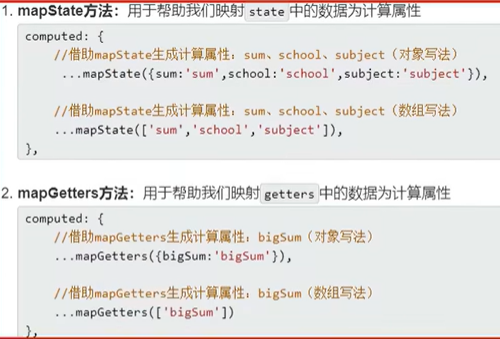
mapState
写法一:对象写法,借助mapState生成计算属性,从state中读取数据
示例一:
<template>
  <div>
    <h3>当前求和为:{{ totalSum }}</h3>
    <h3>当前求和*10为:{{ bigSum }}</h3>
    <h3>我在:{{ mySchool }},学习:{{mySubject }}</h3>
    <!-- 以上写法加计算属性等价于《==》以下写法 -->

    <!-- <h3>当前求和为:{{ $store.state.sum }}</h3>
    <h3>当前求和*10为:{{ $store.getters.bigSum }}</h3>
    <h3>我在:{{ $store.state.school }},学习:{{$store.state.subject }}</h3> -->

    <!-- <select v-model="selectNo">
      <option :value="1">1</option>
      <option :value="2">2</option>
      <option :value="3">3</option>
    </select>
    等价于下面写法
   -->
    <select v-model.number="selectNo">
      <option value="1">1</option>
      <option value="2">2</option>
      <option value="3">3</option>
    </select>
    <button @click="increment">+</button>
    <button @click="decrement">-</button>
    <button @click="incrementOdd">当前为奇数再加</button>
    <button @click="incrementWait">等一下再加</button>
  </div>
</template>

<script>
import { mapState } from 'vuex'

export default {
  name: 'Count2',
  data () {
    return {
      selectNo: 1,//当前选择的数字
    }
  },
  // 通过计算属性获取state数据
  computed: {
    // totalSum () {
    //   return this.$store.state.sum
    // },
    // mySchool () {
    //   return this.$store.state.school
    // },
    // mySubject () {
    //   return this.$store.state.subject
    // },

    // totalSum ()、 mySchool ()、 mySubject () 等价于以下代码
    // 写法一:对象写法,借助mapState生成计算属性,从state中读取数据
    ...mapState({ totalSum: 'sum', mySchool: 'school', mySubject: 'subject' }),

    bigSum () {
      return this.$store.getters.bigSum
    },

  },
  mounted () {
    console.log('count this==>', this)
    console.log('count this.$store==>', this.$store)
  },
  methods: {
    increment () {
      // this.$store.dispatch('increment', this.selectNo)
      // 如果没有业务路基处理,可直接使用mutations中对应的方法
      this.$store.commit('Increment', this.selectNo)
    },
    decrement () {
      // this.$store.dispatch('decrement', this.selectNo)
      // 如果没有业务路基处理,可直接使用mutations中对应的方法
      this.$store.commit('Decrement', this.selectNo)
    },
    incrementOdd () {
      this.$store.dispatch('incrementOdd', this.selectNo)
    },
    incrementWait () {
      this.$store.dispatch('incrementWait', this.selectNo)
    },
  },

}
</script>

<style scoped>
button {
  margin: 6px;
}
</style>
示例二:
// 写法二:数组写法,借助mapState生成计算属性,从state中读取数据
...mapState(['sum', 'school', 'subject']),
注:属性名必须和state中数据的名称一致
<template>
  <div>
    <h3>当前求和*10为:{{ bigSum }}</h3>
    <h3>当前求和为:{{ sum }}</h3>
    <h3>我在:{{ school }},学习:{{subject }}</h3>
    <select v-model.number="selectNo">
      <option value="1">1</option>
      <option value="2">2</option>
      <option value="3">3</option>
    </select>
    <button @click="increment">+</button>
    <button @click="decrement">-</button>
    <button @click="incrementOdd">当前为奇数再加</button>
    <button @click="incrementWait">等一下再加</button>
  </div>
</template>

<script>
import { mapState } from 'vuex'

export default {
  name: 'Count3',
  data () {
    return {
      selectNo: 1,//当前选择的数字
    }
  },
  // 通过计算属性获取state数据
  computed: {
    // totalSum () {
    //   return this.$store.state.sum
    // },
    // mySchool () {
    //   return this.$store.state.school
    // },
    // mySubject () {
    //   return this.$store.state.subject
    // },

    // totalSum ()、 mySchool ()、 mySubject () 等价于以下代码
    // 写法一:对象写法,借助mapState生成计算属性,从state中读取数据
    // ...mapState({ totalSum: 'sum', mySchool: 'school', mySubject: 'subject' }),

    // 写法二:数组写法,借助mapState生成计算属性,从state中读取数据
    ...mapState(['sum', 'school', 'subject']),

    bigSum () {
      return this.$store.getters.bigSum
    },

  },
  mounted () {
    console.log('count this==>', this)
    console.log('count this.$store==>', this.$store)
  },
  methods: {
    increment () {
      // this.$store.dispatch('increment', this.selectNo)
      // 如果没有业务路基处理,可直接使用mutations中对应的方法
      this.$store.commit('Increment', this.selectNo)
    },
    decrement () {
      // this.$store.dispatch('decrement', this.selectNo)
      // 如果没有业务路基处理,可直接使用mutations中对应的方法
      this.$store.commit('Decrement', this.selectNo)
    },
    incrementOdd () {
      this.$store.dispatch('incrementOdd', this.selectNo)
    },
    incrementWait () {
      this.$store.dispatch('incrementWait', this.selectNo)
    },
  },

}
</script>

<style scoped>
button {
  margin: 6px;
}
</style>
mapGetters(使用方式和mapState一致)
    // bigSum () {
    //   return this.$store.getters.bigSum
    // },
    // 等价于
    // ...mapGetters(['bigSum']),//数组写法
    ...mapGetters({ bigSum: 'bigSum' }),//对象写法
mapState + mapGetters 完整示例代码
main.js
// 引入Vue
import Vue from 'vue'
// 引入App
import App from './App.vue'
// 配置提示
Vue.config.productionTip = false

// 引入vuex、store
// import Vuex from 'vuex'  // store/index.js
import store from './store'//默认引入index.js
// 使用插件
// Vue.use(Vuex) // store/index.js

// console.log('Vue.prototype==>', Vue.prototype)
// console.log('VueComponent.prototype.__proto__==>', Vue.prototype)

new Vue({
  render: h => h(App), store

}).$mount('#app')
App.vue
<template>
  <div class="app">
    <!-- <Count /> -->
    <!-- <Count2 /> -->
    <Count3 />
  </div>
</template>

<script>
// 引入组件
import Count from './components/Count.vue';
import Count2 from './components/Count2.vue';
import Count3 from './components/Count3.vue';
export default {
  name: 'App',
  components: { Count, Count2, Count3 },


}
</script>

<style scoped>
</style>
src/store/index.js
// 该文件用于创建vuex中最为核心的store
// 引入Vue
import Vue from 'vue'
// 引入vuex
import Vuex from 'vuex'
// 使用插件
Vue.use(Vuex)

/*  准备actions--用于相应组件中的动作
1.context--miniStore
2.actions:建议逻辑处理在该处处理
3.如果没有业务路基处理,可直接使用mutations中对应的方法
 */
const actions = {
  incrementOdd (context, value) {
    if (context.state.sum % 2) {
      context.commit('Increment', value)//等价于Increment
      // context.commit('IncrementOdd', value)//等价于Increment
    }
  },
  incrementWait (context, value) {
    setTimeout(() => {
      context.commit('Increment', value)//等价于 IncrementWait
      // context.commit('IncrementWait', value)//等价于Increment
    }, 1000);

  },
}

/* 准备 mutations
用于操作数据(state)
不建议写业务逻辑
*/
const mutations = {
  Increment (state, value) {
    state.sum += value
  },
  Decrement (state, value) {
    state.sum -= value
  },
  IncrementOdd (state, value) {
    state.sum += value
  },
  IncrementWait (state, value) {
    state.sum += value
  },
}

// 准备state--用于存储数据(state中存放的就是全局共享数据)
const state = {
  sum: 0,//当前的和
  school: '高新一中',
  subject: '语数外'

}

// 准备getters--用于将state中的数据进行加工
const getters = {
  bigSum (state) {
    return state.sum * 10
  }
}

//创建store
// const store = new Vuex.Store({

//创建并暴露store
export default new Vuex.Store({
  actions: actions,
  mutations: mutations,
  state: state,
  getters
})
// 暴露store
// export default store
Count3.vue
<template>
  <div>
    <h3>当前求和*10为:{{ bigSum }}</h3>
    <h3>当前求和为:{{ sum }}</h3>
    <h3>我在:{{ school }},学习:{{subject }}</h3>
    <select v-model.number="selectNo">
      <option value="1">1</option>
      <option value="2">2</option>
      <option value="3">3</option>
    </select>
    <button @click="increment">+</button>
    <button @click="decrement">-</button>
    <button @click="incrementOdd">当前为奇数再加</button>
    <button @click="incrementWait">等一下再加</button>
  </div>
</template>

<script>
import { mapGetters, mapState } from 'vuex'

export default {
  name: 'Count3',
  data () {
    return {
      selectNo: 1,//当前选择的数字
    }
  },
  // 通过计算属性获取state数据
  computed: {
    // totalSum () {
    //   return this.$store.state.sum
    // },
    // mySchool () {
    //   return this.$store.state.school
    // },
    // mySubject () {
    //   return this.$store.state.subject
    // },

    // totalSum ()、 mySchool ()、 mySubject () 等价于以下代码
    // 写法一:对象写法,借助mapState生成计算属性,从state中读取数据
    // ...mapState({ totalSum: 'sum', mySchool: 'school', mySubject: 'subject' }),

    // 写法二:数组写法,借助mapState生成计算属性,从state中读取数据
    ...mapState(['sum', 'school', 'subject']),


    // bigSum () {
    //   return this.$store.getters.bigSum
    // },
    // 等价于
    // 借助mapGetters生成计算属性,从getters中读取数据
    // ...mapGetters(['bigSum']),//数组写法
    ...mapGetters({ bigSum: 'bigSum' }),//对象写法


  },
  mounted () {
    console.log('count this==>', this)
    console.log('count this.$store==>', this.$store)
  },
  methods: {
    increment () {
      // this.$store.dispatch('increment', this.selectNo)
      // 如果没有业务路基处理,可直接使用mutations中对应的方法
      this.$store.commit('Increment', this.selectNo)
    },
    decrement () {
      // this.$store.dispatch('decrement', this.selectNo)
      // 如果没有业务路基处理,可直接使用mutations中对应的方法
      this.$store.commit('Decrement', this.selectNo)
    },
    incrementOdd () {
      this.$store.dispatch('incrementOdd', this.selectNo)
    },
    incrementWait () {
      this.$store.dispatch('incrementWait', this.selectNo)
    },
  },

}
</script>

<style scoped>
button {
  margin: 6px;
}
</style>
博客内容主要用于日常学习记录,内容比较随意,如有问题,还需谅解!!!

 浙公网安备 33010602011771号