
Vue学习笔记55-配置代理方式
vue脚手架配置代理
方式一:在vue.config.js中添加如下配置
devServer:{
proxy:"http://localhost:5000"
}
说明:
- 优点:配置简单,请求资源时直接发送给前端(8080)即可
- 缺点:不能配置多个代理,不能灵活的控制请求是否走代理
- 工作方式:若按照上述配置代理,当请求了前端不存在的资源时,那么该请求会转发给服务器(优先匹配当前资源)
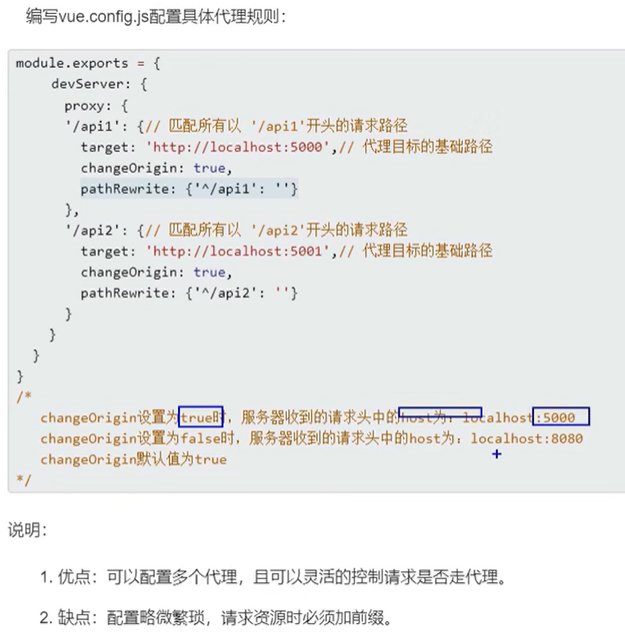
方式二:vue.config.js
module.exports = {
  publicPath: './',
  outputDir: 'Image_quality_control',
  assetsDir: 'static',
  // lintOnSave: process.env.NODE_ENV === 'development',
  lintOnSave: false,
  productionSourceMap: false,
  css: {
    loaderOptions: {
      sass: {
        sassOptions: {
          outputStyle: 'expanded'
        }
      }
    }
  },
  devServer: {
    port: port,
    open: true,
    overlay: {
      warnings: false,
      errors: false
    },
    // 开启代理服务器
    proxy: {
      '/ic-api-test': {
        target: 'http://172.17.112.22:16602',
        pathRewrite: {
          '^/ic-api-test': ''
        },
        changeOrigin: true,
        secure: false
      },
      '/ic-api': {
        target: 'http://172.17.112.22:16602',
        pathRewrite: {
          '^/ic-api': '' // 重置地址
        },
        changeOrigin: true, // 默认ture
        secure: false
      }
    }
  },
  chainWebpack: config => {
    const fileRule = config.module.rule('file')
    fileRule.uses.clear()
    fileRule
      .test(/\.pdf|ico$/)
      .use('file-loader')
      .loader('file-loader')
      .options({
        limit: 10000
      })
  }
}
博客内容主要用于日常学习记录,内容比较随意,如有问题,还需谅解!!!

 浙公网安备 33010602011771号