
Vue学习笔记53--消息订阅与发布
消息订阅与发布
1.订阅消息(需要数据的人):消息名称
2.发布消息(提供数据的人):消息内容
注:
1.订阅名称和发布名称一致
2.需要数据的人--订阅消息;提供数据的人--发布消息
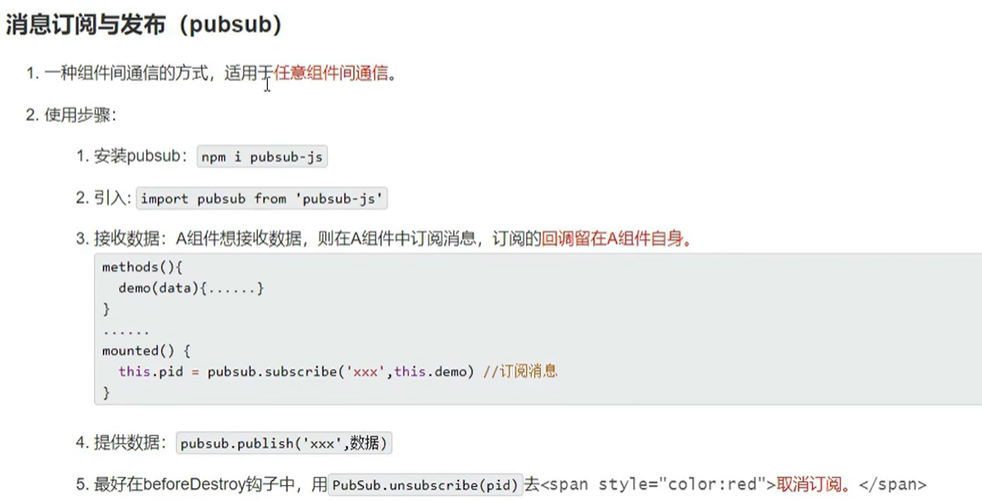
示例一:
第一步:安装支持库
安装第三方支持库:pubsub.js(退出项目运行后执行以下命令,安装库文件)
npm i pubsub-js
第二步:引入 + 订阅
在需要数据的组件引入组件pubsub-js
import pubsub from 'pubsub-js';
<!-- 组件的结构 -->
<template>
  <div class="school">
    <h3>学校姓名:{{name}}</h3>
    <h3>学校地址:{{ address }}</h3>

  </div>
</template>

<!-- 组件交互相关的代码(数据、方法等) -->
<script>
// 引入消息订阅发布插件
import pubsub from 'pubsub-js';

export default ({
  // eslint-disable-next-line vue/multi-word-component-names
  name: 'School',
  data () {
    return {
      name: '高新一小',
      address: '西安/高新一小'
    }
  },
  methods: {
    demo (msgName, getdata) {
      console.log(this)
      console.log('School 发布了hello消息,hello消息的回调执行了==>', msgName, getdata)
    }
  },
  mounted () {
    /*     // 订阅消息
        // this.pubId = pubsub.subscribe('hello', function (msgName, getdata) {
        this.pubId = pubsub.subscribe('hello', (msgName, getdata) => {
          console.log(this)
          console.log('School 发布了hello消息,hello消息的回调执行了==>', msgName, getdata)
        }) */


    this.pubId = pubsub.subscribe('hello', this.demo)
  },
  beforeDestroy () {
    pubsub.unsubscribe(this.pubId)
  },
})
</script>

<!-- 组件的样式 scoped局部样式,否则多个vue组件中同名会导致样式覆盖(将使用最后一个引入的组件样式)-->
<style scoped>
.school {
  background-color: burlywood;
}
</style>
第三步:引入 + 发布
// 引入消息订阅发布插件
import pubsub from 'pubsub-js';
<!-- 组件的结构 -->
<template>
  <div class="student">
    <h3>学生姓名:{{name}}</h3>
    <h3>学生性别:{{ sex }}</h3>
    <button @click="sendStudentName">把学生姓名给School组件</button>
  </div>
</template>

<!-- 组件交互相关的代码(数据、方法等) -->
<script>
// 引入消息订阅发布插件
import pubsub from 'pubsub-js';

export default ({
  // eslint-disable-next-line vue/multi-word-component-names
  name: 'Student',
  data () {
    return {
      msg: 'Vue消息发布与订阅',
      name: '心仪',
      sex: '女',
    }
  },
  methods: {
    sendStudentName () {
      pubsub.publish('hello', this.msg)
    }
  },
  mounted () {

  },

})
</script>

<!-- 组件的默认样式 css写法 -->
<!-- <style scoped>
.demo {
  background-color: cadetblue;
}
</style> -->

<style lang="less" scoped>
.student {
  background-color: cadetblue;
  .myfontsize {
    font-size: 40px;
  }
}
</style>
main.js
// 引入Vue
import Vue from 'vue'
// 引入App
import App from './App.vue'
// 配置提示
Vue.config.productionTip = false

// console.log('Vue.prototype==>', Vue.prototype)
// console.log('VueComponent.prototype.__proto__==>', Vue.prototype)

new Vue({
  render: h => h(App),
}).$mount('#app')


/*
消息订阅与发布
1.订阅消息(需要数据的人):消息名称
2.发布消息(提供数据的人):消息内容
注:
1.订阅名称和发布名称一致
2.需要数据的人--订阅消息;提供数据的人--发布消息

第三方支持库:pubsub.js
 */
App.vue
<template>
  <div class="app">
    <!-- <img src="./assets/logo.png"> -->
    <h2>{{msg}}</h2>
    <hr>
    学校组件:
    <School />
    <hr>
    学生组件:
    <Student />
  </div>
</template>

<script>
// 引入组件
import Student from './components/Student.vue';
import School from './components/School.vue';
export default {
  name: 'App',
  components: { Student, School },
  data () {
    return {
      msg: '消息订阅与发布'
    }
  },

}
</script>

<style scoped>
.app {
  background-color: rgb(178, 168, 168);
  padding: 15px;
}
</style>
博客内容主要用于日常学习记录,内容比较随意,如有问题,还需谅解!!!

 浙公网安备 33010602011771号