
Vue学习笔记44--mixin混入
mixin混入:可以理解为是代码的一种重构复用
一个混入对象可以包含任意组件选项(如data、methods、mounted等等)。当组件使用混入对象时,所有混入对象的选项将被“混合”进入该组件本身的选项。
示例一:局部混合示例
局部混入就是在单独的vue组件中引入了mixin混入对象
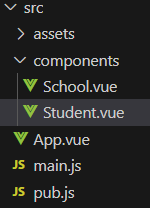
Student.vue
<!-- 组件的结构 -->
<template>
  <div class="demo">
    <h3 @click="showName">学生姓名:{{name}}</h3>
    <h3>学生性别:{{ stuAge }}</h3>
  </div>
</template>
<!-- 组件交互相关的代码(数据、方法等) -->
<script>
// eslint-disable-next-line no-unused-vars
import { mixin } from '../mixin.js'  //引入混合
export default ({
  // eslint-disable-next-line vue/multi-word-component-names
  name: 'Student',
  data () {
    return {
      msg: '我正在学习 Vue',
      name: '心仪',
      stuAge: 6
    }
  },
  // methods: {
  //   showName () {
  //     alert(this.name)
  //   }
  // }

})
</script>

<!-- 组件的样式 -->
<style>
.demo {
  background-color: burlywood;
}
</style>
School.vue
<!-- 组件的结构 -->
<template>
  <div class="demo">
    <h3 @click="showName">学校姓名:{{name}}</h3>
    <h3>学校地址:{{ schoolAddress }}</h3>
  </div>
</template>
<!-- 组件交互相关的代码(数据、方法等) -->
<script>
// eslint-disable-next-line no-unused-vars
import { mixin } from '../mixin.js'  //引入混合
export default ({
  // eslint-disable-next-line vue/multi-word-component-names
  name: 'Student',
  data () {
    return {
      msg: '我正在学习 Vue',
      name: '高新一小',
      schoolAddress: '西安/高新一小'
    }
  },
  // methods: {
  //   showName () {
  //     alert(this.name)
  //   }
  // }

})
</script>

<!-- 组件的样式 -->
<style>
.demo {
  background-color: burlywood;
}
</style>
重构的复用代码:pub.js
// eslint-disable-next-line no-unused-vars
export const mixin = {
  methods: {
    showName () {
      alert(this.name)
    }
  }
}
App.vue
<template>
  <div>
    <!-- <img src="./assets/logo.png"> -->

    <Student></Student>
    <hr>
    <School></School>

  </div>
</template>

<script>
// 引入组件
import Student from './components/Student.vue';
import School from './components/School.vue';
export default {
  name: 'App',
  components: {
    Student,
    School
  },
}
</script>

<style>
</style>
main.js
/*
该文件是整个项目的入口文件
*/

// 引入Vue
import { createApp } from 'vue'
// 引入App组件,其是所有组件的父组件
import App from './App.vue'
// new Vue({
//   render: h => h(App),
// }).$mount('#app')
// 创建实例对象vm 并将App组件放入容器中——等价于 上面代码
createApp(App).mount('#app')
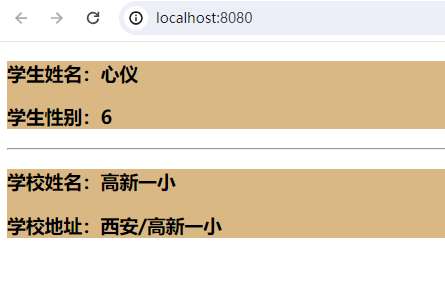
示例二:全局混合示例
混入也可以进行全局注册(慎用)。一旦使用全局混入,它将影响每一个之后创建的 Vue 实例。使用恰当时,这可以用来为自定义选项注入处理逻辑。
全局混入我们只需要把mixin.js引入到main.js中,然后将mixin放入到Vue.mixin()方法中即可;
第一步:
注释掉个个组件中的独立引用:类似// import { mixin } from '../mixin.js' //引入混合
第二步:main.js引入混合
// 引入Vue
import { createApp } from 'vue'
// 引入App组件,其是所有组件的父组件
import App from './App.vue'

import { mixin } from './mixin.js';
createApp(App).mount('#app').mixin(mixin)

// new Vue({
//   render: h => h(App),
// }).$mount('#app')
// 创建实例对象vm 并将App组件放入容器中——等价于 上面代码
createApp(App).mount('#app')
总结:
功能:可以把多个组件共用的配置提取成一个混入对象
使用方式:
第一步:定义混合,例如
export const mixin = {
  methods: {
    showName () {
      alert(this.name)
    }
  }
}
第二步:使用混合,例如
局部引用: mixins:['xxx'] // import { mixin } from '../mixin.js' //引入混合
全局引用:Vue.mixin(xxx)
import { mixin } from './mixin.js';
createApp(App).mount('#app').mixin(mixin)
博客内容主要用于日常学习记录,内容比较随意,如有问题,还需谅解!!!

 浙公网安备 33010602011771号