
集合(二)
Set集合
- Set集合特点
- 不包含重复元素的集合
- 没有索引的方法,所以不能使用普通for循环遍历
- Set集合练习
- 存储字符并遍历
package Set;

import java.util.HashSet;
import java.util.Set;

/*
        Set集合特点:
                不包含重复元素的集合
                没有索引的方法,所以不能使用普通的for循环遍历

        HashSet: 对集合的迭代顺序不做任何保证
*/
public class SetDemo {
    public static void main(String[] args) {
        //创建集合对象
        Set<String> set = new HashSet<String>();

        //添加元素
        set.add("hello");
        set.add("world");
        set.add("java");
        //不包含重复元素的集合
        set.add("world");

        //遍历
        for (String s : set){
            System.out.println(s);
        }

    }
}
哈希值
- 哈希值:是JDK根据对象的地址或者字符串或者数字算出来的int类型的数值
- Object中有一个方法可以获得对象的哈希值
- public int hashCode(): 返回对象的哈希码值
- 对象哈希值特点
- 同一个对象多次调用hashCode()方法返回的哈希值是相同的。
- 默认情况下,不同对象的哈希值是不同的。而重写的hashCode()方法,可以实现让不同对象的哈希值相同。
package Set;

public class HashDemo {
    public static void main(String[] args) {
        //创建学生对象
        Student s1 = new Student("钟启航",21);
        //通一个对象调用多次hashCode的值是相同的
        System.out.println(s1.hashCode());// 1163157884
        System.out.println(s1.hashCode());// 1163157884

        System.out.println("--------------------------");
        //默认情况下,不同对象的哈希值是不同的
        //通过方法重写,可以实现不同对象的哈希值是相同的
        Student s2 = new Student("芜湖",21);
        System.out.println(s2.hashCode());//1956725890

        System.out.println("---------------------------");

        System.out.println("hello".hashCode());// 99162322
//        System.out.println("hello".hashCode());// 99162322
        System.out.println("world".hashCode());// 113318802
        System.out.println("java".hashCode());// 3254818

        System.out.println("---------------------------");

        System.out.println("重地".hashCode());// 1179395
        System.out.println("通话".hashCode());// 1179395
    }
}
HashSet集合概述和特点
- HashSet集合特点
- 底层数据结构是哈希表
- 对集合的迭代顺序不作任何保证,也就是说不保证存储和取出的元素顺序一致
- 没有带索引的方法,所以不能使用普通for循环遍历
- 由于是Set集合,所以是不包含重复元素的集合
- HashSet集合练习
- 存储字符串并遍历
package Set;

import java.util.HashSet;

/*  `   HashSet集合特点
                底层数据结构是哈希表
                对集合的迭代顺序不作任何保证,也就是说不保证存储和取出的元素顺序一致
                没有带索引的方法,所以不能使用普通for循环遍历
                由于是Set集合,所以是不包含重复元素的集合*/
public class HashSetDemo1 {
    public static void main(String[] args) {
        //创建集合对象
        HashSet<String> hs = new HashSet<String>();

        hs.add("hello");
        hs.add("world");
        hs.add("java");

        hs.add("world");

        for (String s : hs){
            System.out.println(s);
        }
    }
}
HashSet集合保证元素唯一性源码分析
- HashSet集合添加一个元素的过程
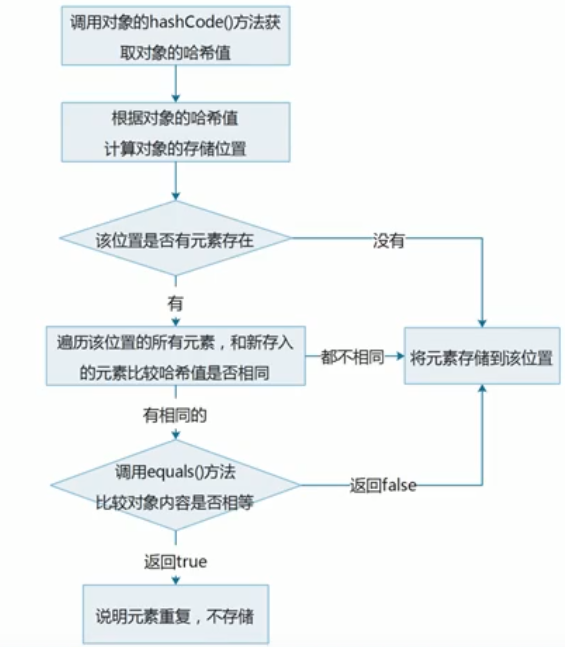
HashSet集合存储元素
- 要保证元素唯一性,需要重写hashCode()和equals()方法
常见数据结构之哈希表
- 哈希表
- JDK8 之前,底层采用数组+链表实现,可以说是一个元素为链表的数组
- JDK8以后,在长度比较长的时候,底层实现了优化
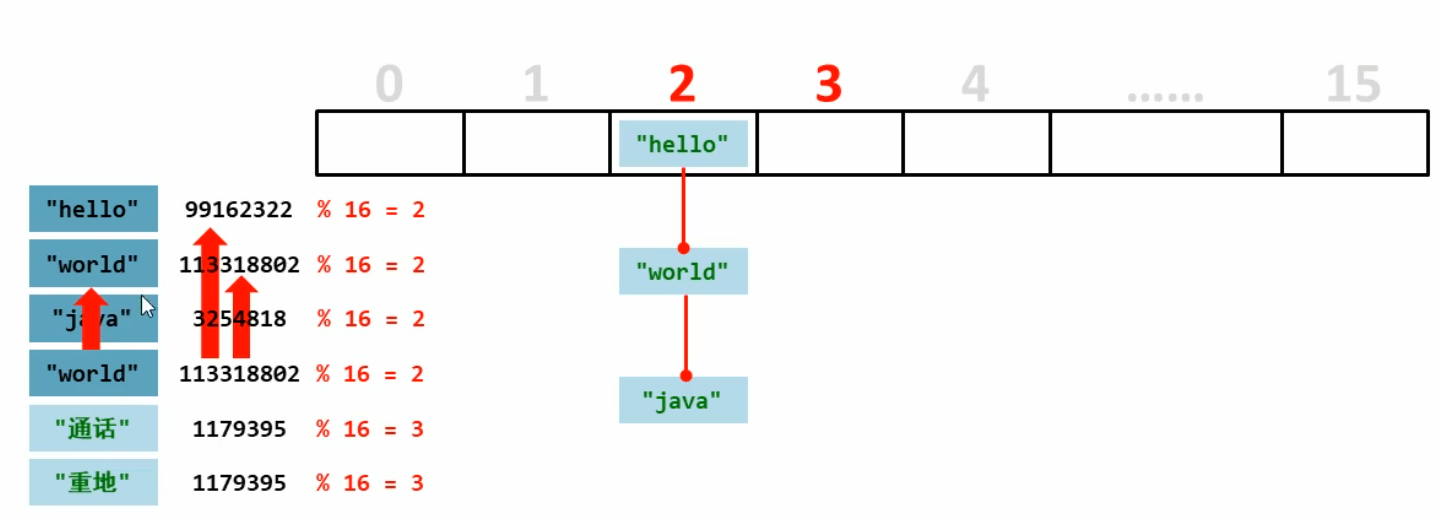
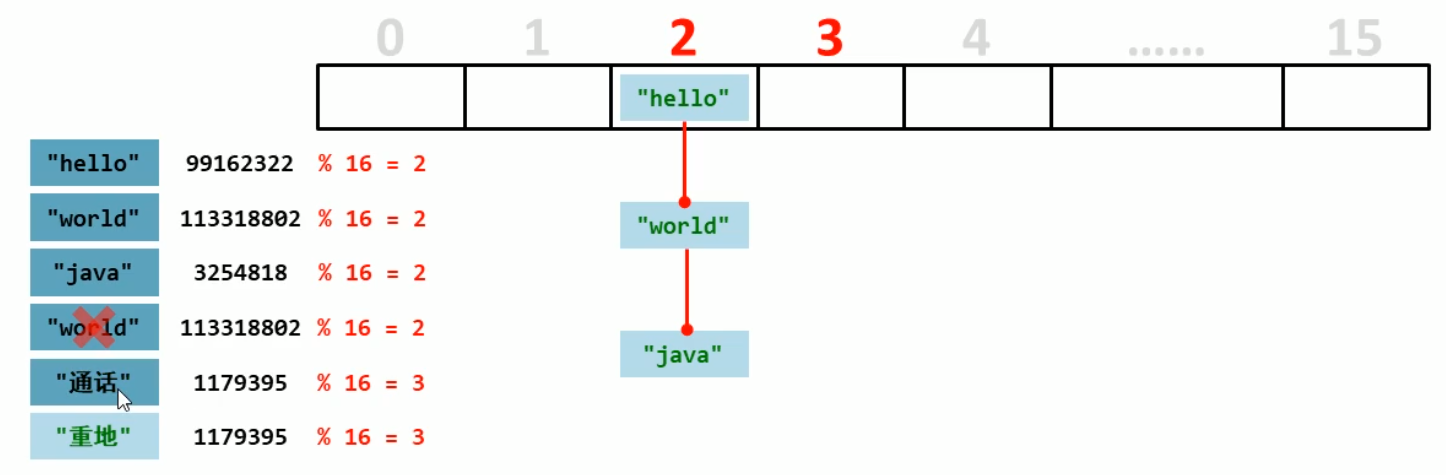
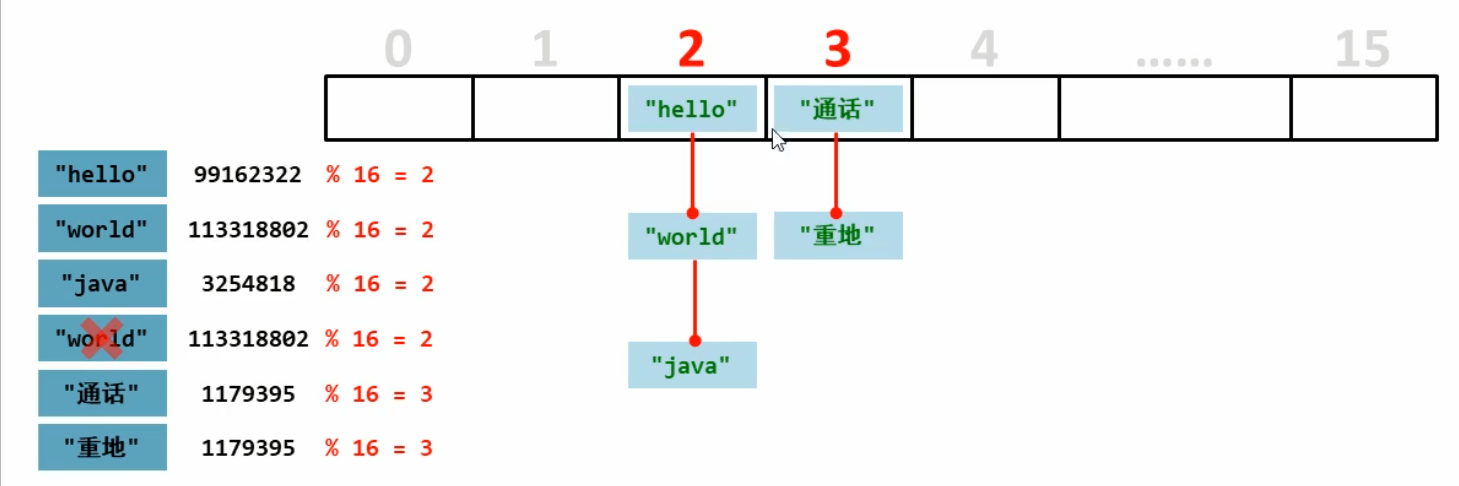
HashSet集合存储学生对象并遍历
- 需求: 创建一个存储学生对象的集合,存储多个学生对象,使用程序实现控制台遍历该集合
- 要求: 学生对象的成员变量值相同,我们认为就是同一个对象
- 思路
- 1.定义学生类
- 2.创建HashSet集合对象
- 3.创建学生对象
- 4.把学生添加到集合
- 5.遍历集合(增强for)
- 最后补充:在Student类中重写hashCode()和equals()方法。
public class HashDemo2 {
    public static void main(String[] args) {
        HashSet<Student> hs = new HashSet<Student>();

        Student s1 = new Student("芜湖",21);
        Student s2 = new Student("uahu",22);
        Student s3 = new Student("wuhu",23);
        Student s4 = new Student("meih",22);

        Student s5 = new Student("meih",22);

        hs.add(s1);
        hs.add(s2);
        hs.add(s3);
        hs.add(s4);
        hs.add(s5);

        for (Student s : hs ){
            System.out.println(s.getName()+"--"+s.getAge());
        }

    }
}
注意:如何使数据具有唯一性?
- 在Student类中重写hashCode()和equals()方法。
package Set;

public class Student {
    private String name;
    private int age;

    public Student(){

    }
    public Student(String name, int age) {
        this.name = name;
        this.age = age;
    }

    public String getName() {
        return name;
    }

    public void setName(String name) {
        this.name = name;
    }

    public int getAge() {
        return age;
    }

    public void setAge(int age) {
        this.age = age;
    }

    @Override
    public boolean equals(Object o) {
        if (this == o) return true;
        if (o == null || getClass() != o.getClass()) return false;

        Student student = (Student) o;

        if (age != student.age) return false;
        return name != null ? name.equals(student.name) : student.name == null;
    }

    @Override
    public int hashCode() {
        int result = name != null ? name.hashCode() : 0;
        result = 31 * result + age;
        return result;
    }
}
LinkedHashSet集合概述和特点
- LInkedHashSet集合概述和特点
- 哈希表和链表实现的Set接口,具有可预测的迭代次序
- 由链表保保证元素有序,也就是说元素的存储和取出顺序是一样的
- 由哈希表保证元素唯一,也就是说没有重复的元素。
- LinkedHashSet集合练习
- 存储字符串并遍历
package Set;

import java.util.LinkedHashMap;
import java.util.LinkedHashSet;

public class LInkedHashDemo1 {
    public static void main(String[] args) {
        LinkedHashSet<String> linkedHashSet = new LinkedHashSet<String>();

        linkedHashSet.add("钟启航");
        linkedHashSet.add("21");
        linkedHashSet.add("芜湖");
        linkedHashSet.add("21");

        for (String s : linkedHashSet){
            System.out.println(s);
        }
    }
}
TreeSet集合概述和特点
- TreeSet集合特点
- 元素有序,这里的顺序不是指存储和取出的顺序,而是按照一定的规则进行排序,具体排序方式取决于构造方法。
- TreeSet():根据其元素的自然排序进行排序
- TreeSet(Comparator comparator):根据指定的比较器进行排序
- 没有带索引的方法,所以不能使用普通For循环遍历,可以使用迭代器和增强For
- 由于是Set集合,所以不包含重复元素的集合
- 元素有序,这里的顺序不是指存储和取出的顺序,而是按照一定的规则进行排序,具体排序方式取决于构造方法。
- TreeSet集合练习
- 存储整数并遍历
package Set;

import org.omg.PortableInterceptor.INACTIVE;

import java.util.Iterator;
import java.util.TreeSet;

public class TreeSetDemo1 {
    public static void main(String[] args) {
        //创建集合
//        TreeSet<String> treeSet = new TreeSet<String>();
        TreeSet<Integer> treeSet = new TreeSet<Integer>();


        treeSet.add(35);
        treeSet.add(50);
        treeSet.add(45);

//        Iterator<Integer> iterator = treeSet.iterator();
//        while (iterator.hasNext()){
//            Integer next = iterator.next();
//            System.out.println(next);
//        }

        for (Integer t : treeSet){
            System.out.println(t);
        }
    }
}
自然排序Comparable的使用
- 存储对象并遍历,创建TreeSet集合使用无参构造方法
- 要求:按照年龄从小到大排序,年龄相同时,按照姓名的字母顺序排序
- 该接口对实现它的每个类的对象强加一个整体排序。 这个排序被称为类的自然排序 ,类的compareTo方法被称为其自然比较方法 。 所以这个练习需要在Student类中实现接口Comparable<>,在Student类中重写compareTo()方法。
- 结论
- TreeSet集合存储自定义对象,无参构造方法使用的是自然排序,对元素进行排序的
- 自然排序,就是让元素所属的类实现Comparable接口,重写compareTo(T o)方法
- 重写方法时,一定要注意排序规则必须按照要求的主要条件和次要条件来写
Student类
package Set;

import java.util.TreeSet;

/*
            存储对象并遍历,创建TreeSet集合使用无参构造方法
            要求:按照年龄从小到大排序,年龄相同时,按照姓名的字母顺序排序
*/
public class TreeSetDemo2 {
    public static void main(String[] args) {
        //创建集合对象
        TreeSet<Student> ts = new TreeSet<Student>();

        Student s1 = new Student("xishi",21);
        Student s2 = new Student("wuhu",24);
        Student s3 = new Student("yahu",22);
        Student s4 = new Student("meihu",26);

        Student s5 = new Student("lingqingxia",26);
        Student s6 = new Student("lingqingxia",26);

        //添加到集合
        ts.add(s1);
        ts.add(s2);
        ts.add(s3);
        ts.add(s4);
        ts.add(s5);
        ts.add(s6);

        for (Student s : ts){
            System.out.println(s);
        }
    }
}
比较器排序Comparator的使用
- 存储学生对象并遍历,创建TreeSet集合使用带参构造方法
- 要求:按照年龄从小到大排序,年龄相同时,按照姓名的字母顺序排序
- 结论
- 用TreeSet集合存储自定义对象,带参构造方法使用的是比较器排序对元素进行排序的
- 比较器排序,就是让集合构造方法接收Comparator的实现类对象,重写compare(T o1,T o2)方法
- 重写方法时,一定要注意排序规则必须按照要求的主要条件和次要条件来写
package Set;

import java.util.Comparator;
import java.util.TreeSet;

public class ComparatorDemo1 {
    public static void main(String[] args) {
        //创建集合对象
        TreeSet<Student> ts = new TreeSet<Student>(new Comparator<Student>() {
            @Override
            public int compare(Student s1, Student s2) {

                int num = s1.getAge() - s2.getAge();
                int num2 = num == 0? s1.getName().compareTo(s2.getName()): num;
                return num2;
            }
        });

        Student s1 = new Student("xishi",21);
        Student s2 = new Student("wuhu",24);
        Student s3 = new Student("yahu",22);
        Student s4 = new Student("meihu",26);

        Student s5 = new Student("lingqingxia",26);
        Student s6 = new Student("lingqingxia",26);

        //添加到集合
        ts.add(s1);
        ts.add(s2);
        ts.add(s3);
        ts.add(s4);
        ts.add(s5);
        ts.add(s6);

        for (Student s : ts){
            System.out.println(s);
        }
    }
}
案例:成绩排序
- 需求:用TreeSet集合存储多个学生信息(姓名,语文成绩,数学成绩),并遍历该集合
- 要求:按照总分从高到低出现
- 思路
- 定义学生类
- 创建TreeSet对象,通过比较器排序进行排序
- 创建学生对象
- 把学生对象添加到集合
- 遍历集合
package Set;

import java.util.Comparator;
import java.util.TreeSet;

/*
    需求:用TreeSet集合存储多个学生信息(姓名,语文成绩,数学成绩),并遍历该集合
        要求:按照总分从高到低出现
        思路
            定义学生类
            创建TreeSet对象,通过比较器排序进行排序
            创建学生对象
            把学生对象添加到集合
            遍历集合
*/
public class StudentDemo2 {
    public static void main(String[] args) {
        TreeSet<Student3> ts = new TreeSet<Student3>(new Comparator<Student3>() {
            @Override
            public int compare(Student3 s1, Student3 s2) {
                int num = (s2.getChineseperformance()+s2.getMathperformance())-(s1.getChineseperformance()+s1.getMathperformance());//也可以在Student类中定义一个Sum,这里不进行定义了。
                int num2 = num ==0 ?s1.getName().compareTo(s2.getName()): num;//也可以使用语文或者数学成绩在排名,但是得吧语文数学以及姓名排序都写上以防成绩完全相同无法写入。
                return num2;
            }
        });

        Student3 s1 = new Student3("钟启航",89,100);
        Student3 s2 = new Student3("方世涛",90,95);
        Student3 s3 = new Student3("张益磊",60,120);
        Student3 s4 = new Student3("凯",50,100);
        Student3 s5 = new Student3("虎",60,60);
        Student3 s6 = new Student3("zhong",70,90);

        Student3 s7 = new Student3("yihu",70,90);
        //添加到集合
        ts.add(s1);
        ts.add(s2);
        ts.add(s3);
        ts.add(s4);
        ts.add(s5);
        ts.add(s6);
        ts.add(s7);

        for (Student3 s : ts){
            System.out.println(s);
        }
    }
}
案例:
- 不重复的随机数
- 需求:编写一个程序,获取10个1-20之间的随机数,要求随机数不能重复,并在控制台输出
- 思路
- 创建Set集合对象
- 创建随机数对象
- 判断集合长度是不是小于10
- 是:产生一个随机数,添加到集合
- 再次执行上一步
- 遍历集合
package Set;

import java.util.HashSet;
import java.util.Random;
import java.util.Set;
import java.util.TreeSet;

/*
    不重复的随机数
        需求:编写一个程序,获取10个1-20之间的随机数,要求随机数不能重复,并在控制台输出
        思路
            创建Set集合对象
            创建随机数对象
            判断集合长度是不是小于10
            是:产生一个随机数,添加到集合
            再次执行上一步
            遍历集合
*/
public class TestDemo2 {
    public static void main(String[] args) {
        //创建set集合
//        Set<Integer> set = new HashSet<Integer>(); //最终结果不会排序
        Set<Integer> set = new TreeSet<Integer>();  //最终结果会进行一个简单的排序
        //创建随机数对象
        Random r = new Random();

        //判断集合是否小于10  Set集合不能有重复元素,所以相同的随机数不会加入到Set集合中
        while (set.size()< 10){
            int num = r.nextInt(20) + 1;
            set.add(num);
        }
        for (Integer i : set){
            System.out.println(i);
        }
    }
}

 浙公网安备 33010602011771号