
swagger测试的使用
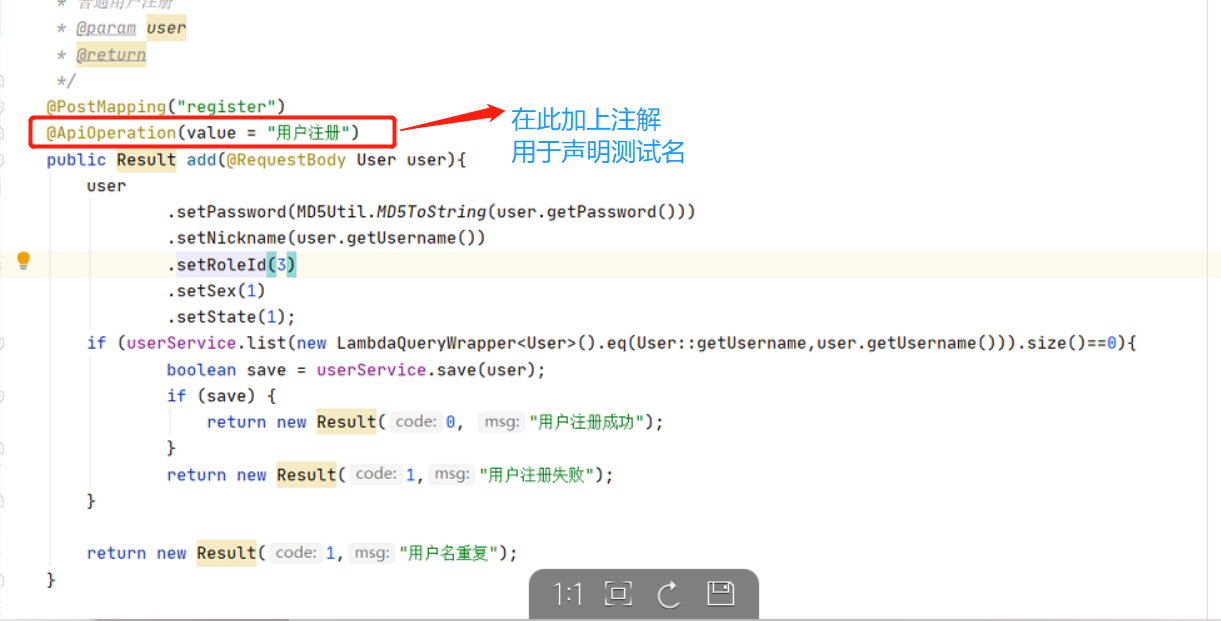
controller的配置
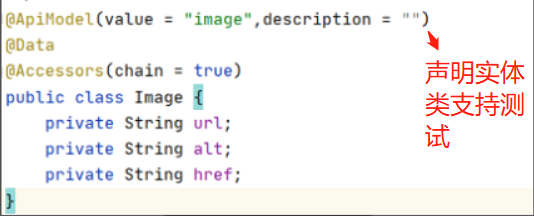
pojo实体类的配置
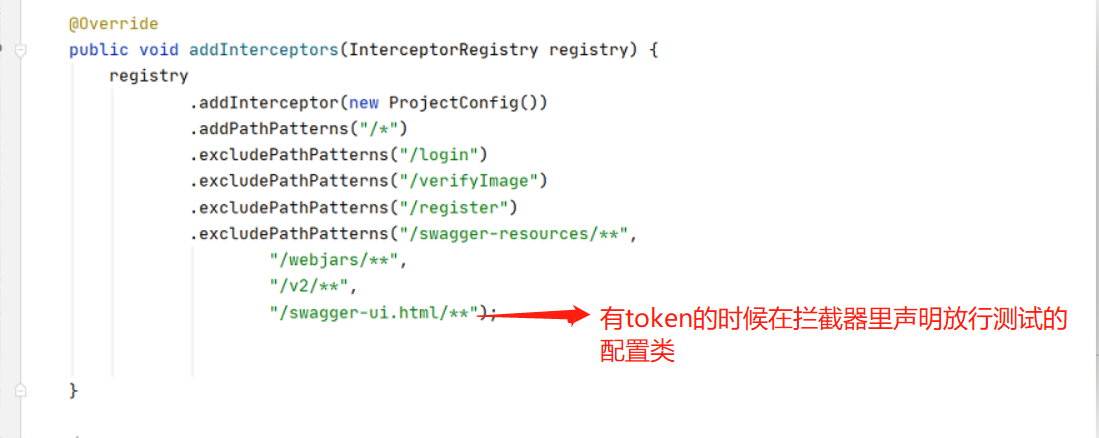
拦截器的配置
pom文件的配置
<!--swagger依赖-->
<dependency>
    <groupId>io.springfox</groupId>
    <artifactId>springfox-swagger2</artifactId>
    <version>2.9.2</version>
</dependency>
<dependency>
    <groupId>io.springfox</groupId>
    <artifactId>springfox-swagger-ui</artifactId>
    <version>2.9.2</version>
</dependency>
swaggeConf文件 用于生成swagger测试
package com.yk.config;

import org.springframework.context.annotation.Bean;
import org.springframework.context.annotation.Configuration;
import springfox.documentation.builders.ApiInfoBuilder;
import springfox.documentation.builders.PathSelectors;
import springfox.documentation.builders.RequestHandlerSelectors;
import springfox.documentation.service.ApiInfo;
import springfox.documentation.service.Contact;
import springfox.documentation.spi.DocumentationType;
import springfox.documentation.spring.web.plugins.Docket;
import springfox.documentation.swagger2.annotations.EnableSwagger2;
/*
* 用于配置SwaggerApi
* */
//开启Swagger使用(项目注释文档)
@EnableSwagger2
//标明是配置类
@Configuration
public class SwaggerConfig {

    @Bean
    public Docket createRestApi() {
        return new Docket(DocumentationType.SWAGGER_2)
                //用于生成API信息
                .apiInfo(apiInfo())
                //select()函数返回一个ApiSelectorBuilder实例,用来控制接口被swagger做成文档
                .select()
                //用于指定扫描哪个包下的接口
                .apis(RequestHandlerSelectors.basePackage("edu.xja.controller"))
                //选择所有的API,如果你想只为部分API生成文档,可以配置这里
                .paths(PathSelectors.any())
                .build();
    }

    /*
     *用于定义API主界面的信息,比如可以声明所有的API的总标题、描述、版本
     */
    private ApiInfo apiInfo() {
        return new ApiInfoBuilder()
                //用来自定义API的标题
                .title("Hello SwaggerAPI")
                //用来描述整体的API
                .description("我想在这里描述点啥,但是又不知道说些什么?")
                //创建人信息
                .contact(new Contact("sunwz","http://localhost:8080/swagger-ui.html","xxxxxxxx@163.com"))
                //用于定义服务的域名
                //.termsOfServiceUrl("")
                .version("1.0") //可以用来定义版本
                .build();
    }
}
application的配置文件
spring:
  datasource:
    url: jdbc:mysql:///shiyan6?useUnicode=true&characterEncoding=utf-8&serverTimezone=GMT%2B8
    username: root
    password: 123456
    driver-class-name: com.mysql.cj.jdbc.Driver
  mvc:
    pathmatch:
      matching-strategy: ant_path_matcher
Swagger UI增强
你可能会觉得现在这个UI不是很好看,现在有一些第三方提供了一些Swagger UI增强,比较流行的是
swagger-bootstrap-ui
<!-- 引入swagger-bootstrap-ui依赖包-->
<dependency>
<groupId>com.github.xiaoymin</groupId>
<artifactId>swagger-bootstrap-ui</artifactId>
<version>1.9.6</version>
</dependency>
在swagger配置类中增加注解 @EnableSwaggerBootstrapUI :
访问API: http://localhost:8080/doc.html ,即可预览到基于bootstarp的Swagger UI界面。

 浙公网安备 33010602011771号