
5四则运算系统结对
结对项目—小学生四则运算系统
首先,感谢队友~
一、Coding.Net项目地址:
https://git.coding.net/laolaf/nidayeproject.git
二、PSP表格
| psp | 任务内容 | 计划共需要的时间(min) |
| Planning | 计划 | 40 |
| Estimate | 估计时间,规划流程 | 20 |
| Development | 开发 | 1200 |
| Analysis | 需求分析&学习技术 | 120 |
|
Design Spec |
生成设计文档 | 40 |
| Design Review | 设计复审 | 20 |
| Coding Standard | 代码规范 | 5 |
| Design | 具体设计 | 30 |
| Coding | 具体编码 | 800 |
| Coding Review | 代码复审 | 45 |
| Test | 测试(自我测试,修改代码,提交修改) | 30 |
| Reporting | 报告 | 30 |
| Test Report | 测试报告 | 20 |
| Size Measurement | 计算工作量 | 20 |
三、接口设计
Information Hiding (信息隐藏)
防止修改程序的其他部分。提供一个稳定的接口保护程序的其余部分(最有可能改变的细节)。将所有的计算和展示模块进行类的封装,提高程序的安全性和稳定性。
Interface Design(接口设计)
模块化设计的思想,专注于每一个类,不同的类有不同的方法,使其相互独立,最后做统一调度,使其便于维护。
Loose Coupling(松耦合)
与紧耦合相对立,使程序内部不易相互错误影响。
四、计算模块接口的设计和实现
使用的类一览
Command.java
Cal.java
Arithmetic.java
Arithmetic Test.java
Athritic.java
Complex.java
English.java
Main.java
Timer.java
Timu2.java
视图如下
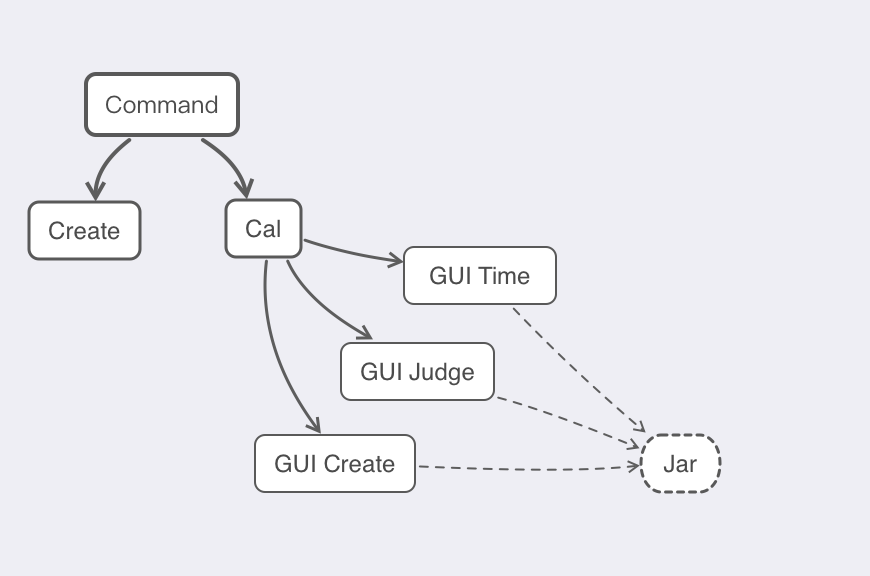
Command:参数抛出&提供测试
Create:制作题目,CreateQuestion
Cal:实现计算功能
GUI
GUI Time计算时间
GUI Judge进行判断,对错数目
GUI Create
另外,用到了按钮监听器和文件监听器
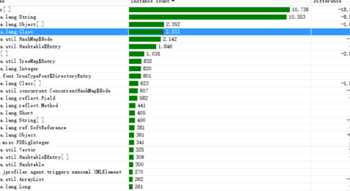
五、计算模块接口部分的性能改进
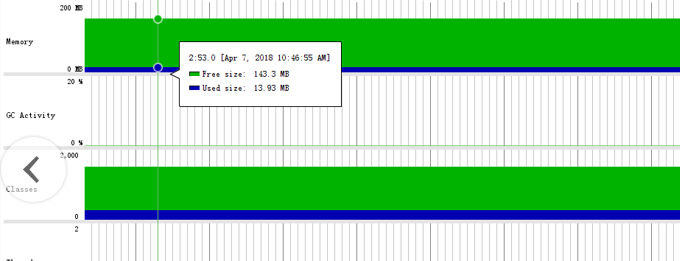
六、计算模块部分单元测试展示
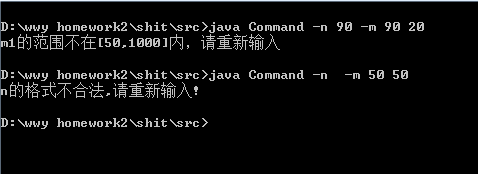
七、计算模块部分异常处理说明
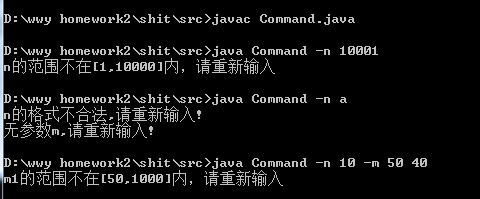
异常处理有五种,分别对参数输入错误(数字变字母),对m的输入大小范围有误,m后两个参数大小颠倒,对n的输入n的大小范围出问题,参数o的范围大小有问题(应该的范围:1到10),而这些代码的写法都差不多,因此就展示抛出参数错误的代码。(这里的抛出我是直接打印在黑窗上了,直接抛出可能会被当成Command本身出了问题。)
public static void parameter1Error(String ex,int i)throws Exception{
    ArrayList<String> ma= new ArrayList<String>();
    ma.add("-n");ma.add("-m");
    ma.add("-o");ma.add("-c");
    ma.add("-b");

if(!ma.contains(ex)){
        System.out.println("参数错误,重新输入");
    }
}
八、界面模块设计过程
guijudge核心代码:通过buttton1及监听类addActionListener完成记录和判断
|
1 2 3 4 5 6 7 8 9 10 11 12 13 14 15 16 17 18 19 20 21 22 23 24 25 26 27 |
|
guicreate:
JButton btnSubmitAnswer = new JButton("Submit answer");
btnSubmitAnswer.addActionListener(new ActionListener() {
public void actionPerformed(ActionEvent e) {
String[] ans =textArea_1.getText().split("\n");
String strings[]=new String[list11.size()];
for(int i=0,j=list11.size();i<j;i++){
strings[i]=list11.get(i);
} int count=0;
for(int i = 0;i < list11.size();i++){
//answer.add(ans[i]+"");}
//for(String str1:answer)
//{
if(ans[i].equals(strings[i]))
{
print.add("Right\n");
count++;
}
else{print.add("Wrong\n");}
}
//for(int i=0,j=print.size();i<j;i++){
textArea_2.append(print+"\n");
double sum =((double)count/(double)(list11.size()))*100;
lblNewLabel.setText("Accuracy:"+sum+"%");
// String [] print1=print;
//}
}
});
btnSubmitAnswer.setBounds(30, 236, 124, 23);
contentPane.add(btnSubmitAnswer);
getContentPane().setLayout(null);
JScrollPane scrollPane = new JScrollPane();
scrollPane.setBounds(20, 49, 146, 177);
contentPane.add(scrollPane);
scrollPane.setViewportView(textArea);
textArea.setBackground(UIManager.getColor("Button.background"));
textArea.setFont(new Font("MS Gothic", Font.PLAIN, 18));
JScrollPane scrollPane_1 = new JScrollPane();
scrollPane_1.setBounds(176, 49, 62, 177);
contentPane.add(scrollPane_1);
textArea_1.setFont(new Font("Monospaced", Font.PLAIN, 15));
scrollPane_1.setViewportView(textArea_1);
JScrollPane scrollPane_2 = new JScrollPane();
scrollPane_2.setBounds(265, 49, 62, 177);
contentPane.add(scrollPane_2);
textArea_2.setFont(new Font("Monospaced", Font.PLAIN, 18));
scrollPane_2.setViewportView(textArea_2);
textArea_2.setBackground(UIManager.getColor("Button.background"));
JButton btnCallTimer = new JButton("Call timer");
btnCallTimer.addActionListener(new ActionListener() {
public void actionPerformed(ActionEvent e) {
new timer().setVisible(true); }
});
btnCallTimer.setBounds(297, 238, 127, 23);
contentPane.add(btnCallTimer);
setDefaultCloseOperation(JFrame.EXIT_ON_CLOSE);
setBounds(100, 100, 450, 300);
contentPane = new JPanel();
contentPane.setForeground(Color.BLACK);
contentPane.setBorder(new EmptyBorder(5, 5, 5, 5));
setContentPane(contentPane);
contentPane.setLayout(null);
JLabel lblQing = new JLabel("\u8BF7\u8F93\u5165\u9898\u76EE\u6570\u91CF");
lblQing.setBounds(78, 10, 103, 35);
contentPane.add(lblQing);
textField = new JTextField();
textField.setBounds(191, 17, 66, 21);
contentPane.add(textField);
textField.setColumns(10);
|
1
|
|
以及:
|
1
2
3
4
5
6
7
8
9
10
11
12
13
14
15
16
17
18
19
20
21
22
23
24
25
26
27
28
29
30
31
32
33
34
35
36
37
38
39
40
41
42
43
44
45
46
47
48
49
50
51
52
53
54
55
56
57
58
59
|
JButton btnSubmitAnswer = new JButton("Submit answer"); btnSubmitAnswer.addActionListener(new ActionListener() { public void actionPerformed(ActionEvent e) { String[] ans =textArea_1.getText().split("\n"); String strings[]=new String[list11.size()]; for(int i=0,j=list11.size();i<j;i++){ strings[i]=list11.get(i); } int count=0; for(int i = 0;i < list11.size();i++){ //answer.add(ans[i]+"");} //for(String str1:answer) //{ if(ans[i].equals(strings[i])) { print.add("Right\n"); count++; } else{print.add("Wrong\n");} } //for(int i=0,j=print.size();i<j;i++){ textArea_2.append(print+"\n"); double sum =((double)count/(double)(list11.size()))*100; lblNewLabel.setText("Accuracy:"+sum+"%"); // String [] print1=print; //} } }); btnSubmitAnswer.setBounds(30, 236, 124, 23); contentPane.add(btnSubmitAnswer); getContentPane().setLayout(null); JScrollPane scrollPane = new JScrollPane(); scrollPane.setBounds(20, 49, 146, 177); contentPane.add(scrollPane); scrollPane.setViewportView(textArea); textArea.setBackground(UIManager.getColor("Button.background")); textArea.setFont(new Font("MS Gothic", Font.PLAIN, 18)); JScrollPane scrollPane_1 = new JScrollPane(); scrollPane_1.setBounds(176, 49, 62, 177); contentPane.add(scrollPane_1); textArea_1.setFont(new Font("Monospaced", Font.PLAIN, 15)); scrollPane_1.setViewportView(textArea_1); JScrollPane scrollPane_2 = new JScrollPane(); scrollPane_2.setBounds(265, 49, 62, 177); contentPane.add(scrollPane_2); textArea_2.setFont(new Font("Monospaced", Font.PLAIN, 18)); scrollPane_2.setViewportView(textArea_2); textArea_2.setBackground(UIManager.getColor("Button.background")); JButton btnCallTimer = new JButton("Call timer"); btnCallTimer.addActionListener(new ActionListener() { public void actionPerformed(ActionEvent e) { new timer().setVisible(true); } }); btnCallTimer.setBounds(297, 238, 127, 23); contentPane.add(btnCallTimer); |
九、界面模块与计算模块的对接
调用Cal的cal方法,原先求值和现在通过了一次数据类型转换。
|
1
2
3
4
|
String c = (data1+operator[i]+data2+"="); textArea.append(c+"\n"); String rightanswer=Cal.cal(data1,operator[i],data2); list11.add(rightanswer); |
Cal模块:
|
1
2
3
4
5
6
7
8
9
10
11
12
13
14
15
16
17
18
19
20
21
22
23
24
25
26
27
28
29
30
31
32
33
34
35
36
37
38
39
40
41
42
43
44
45
46
47
48
49
50
51
52
53
54
55
56
57
58
59
60
61
62
63
64
65
66
67
68
69
70
71
72
73
74
75
76
77
78
79
|
BigDecimal jieguo; public BigDecimal Cal(String str) { if (str == null) { return null; } String fuhao = ""; int index = 0; str = str.replaceAll("--", "+"); // 等价替换; str = str.replaceAll(" ", ""); // 去掉空格 fuhao = "("; index = str.lastIndexOf(fuhao); if (index >= 0) { int rightIndex = str.indexOf(")", index); String left = str.substring(0, index); String right = ""; if (rightIndex + 1 < str.length()) { right = str.substring(rightIndex + 1); } BigDecimal middle = Cal(str.substring(index + 1, rightIndex)); return Cal(left + middle + right); } fuhao = "+"; index = str.lastIndexOf(fuhao); if (index > 0) { BigDecimal left = Cal(str.substring(0, index)); BigDecimal right = Cal(str.substring(index + 1)); return left.add(right); } fuhao = "-"; index = str.lastIndexOf(fuhao); if (index == 0) { // 负数处理 BigDecimal result = Cal(str.substring(index + 1)); if (result.compareTo(new BigDecimal("0")) == -1) { // 小于0 return result.abs(); // 绝对值 } else { return result.negate(); // 相反数 } } else if (index > 0) { BigDecimal left = Cal(str.substring(0, index)); BigDecimal right = Cal(str.substring(index + 1)); return left.subtract(right); } fuhao = "*"; index = str.lastIndexOf(fuhao); if (index > 0) { BigDecimal left = Cal(str.substring(0, index)); BigDecimal right = Cal(str.substring(index + 1)); return left.multiply(right); } fuhao = "÷"; index = str.lastIndexOf(fuhao); if (index > 0) { BigDecimal left = Cal(str.substring(0, index)); BigDecimal right = Cal(str.substring(index + 1)); return left.divide(right); } return new BigDecimal(str); |
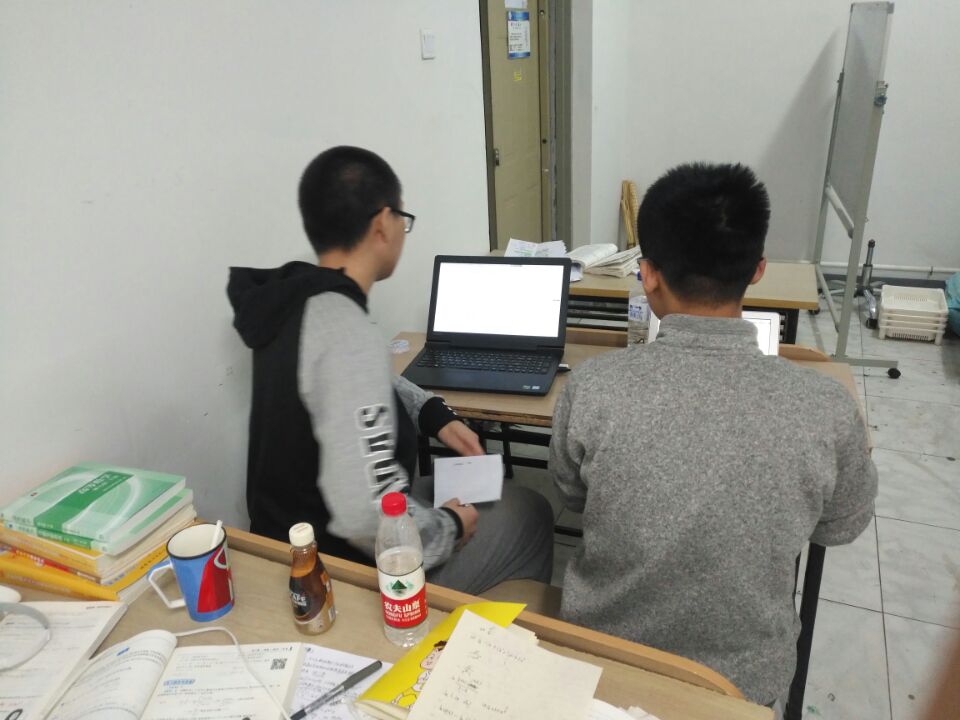
十、结对过程(照片)
十一、结对编程的优点和缺点
结对编程的优点:
结对编程是一个特殊的开发模式,开发复审一体化的模式。
结对编程是个渐进的过程,度过学习阶段后,开发的质量和效率大大提高。
两人结对,可以分工合作,提高效率,减轻负担。
结对编程的缺点:
结对编程需要和队友交流,需要较好的交流技巧。
考验合作的能力,需要有学习适应的过程。
队友的优点和缺点
队友coding水平还是可以的,
缺点,不是很擅长与人交流。
十二、在附录提供的PSP表格记录各个模块耗时

 浙公网安备 33010602011771号