
2.0docker安装
参考安装地址:https://developer.aliyun.com/article/110806
https://www.cnblogs.com/straycats/p/10680502.html
1、关闭防火墙 设置开机不自启
[root@localhost ~]# systemctl stop firewalld
[root@localhost ~]# systemctl status firewalld
● firewalld.service - firewalld - dynamic firewall daemon
Loaded: loaded (/usr/lib/systemd/system/firewalld.service; enabled; vendor preset: enabled)
Active: inactive (dead) since Tue 2020-09-01 13:09:17 CST; 920ms ago
Docs: man:firewalld(1)
Process: 755 ExecStart=/usr/sbin/firewalld --nofork --nopid $FIREWALLD_ARGS (code=exited, status=0/SUCCESS)
Main PID: 755 (code=exited, status=0/SUCCESS)
Sep 01 11:43:27 localhost.localdomain systemd[1]: Starting firewalld - dynamic firewall daemon...
Sep 01 11:43:27 localhost.localdomain systemd[1]: Started firewalld - dynamic firewall daemon.
Sep 01 13:09:16 localhost.localdomain systemd[1]: Stopping firewalld - dynamic firewall daemon...
Sep 01 13:09:17 localhost.localdomain systemd[1]: Stopped firewalld - dynamic firewall daemon.
[root@localhost ~]# systemctl enable firewalld
2、获取官方镜像源
[root@localhost ~]# wget -P /etc/yum.repos.d/ https://download.docker.com/linux/centos/docker-ce.repo
--2020-09-01 13:09:43-- https://download.docker.com/linux/centos/docker-ce.repo
Resolving download.docker.com (download.docker.com)... 13.32.54.120, 13.32.54.77, 13.32.54.53, ...
Connecting to download.docker.com (download.docker.com)|13.32.54.120|:443... connected.
HTTP request sent, awaiting response... 200 OK
Length: 2424 (2.4K) [binary/octet-stream]
Saving to: ‘/etc/yum.repos.d/docker-ce.repo’
100%[===================================================================================>] 2,424 --.-K/s in 0s
2020-09-01 13:09:44 (479 MB/s) - ‘/etc/yum.repos.d/docker-ce.repo’ saved [2424/2424]
[root@localhost ~]# cd /etc/yum.repos.d/
[root@localhost yum.repos.d]# ll
total 40
-rw-r--r--. 1 root root 1664 Sep 5 2019 CentOS-Base.repo
-rw-r--r--. 1 root root 1309 Sep 5 2019 CentOS-CR.repo
-rw-r--r--. 1 root root 649 Sep 5 2019 CentOS-Debuginfo.repo
-rw-r--r--. 1 root root 314 Sep 5 2019 CentOS-fasttrack.repo
-rw-r--r--. 1 root root 630 Sep 5 2019 CentOS-Media.repo
-rw-r--r--. 1 root root 1331 Sep 5 2019 CentOS-Sources.repo
-rw-r--r--. 1 root root 6639 Sep 5 2019 CentOS-Vault.repo
-rw-r--r--. 1 root root 2424 Jul 28 19:08 docker-ce.repo
-rw-r--r--. 1 root root 62 Sep 1 12:54 local.repo
[root@localhost yum.repos.d]#
3、安装docker
[root@localhost yum.repos.d]# yum install -y docker-ce
当然也可以选择安装指定版本(毕竟生产环境使用服务不能太过激进)
# 用下面的命令可以查看可以安装的版本
[root@localhost yum.repos.d]# yum list docker-ce --showduplicates | sort -r
* updates: mirrors.aliyun.com
Loading mirror speeds from cached hostfile
Loaded plugins: fastestmirror
Installed Packages
* extras: mirrors.aliyun.com
docker-ce.x86_64 3:19.03.9-3.el7 docker-ce-stable
docker-ce.x86_64 3:19.03.8-3.el7 docker-ce-stable
docker-ce.x86_64 3:19.03.7-3.el7 docker-ce-stable
docker-ce.x86_64 3:19.03.6-3.el7 docker-ce-stable
docker-ce.x86_64 3:19.03.5-3.el7 docker-ce-stable
docker-ce.x86_64 3:19.03.4-3.el7 docker-ce-stable
docker-ce.x86_64 3:19.03.3-3.el7 docker-ce-stable
docker-ce.x86_64 3:19.03.2-3.el7 docker-ce-stable
docker-ce.x86_64 3:19.03.1-3.el7 docker-ce-stable
docker-ce.x86_64 3:19.03.12-3.el7 docker-ce-stable
docker-ce.x86_64 3:19.03.12-3.el7 @docker-ce-stable
docker-ce.x86_64 3:19.03.11-3.el7 docker-ce-stable
docker-ce.x86_64 3:19.03.10-3.el7 docker-ce-stable
docker-ce.x86_64 3:19.03.0-3.el7 docker-ce-stable
docker-ce.x86_64 3:18.09.9-3.el7 docker-ce-stable
docker-ce.x86_64 3:18.09.8-3.el7 docker-ce-stable
docker-ce.x86_64 3:18.09.7-3.el7 docker-ce-stable
docker-ce.x86_64 3:18.09.6-3.el7 docker-ce-stable
docker-ce.x86_64 3:18.09.5-3.el7 docker-ce-stable
docker-ce.x86_64 3:18.09.4-3.el7 docker-ce-stable
docker-ce.x86_64 3:18.09.3-3.el7 docker-ce-stable
docker-ce.x86_64 3:18.09.2-3.el7 docker-ce-stable
docker-ce.x86_64 3:18.09.1-3.el7 docker-ce-stable
docker-ce.x86_64 3:18.09.0-3.el7 docker-ce-stable
docker-ce.x86_64 18.06.3.ce-3.el7 docker-ce-stable
docker-ce.x86_64 18.06.2.ce-3.el7 docker-ce-stable
docker-ce.x86_64 18.06.1.ce-3.el7 docker-ce-stable
docker-ce.x86_64 18.06.0.ce-3.el7 docker-ce-stable
docker-ce.x86_64 18.03.1.ce-1.el7.centos docker-ce-stable
docker-ce.x86_64 18.03.0.ce-1.el7.centos docker-ce-stable
docker-ce.x86_64 17.12.1.ce-1.el7.centos docker-ce-stable
docker-ce.x86_64 17.12.0.ce-1.el7.centos docker-ce-stable
docker-ce.x86_64 17.09.1.ce-1.el7.centos docker-ce-stable
docker-ce.x86_64 17.09.0.ce-1.el7.centos docker-ce-stable
docker-ce.x86_64 17.06.2.ce-1.el7.centos docker-ce-stable
docker-ce.x86_64 17.06.1.ce-1.el7.centos docker-ce-stable
docker-ce.x86_64 17.06.0.ce-1.el7.centos docker-ce-stable
docker-ce.x86_64 17.03.3.ce-1.el7 docker-ce-stable
docker-ce.x86_64 17.03.2.ce-1.el7.centos docker-ce-stable
docker-ce.x86_64 17.03.1.ce-1.el7.centos docker-ce-stable
docker-ce.x86_64 17.03.0.ce-1.el7.centos docker-ce-stable
* base: mirrors.aliyun.com
Available Packages
4、比方想安装docker ce的版本18.03.0
[root@localhost yum.repos.d]# yum install -y docker-ce-18.03.0.ce-1.el7.centos
Loaded plugins: fastestmirror
Loading mirror speeds from cached hostfile
* base: mirrors.aliyun.com
* extras: mirrors.aliyun.com
* updates: mirrors.aliyun.com
Package matching docker-ce-18.03.0.ce-1.el7.centos.x86_64 already installed. Checking for update.
Nothing to do
5、设置镜像加速器
墙的缘故,访问docker hub拉取和推送的速度不稳定,故需要设置镜像加速器来解决这个问题。
我使用的是阿里云的镜像加速器。浏览器访问https://cr.console.aliyun.com/undefined/instances/mirrors
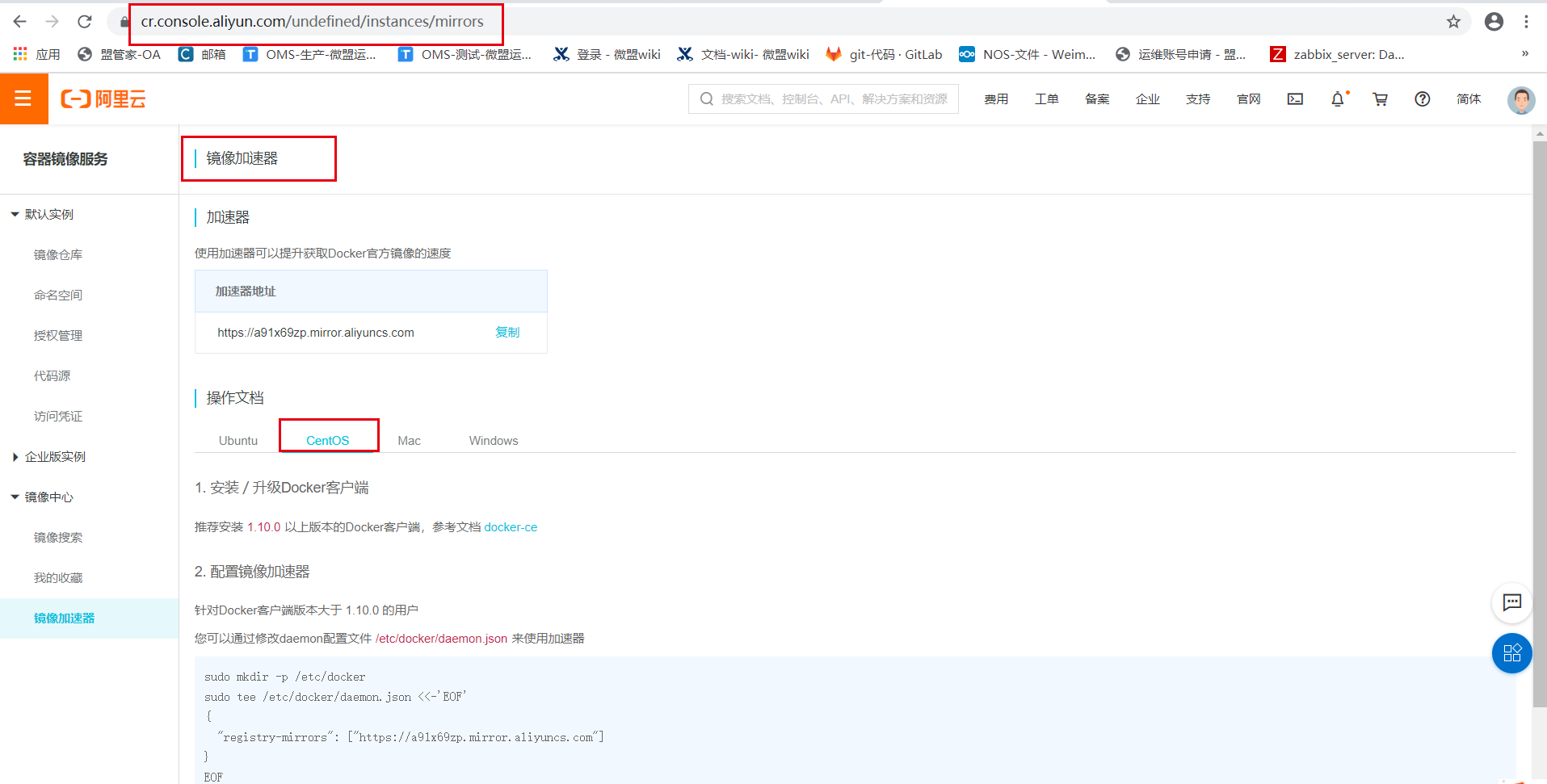
配置镜像加速器
[root@localhost yum.repos.d]# sudo mkdir -p /etc/docker
[root@localhost yum.repos.d]# sudo tee /etc/docker/daemon.json <<-'EOF'
> {
> "registry-mirrors": ["https://a91x69zp.mirror.aliyuncs.com"]
> }
> EOF
sudo mkdir -p /etc/docker
sudo tee /etc/docker/daemon.json <<-'EOF'
{
"registry-mirrors": [
"https://do.nark.eu.org",
"https://dc.j8.work",
"https://docker.m.daocloud.io",
"https://dockerproxy.com",
"https://docker.mirrors.ustc.edu.cn",
"https://docker.nju.edu.cn"
]
}
EOF
sudo systemctl daemon-reload
sudo systemctl restart docker
[root@localhost yum.repos.d]# cd /etc/docker/daemon.json
-bash: cd: /etc/docker/daemon.json: Not a directory
[root@localhost yum.repos.d]# cat /etc/docker/daemon.json
{
"registry-mirrors": ["https://a91x69zp.mirror.aliyuncs.com"]
修改配置文件后需要重载配置文件和重启容器[root@docker ~]# systemctl daemon-reload[root@docker ~]# systemctl restart docker6、设置开机自启
[root@localhost yum.repos.d]# systemctl start docker
[root@localhost yum.repos.d]# systemctl status docker
● docker.service - Docker Application Container Engine
Loaded: loaded (/usr/lib/systemd/system/docker.service; disabled; vendor preset: disabled)
Active: active (running) since Tue 2020-09-01 13:29:47 CST; 6s ago
Docs: https://docs.docker.com
Main PID: 9409 (dockerd)
Tasks: 10
Memory: 38.3M
CGroup: /system.slice/docker.service
└─9409 /usr/bin/dockerd -H fd:// --containerd=/run/containerd/containerd.sock
Sep 01 13:29:47 localhost.localdomain dockerd[9409]: time="2020-09-01T13:29:47.046546071+08:00" level=info msg="schem...=grpc
Sep 01 13:29:47 localhost.localdomain dockerd[9409]: time="2020-09-01T13:29:47.046583906+08:00" level=info msg="ccRes...=grpc
Sep 01 13:29:47 localhost.localdomain dockerd[9409]: time="2020-09-01T13:29:47.046608195+08:00" level=info msg="Clien...=grpc
Sep 01 13:29:47 localhost.localdomain dockerd[9409]: time="2020-09-01T13:29:47.071458800+08:00" level=info msg="Loadi...art."
Sep 01 13:29:47 localhost.localdomain dockerd[9409]: time="2020-09-01T13:29:47.235516123+08:00" level=info msg="Defau...ress"
Sep 01 13:29:47 localhost.localdomain dockerd[9409]: time="2020-09-01T13:29:47.291065247+08:00" level=info msg="Loadi...one."
Sep 01 13:29:47 localhost.localdomain dockerd[9409]: time="2020-09-01T13:29:47.310772479+08:00" level=info msg="Docke...03.12
Sep 01 13:29:47 localhost.localdomain dockerd[9409]: time="2020-09-01T13:29:47.310944944+08:00" level=info msg="Daemo...tion"
Sep 01 13:29:47 localhost.localdomain dockerd[9409]: time="2020-09-01T13:29:47.331091903+08:00" level=info msg="API l...sock"
Sep 01 13:29:47 localhost.localdomain systemd[1]: Started Docker Application Container Engine.
Hint: Some lines were ellipsized, use -l to show in full.
[root@localhost yum.repos.d]# systemctl enable docker
Created symlink from /etc/systemd/system/multi-user.target.wants/docker.service to /usr/lib/systemd/system/docker.service.
[root@localhost yum.repos.d]#
7、查看docker版本
[root@localhost ~]# docker version
Client: Docker Engine - Community
Version: 19.03.12
API version: 1.40
Go version: go1.13.10
Git commit: 48a66213fe
Built: Mon Jun 22 15:46:54 2020
OS/Arch: linux/amd64
Experimental: false
Server: Docker Engine - Community
Engine:
Version: 19.03.12
API version: 1.40 (minimum version 1.12)
Go version: go1.13.10
Git commit: 48a66213fe
Built: Mon Jun 22 15:45:28 2020
OS/Arch: linux/amd64
Experimental: false
containerd:
Version: 1.2.13
GitCommit: 7ad184331fa3e55e52b890ea95e65ba581ae3429
runc:
Version: 1.0.0-rc10
GitCommit: dc9208a3303feef5b3839f4323d9beb36df0a9dd
docker-init:
Version: 0.18.0
GitCommit: fec3683

 浙公网安备 33010602011771号