


vuex中mutations怎么调用
做项目时候需要设定一个状态值为全局可以使用。所以使用vuex 在index.js当中state内设定属性。
state: {
    // 切换播放按钮
    playPause: true
  },
  mutations: {
    updataPlayPause: function (state) {
      state.playPause = !state.playPause
    }
  }
而如果在组件当中不可以直接对 state内属性直接进行修改。需要在mutations内定义方法对其进行修改。
根据视频教程书写 调用updataplaypause方法则会报错
import { mapMutations, mapState } from 'vuex'
export default {
  data () {
    return {
      isShow: true
    }
  },
  computed: {
    ...mapState(['playList', 'playListIndex', 'playPause']),
    ...mapMutations(['updataPlayPause'])
  },
  mounted () {

  },
  methods: {
    // 播放音乐
    play: function () {
      // this.$refs.audio.paused 暂停状态 如果暂停 就点击播放
      if (this.$refs.audio.paused) {
        this.$refs.audio.play()
        this.updataPlayPause()
      } else {
        this.$refs.audio.pause()
        this.updataPlayPause()
      }
    }
  }

}
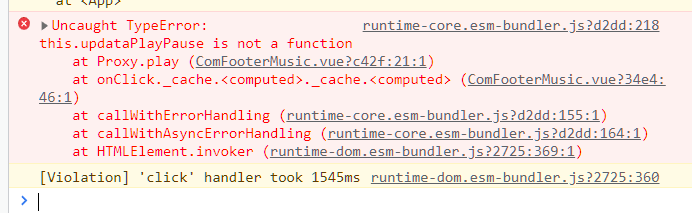
updataplaypause 不是一个函数,分析是因为this.updataplaypause() 被当做在组件内的一个方法,而又没有定义,所以报错。
修改调用方式。
methods: {
    // 播放音乐
    play: function () {
      // this.$refs.audio.paused 暂停状态 如果暂停 就点击播放
      if (this.$refs.audio.paused) {
        this.$refs.audio.play()
        this.$store.commit('updataPlayPause')
      } else {
        this.$refs.audio.pause()
        this.$store.commit('updataPlayPause')
      }
    }
  }

 浙公网安备 33010602011771号