
仿外卖小程序菜单联动
仿外卖小程序菜单选择
仿美团外卖菜单分类,左右联动功能,顶部为轮播图,以及客服部分,主体部分为联动功能,滚动时,客服部分也显示在页面内,主体部分在红圈内。话不多说,直接上图
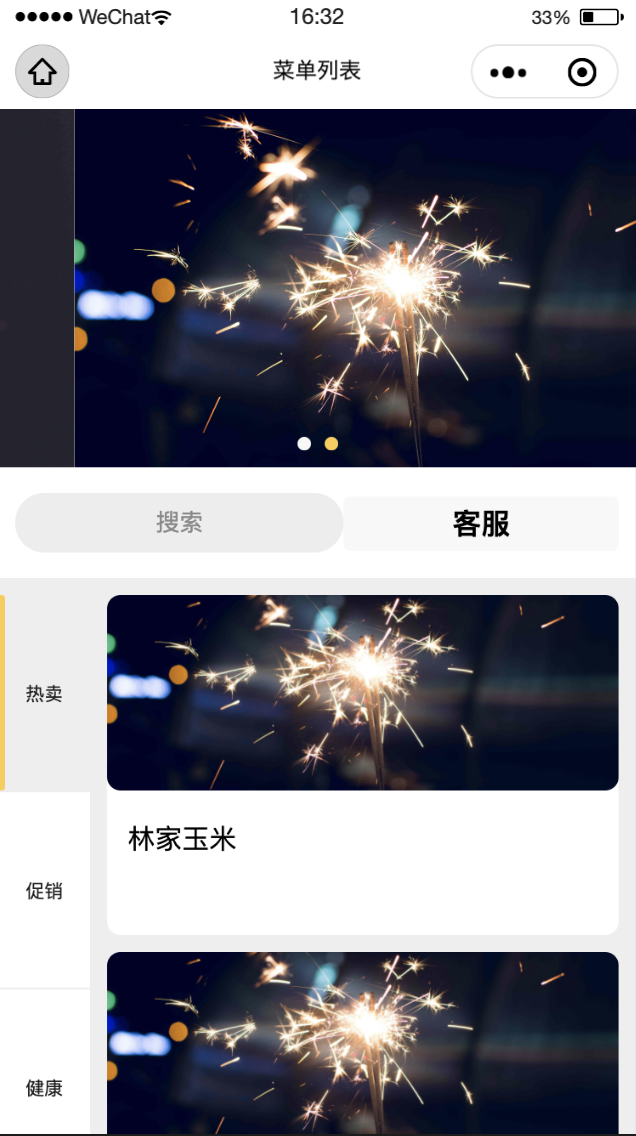
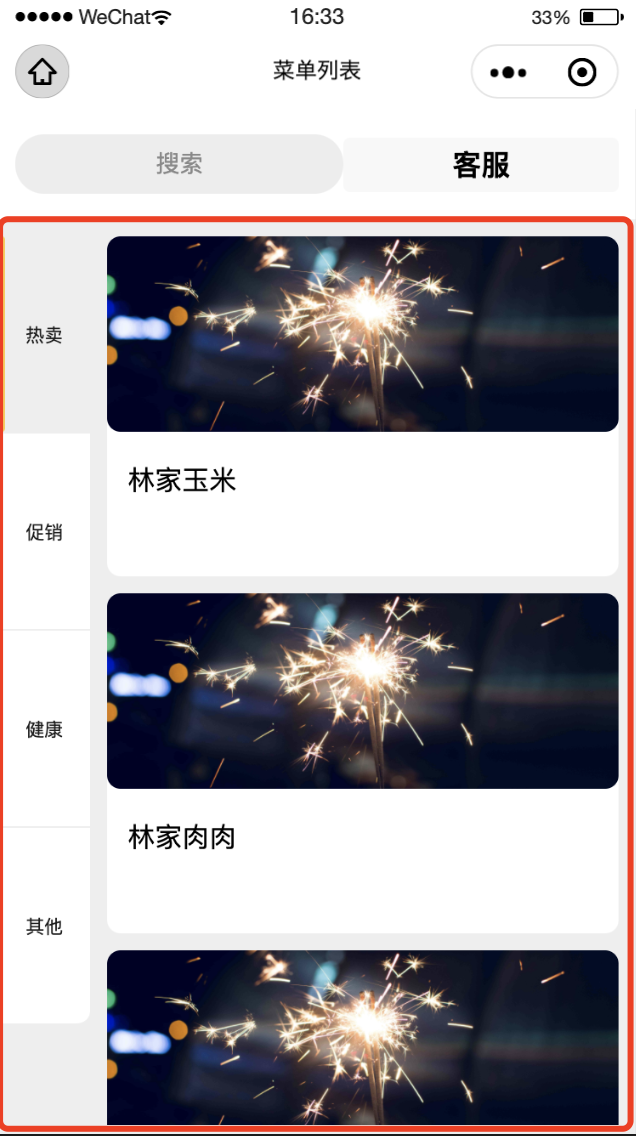
顶部:轮播图及客服
轮播图与客服部分,简单,直接上代码:
<view class="producttop">
    <swiper indicator-dots="true" autoplay="true" circular="true" style="height: 422rpx" indicator-color="#f8f8f8" indicator-active-color="#fccc48">
      <swiper-item wx:for="{{goodImages}}" wx:key="index">
        <view>
          <image src="{{item.imgUrl}}" class="slide-image" lazy-load='true' mode="aspectFill" />
        </view>
      </swiper-item>
    </swiper>
  </view>
  <view class='searchPro'>
    <view class='searchPro-t'>搜索</view>
    <button open-type="contact" show-message-card="true" class="service">
      客服
    </button>
  </view>
主体部分
主体部分用scroll-view组件,同时设置滚动方向 scroll-y="true", scroll-into-view 为子元素id,设置哪个方向可滚动,则在哪个方向滚动到该元素。id='type{{**parentIndex**}}' 这句必须存在,用来实现左边联动右边的效果
<view class="middle-content" style='height:{{conHeight}}rpx;'>
    <!-- 左侧 -->
    <scroll-view scroll-y="true" style='height:{{conHeight}}rpx;' class="cates">
      <view class="type {{index === navActive ? 'type-active' : 'cates-content'}}" wx:for="{{typeList}}" wx:key="index" data-index="{{index}}" data-id='type{{index}}' catchtap="chooseType">
        <view>
          {{item.typeName}}
        </view>
      </view>
    </scroll-view>

    <!-- 右侧 -->
    <scroll-view class="product-list" style='height:{{conHeight}}rpx;' scroll-y="true" scroll-into-view="{{contentActive}}" scroll-with-animation="true" bindscroll="onScroll">
      <view class="content" data-typeId="{{item.type}}" wx:for-index="parentIndex" id='type{{parentIndex}}' wx:for="{{goodList}}" wx:key="index">
        <view class='content-li' wx:for="{{item.list}}" wx:key="key">
          <image src="/images/trummer12.jpg" lazy-load='true' class="pro-img" mode="aspectFill" bindtap='proDetails' data-proid='{{item.goodsId}}' />
          <view class='content-detail'>
            <view class='pro-name'>{{item.goodsName}}</view>
          </view>
        </view>
      </view>
    </scroll-view>
  </view>
记录页面滚动的高度,以及每个类别的占的页面高度
//获取系统参数
    wx.getSystemInfo({
      success: (res) => {
        let windowHeight = (res.windowHeight * (750 / res.windowWidth));
        this.setData({
          conHeight: windowHeight - 160   //160 为页面顶部不滚动部分的高度
        })
      }
    })
    //获取每个元素高度 数组
    let heightArr = []
    let h = 0

    let query = wx.createSelectorQuery()
    query.selectAll('.content').boundingClientRect()
    query.exec(res => {
      res[0].forEach((item) => {
        h += item.height;
        heightArr.push(h);
      })
      this.setData({
        heightArr: heightArr
      })
    })
接下来是最核心的部分,页面滚动时执行的页面滚动事件,右侧页面滚动时计算滚动高度,判断左侧激活状态的类型。为了提高性能 ,这里同时使用了节流,代码如下:
onScroll: function(e) {
    const scrollTop = e.detail.scrollTop;
    const scorllArr = this.data.heightArr;
    //节流执行滚动效果
    if (scrollTop <= this.data.heightArr[this.data.heightArr.length - 1] - this.data.conHeight) {
      scrollToTop(scrollTop);
    }
    if (scrollTop >= scorllArr[scorllArr.length - 1] - (this.data.conHeight / 2)) {
      return;
    } else {
      for (let i = 0; i < scorllArr.length; i++) {
        if (scrollTop >= 0 && scrollTop < scorllArr[0]) {
          if (0 != this.data.lastActive) {
            this.setData({
              navActive: 0,
              lastActive: 0,
            })
          }
        } else if (scrollTop >= scorllArr[i - 1] && scrollTop < scorllArr[i]) {
          if (i != this.data.lastActive) {
            this.setData({
              navActive: i,
              lastActive: i,
            })
          }
        }
      }
    }
  },
不仅仅是滑动联动效果,还需要点击左侧菜单也可以使右侧内容直接联动到该类别的第一个元素位置
chooseType: function(e) {
    let typeid = e.currentTarget.dataset.id
    this.setData({
      navActive: e.currentTarget.dataset.index,//当前类型
      contentActive: typeid
    })
  }
右侧持续滑动后,不显示顶部轮播图,而搜索栏与联系客服栏则在页面顶部显示:
//右侧继续往下滑动后,不显示顶部轮播图
var systemInfo = wx.getSystemInfoSync();
let scrollFunc = function(e) {
  wx.pageScrollTo({
    scrollTop: 422 / 750 * systemInfo.windowWidth,//scrollTop的单位为px,顶部轮播图的高度为422rpx,此处scrollTop的值计算不懂的自行学下数学公式
    duration: 300
  })
}

 浙公网安备 33010602011771号