
Springboot实现Tomcat热部署
1开发者工具导入依赖
<dependency>
    <groupId>org.springframework.boot</groupId>
    <artifactId>spring-boot-devtools</artifactId>
    <optional>true</optional>
</dependency>
2使用构建项目操作启动热部署(ctrl+f9)
3自动启动热部署
设置自动构建项目,勾选Build project automatically‘

2Ctrl+Alt+Shift+/ 点击registry

3勾选app.runnging(表示运行的时候进行自动部署)
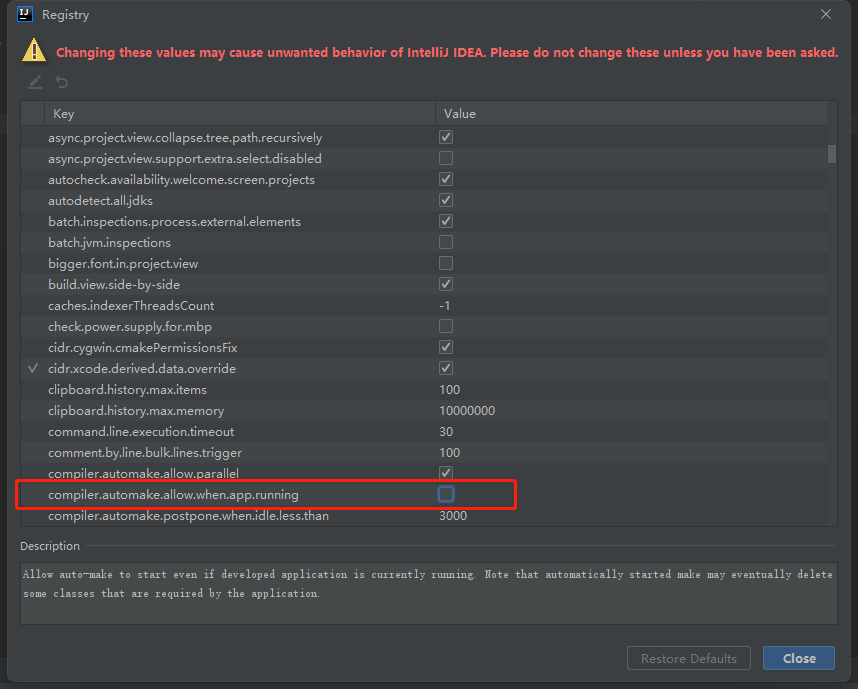
4.yml设置热部署的范围设置
devtools:
  restart:
    #设置不参与热部署的文件或文件夹
    exclude: static/**,public/**,config/application.yml
5关闭热部署
public static void main(String[] args) {
    System.setProperty("spring.devtools.restart.enabled","false");
    SpringApplication.run(DruidApplication.class, args);
}

 浙公网安备 33010602011771号