C++核心编程
五、文件操作
- C++文件操作需要文件流管理的头文件:
- 文本的类型
- 文本文件:ASCII码存放
- 二进制文件:用户不会直接读懂
- 操作文件三大类
- ofstream
- ifstream
- fstream
5.1文本文件
- 写文件
- 流程
- 包含头文件
#include<fstream>
- 创建流对象
oftream ofs;
- 打开文件
ofs.open("文件路径",打开方式);
- 关闭文件
ofs.close();
- 文件的打开方式
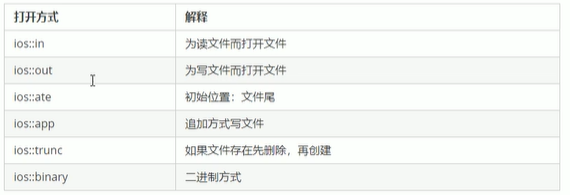
- 两种方法配合使用文件打开方式,使用操作符号“|”
- 例如:用二进制写文件
ios::binary|ios::out
- 读文件
- 流程
- 包含头文件
#include<fstream>
- 创建流对象
iftream ifs;
- 打开文件
ifs.open("文件路径",打开方式);
- 读数据:
四种方式读取
- 关闭文件
ifs.close();
- 程序实例
#include<iostream>
#include<fstream>
#include<string>
using namespace std;


//文件中的写文件
void test01() {

	//创建流对象,输出流对象
	ofstream ofs;
	//打开文件 文件路径 打开方式
	ofs.open("./test.txt", ios::out);

	ofs << "写入的数据" << endl;

	ofs.close();


}

void test02() {
	ifstream ifs;
	ifs.open("./test.txt", ios::in);
	if (!ifs.is_open()) {
		cout << "文件打开失败" << endl;
		return;
	}
	//读数据方式1
	char buf[1024] = { 0 };
	while (ifs >> buf) {
		cout << buf << endl;
	}
	ifs.close();

	//读取方式2
	ifs.open("./test.txt", ios::in);
	char buf2[1024] = { 0 };
	while (ifs.getline(buf2, sizeof(buf2))
	){
		cout << buf2 << endl;
	}
	ifs.close();

	ifs.open("./test.txt", ios::in);
	//读取方式3
	string buf3;
	while (getline(ifs, buf3)) {
		cout << buf3 << endl;
	}
	ifs.close();


	ifs.open("./test.txt", ios::in);
	//读取方式4
	char c;
	//EOF文件尾标志
	while ((c = ifs.get()) != EOF) {
		cout << c ;
	}
	ifs.close();
}

int main() {

	test01();
	test02();
	return 0;
}
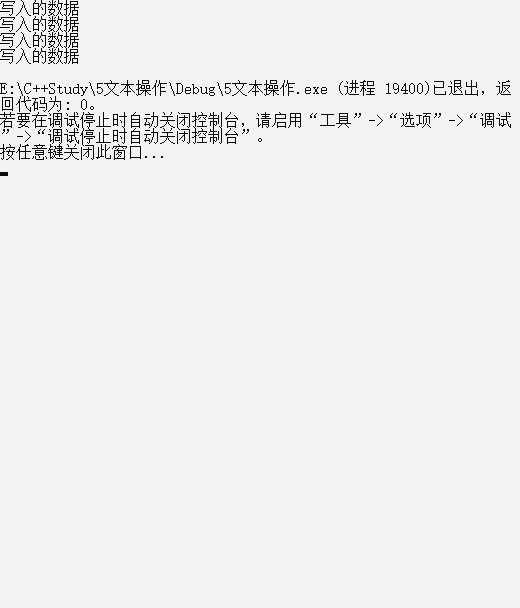
- 输出结果
5.2二进制文件
- 写文件&读文件
#include<iostream>
#include<fstream>
using namespace std;


//二进制文件 写文件
class Person {
public:
	char m_Name[64];//姓名
	int m_Age;
};

void test01() {

	//流对象可以在创建的时候就进行初始化工作
	ofstream ofs("./person.txt", ios::out | ios::binary);
//	ofs.open("./person.txt", ios::out | ios::binary);

	Person p = { "张三",18 };
	ofs.write((const char *)&p, sizeof(Person));
	ofs.close();

}

//二进制文件 读取文件
void test02() {

	ifstream ifs;
	ifs.open("person.txt", ios::in | ios::binary);
	if (!(ifs.is_open())) {
		cout << "文件打开失败" << endl;
		system("pause");
		return;
	}
	Person p;
	ifs.read((char*)&p, sizeof(Person));
	cout << "姓名:" << p.m_Name << " 年龄:" << p.m_Age << endl;
	ifs.close();


}
int main() {

	test01();
	test02();
	return 0;
}
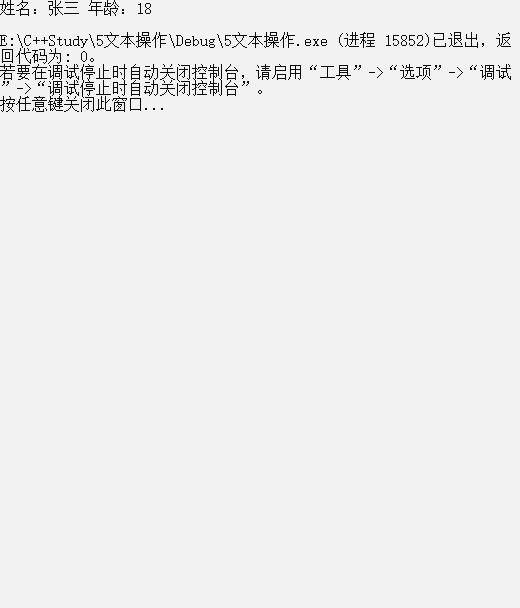
- 运行结果


 浙公网安备 33010602011771号