
Struts2基础2
一、struts中的API
1)完全解耦合的方式
1.1首先创建一个示例工程,在WEB-INF下创建lib文件夹,把struts2核心jar包导入。在工程下创建resource文件夹,并将其设为资源文件夹,把struts.xml放入。在web.xml中配置核心控制器。
1.2创建一个表单jsp,提交到form.action,在struts.xml中配置form.action

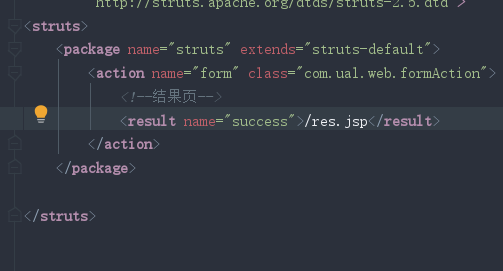
1.3在action类中接收参数并向域中写入
import com.opensymphony.xwork2.ActionContext;
import com.opensymphony.xwork2.ActionSupport;
import org.apache.struts2.dispatcher.HttpParameters;

import java.util.Arrays;

public class formAction extends ActionSupport {
    public String execute(){
        //接收表单中的参数
        ActionContext context = ActionContext.getContext();
        HttpParameters parameters = context.getParameters();
        //获取参数
        String username = parameters.get("username").getValue();
        System.out.println(username);
        String password = parameters.get("password").getValue();
        System.out.println(password);
        String[] hobbies = parameters.get("hobby").getMultipleValues();//获取多个值
        System.out.println(Arrays.toString(hobbies));
        System.out.println("接收到表单");
        //往域中写入数据
        //往request域中:
        context.put("reqName","reqValue");
        //往session:
        context.getSession().put("sessionName","sessionValue");
        //往application域
        context.getApplication().put("name","Applicationvalue");

     return  SUCCESS;
    }
}
接收表单数据:通过ActionContext.getContext获取ActionContext对象,通过该对象获取HttpParameters对象。

获取参数:

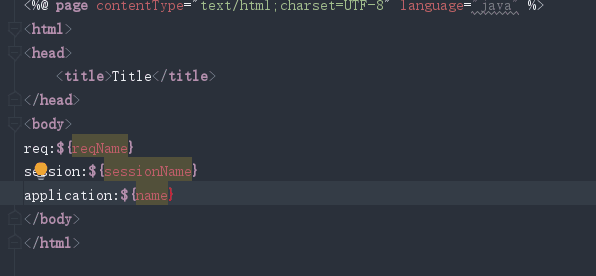
往域中存参

在jsp中获取参数
2)使用Servlet的原声API
    public String form2(){
        System.out.println("form2");
        //获取原生api
        HttpServletRequest request = ServletActionContext.getRequest();
        //获取参数
        String username = request.getParameter("username");
        String pasword = request.getParameter("password");
        String[] hobbies = request.getParameterValues("hobby");
        System.out.println(username);
        System.out.println(pasword);
        System.out.println(Arrays.toString(hobbies));
        //往域中存数据
        request.setAttribute("reqNmae2","reqValue2");
        request.getSession().setAttribute("sessionName2","sessionValue2");
        ServletActionContext.getServletContext().setAttribute("contextName","contextValue");

        return SUCCESS;
    }
3)接口注入的方式
二、结果页配置
1)局部配置
局部结果页面:在action中的result标签中配置
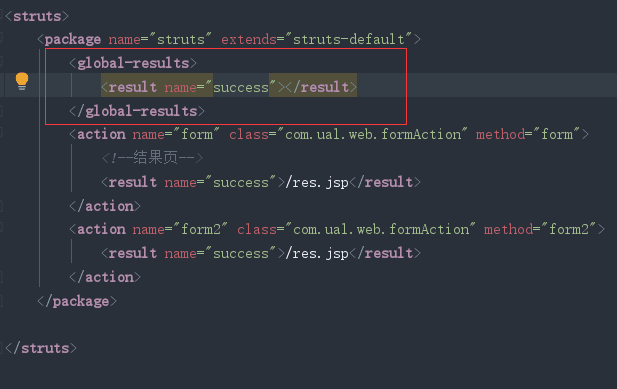
2)全局配置
全局结果页指的是,在包中配置一次,其他的在这个包中的action只要返回这个结果,都可以跳转这个页面。
先在局部找,局部没有找到就到全局找
三、接收参数
一般在开发中不会使用一中提到的方式
当发送一个请求时,除了使用requestAPI来接收参数之外,struts内部提供了三种接收参数方式
1)接收参数方式
1.提供属性set方法的方式
在Action中提供对应属性的set方法,会自动接收参数,并且会自动做类型转换
缺点:接收大量数据时,还需要自己手动封装成对象。
package com.ual.web;

import com.opensymphony.xwork2.ActionSupport;

import java.util.List;

public class formAction3  extends ActionSupport {
    //这里的属性值要与表单中提交的name值相同
    private  String username;
    private Integer age;
    private List hobby;
    //提供set方法
    public void setUsername(String username) {
        this.username = username;
    }

    public void setAge(Integer age) {
        this.age = age;
    }

    public void setHobby(List hobby) {
        this.hobby = hobby;
    }

    public String form3(){
        System.out.println(username);
        System.out.println(age);
        System.out.println(hobby);
        return null;
    }
}
2.页面中提供表达式
2.1创建一个接收参数的domain模型,模型中的字段与提交表单对应。并提供对应get,set方法。
package com.ual.domain;

import java.util.List;

public class User {
    private String username;
    private Integer age;
    private List hobby;

    public String getUsername() {
        return username;
    }

    public void setUsername(String username) {
        this.username = username;
    }

    public Integer getAge() {
        return age;
    }

    public void setAge(Integer age) {
        this.age = age;
    }

    public List getHobby() {
        return hobby;
    }

    public void setHobby(List hobby) {
        this.hobby = hobby;
    }

    @Override
    public String toString() {
        return "User{" +
                "username='" + username + '\'' +
                ", age=" + age +
                ", hobby=" + hobby +
                '}';
    }
}
2.2在Action提供对应domain的对象属性,并提供该对象的get,set方法。
package com.ual.web;

import com.opensymphony.xwork2.ActionSupport;
import com.ual.domain.User;

import java.util.List;


public class formAction4 extends ActionSupport {
    //页面中提供表达式
    private User user;

    public User getUser() {
        return user;
    }
    public void setUser(User user) {
        this.user = user;
    }

    public String form4(){
        System.out.println(user);
        return null;
    }
}
2.3在jsp中页面当中,发送参数时,要带上Action当中的对象属性名

3.采用模型驱动方式
3.1创建一个接收参数的domain模型
3.2在Action中实现ModelDriven<T>接口,其中T为domain模型类
3.3实现接口方法getModel()
3.4创建一个domain模型对象,在接口方法中返回。
package com.ual.web;

import com.opensymphony.xwork2.ActionSupport;
import com.opensymphony.xwork2.ModelDriven;
import com.ual.domain.User;

public class formAction5 extends ActionSupport implements ModelDriven<User> {
    //采用模型驱动方式
    private  User user=new User();
    @Override
    public User getModel() {
        return user;
    }
    public String form5(){
        System.out.println("user===="+user);
        return null;
    }


}
4)接收参数错误
只要任何一个拦截器在执行过程中,出现错误都会向错误信息中添加错误信息。最后workfllow会检查错误信息当中是否有错误,如果没有,就会到目标action,如果有,就会跳转input逻辑视图。
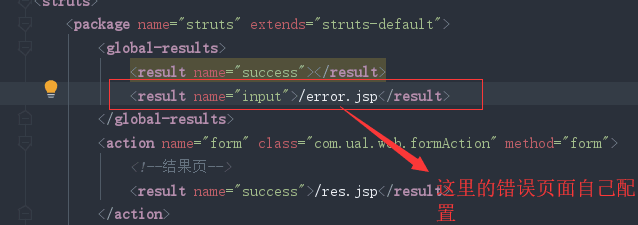
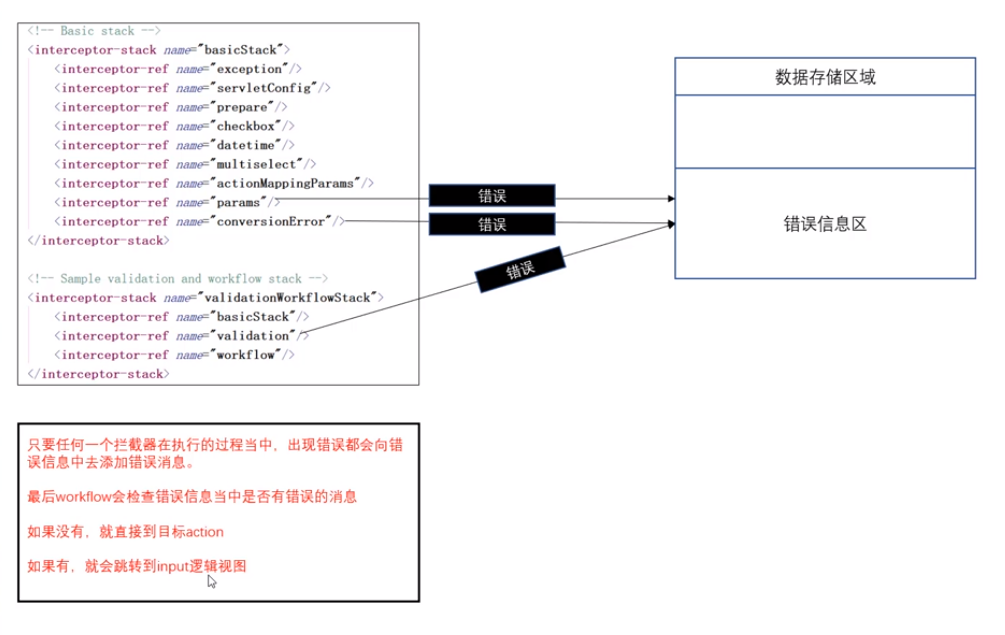
在开发时,可以配置一个input逻辑视图,错误时,可以跳转到自己指定界面,在页面中可以显示错误信息。
5)通过List集合接收多组相同参数
1.定义domain类
package com.ual.domain;

public class goods {
    private String name;
    private double price;

    public String getName() {
        return name;
    }

    public void setName(String name) {
        this.name = name;
    }

    public double getPrice() {
        return price;
    }

    public void setPrice(double price) {
        this.price = price;
    }

    @Override
    public String toString() {
        return "goods{" +
                "name='" + name + '\'' +
                ", price=" + price +
                '}';
    }
}
2.在Action中,采用页面中提供表达式方法
package com.ual.web;

import com.opensymphony.xwork2.ActionSupport;
import com.opensymphony.xwork2.ModelDriven;
import com.ual.domain.goods;

import java.util.List;

public class formAction6 extends ActionSupport {
    private List<goods> goodsList;//定义一个List集合,其中装入domain类,提供getset方法。
    public List<goods> getGoodsList() {
        return goodsList;
    }

    public void setGoodsList(List<goods> goodsList) {
        this.goodsList = goodsList;
    }

    public String form6(){
        System.out.println(goodsList);
        return  null;
    }
}
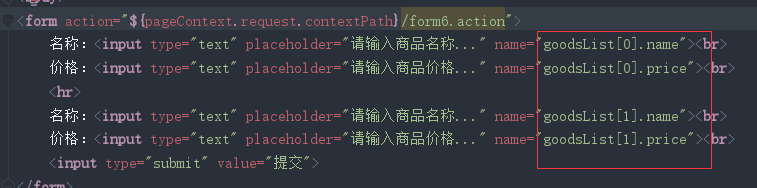
3.jsp中,参数名前写入Action中定义的List集合加下标
6)使用map接收参数
1.定义domain类
2.在Action中,采用页面中提供表达式方法
package com.ual.web;

import com.opensymphony.xwork2.ActionSupport;
import com.ual.domain.goods;

import java.util.Map;

public class formAction7 extends ActionSupport {
    private Map<String , goods> goodsMap;//定义存domain类对象的map,键是string类型,值是domain对象

    public Map<String, goods> getGoodsMap() {//提供getset方法。
        return goodsMap;
    }

    public void setGoodsMap(Map<String, goods> goodsMap) {
        this.goodsMap = goodsMap;
    }
    public String form7(){
        System.out.println(goodsMap);
        return null;
    }
}
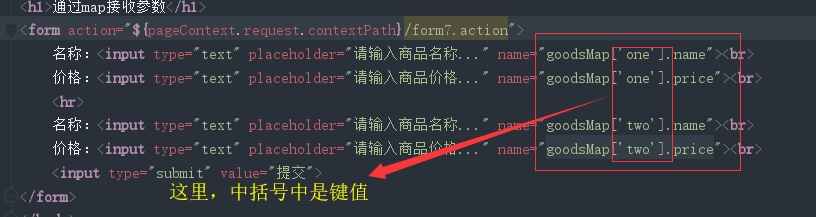
3.jsp中参数值设置

 浙公网安备 33010602011771号