
IDEA+gradle+SpringBoot实现热部署
所谓热部署就是修改文件后不需要重新启动服务器即可实现浏览效果。
添加gradle依赖
在build.gradle中的dependencies节点里添加如下行:
implementation 'org.springframework.boot:spring-boot-devtools'
添加后应该是这样:
dependencies {
    implementation 'org.springframework.boot:spring-boot-devtools'
}
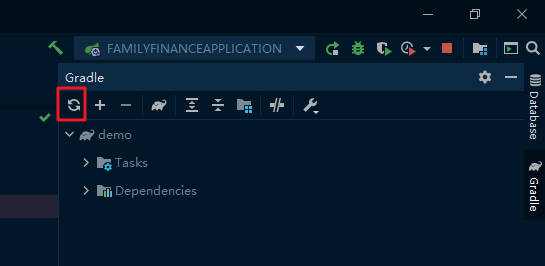
然后点击Gradle页面的刷新按钮
启动热部署
打开IDEA,按住Ctrl+Shift+A,输入registry。
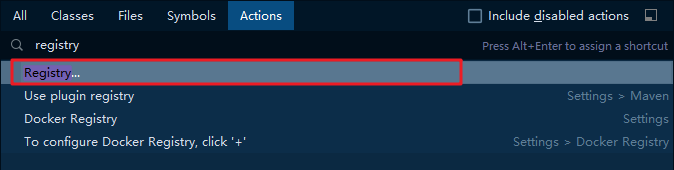
弹出一个框,选择第一个Registry...。
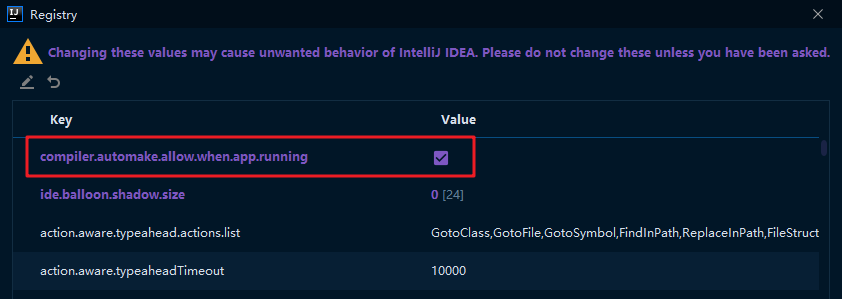
然后往下翻,找到compiler.automake.allow.when.app.running,打上勾。
最后来到设置页面:
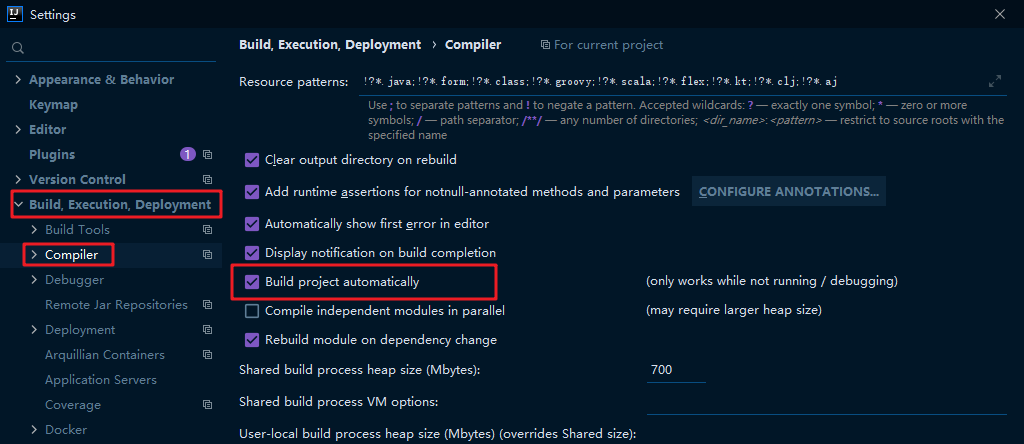
依次进入Build, Execution, Deployment,Compiler。
把Build project automatically打上勾即可完成热部署。

 浙公网安备 33010602011771号