
http://www.superqq.com/blog/2015/07/04/uibuttonzhong-de-san-ge-uiedgeinsetsshu-xing-(er-)/
初探button的titleEdgeInsets和imageEdgeInsets

//top为正数时,向下移动,top为负数时,向上移动
//bottom为正数时,向上移动,bottom为负数时,向下移动
[addItem setImageEdgeInsets:UIEdgeInsetsMake(50, 0, 10, 0)];
废话不多说,直接上例子:

//将button的图片和文字的显示位置互换,也就是button的图片显示在右侧,而文字显示在左侧
self.button.titleEdgeInsets = UIEdgeInsetsMake(0, -imageViewWidth, 0, imageViewWidth);
self.button.imageEdgeInsets = UIEdgeInsetsMake(0, titleLabelWidth, 0, -titleLabelWidth);
理解备注:对比前后两者位置变化,初始时edgeInsets都是(0,0,0,0),变化过程就好比将title向左移动了imageView的宽度,靠近是负值远离是正值(api上又说)所以左侧为-imageViewWidth,右侧为imageViewWidth。imageView同理。

//将button的图片和文字居中显示,并且button的图片显示在上面,而文字显示在下面
self.button.titleEdgeInsets = UIEdgeInsetsMake(0.0, -imageSize.width, -imageSize.height, 0.0);
self.button.imageEdgeInsets = UIEdgeInsetsMake(-titleSize.height, 0.0, 0.0, -titleSize.width);
理解备注:理解同上,对比前后两者位置变化,初始时edgeInsets都是(0,0,0,0),最终状态,imageView在titleLabel上面,变化过程就好比将imageView向上移动了titleLabel的高度,所以top为-titleSize.heigth。titleLabel同理。

UIButton *button =   [UIButton buttonWithType:UIButtonTypeCustom];
    UIButton *button1 =  [UIButton buttonWithType:UIButtonTypeCustom];
    UIButton *button2 =  [UIButton buttonWithType:UIButtonTypeCustom];

    [button setTitle:@"收藏" forState:UIControlStateNormal];
    button.titleLabel.backgroundColor = [UIColor clearColor];
    [button setImage:[UIImage imageNamed:@"Dark_Fav_icon"] forState:UIControlStateNormal];
    [button.titleLabel setFont:[UIFont systemFontOfSize:10]];
    [button.titleLabel setMinimumScaleFactor:0.5];
    button.titleEdgeInsets = UIEdgeInsetsMake(0.0, -20, -30, 0.0);
    button.imageEdgeInsets = UIEdgeInsetsMake(-5, 0.0, 0.0, -20);

    [button1.titleLabel setFont:[UIFont systemFontOfSize:10]];
    [button1.titleLabel setMinimumScaleFactor:0.5];
    button1.titleEdgeInsets = UIEdgeInsetsMake(0.0, -20, -30, 0.0);
    button1.imageEdgeInsets = UIEdgeInsetsMake(-5, 0.0, 0.0, -20);
    [button1 setTitle:@"消息" forState:UIControlStateNormal];
    button1.titleLabel.backgroundColor = [UIColor clearColor];
    [button1 setImage:[UIImage imageNamed:@"Menu_Icon_Message"] forState:UIControlStateNormal];

    [button2.titleLabel setFont:[UIFont systemFontOfSize:10]];
    [button2.titleLabel setMinimumScaleFactor:0.5];
    button2.titleEdgeInsets = UIEdgeInsetsMake(0.0, -20, -30, 0.0);
    button2.imageEdgeInsets = UIEdgeInsetsMake(-5, 0.0, 0.0, -20);
    [button2 setTitle:@"设置" forState:UIControlStateNormal];
    button2.titleLabel.backgroundColor = [UIColor clearColor];
    [button2 setImage:[UIImage imageNamed:@"Menu_Icon_Setting"] forState:UIControlStateNormal];
如何布局包含Image和Title的UIButton
UIButton中的titleEdgeInsets和imageEdgeInsets可以管理button中image和title的布局。 如果对其理解不够深入,用纯数字进行布局管理,经过不断的调试,还是能试出来的,但是如果改变了图片大小或文字长度,又要再来一遍。 作为程序猿,我们不应该放弃任何一个偷懒的机会。
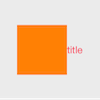
- 默认情况下,是图片在左,文字在右,垂直居中显示,如下图:
button.titleEdgeInsets = UIEdgeInsetsZero;
button.imageEdgeInsets = UIEdgeInsetsZero;
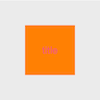
- 设置如下布局后,图片和文字都居中显示。
button.titleEdgeInsets = UIEdgeInsetsMake(0, -button.imageView.frame.size.width, 0, 0);
// button.imageEdgeInsets = UIEdgeInsetsMake(0, 0, 0, -button.titleLabel.frame.size.width);
// 由于iOS8中titleLabel的size为0,用上面这样设置有问题,修改一下即可
button.imageEdgeInsets = UIEdgeInsetsMake(0, 0, 0, -button.titleLabel.intrinsicContentSize.width);
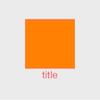
- 如果想图片在上,文字在下,水平居中显示,则按下面设置即可:
button.titleEdgeInsets = UIEdgeInsetsMake(0, -button.imageView.frame.size.width, -button.imageView.frame.size.height, 0);
// button.imageEdgeInsets = UIEdgeInsetsMake(-button.titleLabel.frame.size.height, 0, 0, -button.titleLabel.frame.size.width);
// 由于iOS8中titleLabel的size为0,用上面这样设置有问题,修改一下即可
button.imageEdgeInsets = UIEdgeInsetsMake(-button.titleLabel.intrinsicContentSize.height, 0, 0, -button.titleLabel.intrinsicContentSize.width);
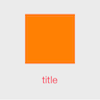
如果觉得图片和文字离的太近了,稍微分开一点:
CGFloat offset = 40.0f;
button.titleEdgeInsets = UIEdgeInsetsMake(0, -button.imageView.frame.size.width, -button.imageView.frame.size.height-offset/2, 0);
// button.imageEdgeInsets = UIEdgeInsetsMake(-button.titleLabel.frame.size.height-offset/2, 0, 0, -button.titleLabel.frame.size.width);
// 由于iOS8中titleLabel的size为0,用上面这样设置有问题,修改一下即可
button.imageEdgeInsets = UIEdgeInsetsMake(-button.titleLabel.intrinsicContentSize.height-offset/2, 0, 0, -button.titleLabel.intrinsicContentSize.width);
- 文字左对齐,图片右对齐
button.titleEdgeInsets = UIEdgeInsetsMake(0, -button.imageView.frame.size.width - button.frame.size.width + button.titleLabel.intrinsicContentSize.width, 0, 0);
    button.imageEdgeInsets = UIEdgeInsetsMake(0, 0, 0, -button.titleLabel.frame.size.width - button.frame.size.width + button.imageView.frame.size.width);

 浙公网安备 33010602011771号