
http://www.cnblogs.com/kenshincui/p/3871178.html
概述
由于ObjC主要基于Smalltalk进行设计,因此它有很多类似于Ruby、Python的动态特性,例如动态类型、动态加载、动态绑定等。今天我们着重介绍ObjC中的键值编码(KVC)、键值监听(KVO)特性:
键值编码KVC
我们知道在C#中可以通过反射读写一个对象的属性,有时候这种方式特别方便,因为你可以利用字符串的方式去动态控制一个对象。其实由于ObjC的语言特性,你根部不必进行任何操作就可以进行属性的动态读写,这种方式就是Key Value Coding(简称KVC)。
KVC的操作方法由NSKeyValueCoding协议提供,而NSObject就实现了这个协议,也就是说ObjC中几乎所有的对象都支持KVC操作,常用的KVC操作方法如下:
- 动态设置: setValue:属性值 forKey:属性名(用于简单路径)、setValue:属性值 forKeyPath:属性路径(用于复合路径,例如Person有一个Account类型的属性,那么person.account就是一个复合属性)
- 动态读取: valueForKey:属性名 、valueForKeyPath:属性名(用于复合路径)
下面通过一个例子来理解KVC
Account.h
#import <Foundation/Foundation.h>
@interface Account : NSObject
@property (nonatomic,assign) float balance;
@end
Account.m
#import "Account.h"
@implementation Account
@end
Person.h
#import <Foundation/Foundation.h>
@class Account;
@interface Person : NSObject{
    @private
    int _age;
}
@property (nonatomic,copy) NSString *name;
@property (nonatomic,retain) Account *account;
-(void)showMessage;
@end
Person.m
#import "Person.h"
@implementation Person
-(void)showMessage{
    NSLog(@"name=%@,age=%d",_name,_age);
}
@end
main.m
#import <Foundation/Foundation.h>
#import "Person.h"
#import "Account.h"

int main(int argc, const char * argv[])
 {
    @autoreleasepool
     {
        Person *person1=[[Person alloc]init];
        [person1 setValue:@"Kenshin" forKey:@"name"];
        [person1 setValue:@28 forKey:@"age"];//注意即使一个私有变量仍然可以访问
        [person1 showMessage];

        //结果:name=Kenshin,age=28
        NSLog(@"person1's name is :%@,age is :%@",person1.name,[person1 valueForKey:@"age"]);
        //结果:person1's name is :Kenshin,age is :28

        Account *account1= [[Account alloc]init];
    //注意这一步一定要先给account属性赋值,否则下面按路径赋值无法成功,因为account为nil,当然这一步骤也可以写成:
    [person1 setValue:account1 forKeyPath:@"account"];
person1.account=account1;
    [person1 setValue:@100000000.0 forKeyPath:@"account.balance"];
    NSLog(@"person1's balance is :%.2f",[[person1 valueForKeyPath:@"account.balance"] floatValue]);
    //结果:person1's balance is :100000000.00
  }
    return 0;
}
KVC使用起来比较简单,但是它如何查找一个属性进行读取呢?具体查找规则(假设现在要利用KVC对a进行读取):
- 如果是动态设置属性,则优先考虑调用setA方法,如果没有该方法则优先考虑搜索成员变量_a,如果仍然不存在则搜索成员变量a,如果最后仍然没搜索到则会调用这个类的setValue:forUndefinedKey:方法(注意搜索过程中不管这些方法、成员变量是私有的还是公共的都能正确设置);
- 如果是动态读取属性,则优先考虑调用a方法(属性a的getter方法),如果没有搜索到则会优先搜索成员变量_a,如果仍然不存在则搜索成员变量a,如果最后仍然没搜索到则会调用这个类的valueforUndefinedKey:方法(注意搜索过程中不管这些方法、成员变量是私有的还是公共的都能正确读取);
键值监听KVO
我们知道在WPF、Silverlight中都有一种双向绑定机制,如果数据模型修改了之后会立即反映到UI视图上,类似的还有如今比较流行的基于MVVM设计模式的前端框架,例如Knockout.js。其实在ObjC中原生就支持这种机制,它叫做Key Value Observing(简称KVO)。KVO其实是一种观察者模式,利用它可以很容易实现视图组件和数据模型的分离,当数据模型的属性值改变之后作为监听器的视图组件就会被激发,激发时就会回调监听器自身。在ObjC中要实现KVO则必须实现NSKeyValueObServing协议,不过幸运的是NSObject已经实现了该协议,因此几乎所有的ObjC对象都可以使用KVO。
在ObjC中使用KVO操作常用的方法如下:
- 注册指定Key路径的监听器: addObserver: forKeyPath: options: context:
- 删除指定Key路径的监听器: removeObserver: forKeyPath、removeObserver: forKeyPath: context:
- 回调监听: observeValueForKeyPath: ofObject: change: context:
KVO的使用步骤也比较简单:
- 通过addObserver: forKeyPath: options: context:为被监听对象(它通常是数据模型)注册监听器
- 重写监听器的observeValueForKeyPath: ofObject: change: context:方法
由于我们还没有介绍过IOS的界面编程,这里我们还是在上面的例子基础上继续扩展,假设当我们的账户余额balance变动之后我们希望用户可以及时获得通知。那么此时Account就作为我们的被监听对象,需要Person为它注册监听(使用addObserver: forKeyPath: options: context:);而人员Person作为监听器需要重写它的observeValueForKeyPath: ofObject: change: context:方法,当监听的余额发生改变后会回调监听器Person监听方法(observeValueForKeyPath: ofObject: change: context:)。
下面通过代码模拟上面的过程:
Account.h
#import <Foundation/Foundation.h>
@interface Account : NSObject
@property (nonatomic,assign) float balance;
@end
Account.m
#import "Account.h"
@implementation Account
@end
Person.h
#import <Foundation/Foundation.h>
@class Account;

@interface Person : NSObject{
    @private
    int _age;
}
@property (nonatomic,copy) NSString *name;
@property (nonatomic,retain) Account *account;
-(void)showMessage;
@end
Person.m
#import "Person.h"
#import "Account.h"

@implementation Person

-(void)showMessage{
    NSLog(@"name=%@,age=%d",_name,_age);
}

-(void)setAccount:(Account *)account
{
    _account=account;
    //添加对Account的监听
    [self.account addObserver:self forKeyPath:@"balance" options:NSKeyValueObservingOptionNew context:nil];
}

#pragma mark - 覆盖方法
#pragma mark 重写observeValueForKeyPath方法,当账户余额变化后此处获得通知
-(void)observeValueForKeyPath:(NSString *)keyPath ofObject:(id)object change:(NSDictionary *)change context:(void *)context
{
    if([keyPath isEqualToString:@"balance"])
     {   //这里只处理balance属性
        NSLog(@"keyPath=%@,object=%@,newValue=%.2f,context=%@",keyPath,object,[[change objectForKey:@"new"] floatValue],context);
    }
}

#pragma mark 重写销毁方法
-(void)dealloc{
    [self.account removeObserver:self forKeyPath:@"balance"];//移除监听
    //[super dealloc];//注意启用了ARC,此处不需要调用
}
@end
main.m
#import <Foundation/Foundation.h>
#import "Person.h"
#import "Account.h"

int main(int argc, const char * argv[])
{
    @autoreleasepool {
        Person *person1=[[Person alloc]init];
        person1.name=@"Kenshin";
        Account *account1=[[Account alloc]init];
        account1.balance=100000000.0;
        person1.account=account1;

        account1.balance=200000000.0;//注意执行到这一步会触发监听器回调函数observeValueForKeyPath: ofObject: change: context:
        //结果:keyPath=balance,object=<Account: 0x100103aa0>,newValue=200000000.00,context=(null)
    }
    return 0;
}
在上面的代码中我们在给人员分配账户时给账户的balance属性添加了监听,并且在监听回调方法中输出了监听到的信息,同时在对象销毁时移除监听,这就构成了一个典型的KVO应用。
通知中心
对于很多初学者往往会把iOS中的本地通知、推送通知和iOS通知中心的概念弄混。其实二者之间并没有任何关系,事实上它们都不属于一个框架,前者属于UIKit框架,后者属于Foundation框架。
通知中心实际上是iOS程序内部之间的一种消息广播机制,主要为了解决应用程序内部不同对象之间解耦而设计。它是基于观察者模式设计的,不能跨应用程序进程通信,当通知中心接收到消息之后会根据内部的消息转发表,将消息发送给订阅者。下面是一个简单的流程示意图:
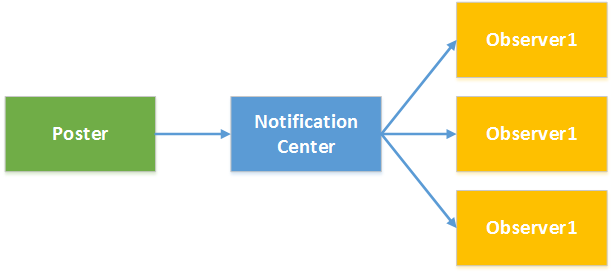
了解通知中心需要熟悉NSNotificationCenter和NSNotification两个类:
NSNotificationCenter:是通知系统的中心,用于注册和发送通知,下表列出常用的方法。
| 方法 | 说明 |
| - (void)addObserver:(id)observer selector:(SEL)aSelector name:(NSString *)aName object:(id)anObject | 添加监听,参数: observer:监听者 selector:监听方法(监听者监听到通知后执行的方法) name:监听的通知名称 object:通知的发送者(如果指定nil则监听任何对象发送的通知) |
| - (id <NSObject>)addObserverForName:(NSString *)name object:(id)obj queue:(NSOperationQueue *)queue usingBlock:(void (^)(NSNotification *note))block | 添加监听,参数: name:监听的通知名称 object:通知的发送者(如果指定nil则监听任何对象发送的通知) queue:操作队列,如果制定非主队线程队列则可以异步执行block block:监听到通知后执行的操作 |
| - (void)postNotification:(NSNotification *)notification | 发送通知,参数: notification:通知对象 |
| - (void)postNotificationName:(NSString *)aName object:(id)anObject | 发送通知,参数: aName:通知名称 anObject:通知发送者 |
| - (void)postNotificationName:(NSString *)aName object:(id)anObject userInfo:(NSDictionary *)aUserInfo | 发送通知,参数: aName:通知名称 anObject:通知发送者 aUserInfo:通知参数 |
| - (void)removeObserver:(id)observer | 移除监听,参数: observer:监听对象 |
| - (void)removeObserver:(id)observer name:(NSString *)aName object:(id)anObject | 移除监听,参数: observer:监听对象 aName:通知名称 anObject:通知发送者 |
NSNotification:代表通知内容的载体,主要有三个属性:name代表通知名称,object代表通知的发送者,userInfo代表通知的附加信息。
虽然前面的文章中从未提到过通知中心,但是其实通知中心我们并不陌生,前面文章中很多内容都是通过通知中心来进行应用中各个组件通信的,只是没有单独拿出来说而已。例如前面的文章中讨论的应用程序生命周期问题,当应用程序启动后、进入后台、进入前台、获得焦点、失去焦点,窗口大小改变、隐藏等都会发送通知。这个通知可以通过前面NSNotificationCenter进行订阅即可接收对应的消息,下面的示例演示了如何添加监听获得UIApplication的进入后台和获得焦点的通知
#import "KCMainViewController.h"
@interface KCMainViewController ()
@end

@implementation KCMainViewController
- (void)viewDidLoad {
    [super viewDidLoad];
    [self addObserverToNotificationCenter];

}

#pragma mark 添加监听
-(void)addObserverToNotificationCenter{
    /*添加应用程序进入后台监听
     * observer:监听者
     * selector:监听方法(监听者监听到通知后执行的方法)
     * name:监听的通知名称(下面的UIApplicationDidEnterBackgroundNotification是一个常量)
     * object:通知的发送者(如果指定nil则监听任何对象发送的通知)
     */
    [[NSNotificationCenter defaultCenter] addObserver:self selector:@selector(applicationEnterBackground) name:UIApplicationDidEnterBackgroundNotification object:[UIApplication sharedApplication]];

    /* 添加应用程序获得焦点的通知监听
     * name:监听的通知名称
     * object:通知的发送者(如果指定nil则监听任何对象发送的通知)
     * queue:操作队列,如果制定非主队线程队列则可以异步执行block
     * block:监听到通知后执行的操作
     */
    NSOperationQueue *operationQueue=[[NSOperationQueue alloc]init];
    [[NSNotificationCenter defaultCenter] addObserverForName:UIApplicationDidBecomeActiveNotification object:[UIApplication sharedApplication] queue:operationQueue usingBlock:^(NSNotification *note) {
        NSLog(@"Application become active.");
    }];
}

#pragma mark 应用程序启动监听方法
-(void)applicationEnterBackground{
    NSLog(@"Application enter background.");
}
@end
当然很多时候使用通知中心是为了添加自定义通知,并获得自定义通知消息。在前面的文章“iOS开发系列--视图切换”中提到过如何进行多视图之间参数传递,其实利用自定义通知也可以进行参数传递。通常一个应用登录后会显示用户信息,而登录信息可以通过登录界面获取。下面就以这样一种场景为例,在主界面中添加监听,在登录界面发送通知,一旦登录成功将向通知中心发送成功登录的通知,此时主界面中由于已经添加通知监听所以会收到通知并更新UI界面。
主界面KCMainViewController.m:
#import "KCMainViewController.h"
#import "KCLoginViewController.h"
#define UPDATE_LGOGIN_INFO_NOTIFICATION @"updateLoginInfo"

@interface KCMainViewController (){
    UILabel *_lbLoginInfo;
    UIButton *_btnLogin;
}
@end

@implementation KCMainViewController
- (void)viewDidLoad {
    [super viewDidLoad];
    [self setupUI];
}

-(void)setupUI{
    UILabel *label =[[UILabel alloc]initWithFrame:CGRectMake(0, 100,320 ,30)];
    label.textAlignment=NSTextAlignmentCenter;
    label.textColor=[UIColor colorWithRed:23/255.0 green:180/255.0 blue:237/255.0 alpha:1];
    _lbLoginInfo=label;
    [self.view addSubview:label];

    UIButton *button=[UIButton buttonWithType:UIButtonTypeSystem];
    button.frame=CGRectMake(60, 200, 200, 25);
    [button setTitle:@"登录" forState:UIControlStateNormal];
    [button addTarget:self action:@selector(loginOut) forControlEvents:UIControlEventTouchUpInside];
    _btnLogin=button;
    [self.view addSubview:button];
}

-(void)loginOut{
    //添加监听
    [self addObserverToNotification];
    KCLoginViewController *loginController=[[KCLoginViewController alloc]init];
    [self presentViewController:loginController animated:YES completion:nil];
}

/**
 *  添加监听
 */
-(void)addObserverToNotification{
    [[NSNotificationCenter defaultCenter] addObserver:self selector:@selector(updateLoginInfo:) name:UPDATE_LGOGIN_INFO_NOTIFICATION object:nil];
}

/**
 *  更新登录信息,注意在这里可以获得通知对象并且读取附加信息
 */
-(void)updateLoginInfo:(NSNotification *)notification
{
    NSDictionary *userInfo = notification.userInfo;
    _lbLoginInfo.text = userInfo[@"loginInfo"];
    _btnLogin.titleLabel.text=@"注销";
}

-(void)dealloc{
    //移除监听
    [[NSNotificationCenter defaultCenter] removeObserver:self];
}
@end
登录界面KCLoginViewController.m:
#import "KCLoginViewController.h"
#define UPDATE_LGOGIN_INFO_NOTIFICATION @"updateLoginInfo"

@interface KCLoginViewController (){
    UITextField *_txtUserName;
    UITextField *_txtPassword;
}
@end

@implementation KCLoginViewController
- (void)viewDidLoad {
    [super viewDidLoad];
    [self setupUI];
}

-(void)setupUI{
    //用户名
    UILabel *lbUserName=[[UILabel alloc]initWithFrame:CGRectMake(50, 150, 100, 30)];
    lbUserName.text=@"用户名:";
    [self.view addSubview:lbUserName];

    _txtUserName=[[UITextField alloc]initWithFrame:CGRectMake(120, 150, 150, 30)];
    _txtUserName.borderStyle=UITextBorderStyleRoundedRect;
    [self.view addSubview:_txtUserName];

    //密码
    UILabel *lbPassword=[[UILabel alloc]initWithFrame:CGRectMake(50, 200, 100, 30)];
    lbPassword.text=@"密码:";
    [self.view addSubview:lbPassword];

    _txtPassword=[[UITextField alloc]initWithFrame:CGRectMake(120, 200, 150, 30)];
    _txtPassword.secureTextEntry=YES;
    _txtPassword.borderStyle=UITextBorderStyleRoundedRect;
    [self.view addSubview:_txtPassword];

    //登录按钮
    UIButton *btnLogin=[UIButton buttonWithType:UIButtonTypeSystem];
    btnLogin.frame=CGRectMake(70, 270, 80, 30);
    [btnLogin setTitle:@"登录" forState:UIControlStateNormal];
    [self.view addSubview:btnLogin];
    [btnLogin addTarget:self action:@selector(login) forControlEvents:UIControlEventTouchUpInside];

    //取消登录按钮
    UIButton *btnCancel=[UIButton buttonWithType:UIButtonTypeSystem];
    btnCancel.frame=CGRectMake(170, 270, 80, 30);
    [btnCancel setTitle:@"取消" forState:UIControlStateNormal];
    [self.view addSubview:btnCancel];
    [btnCancel addTarget:self action:@selector(cancel) forControlEvents:UIControlEventTouchUpInside];
}

#pragma mark 登录操作
-(void)login{
    if ([_txtUserName.text isEqualToString:@"kenshincui"] && [_txtPassword.text isEqualToString:@"123"] ) {
        //发送通知
        [self postNotification];
        [self dismissViewControllerAnimated:YES completion:nil];
    }else{
        //登录失败弹出提示信息
        UIAlertView *alertView=[[UIAlertView alloc]initWithTitle:@"系统信息" message:@"用户名或密码错误,请重新输入!" delegate:nil cancelButtonTitle:@"取消" otherButtonTitles:nil];
        [alertView show];
    }
}

#pragma mark 点击取消
-(void)cancel{
    [self dismissViewControllerAnimated:YES completion:nil];
}

/**
 *  添加通知,注意这里设置了附加信息
 */
-(void)postNotification
{
    NSDictionary *userInfo=@{@"loginInfo":[NSString stringWithFormat:@"Hello,%@!",_txtUserName.text]};
    NSLog(@"%@",userInfo);

    NSNotification *notification=[NSNotification notificationWithName:UPDATE_LGOGIN_INFO_NOTIFICATION object:self userInfo:userInfo];

    [[NSNotificationCenter defaultCenter] postNotification:notification];

  //也可直接采用下面的方法
  //[[NSNotificationCenter defaultCenter] postNotificationName:UPDATE_LGOGIN_INFO_NOTIFICATION object:self userInfo:userInfo];
}
@end
运行效果:

http://www.cnblogs.com/xiaofeixiang/p/4457792.html
消息通知中重要的两个类:
(1)NSNotificationCenter: 实现NSNotificationCenter的原理是一个观察者模式,获得NSNotificationCenter的方法只有一种,那就是[NSNotificationCenter defaultCenter] ,通过调用静态方法defaultCenter就可以获取这个通知中心的对象了。NSNotificationCenter是一个单例模式,而这个通知中心的对象会一直存在于一个应用的生命周期。
(2) NSNotification: 这是消息携带的载体,通过它,可以把消息内容传递给观察者。
1.通过NSNotificationCenter注册通知NSNotification,viewDidLoad中代码如下:
[[NSNotificationCenter defaultCenter] addObserver:self selector:@selector(notificationFirst:) name:@"First" object:nil];
[[NSNotificationCenter defaultCenter] addObserver:self selector:@selector(notificationSecond:) name:@"Second" object:nil];
第一个参数是观察者为本身,第二个参数表示消息回调的方法,第三个消息通知的名字,第四个为nil表示表示接受所有发送者的消息~
回调方法:
-(void)notificationFirst:(NSNotification *)notification{
    NSString  *name=[notification name];
    NSString  *object=[notification object];
    NSLog(@"名称:%@----对象:%@",name,object);
}

-(void)notificationSecond:(NSNotification *)notification{
    NSString  *name=[notification name];
    NSString  *object=[notification object];
    NSDictionary  *dict=[notification userInfo];
    NSLog(@"名称:%@----对象:%@",name,object);
    NSLog(@"获取的值:%@",[dict objectForKey:@"key"]);
}
2.消息传递给观察者:
[[NSNotificationCenter defaultCenter] postNotificationName:@"First" object:@"博客园-Fly_Elephant"];
NSDictionary  *dict=[[NSDictionary alloc]initWithObjects:@[@"keso"] forKeys:@[@"key"]];
[[NSNotificationCenter defaultCenter] postNotificationName:@"Second" object:@"http://www.cnblogs.com/xiaofeixiang" userInfo:dict];
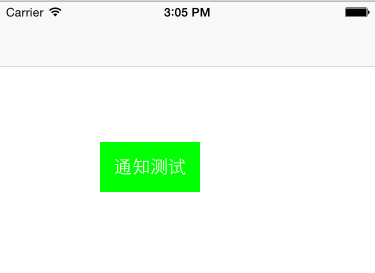
3.页面跳转:
-(void)pushController:(UIButton *)sender{
    ViewController *customController=[[ViewController alloc]init];
    [self.navigationController pushViewController:customController animated:YES];
}
4.销毁观察者
-(void)dealloc{
    NSLog(@"观察者销毁了");
    [[NSNotificationCenter defaultCenter] removeObserver:self];
}
也可以通过name单个删除:
[[NSNotificationCenter defaultCenter] removeObserver:self name:@"First" object:nil];
5.运行结果
2015-04-26 15:08:25.900 CustoAlterView[2169:148380] 观察者销毁了
2015-04-26 15:08:29.222 CustoAlterView[2169:148380] 名称:First----对象:博客园-Fly_Elephant
2015-04-26 15:08:29.222 CustoAlterView[2169:148380] 名称:Second----对象:http://www.cnblogs.com/xiaofeixiang
2015-04-26 15:08:29.223 CustoAlterView[2169:148380] 获取的值:keso

 浙公网安备 33010602011771号