
【Mybatis】数据库动态查询
在工作目录中新建文件夹
idea中file→new→project→Maven
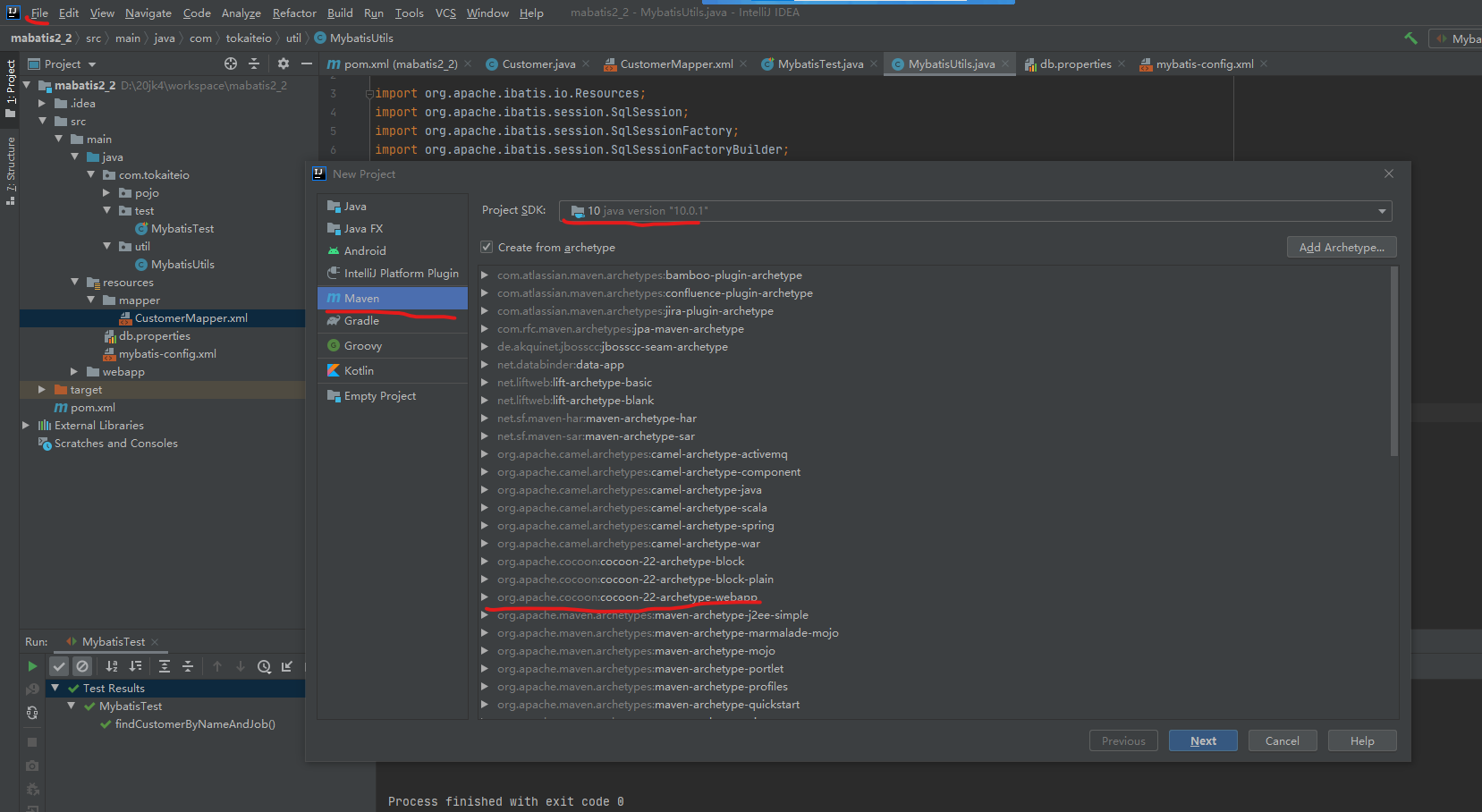
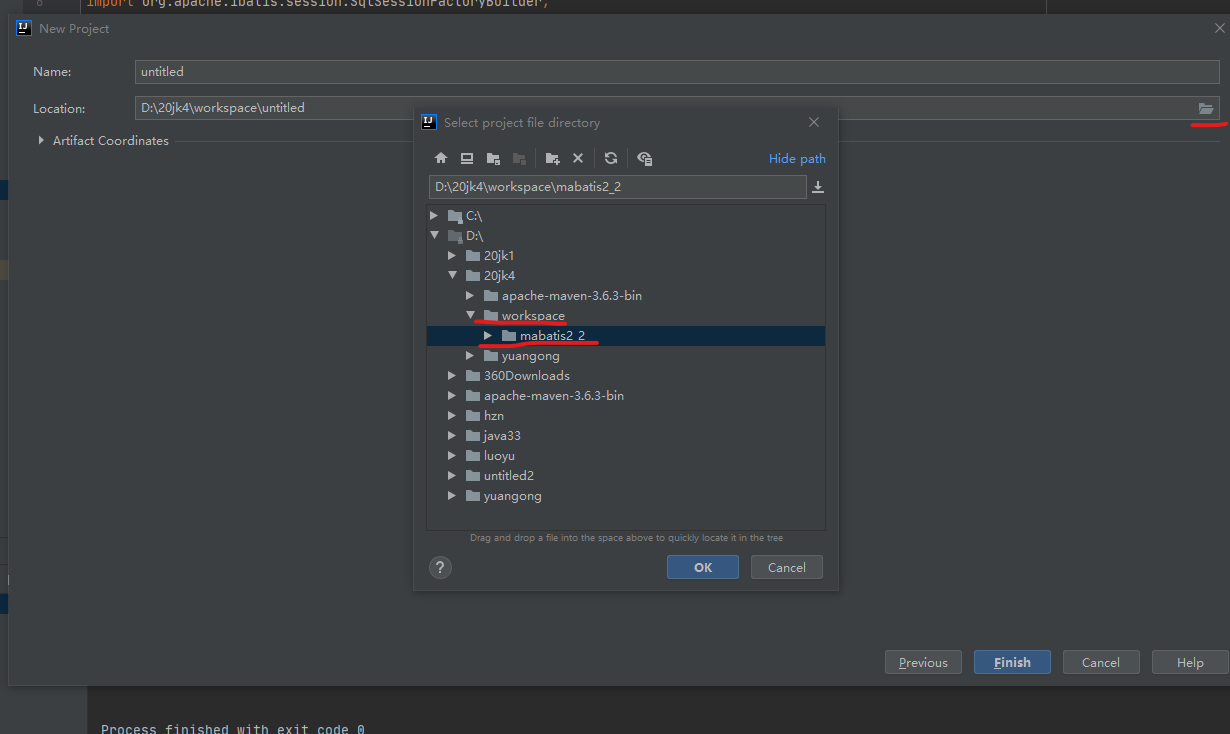
pom.xml中dependencies之内的是依靠
<?xml version="1.0" encoding="UTF-8"?>

<project xmlns="http://maven.apache.org/POM/4.0.0" xmlns:xsi="http://www.w3.org/2001/XMLSchema-instance"
  xsi:schemaLocation="http://maven.apache.org/POM/4.0.0 http://maven.apache.org/xsd/maven-4.0.0.xsd">
  <modelVersion>4.0.0</modelVersion>

  <groupId>org.example</groupId>
  <artifactId>mabatis2_2</artifactId>
  <version>1.0-SNAPSHOT</version>
  <packaging>war</packaging>

  <name>mabatis2_2 Maven Webapp</name>
  <!-- FIXME change it to the project's website -->
  <url>http://www.example.com</url>

  <properties>
    <project.build.sourceEncoding>UTF-8</project.build.sourceEncoding>
    <maven.compiler.source>1.7</maven.compiler.source>
    <maven.compiler.target>1.7</maven.compiler.target>
  </properties>

  <dependencies>
    <dependency>
      <groupId>junit</groupId>
      <artifactId>junit</artifactId>
      <version>4.11</version>
      <scope>test</scope>
    </dependency>
    <dependency>
      <groupId>org.mybatis</groupId>
      <artifactId>mybatis</artifactId>
      <version>3.5.2</version>
    </dependency>
    <dependency>
      <groupId>com.mysql</groupId>
      <artifactId>mysql-connector-j</artifactId>
      <version>8.0.32</version>
    </dependency>
    <dependency>
      <groupId>org.junit.jupiter</groupId>
      <artifactId>junit-jupiter</artifactId>
      <version>RELEASE</version>
      <scope>compile</scope>
    </dependency>
  </dependencies>

  <build>
    <finalName>mabatis2_2</finalName>
    <pluginManagement><!-- lock down plugins versions to avoid using Maven defaults (may be moved to parent pom) -->
      <plugins>
        <plugin>
          <artifactId>maven-clean-plugin</artifactId>
          <version>3.1.0</version>
        </plugin>
        <!-- see http://maven.apache.org/ref/current/maven-core/default-bindings.html#Plugin_bindings_for_war_packaging -->
        <plugin>
          <artifactId>maven-resources-plugin</artifactId>
          <version>3.0.2</version>
        </plugin>
        <plugin>
          <artifactId>maven-compiler-plugin</artifactId>
          <version>3.8.0</version>
        </plugin>
        <plugin>
          <artifactId>maven-surefire-plugin</artifactId>
          <version>2.22.1</version>
        </plugin>
        <plugin>
          <artifactId>maven-war-plugin</artifactId>
          <version>3.2.2</version>
        </plugin>
        <plugin>
          <artifactId>maven-install-plugin</artifactId>
          <version>2.5.2</version>
        </plugin>
        <plugin>
          <artifactId>maven-deploy-plugin</artifactId>
          <version>2.8.2</version>
        </plugin>
      </plugins>
    </pluginManagement>
  </build>
</project>
在resource中(若没有新建一个resource文件夹并右键Mark为源文件)
新建一个db.properties文件
其中 3306/****? *号为数据库名
mysql.driver=com.mysql.cj.jdbc.Driver
mysql.url=jdbc:mysql://localhost:3306/数据库名?serverTimezone=UTC&
characterEncoding=utf8&useUnicode=true&useSSL=false
mysql.username=root
mysql.password=1234//自己数据库密码
在src下main下java下创建一个包 包名:com.xxx.pojo
在com.xxx.pojo下创建一个类(右键包→new→Java Class)类名:Customer
注:写完封装之后右键→Generate→getter and setter 之后再右键右键→Generate→toString() 用的是idea文本编辑
package com.tokaiteio.pojo;

public class Customer {
    private int id;//客户id
    private String name;//名字
    private String job;//工作
    private String phone;//电话

    public int getId() {
        return id;
    }

    public void setId(int id) {
        this.id = id;
    }

    public String getName() {
        return name;
    }

    public void setName(String name) {
        this.name = name;
    }

    public String getJob() {
        return job;
    }

    public void setJob(String job) {
        this.job = job;
    }

    public String getPhone() {
        return phone;
    }

    public void setPhone(String phone) {
        this.phone = phone;
    }

    @Override
    public String toString() {
        return "Customer{" +
                "id=" + id +
                ", name='" + name + '\'' +
                ", job='" + job + '\'' +
                ", phone='" + phone + '\'' +
                '}';
    }
}
同样在resource中新建一个mybatis-config.xml
其中<typeAlias type="com.tokaiteio.pojo.Customer" alias="Customer"/>中的type=" "填java下面的包名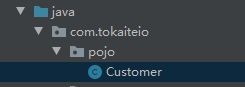 com.tokaiteio.pojo.Customer
<?xml version="1.0" encoding="UTF-8" ?>
<!DOCTYPE configuration
        PUBLIC "-//mybatis.org//DTD Config 3.0//EN"
        "http://mybatis.org/dtd/mybatis-3-config.dtd">
<configuration>
    <!-- 环境配置 -->
    <!-- 加载类路径下的属性文件 -->
    <properties resource="db.properties"/>
    <!--User类路径别名-->
    <typeAliases>
        <typeAlias type="com.tokaiteio.pojo.Customer" alias="Customer"/>
    </typeAliases>
    <environments default="development">
        <environment id="development">
            <transactionManager type="JDBC"/>
            <!-- 数据库连接相关配置 ,db.properties文件中的内容-->
            <dataSource type="POOLED">
                <property name="driver" value="${mysql.driver}"/>
                <property name="url" value="${mysql.url}"/>
                <property name="username" value="${mysql.username}"/>
                <property name="password" value="${mysql.password}"/>
            </dataSource>
        </environment>
    </environments>
    <!--配置mapper文件-->
    <mappers>
        <mapper resource="mapper\CustomerMapper.xml"/>
    </mappers>

</configuration>
右键com.tokaiteio新建一个util包并在util包中创建一个工具类 类名MybatisUtils
package com.tokaiteio.util;

import org.apache.ibatis.io.Resources;
import org.apache.ibatis.session.SqlSession;
import org.apache.ibatis.session.SqlSessionFactory;
import org.apache.ibatis.session.SqlSessionFactoryBuilder;

import java.io.IOException;
import java.io.Reader;

public class MybatisUtils {
    public static SqlSessionFactory sqlMapper = null;
    static {
        Reader reader = null;//配置文件转换成流
        try {
            reader = Resources.getResourceAsReader("mybatis-config.xml");
        } catch (IOException e) {
            e.printStackTrace();
        }
        sqlMapper=new SqlSessionFactoryBuilder().build(reader);//构建sqlSeesion工厂

    }
    //获取sqlsession
    public static SqlSession getSession(){
        return sqlMapper.openSession();//打开sql连接会话
    }
}
最后写Test类
在com.tokaiteio的包下添加一个包 包名Test 在新建一个类 类名:MybatisTest
package com.tokaiteio.test;

import com.tokaiteio.pojo.Customer;

import com.tokaiteio.util.MybatisUtils;
import org.apache.ibatis.session.SqlSession;
import org.junit.jupiter.api.Test;

import java.util.List;

public class MybatisTest {
    @Test
    public void findCustomerByNameAndJob(){
        SqlSession session = MybatisUtils.getSession();
        Customer c = new Customer();
        c.setName("张");
        c.setJob("医生");
        //s第一个参数对应mapper中的seclcte中的id第二
        List<Customer> list = session.selectList("findCustomerByNameAndJob",c);
        for(Customer customer:list){
            System.out.println(customer);
        }
    }
}
补充MybatisTest.java
package com.tokaiteio.test;

import com.tokaiteio.pojo.Customer;

import com.tokaiteio.util.MybatisUtils;
import org.apache.ibatis.session.SqlSession;
import org.junit.jupiter.api.Test;

import java.util.ArrayList;
import java.util.List;

public class MybatisTest {
//    查询方法
    @Test
    public void findCustomerByNameAndJob(){
        SqlSession session = MybatisUtils.getSession();
        Customer c = new Customer();
        c.setName("t");
        c.setJob("doctor");
        //s第一个参数对应mapper中的seclcte中的id第二
        List<Customer> list = session.selectList("findCustomerByNameAndJobs",c);
        for(Customer customer:list){
            System.out.println(customer);
        }
    }
//    修改方法 下面是用main方法写不需要@Test
//    public static void main(String[] args){
//        SqlSession session = MybatisUtils.getSession();
//        Customer c = new Customer();
//        c.setName("t");
//        c.setJob("doctor");
//        c.setPhone("110");
//        c.setId(1);
//        session.update("edit",c);
//        session.commit();
//    }
    public static void main(String[] args){
        SqlSession session = MybatisUtils.getSession();
//        Integer[] arr = {1,2,3};
        List<Integer> ids = new ArrayList<Integer>();
        ids.add(1);
        ids.add(2);
        ids.add(3);
        List<Customer> list = session.selectList("findByArray",ids);
        for (Customer c:list){
            System.out.println(c);
        }
    }
    public static void main(String[] args){
//        SqlSession session = MybatisUtils.getSession();
////        Integer[] arr = {1,2,3};
//        List<Integer> ids = new ArrayList<Integer>();
//        ids.add(1);
//        ids.add(2);
//        ids.add(3);
//        Map<String,Object> map = new HashMap<String,Object>();
////        Map<>中第一个属性为键的类型,第二个为值的类型
//        map.put("id",ids);
//        map.put("job","nurse");
////        map.put("id")对应的是CustomerMapper中的collection="id"值
//        List<Customer> list = session.selectList("findByArray",map);
//        for (Customer c:list){
//            System.out.println(c);
//        }
//    }
}
补充CustomerMapper.xml
<?xml version="1.0" encoding="UTF-8"?> <!DOCTYPE mapper PUBLIC "-//mybatis.org//DTD mapper 3.0//EN" "http://mybatis.org/dtd/mybatis-3-mapper.dtd"> <mapper namespace="Customer"> <!-- 查询 --> <select id="findCustomerByNameAndJobs" parameterType="Customer" resultType="Customer"> SELECT * from customer <trim prefix="where" prefixOverrides="and"> <choose> <when test="name != null and name != ''"> and name like concat('%',#{name},'%') </when> <when test="jobs != null and jobs != ''"> and jobs = #{job} </when> <otherwise> and phones != '' </otherwise> </choose> </trim> <!-- <if test="name != null and name != ''">--> <!-- and name like concat('%',#{name},'%')--> <!-- </if>--> <!-- <if test="jobs != null and jobs != ''">--> <!-- and jobs = #{jobs}--> <!-- </if>--> </select> <update id="edit" parameterType="com.tokaiteio.pojo.Customer"> <!-- 传参的方法类型为主类的路径--> update customer <trim prefix="set" suffixOverrides=","> <!-- prefix为原<set></set> suffixOverrides要去除每条if中的语句的逗号--> <if test="name != null and name != ''"> <!-- test中的name job phone与Customer中private的name job phone相同--> <!-- 条件与查询一样 解释:为当name不为空 同时 也不为空串--> name = #{name}, </if> <if test="job != null and job != ''"> job = #{job}, </if> <if test="phone !=null and phone != ''"> phone = #{phone} </if> </trim> where id =#{id} </update> <!-- <select id="findByArray" parameterType="java.util.Arrays" resultType="com.tokaiteio.pojo.Customer">--> <!-- select * from customer where id in--> <!-- <foreach collection="array" item="id" index="index" open="( " separator="," close=")">--> <!--<!– index后面为拼接 open为foreach的开始符号 这里为前括号( close为–>--> <!-- #{id}--> <!-- </foreach>--> <!-- </select>--> <select id="findByArray" parameterType="java.util.Arrays" resultType="com.tokaiteio.pojo.Customer">
//用数组查询 parameterType="java.util.Arrays" resultType="com.tokaiteio.pojo.Customer
    select * from customer where id in <foreach collection="list" item="id" index="index" open="( " separator="," close=")"> <!-- index后面为拼接 open为foreach的开始符号 这里为前括号( close为--> #{id} </foreach>
  </select>
<!-- <select id="findByArray" parameterType="java.util.Arrays" resultType="com.tokaiteio.pojo.Customer">-->
<!-- select * from customer where id in-->
<!-- <foreach collection="id" item="roleMap" index="index" open="( " separator="," close=")">-->
<!-- <!– index后面为拼接 open为foreach的开始符号 这里为前括号( close为–>-->
<!--<!– #{}中的值对应item的值–>-->
<!-- #{roleMap}-->
<!-- </foreach>-->
<!-- </select>-->
</mapper>

 浙公网安备 33010602011771号