静态资源版本控制方式
前言:在html页面开发时,为了用户体验考虑我们会对JavaScript和CSS进行缓存以减少不必要的服务器请求;另一方面我们也希望当服务器端内容发生变更时用户能及时收到反馈,因此我们需要静态资源进行缓存控制。
一、Springboot的缓存控制方式(MD5实现)
1、启用Cache Busting
修改配置文件application.yml
- spring:
- resources:
- chain:
- strategy:
- content:
- enabled: true
- paths: /**
2、页面静态资源引用
启用Cache Busting后,如果使用thymeleaf作为模板引擎,页面引用静态资源方式如下:
<script th:src="${@mvcResourceUrlProvider.getForLookupPath('/mods/admin/demo.js')}"></script>
如果模板引擎无法直接访问Spring bean,可以将ResourceUrlProvider添加到Spring中,使用ControllerAdvice,代码如下:
 1 @ControllerAdvice
 2
 3 public class ControllerConfig {
 4
 5     @Autowired
 6
 7     ResourceUrlProvider resourceUrlProvider;
 8
 9     @ModelAttribute("urls")
10
11     public ResourceUrlProvider urls() {
12
13         return this.resourceUrlProvider;
14
15     }
16
17 }
然后在页面上通过下述代码引用:
<script th:src="${urls.getForLookupPath('/mods/admin/demo.js')}"></script>
3、编译结果
编译后的html页面显示效果:
<script src="/mods/admin/demo-96d770c87905659930c9786eaa08d710.js"></script>
由于版本控制时加入的是js/css文件md5码,这样一旦文件发生任何的变更,页面都会重新向服务端请求资源文件。
二、maven打包自动化添加缓存版本号(jcv-maven-plugin)
1、简介
jcv-maven-plugin是一个自动为网页添加js css的版本号maven插件。
特性:支持js css的自动压缩,支持多种方法版本号添加,在使用时对代码零入侵,不需要在页面上做任何标记,对开发友好,不需要调整现在代码.直接引入mvn中配置,会自动对打包的页面进行处理.
该插件自动采集文件的md5值进行文件版本号修订,在使用文件的md5值用于该文件的版本号,因此该插件不会引发js css缓存全部失效(因此不建议使用时间戳的方式),同时修改的内容又能及时到客户浏览器中去,不会在存在缓存的问题.
支持清理网页上的<!-- -->注释,让网页更干净.
所有的操作都不会修改代码,只会对打包文件进行修改.文件名md5的方式可以解决有些浏览器忽略version标签.
2、验证
环境:springboot+freemarker
依赖jar包:jcv-maven-plugin:1.0.2
过程:
测试页面index.ftl(引入easyui的js和css)
<!DOCTYPE html>
<html>
<head lang="en">
    <meta charset="UTF-8"/>
    <meta http-equiv="X-UA-Compatible" content="IE=edge">
    <meta name="viewport" content="with-device-with,inital-scale=1">
    <title>测试</title>
    <link rel="stylesheet" type="text/css" href="/static/css/easyui.css">
    <link rel="stylesheet" type="text/css" href="/static/css/icon.css">
    <script type="text/javascript" src="/static/js/jquery.min.js"></script>
    <script type="text/javascript" src="/static/js/jquery.easyui.min.js"></script>
    <script type="text/javascript" src="/static/js/json2.js"></script>
</head>
<body>
<h1>测试</h1>
<div id="p" class="easyui-panel" title="测试" style="width: 500px;height: 150px;padding:10px;background: #fafafa;"
data-options="iconCls:'icon-save',closable:true,collapsible:true,minimizable:true,maxmizable:true">
    <p>cece</p>
    <p>cece</p>
</div>
</body>
</html>
pom.xml引入jcv-maven-plugin并配置:
<plugin>

    <groupId>com.iqarr.maven.plugin</groupId>

    <artifactId>jcv-maven-plugin</artifactId>

    <version>1.0.2</version>

    <executions>

        <execution>

            <id>process</id>

            <phase>process-resources</phase>

            <goals>

                <goal>process-springboot</goal>

            </goals>

        </execution>

    </executions>

    <configuration>

        <suffixs>

            <param>ftl</param>

        </suffixs>

        <includes>

            <include>/static/css</include>

            <include>/static/js</include>

        </includes>

        <clearPageComment>true</clearPageComment>

        <globaJsMethod>MD5_METHOD</globaJsMethod>

        <globaCssMethod>MD5_METHOD</globaCssMethod>

        <!--压缩Js和Css-->

        <compressionJs>true</compressionJs>

        <compressionCss>true</compressionCss>

    </configuration>

</plugin>
执行mvn install打包项目:
- [INFO] Scanning for projects...
- [INFO]
- [INFO] ---------------------< com.jsepc:dytqznfx-factory >---------------------
- [INFO] Building dytqznfx-factory 0.0.1-SNAPSHOT
- [INFO] --------------------------------[ jar ]---------------------------------
- [INFO]
- [INFO] --- maven-resources-plugin:2.7:resources (default-resources) @ dytqznfx-factory ---
- [INFO] Using 'UTF-8' encoding to copy filtered resources.
- [INFO] Copying 1 resource
- [INFO] Copying 108 resources
- [INFO]
- [INFO] --- jcv-maven-plugin:1.0.2:process-springboot (process) @ dytqznfx-factory ---
- [INFO] =================================JCV====================================
- [INFO] _ _______ __
- [INFO] | |/ ____\ \ / /
- [INFO] | | | \ \ / /
- [INFO] _ | | | \ \/ /
- [INFO] | |__| | |____ \ /
- [INFO] \____/ \_____| \/
- [INFO]
- [INFO]
- [INFO] find suffixs size:1
- [INFO] build sourceEncoding:UTF-8
- [INFO] out Dir:G:\SVN\dytqznfx-factory\target\classes
- [INFO] system is linux:false
- [INFO] css method is :MD5_METHOD
- [INFO] js method is :MD5_METHOD
- [INFO] build webRootName:classes
- [INFO] web app Dir:G:\SVN\dytqznfx-factory\src\main\resources
- [INFO] The suffix is .min ,not processed:jquery.min.js
- [INFO] The suffix is .min ,not processed:jquery.easyui.min.js
- [INFO] --------------------------------- copy untreated file file size: 10
- [INFO] --------------------------------- process success file size: 2
- [INFO] =============== Total time [293 millisecond]===========================
- [INFO] ========================================================================
- [INFO]
- [INFO] --- maven-compiler-plugin:3.1:compile (default-compile) @ dytqznfx-factory ---
- [INFO] Nothing to compile - all classes are up to date
- [INFO]
- [INFO] --- maven-resources-plugin:2.7:testResources (default-testResources) @ dytqznfx-factory ---
- [INFO] Using 'UTF-8' encoding to copy filtered resources.
- [INFO] skip non existing resourceDirectory G:\SVN\dytqznfx-factory\src\test\resources
- [INFO]
- [INFO] --- maven-compiler-plugin:3.1:testCompile (default-testCompile) @ dytqznfx-factory ---
- [INFO] Nothing to compile - all classes are up to date
- [INFO]
- [INFO] --- maven-surefire-plugin:2.18.1:test (default-test) @ dytqznfx-factory ---
- [INFO] Tests are skipped.
- [INFO]
- [INFO] --- maven-jar-plugin:2.6:jar (default-jar) @ dytqznfx-factory ---
- [INFO] Building jar: G:\SVN\dytqznfx-factory\target\dytqznfx-factory-0.0.1-SNAPSHOT.jar
- [INFO]
- [INFO] --- spring-boot-maven-plugin:1.5.19.RELEASE:repackage (default) @ dytqznfx-factory ---
- [INFO]
- [INFO] --- maven-install-plugin:2.5.2:install (default-install) @ dytqznfx-factory ---
- [INFO] Installing G:\SVN\dytqznfx-factory\target\dytqznfx-factory-0.0.1-SNAPSHOT.jar to F:\maven\mvnrepository\com\jsepc\dytqznfx-factory\0.0.1-SNAPSHOT\dytqznfx-factory-0.0.1-SNAPSHOT.jar
- [INFO] Installing G:\SVN\dytqznfx-factory\pom.xml to F:\maven\mvnrepository\com\jsepc\dytqznfx-factory\0.0.1-SNAPSHOT\dytqznfx-factory-0.0.1-SNAPSHOT.pom
- [INFO] ------------------------------------------------------------------------
- [INFO] BUILD SUCCESS
- [INFO] ------------------------------------------------------------------------
- [INFO] Total time: 7.047 s
- [INFO] Finished at: 2020-07-21T17:17:15+08:00
- [INFO] ------------------------------------------------------------------------
运行jar包访问网址查看页面:
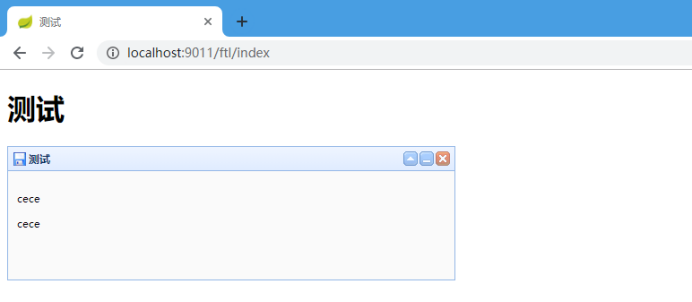
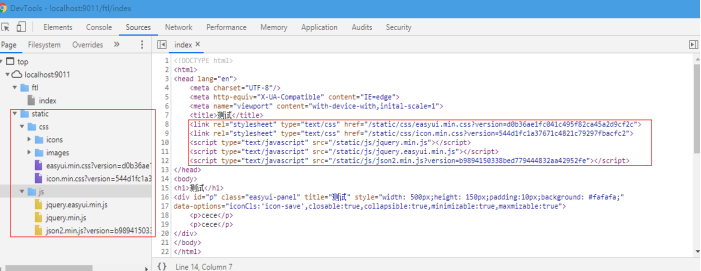
静态资源除压缩版的文件外都在加上了md5值并压缩作为新文件名。
三、总结
当前比较常用的方式为采集文件md5值对文件版本号修订或生成时间戳作为静态资源版本号。相比较来说md5方式仅在文件内容发生变化时才会更改版本号,不会在每次发布版本时引发js、css全部失效。因此不建议采用时间戳的方式。以上两种方式均可实现md5做静态资源版本号,使服务端有静态资源修改时客户浏览器可以及时缓存新文件。

 浙公网安备 33010602011771号