(八)警告框处理
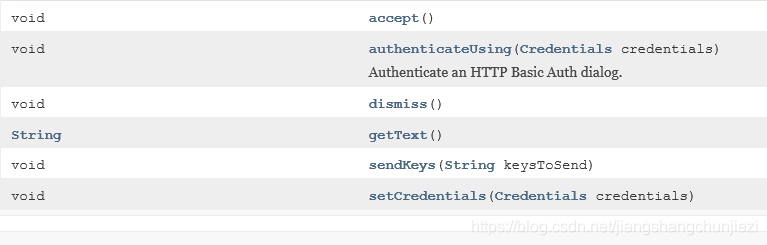
在WebDriver中处理JavaScript所生成的alert、confirm、prompt是很简单的。具体做法是使用switch_to_alert()方法定位到alert/confim/prompt。然后使用text/accept/dissmiss/sendKeys按需进行操作。
- accept()点击确认按钮
- dismiss()点击取消按钮,如果有的话
- sendKeys()输入值,这个alert\confirm没有对话框就不能用了,否则会报错
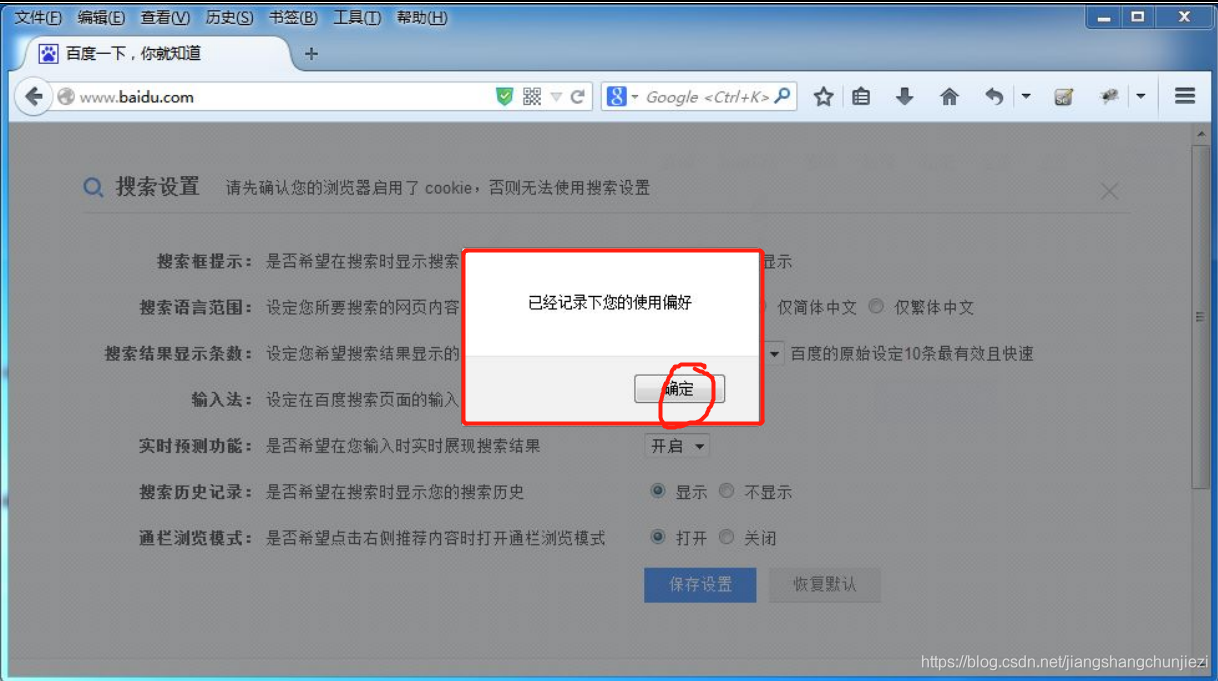
accept()例子:
此弹窗是不能通过前端工具对其进行定位的,这个时候就可以通过switchTo().alert()方法接收这个弹窗
![]()
public static void main(String[] args) throws InterruptedException {
		System.setProperty("webdriver.firefox.bin", "D:/Program Files (x86)/Mozilla Firefox/firefox.exe");
		System.setProperty("webdriver.gecko.driver", "E://selenium//geckodriver-v0.24.0-win64//geckodriver.exe");
		WebDriver driver=new FirefoxDriver();

		driver.manage().timeouts().pageLoadTimeout(10, TimeUnit.SECONDS);
		driver.get("http://www.baidu.com/");

		Actions action=new Actions(driver);
		action.clickAndHold(driver.findElement(By.linkText("设置"))).perform();;

		//打开搜索设置
		driver.findElement(By.className("setpref")).click();


		//更改设置:搜索框提示  不显示
		driver.findElement(By.id("s1_2")).click();

		//保存设置
		driver.findElement(By.className("prefpanelgo")).click();
		driver.switchTo().alert().accept();


	}
在测试过程中出现了org.openqa.selenium.ElementNotInteractableException,解决方式是加等待时间
-
![]()

 浙公网安备 33010602011771号