
【NCS随笔】NCS如何修改连接间隔
NCS如何修改连接间隔
一、连接间隔
连接间隔(Connection Interval)是在 两个已建立连接的 Bluetooth LE 设备之间,连续两次“连接事件”开始之间的时间间隔
在一个连接中,双方大部分时间都在休眠,只在每个连接间隔到期时同时唤醒,进行一次“连接事件”(交换数据或空包,用来保持同步)
连接间隔越短:设备更频繁地唤醒通信,延迟更低、可用吞吐量更高,但功耗更高
连接间隔越长:唤醒次数减少,功耗更低,但数据延迟更大,丢包重传时等待时间也更长
在协议里,连接间隔以 1.25 ms 为单位 表示,例如 Interval = 24 就对应 24 × 1.25 ms = 30 ms
区间:定义连接的区间。主机节点多久会发送一次连接事件包到从机。连接间隔的单位为1.25毫秒。
延迟:从属延迟。从设备/外设可以跳过唤醒,直接响应主从连接事件。延迟是从机可以跳过的连接事件数量。这是为了节省从属端的电力。当没有数据时,它可以跳过一些连接事件。但睡眠时间不应过长,以免连接超时。
超时:主控在没有从机响应的情况下持续发送连接事件多久,连接才会终止
[图片上传中...(image-0uB1Wx2uQ2YOjOvP)]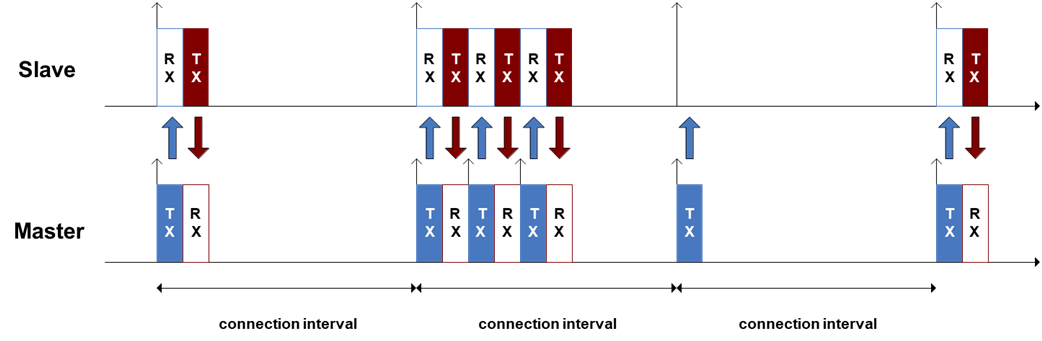
二、NCS怎么修改连接间隔
2.1 通过宏配置静态修改
在prj.conf里面添加如下配置
以下配置将首选连接间隔设置为 800 * 1.25 ms ≈ 1000 ms,监督超时 4 s。
请求不会在你的请求后立即发送,有一个预设的延迟,不设置的话默认是5S,如果需要缩短或者延长时间你需要设置:CONFIG_BT_CONN_PARAM_UPDATE_TIMEOUT
CONFIG_BT_PERIPHERAL_PREF_MIN_INT=800
CONFIG_BT_PERIPHERAL_PREF_MAX_INT=800
CONFIG_BT_PERIPHERAL_PREF_LATENCY=0
CONFIG_BT_PERIPHERAL_PREF_TIMEOUT=400
CONFIG_BT_GAP_AUTO_UPDATE_CONN_PARAMS=y
2.2 通过API动态修改
获取连接间隔并且打印出来
struct bt_conn_info info;
	err = bt_conn_get_info(conn, &info);
	if (err) {
		LOG_ERR("bt_conn_get_info() returned %d", err);
		return;
	}

double connection_interval = info.le.interval*1.25; // in ms
uint16_t supervision_timeout = info.le.timeout*10; // in ms
LOG_INF("Connection parameters: interval %.2f ms, latency %d intervals, timeout %d ms", connection_interval, info.le.latency, supervision_timeout);
设置连接,并且通过连接回调打印
主要需要添加CONFIG_FPU=y这个宏,才能打印浮点数
//设置更新参数回调
void on_le_param_updated(struct bt_conn *conn, uint16_t interval, uint16_t latency, uint16_t timeout)
{
    double connection_interval = interval*1.25;         // in ms
    uint16_t supervision_timeout = timeout*10;          // in ms
    LOG_INF("Connection parameters updated: interval %.2f ms, latency %d intervals, timeout %d ms", connection_interval, latency, supervision_timeout);
}

//更新连接参数
static struct bt_conn *current_conn;
#define INTERVAL_MIN 800
#define INTERVAL_MAX 800
static struct bt_le_conn_param *conn_param = BT_LE_CONN_PARAM(INTERVAL_MIN, INTERVAL_MAX, 0, 400);
static int update_connection_parameters(void)
{
int err = bt_conn_le_param_update(current_conn, conn_param);
if (err)
{
	 LOG_ERR("Cannot update connection parameter (err: %d)", err);
	 return err;
 }
 LOG_INF("Connection parameters update requested"); return 0; }

//将回调添加到蓝牙事件里面
BT_CONN_CB_DEFINE(conn_callbacks) = {

.connected = connected,

.disconnected = disconnected,

.recycled = recycled_cb,
.le_param_updated   = on_le_param_updated,
#ifdef CONFIG_BT_NUS_SECURITY_ENABLED

.security_changed = security_changed,

#endif

};
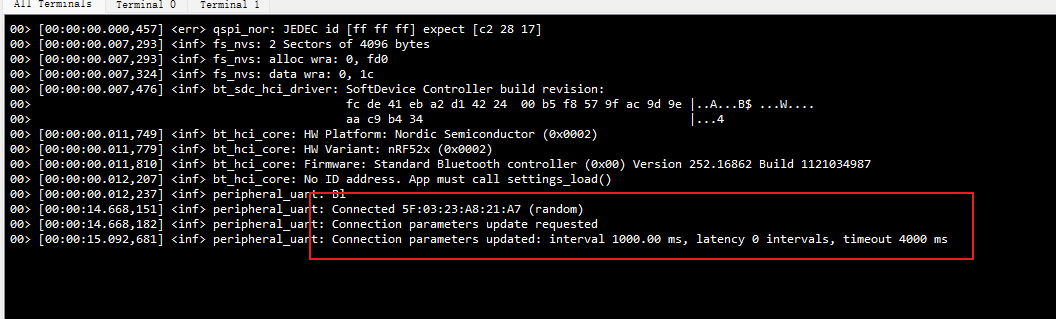
打印的LOG

 浙公网安备 33010602011771号