3、ESP8266 Windows开发环境搭建
官方教程:
https://docs.espressif.com/projects/esp8266-rtos-sdk/en/latest/get-started/windows-setup.html
一、环境配置
1、https://dl.espressif.com/dl/esp32_win32_msys2_environment_and_toolchain-20181001.zip 解压到F盘即F:/msys32
2、https://dl.espressif.com/dl/xtensa-lx106-elf-gcc8_4_0-esp-2020r3-win32.zip 解压到F:/msys32/opt即F:/msys32/opt/xtensa-lx106-elf
二、下载ESP8266_RTOS_SDK
1、下载
mkdir -p ~/esp
cd ~/esp
git clone --recursive https://github.com/espressif/ESP8266_RTOS_SDK.git

2、环境变量
export PATH="$PATH:/opt/xtensa-lx106-elf/bin"
export IDF_PATH=~/esp/ESP8266_RTOS_SDK
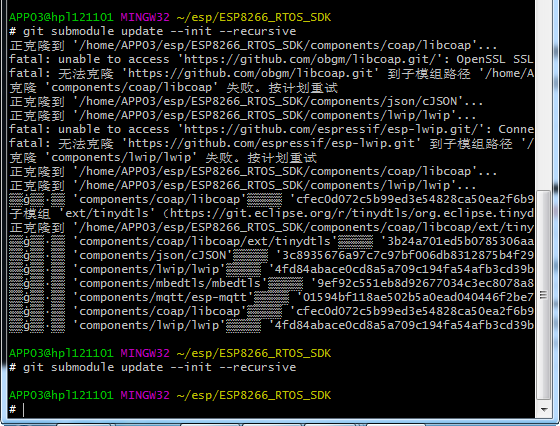
3、部分git clone不成功,重新下载
cd $IDF_PATH
git submodule update --init --recursive
三、安装python包
python -m pip install --user -r $IDF_PATH/requirements.txt
四、测试hello_world
cd ~/esp
cp -r $IDF_PATH/examples/get-started/hello_world .
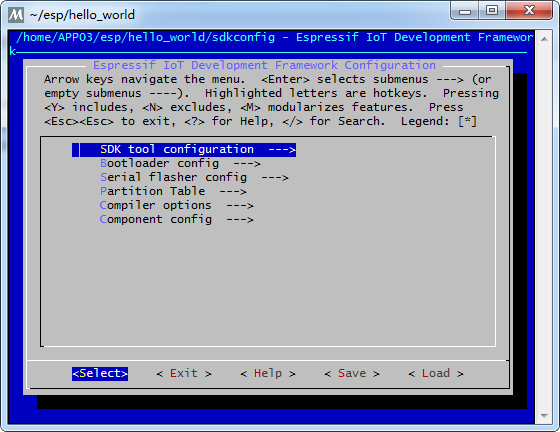
cd ~/esp/hello_world

make menuconfig
![]()
make clean
make all
make flash

 浙公网安备 33010602011771号