
java关于itext5生成pdf的完整方法
Itext5API生成文pdf文档
前言
本文为本人开发时使用过的itext5生成pdf时的一些使用心得,本文仅供参考,有错误之处望读者友善提出。
Itext5生成api主要是后端在生成pdf的模板的同时,将数据填入pdf中,本文提供生成pdf页眉页脚、页码、表格、段落、背景颜色、字体设置、水印,多个pdf合并等的方法。
引入相关依赖
<!-- https://mvnrepository.com/artifact/com.itextpdf/itextpdf -->
<dependency>
<groupId>com.itextpdf</groupId>
<artifactId>itextpdf</artifactId>
<version>5.5.13</version>
</dependency>
<!-- https://mvnrepository.com/artifact/com.itextpdf/itext-asian 字体-->
<dependency>
<groupId>com.itextpdf</groupId>
<artifactId>itext-asian</artifactId>
<version>5.2.0</version>
</dependency>
正文内容
一、 创建pdf文档
总结一下用java生成PDF的方法:
A、itext-PdfStamper
pdfStamper(俗称抠模板)
B、itext-Document
document(正常代码撰写)
C、wkhtmltopdf(使用工具)
分析比较
|
方法 |
优点 |
缺点 |
|
A |
代码简单 |
模板要先提供,且字段长度固定、不 灵活 |
|
B |
模板可根据代码调整、但样式不如C灵活 |
要维护的后台代码较多 |
|
C |
模板样式可根据前端随意调整 |
要维护的前台代码较多 |
本文采用B方式生成pdf
|
1、 创建文档对象Document 创建文档有三个构造方法 (1) Document document =new Document(); // 默认页面大小是A4; (2) Document document =new Document(PageSize.A4); // 指定页面大小为A4; (3) Document document =new Document(PageSize.A4,50,50,30,20); // 指定页面大小为A4,且自定义页边距(marginLeft(左边距)、marginRight(右边距)、marginTop(上边距)、marginBottom(下边距))
也可以自定义页面大小 Document document = new Document(new RectangleReadOnly(宽,高));
2、 创建文档书写器(Writer) .建立一个书写器(Writer)与document对象关联,通过书写器(Writer)可以将文档写入到磁盘中。 创建 PdfWriter 对象 第一个参数是对文档对象的引用,第二个参数是文件的实际名称,在该名称中还会给出其输出路径 PdfWriter writer = PdfWriter.getInstance(document,new FileOutputStream(filePath)); filePath为输出路径字符串。
3、 打开文档 document.open();//在写入内容之前需要先打开文档。 document.newPage();//用于一页填不满转下一页时 4、 添加内容 document.add();//往文档中添加内容 5、 关闭文档 document.close();
|
一个完整的pdf文档生成有5个步骤
二、 字体设置
|
Itext字体设置一共有三种方式: 第一种是引用window本地系统字体(这里以常见的宋体为例,只能在window系统上面使用) BaseFont bf =BaseFont.createFont("C:/WINDOWS/Fonts/simsun.ttf", BaseFont.IDENTITY_H,BaseFont.NOT_EMBEDDED);//本地系统字体 Font f = new Font(bf,18,Font.NORMAL);//字体类型、大小、风格样式
第二种是读取路径下的ttf字体文件,以项目路径下的字体为例(必须要有许可才能使用) String path = getClass().getResource("/").getPath(); if (path.indexOf("WEB-INF/classes") != -1) { path = path.substring(1, path.indexOf("WEB-INF/classes")); path = "/"+path + "font/simsun.ttf"; } BaseFont bf =BaseFont.createFont(path , BaseFont.IDENTITY_H,BaseFont.NOT_EMBEDDED); Font f = new Font(bf,18,Font.NORMAL);
第三种是用jar包(itext-asian)中的常规字体 BaseFont chinese = BaseFont.createFont("STSongStd-Light", "UniGB-UCS2-H", BaseFont.NOT_EMBEDDED); font = new Font(chinese, 10, Font.NORMAL); 注意:font = new Font(chinese, 10, Font.NORMAL| UNDEFINED); 样式可以写多种样式中间用|隔开
|
三、 文本对象元素添加
|
文本有三个基础对象
|
四、 文档属性
|
文档属性的设置不需要在文档打开之后设置 document.addTitle("标题");// 标题 document.addAuthor("作者");// 作者 document.addSubject("主题");// 主题 document.addKeywords("关键字");// 关键字 document.addCreator("创建者");// 创建者
|
五、 文档内容
|
段落 Paragraph pt=new Paragraph(name,headfont);//设置字体样式 pt.setAlignment(1);//设置文字居中 0靠左 1,居中 2,靠右 pt.setIndentationLeft(12);// 左缩进 pt.setIndentationRight(12);// 右缩进 pt.setFirstLineIndent(24);// 首行缩进 paragraph.setLeading(20f); //行间距 paragraph.setSpacingBefore(5f); //设置段落上空白 paragraph.setSpacingAfter(10f); //设置段落下空白 |
|
表格 表格可以指定列数(每列宽度相同),也可以指定不同宽度的列 //创建一个 4列的表格 PdfPTable table = new PdfPTable(4); //创建一个2列的表格宽度分别为25,425 PdfPTable table = new PdfPTable(new float[] { 25, 425 }); //设置列宽 table.setTotalWidth(540);// 如果只设置总宽度,那么表格每列宽度就是均分的。 int width[] = {10,45,45};//设置每列宽度比例 table.setWidths(width); //锁定列宽 table.setLockedWidth(true); //添加单元格 table.addCell(cell);
|
|
单元格(表格的每一格) PdfPCell cell = new PdfPCell(new Phrase(val1, font)); //水平居中 cell.setHorizontalAlignment(Element.ALIGN_CENTER); //垂直居中 cell.setVerticalAlignment(Element.ALIGN_MIDDLE); //单元格高度 cell.setFixedHeight(20); //背景颜色 cell.setBackgroundColor(); //单元格跨列列数 cell.setColspan(); //单元格跨行行数 cell.setRowspan();//设置跨行行数 //单元格嵌套表格 PdfPCell cell2 = new PdfPCell(new PdfPTable(2)); |
|
直线 Paragraph p1 =new Paragraph(); p1.add(new Chunk(new LineSeparator())); doc.add(p1); |
|
点线 Paragraph p2 =new Paragraph(); p2.add(new Chunk(new DottedLineSeparator())); |
|
超链接 Anchor anchor =new Anchor("this is anchor"); |
|
添加图片 Image image =Image.getInstance(imgPath); image.setAlignment(Image.ALIGN_CENTER); image.scalePercent(40);//依照比例缩放 |
六、 页眉页脚水印页码设置
页眉 页脚 水印调用文档生命周期函数,需要继承PdfPageEventHelper类,重写
public void onEndPage(PdfWriter writer, Document document) {}方法,在onEndPage方法中调用table. WriteSelectedRows()方法。
|
注意:onEndPage方法的源码注释如下: Called when a page is finished, just before being written to the document. 译为:在页面写完文档之前,当页面完成时调用。 页眉页脚实际上是将文字或者图片放在页眉、页脚(固定坐标)位置。
|
页码设置格式为第N页/共M页。Pdf写入页码我采用的方法是整个pdf生成之后,再读入pdf,在规定位置写好页码,写出新的pdf文档。
七、 生成pdf实例
|
private static final String DEST = "E:/pdfModel"; private static final String SPACE = " ";
private static final String SPACE3 =" ";
public static void main(String[] args) throws IOException, DocumentException {
//封面pdf String cover = DEST+"/"+System.currentTimeMillis()+"cover.pdf"; File file = new File(cover);
// String font2 = "src/main/resources/font.TTF"; // BaseFont bf =BaseFont.createFont(font2 , BaseFont.IDENTITY_H,BaseFont.NOT_EMBEDDED); BaseFont bf =BaseFont.createFont("C:/WINDOWS/Fonts/STCAIYUN.TTF", BaseFont.IDENTITY_H,BaseFont.NOT_EMBEDDED);//本地系统字体 BaseFont chinese = BaseFont.createFont("STSongStd-Light", "UniGB-UCS2-H", BaseFont.NOT_EMBEDDED); Font fontTital = new Font(bf, 22, Font.NORMAL); Font font = new Font(chinese, 12, Font.NORMAL);
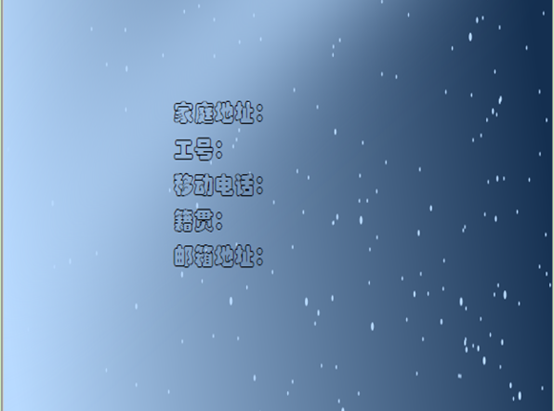
Document tDoc = new Document(PageSize.A4, 50, 50, 50, 50); //创建文档 PdfWriter tWriter = PdfWriter.getInstance(tDoc, new FileOutputStream(file)); //创建输出流 //加密 注意加密过的文档是无法再处理的,如果生成pdf之后还需要对生成的pdf做处理则不能加密 // tWriter.setEncryption(null,"1".getBytes(), PdfWriter.ALLOW_SCREENREADERS|PdfWriter.ALLOW_PRINTING,PdfWriter.STANDARD_ENCRYPTION_128); //加密 tDoc.open(); //打开文档 tDoc.newPage(); //背景图片 Image tImgCover = Image.getInstance(DEST+"/"+"星空.png"); /* 设置图片的位置 */ tImgCover.setAbsolutePosition(0, 0); /* 设置图片的大小 */ tImgCover.scaleAbsolute(595, 842);
tDoc.add(tImgCover); Paragraph paragraph1 = new Paragraph(SPACE+"家庭地址:"+SPACE3, fontTital); Paragraph paragraph2 = new Paragraph(SPACE+"工号:"+SPACE3, fontTital); Paragraph paragraph3 = new Paragraph(SPACE+"移动电话:"+SPACE3, fontTital); Paragraph paragraph4 = new Paragraph(SPACE+"籍贯:"+SPACE3, fontTital); Paragraph paragraph5 = new Paragraph(SPACE+"邮箱地址:"+SPACE3, fontTital); paragraph1.setSpacingBefore(470f); tDoc.add(paragraph1); tDoc.add(paragraph2); tDoc.add(paragraph3); tDoc.add(paragraph4); tDoc.add(paragraph5);
tDoc.close();
//正文pdf String mainPath = DEST+"/"+System.currentTimeMillis()+"mainBody.pdf"; File mainFile = new File(mainPath); Document mainDoc = new Document(PageSize.A4, 50, 50, 50, 50); //创建文档 PdfWriter writer = PdfWriter.getInstance(mainDoc, new FileOutputStream(mainFile)); //创建输出流
//页眉图片 String hander = DEST+"/"+"页眉.jpg";
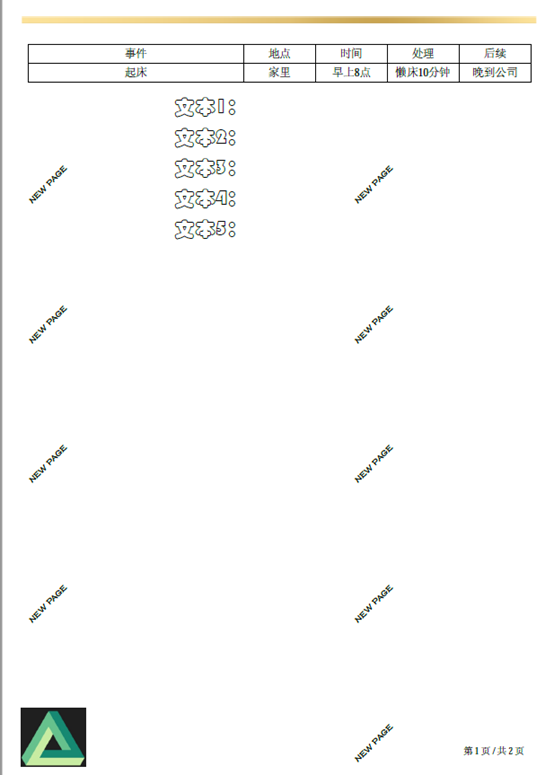
//页脚图片 String fotter = DEST+"/"+"页脚.jpg"; mainDoc.open(); mainDoc.newPage(); creatHeader(mainDoc,writer,hander,fotter); PdfPTable table = new PdfPTable(7); table.setTotalWidth(540); table.setLockedWidth(true); table.setSpacingBefore(100);
table.addCell(addCell("事件", font, null, 3)); table.addCell(addCell("地点", font, null, 1)); table.addCell(addCell("时间", font, null, 1)); table.addCell(addCell("处理", font, null, 1)); table.addCell(addCell("后续", font, null, 1)); table.addCell(addCell("起床", font, null, 3)); table.addCell(addCell("家里", font, null, 1)); table.addCell(addCell("早上8点", font, null, 1)); table.addCell(addCell("懒床10分钟", font, null, 1)); table.addCell(addCell("晚到公司", font, null, 1));
Paragraph paragraph6 = new Paragraph(SPACE+"文本1:"+SPACE3, fontTital); Paragraph paragraph7 = new Paragraph(SPACE+"文本2:"+SPACE3, fontTital); Paragraph paragraph8 = new Paragraph(SPACE+"文本3:"+SPACE3, fontTital); Paragraph paragraph9 = new Paragraph(SPACE+"文本4:"+SPACE3, fontTital); Paragraph paragraph10 = new Paragraph(SPACE+"文本5:"+SPACE3, fontTital); paragraph1.setSpacingBefore(470f);
try {
mainDoc.add(table); mainDoc.add(paragraph6); mainDoc.add(paragraph7); mainDoc.add(paragraph8); mainDoc.add(paragraph9); mainDoc.add(paragraph10);
} catch (DocumentException e) { log.error(e.getMessage());
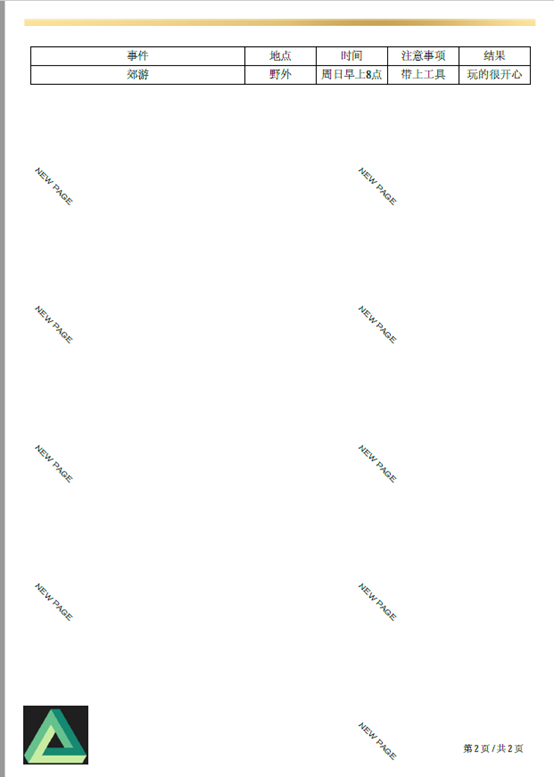
} mainDoc.newPage(); PdfPTable table2 = new PdfPTable(7); table2.setTotalWidth(540); table2.setLockedWidth(true); table2.setSpacingBefore(100);
table2.addCell(addCell("事件", font, null, 3)); table2.addCell(addCell("地点", font, null, 1)); table2.addCell(addCell("时间", font, null, 1)); table2.addCell(addCell("注意事项", font, null, 1)); table2.addCell(addCell("结果", font, null, 1)); table2.addCell(addCell("郊游", font, null, 3)); table2.addCell(addCell("野外", font, null, 1)); table2.addCell(addCell("周日早上8点", font, null, 1)); table2.addCell(addCell("带上工具", font, null, 1)); table2.addCell(addCell("玩的很开心", font, null, 1));
mainDoc.add(table2); mainDoc.close(); String pdfArrays[] = {cover,mainPath}; //合并pdf String mergePdf = "mergePdf.pdf"; String finalPdf = "finalPdf.pdf"; mergePDF(pdfArrays,DEST,mergePdf); //添加页码 addPageNum(DEST+"/"+mergePdf,DEST+"/"+finalPdf,font); }
/** * 添加页码 * @param pdfPath * @param outFilePath */ public static void addPageNum(String pdfPath, String outFilePath,Font font) { PdfReader reader = null; PdfStamper stamper = null; try { // 创建一个pdf读入流 reader = new PdfReader(pdfPath); // 根据一个pdfreader创建一个pdfStamper.用来生成新的pdf. stamper = new PdfStamper(reader, new FileOutputStream(outFilePath)); // 这个字体是itext-asian.jar中自带的 所以不用考虑操作系统环境问题. // BaseFont bf = BaseFont.createFont(PATH_FONT_COUR, BaseFont.IDENTITY_H, BaseFont.NOT_EMBEDDED); // baseFont不支持字体样式设定.但是font字体要求操作系统支持此字体会带来移植问题. // Font font = new Font(bf, 10); // font.setStyle(Font.BOLD); font.setColor(146,146,146); font.getBaseFont(); // 获得宽 Rectangle pageSize = reader.getPageSize(1); float width = pageSize.getWidth(); // 获取页码 int num = reader.getNumberOfPages(); for (int i = 1; i <= num; i++) { if (i >1){
PdfContentByte over = stamper.getOverContent(i);
over.beginText(); over.setFontAndSize(font.getBaseFont(), 10); // over.setColorFill(BaseColor.BLACK); // 设置页码在页面中的坐标 over.setTextMatrix((int) width - 100, 30); // over.setTextRenderingMode(1); // 设置字体加粗 over.showText("第 " + (i-1) + " 页"+" / "+"共 " +(num-1)+" 页"); over.endText(); over.stroke(); } } stamper.close(); } catch (Exception e) { e.printStackTrace(); } finally { if (reader != null) { reader.close(); } } } /** * @param files 源PDF路径 * @param outputPath 合并后输出的PDF路径 * @param outputFileName 合并后输出的PDF文件名 * @author Reverse_XML * 将多个PDF合并成一个PDF */ public static void mergePDF(String[] files, String outputPath, String outputFileName) { Document document = null; PdfCopy copy = null; PdfReader reader = null; try { document = new Document(new PdfReader(files[0]).getPageSize(1)); copy = new PdfCopy(document, new FileOutputStream(outputPath + "/" + outputFileName)); document.open(); for (int i = 0; i < files.length; i++) { reader = new PdfReader(files[i]); int numberOfPages = reader.getNumberOfPages(); for (int j = 1; j <= numberOfPages; j++) { document.newPage(); PdfImportedPage page = copy.getImportedPage(reader, j); copy.addPage(page); } } } catch (IOException e) { log.error(e.getMessage(), e); } catch (DocumentException e) { log.error(e.getMessage(), e); } finally { document.close(); reader.close(); copy.close(); } }
/** * 添加单元格 * * @param val 单元格内容 * @param font 单元格字体 * @param backgroudColor 单元格背景颜色 * @param colSpan 单元格跨列列数 */ private static PdfPCell addCell(String val, Font font, BaseColor backgroudColor, int colSpan) { String val1 = null == val ? " " : val; //新建单元格 PdfPCell cell = new PdfPCell(new Phrase(val1, font)); //水平居中 cell.setHorizontalAlignment(Element.ALIGN_CENTER); //单元格高度 cell.setFixedHeight(20); if (backgroudColor != null) { //设置背景颜色 cell.setBackgroundColor(backgroudColor); }
if (colSpan != 0) { //设置跨列列数 cell.setColspan(colSpan); }
// if (rowSpan != 0) { // cell.setRowspan(rowSpan);//设置跨行行数 // }
return cell; }
/** * 正文页眉页脚水印 * * @param document * @param writer * @throws BadElementException * @throws IOException */ private static void creatHeader( Document document, PdfWriter writer ,String signImage ,String footerImage) throws DocumentException, IOException { // PdfPTable table = new PdfPTable(new float[]{25, 425}); PdfPTable table = new PdfPTable(1); table.setTotalWidth(475);
//页眉图片 Image image = Image.getInstance(signImage); image.setAlignment(Image.ALIGN_CENTER); image.scalePercent(30); //依照比例缩放 //image.setWidthPercentage(); PdfPCell cell1Imag = new PdfPCell(image);
cell1Imag.setBorder(0);
//页脚图片 Image imageFotter = Image.getInstance(footerImage); imageFotter.setAlignment(Image.ALIGN_CENTER); imageFotter.scalePercent(35); //依照比例缩放 PdfPCell cellImag = new PdfPCell(imageFotter); // cellImag.setPaddingTop(-15f); // cellImag.setPaddingLeft(-12f); // cell1Imag.setPaddingRight(25f); cellImag.setBorder(0);
// table.getDefaultCell().setBorder(0); table.addCell(cell1Imag); table.addCell(cellImag); // table.addCell(cell1); // table.addCell(cell); PdfHeaderFooter event = new PdfHeaderFooter(table); writer.setPageEvent(event); //页眉页脚 event.onEndPage(writer, document); // event.onEndPage(writer, document,20,20);
Watermark waterEvent = new Watermark("NEW PAGE"); writer.setPageEvent(waterEvent); //水印 waterEvent.onEndPage(writer, document); // event.onEndPage(writer, document,20,20);
} |
|
/** * PdfHeaderFooter * * @author * @Description pdf生成页眉页脚工具类 * @Date 2020/12/8 13:51 */ public class PdfHeaderFooter extends PdfPageEventHelper { public static PdfPTable header;
public PdfHeaderFooter(PdfPTable header) { PdfHeaderFooter.header = header; }
/** * 页眉 * @param writer * @param document */ @Override public void onEndPage(PdfWriter writer, Document document) {
// //页眉 header.writeSelectedRows( 0, 1, 20, PageSize.A4.getHeight() - 20, writer.getDirectContent()); // //页脚 header.writeSelectedRows(1, 2, 20, 80, writer.getDirectContent()); }
} |
|
/** * Watermark * * @author * @Description 水印工具类 * @Date 2021/1/6 10:23 */ public class Watermark extends PdfPageEventHelper {
BaseFont chinese =BaseFont.createFont("C:/WINDOWS/Fonts/FZSTK.TTF", BaseFont.IDENTITY_H,BaseFont.NOT_EMBEDDED);//本地系统字体 Font fontTital = new Font(chinese, 10, Font.NORMAL);
private String waterCont;//水印内容 public Watermark() throws IOException, DocumentException {
} public Watermark(String waterCont) throws IOException, DocumentException { this.waterCont = waterCont; }
@Override public void onEndPage(PdfWriter writer, Document document) { for(int i=0 ; i<5; i++) { for(int j=0; j<5; j++) { ColumnText.showTextAligned(writer.getDirectContentUnder(), Element.ALIGN_CENTER, new Phrase(this.waterCont == null ? "HELLO WORLD" : this.waterCont, fontTital), (50.5f+i*350), (40.0f+j*150), writer.getPageNumber() % 2 == 1 ? 45 : -45); } } }
} |
八、 生成pdf成品展示
本文只做一个粗略的展示,pdf做的略显粗糙,更好的优化还需要读者去自己探索
|
|
|
九、 后记
本文采用的是后端代码撰写的方式生成pdf文档,这种方法的主要问题是模板有修改的话后端需要维护代码较多,这种做法比较繁琐

 浙公网安备 33010602011771号