
对于购物中心HTML前端页面的优化
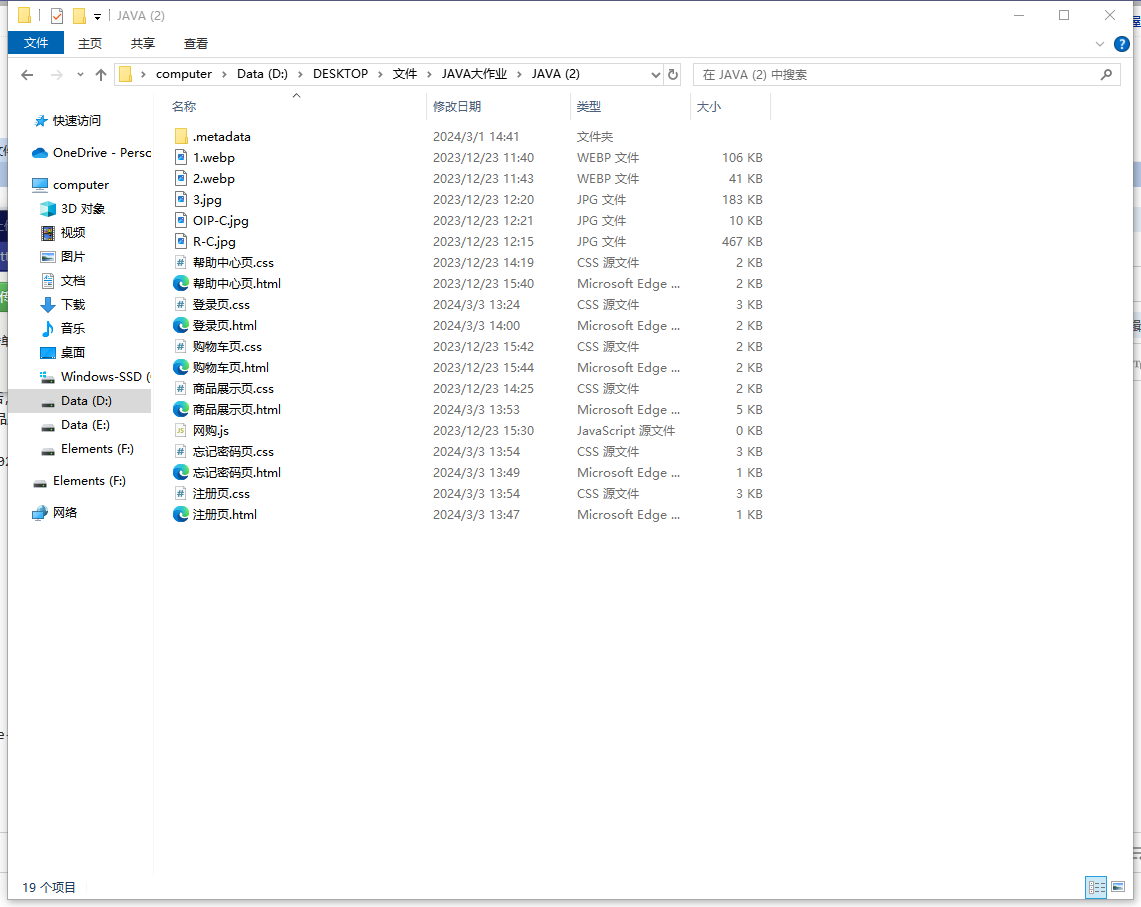
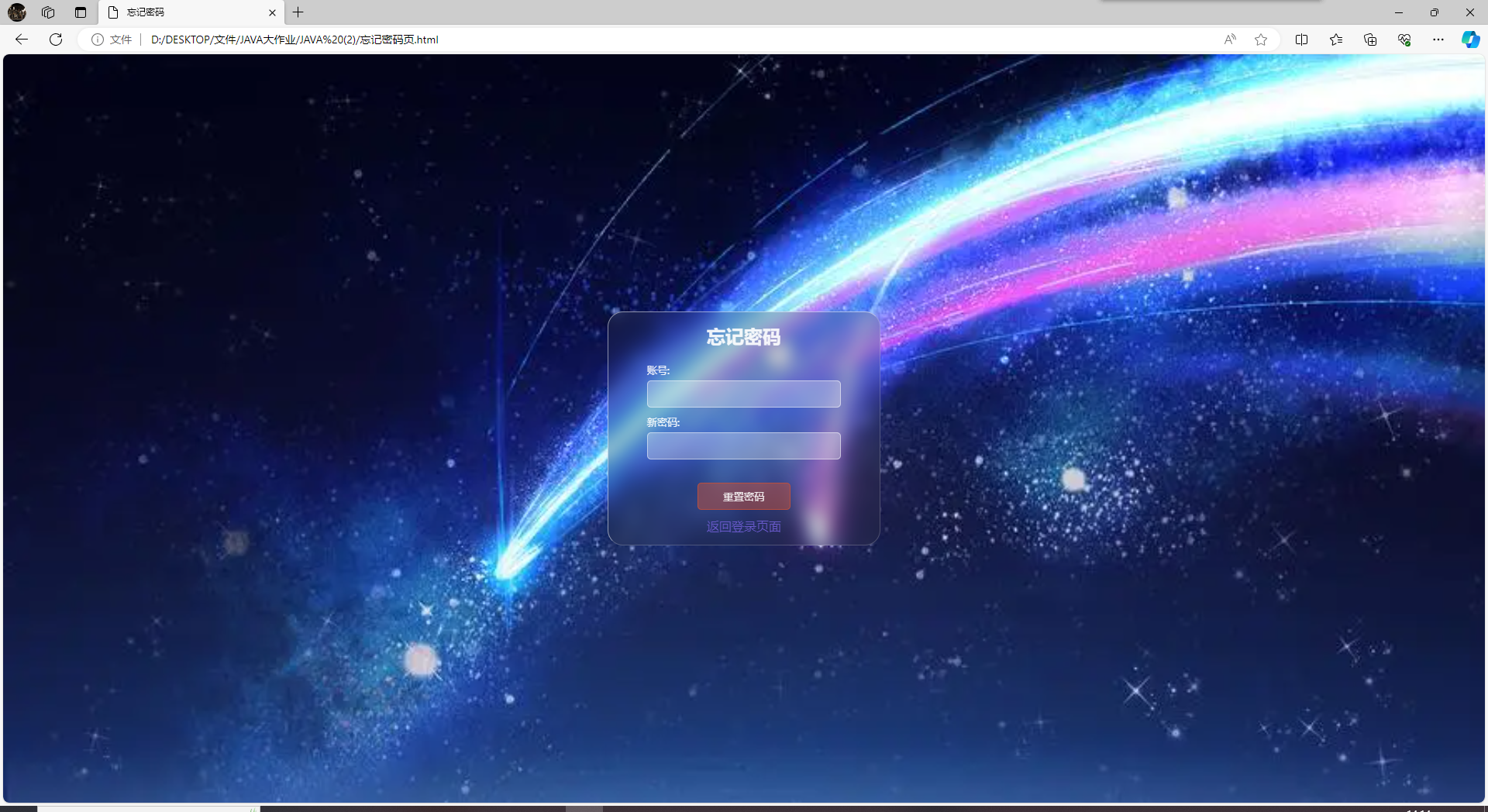
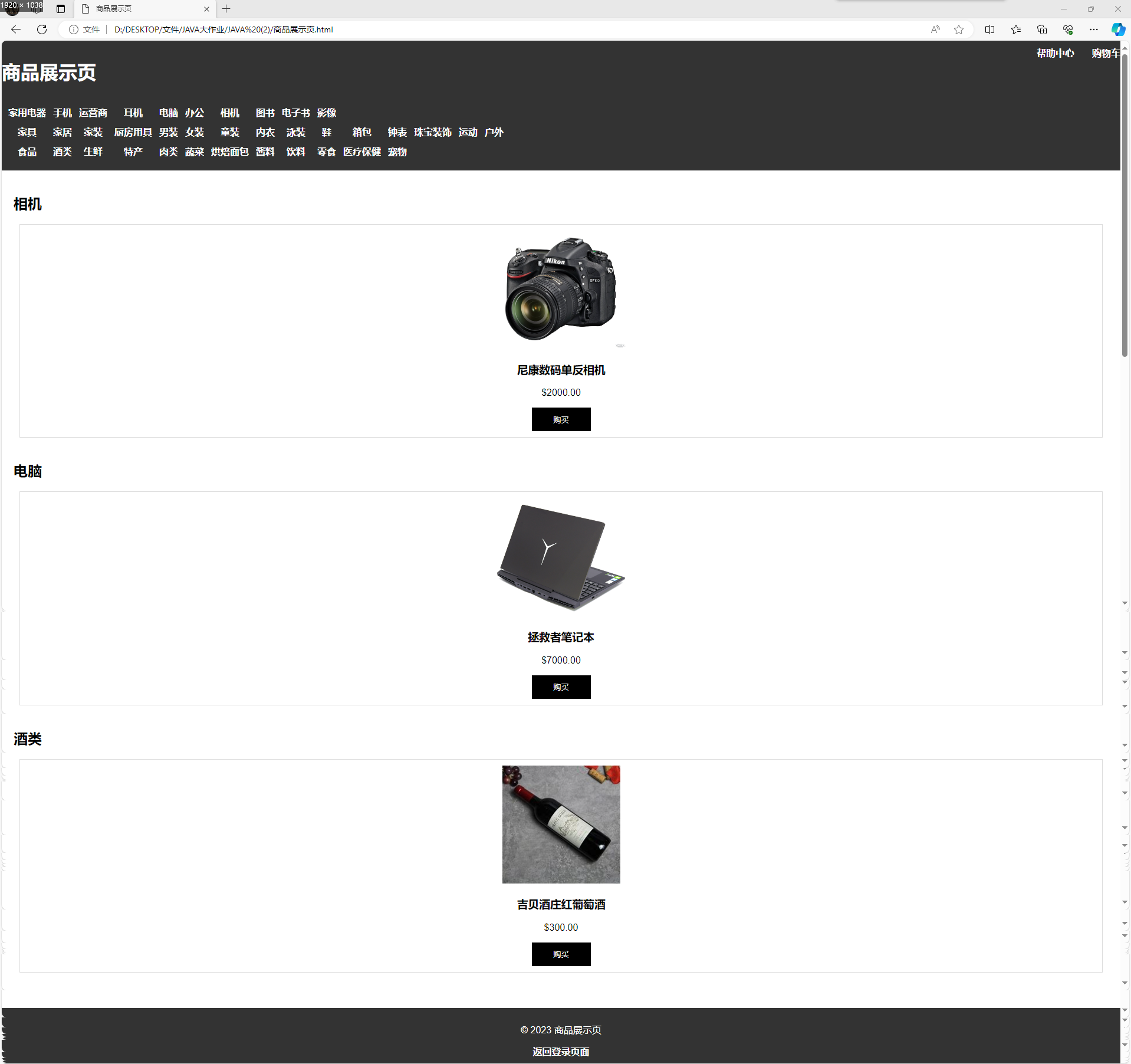
在对同学上学期的购物中心HTML前端页面项目进行学习后,我对它进行了优化。在原先的基础上,给它的注册、忘记密码按钮增加了跳转接口,使得这两个功能可以实现跳转,并且在商品展示页增加了返回登录页面的接口。
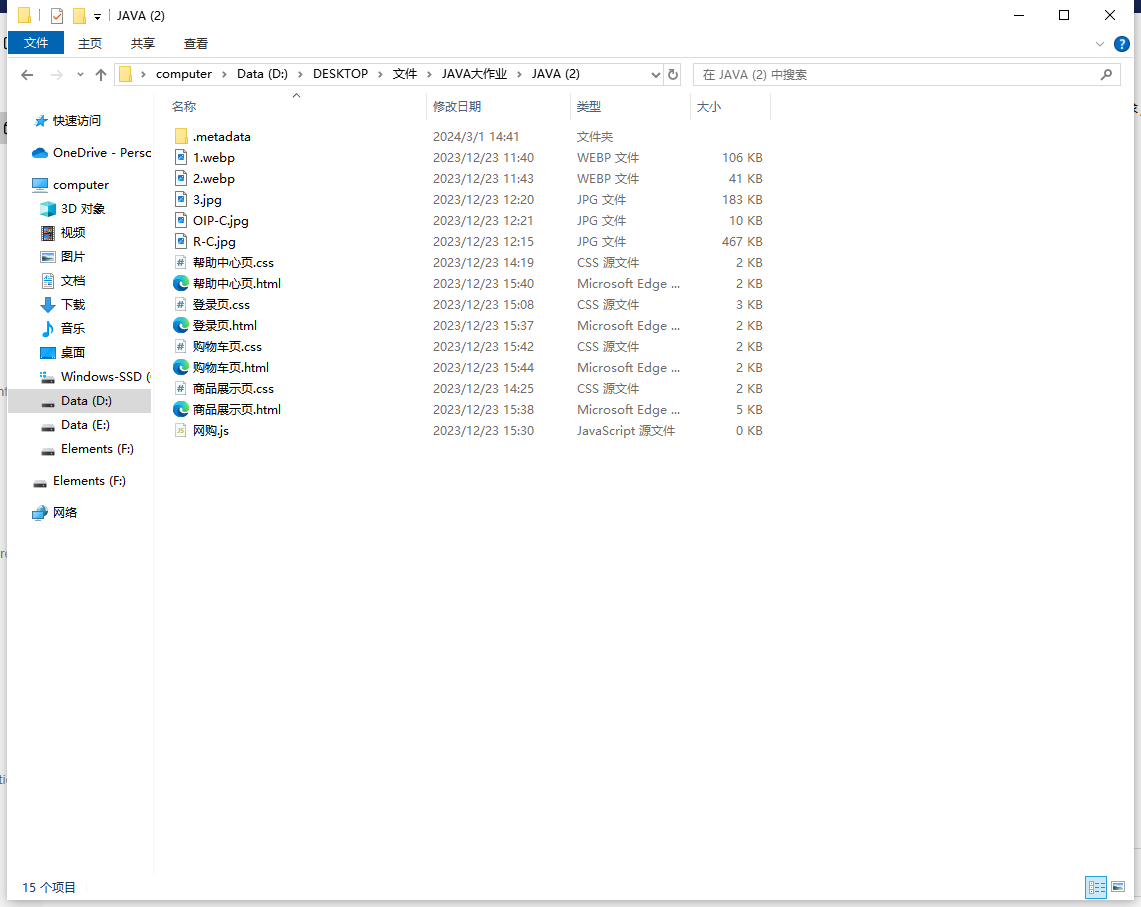
原始代码列表:
优化后代码列表:
代码文件:
原始登录页.html:
点击查看代码
<!DOCTYPE html>
<html lang="en">
<head>
    <meta charset="UTF-8">
    <meta name="viewport" content="width=device-width, initial-scale=1.0">
    <title>Login</title>
    <link rel="stylesheet" href="登录页.css"/>
</head>
<body>
    <div class="box">
        <h2>网上购物商场</h2>
        <div class="input-box">
            <label>账号</label>
            <input type="text" id="username"/>
        </div>
        <div class="input-box">
            <label>密码</label>
            <input type="password" id="password"/>
        </div>
        <div class="btn-box">
            <a href="#">忘记密码?</a>
            <div>
                <input id="a" type="submit" onclick="a1()" value="登录">
                <button>注册</button>
            </div>
        </div>
    </div>
<script>
    function a1(){
    var username=document.getElementById("username")
    var password=document.getElementById("password")
    if(username.value==="admin" && password.value==="123456")
    {
        alert("登录成功");
        window.location.href = "商品展示页.html";
    }
    else{
        alert("账号或密码错误");
    }
}
</script>
</body>
</html>
进行优化后的登录页.html:
点击查看代码
<!DOCTYPE html>
<html lang="en">
<head>
    <meta charset="UTF-8">
    <meta name="viewport" content="width=device-width, initial-scale=1.0">
    <title>Login</title>
    <link rel="stylesheet" href="登录页.css"/>
    <style>

        .btn-box {
            margin-left: -16px;
        }
    </style>
</head>
<body>
    <div class="box">
        <h2>网上购物商场</h2>
        <div class="input-box">
            <label>账号</label>
            <input type="text" id="username"/>
        </div>
        <div class="input-box">
            <label>密码</label>
            <input type="password" id="password"/>
        </div>
        <div class="btn-box">
            <a href="忘记密码页.html">忘记密码?</a>
            <div style="margin-top: 20px; text-align: center;">
                <input id="a" type="submit" onclick="a1()" value="登录" style="margin-right: 3px;">
                <button onclick="window.location.href = '注册页.html';" style="margin-left: 3px;">注册</button>
            </div>
        </div>
    </div>
<script>
    function a1(){
    var username=document.getElementById("username")
    var password=document.getElementById("password")
    if(username.value==="admin" && password.value==="123456")
    {
        alert("登录成功");
        window.location.href = "商品展示页.html";
    }
    else{
        alert("账号或密码错误");
    }
}
</script>
</body>
</html>
新增注册页.html:
点击查看代码
<!DOCTYPE html>
<html lang="en">
<head>
    <meta charset="UTF-8">
    <meta name="viewport" content="width=device-width, initial-scale=1.0">
    <title>注册</title>
    <link rel="stylesheet" href="注册页.css"/>
</head>
<body>
    <div class="box">
        <h2>注册</h2>
        <div class="input-box">
            <label>新账号:</label>
            <input type="text" id="new_username" name="new_username">
        </div>
        <div class="input-box">
            <label>新密码:</label>
            <input type="password" id="new_password" name="new_password">
        </div>
        <div class="btn-box">
            <input type="submit" value="注册">
            <a href="登录页.html" class="back-link">返回登录页面</a>
        </div>
    </div>
</body>
</html>
注册页.css:
点击查看代码
@charset "utf-8";
*{
    margin: 0;
    padding: 0;
}
body{
    display: flex;
    flex-direction: column;
    justify-content: center;
    align-items: center;
    height: 100vh;
    background: url(2.webp) no-repeat;
    background-size: cover;
}
.box{
    border-radius: 20px;
    display: flex;
    flex-direction: column;
    justify-content: center;
    align-items: center;
    width: 350px;
    height: 300px;
    border-top: 1px solid rgba(255, 255, 255, 0.5);
    border-left: 1px solid rgba(255, 255, 255, 0.5);
    border-right: 1px solid rgba(255, 255, 255, 0.2);
    border-bottom: 1px solid rgba(255, 255, 255, 0.2);
    backdrop-filter: blur(10px);
    background: rgba(50,50,50,0.2);
}
.box > h2{
    color: rgba(255, 255, 255, 0.9);
    margin-bottom: 20px;
}
.box .input-box{
    display: flex;
    flex-direction: column;
    justify-content: center;
    align-items: start;
    margin-bottom: 10px;
}
.box .input-box > label {
    margin-bottom: 5px;
    color:rgba(255, 255, 255, 0.9);
    font-size: 13px;
}
.box .input-box > input{
    box-sizing: border-box;
    color:rgba(255, 255, 255, 0.9);
    font-size: 14px;
    height: 35px;
    width: 250px;
    background: rgba(255, 255, 255, 0.3);
    border: 1px solid rgba(255, 255, 255, 0.5);
    border-radius: 5px;
    transition: 0.2s;
    outline: none;
    padding: 0 10px;
    letter-spacing: 1px;
}
.box .input-box > input:focus{
    border: 1px solid rgba(255, 255, 255, 0.8);
}
.box .btn-box{
    width: 250px;
    display: flex;
    flex-direction: column;
    justify-content: center;
    align-items: center;
    margin-top: 20px;
}
.box .btn-box > input[type="submit"]{
    width: 120px;
    height: 35px;
    border: 1px solid rgba(197,81,58,0.8);
    background: rgba(197,81,58,0.5);
    color: rgba(255, 255, 255, 0.9);
    border-radius: 5px;
    transition: 0.2s;
}
.box .btn-box > input[type="submit"]:hover{
    border: 1px solid rgba(248, 108, 76, 0.8);
    background: rgba(248, 108, 76, 0.5);
}

.back-link {
    color: #6A5ACD;
    text-decoration: none;
    margin-top: 10px;
}

.back-link:hover {
    text-decoration: underline;
}
新增忘记密码页.html:
点击查看代码
<!DOCTYPE html>
<html lang="en">
<head>
    <meta charset="UTF-8">
    <meta name="viewport" content="width=device-width, initial-scale=1.0">
    <title>忘记密码</title>
    <link rel="stylesheet" href="忘记密码页.css"/>
</head>
<body>
    <div class="box">
        <h2>忘记密码</h2>
        <div class="input-box">
            <label>账号:</label>
            <input type="text" id="username" name="username">
        </div>
        <div class="input-box">
            <label>新密码:</label>
            <input type="password" id="new_password" name="new_password">
        </div>
        <div class="btn-box">
            <input type="submit" value="重置密码">
            <a href="登录页.html" class="back-link">返回登录页面</a>
        </div>
    </div>
</body>
</html>
忘记密码页.css:
点击查看代码
@charset "utf-8";
*{
    margin: 0;
    padding: 0;
}
body{
    display: flex;
    flex-direction: column;
    justify-content: center;
    align-items: center;
    height: 100vh;
    background: url(2.webp) no-repeat;
    background-size: cover;
}
.box{
    border-radius: 20px;
    display: flex;
    flex-direction: column;
    justify-content: center;
    align-items: center;
    width: 350px;
    height: 300px;
    border-top: 1px solid rgba(255, 255, 255, 0.5);
    border-left: 1px solid rgba(255, 255, 255, 0.5);
    border-right: 1px solid rgba(255, 255, 255, 0.2);
    border-bottom: 1px solid rgba(255, 255, 255, 0.2);
    backdrop-filter: blur(10px);
    background: rgba(50,50,50,0.2);
}
.box > h2{
    color: rgba(255, 255, 255, 0.9);
    margin-bottom: 20px;
}
.box .input-box{
    display: flex;
    flex-direction: column;
    justify-content: center;
    align-items: start;
    margin-bottom: 10px;
}
.box .input-box > label {
    margin-bottom: 5px;
    color:rgba(255, 255, 255, 0.9);
    font-size: 13px;
}
.box .input-box > input{
    box-sizing: border-box;
    color:rgba(255, 255, 255, 0.9);
    font-size: 14px;
    height: 35px;
    width: 250px;
    background: rgba(255, 255, 255, 0.3);
    border: 1px solid rgba(255, 255, 255, 0.5);
    border-radius: 5px;
    transition: 0.2s;
    outline: none;
    padding: 0 10px;
    letter-spacing: 1px;
}
.box .input-box > input:focus{
    border: 1px solid rgba(255, 255, 255, 0.8);
}
.box .btn-box{
    width: 250px;
    display: flex;
    flex-direction: column;
    justify-content: center;
    align-items: center;
    margin-top: 20px;
}
.box .btn-box > input[type="submit"]{
    width: 120px;
    height: 35px;
    border: 1px solid rgba(197,81,58,0.8);
    background: rgba(197,81,58,0.5);
    color: rgba(255, 255, 255, 0.9);
    border-radius: 5px;
    transition: 0.2s;
}
.box .btn-box > input[type="submit"]:hover{
    border: 1px solid rgba(248, 108, 76, 0.8);
    background: rgba(248, 108, 76, 0.5);
}

.back-link {
    color: #6A5ACD;
    text-decoration: none;
    margin-top: 10px;
}

.back-link:hover {
    text-decoration: underline;
}
原始商品展示页.html:
点击查看代码
<!DOCTYPE html>
<html lang="en">
<head>
<meta charset="UTF-8">
<meta name="viewport" content="width=device-width, initial-scale=1.0">
<title>商品展示页</title>
<link rel="stylesheet" href="商品展示页.css">
</head>
<body>
<header>
<div class="d1">
<h1 class="h1">商品展示页</h1>
<a class="h2" href="购物车页.html">购物车</a>
<a class="h2" href="帮助中心页.html">帮助中心</a>
</div>
<nav>
<table id="t1">
<tr>
<td><a href="#category1">家用电器</a></td>
<td><a href="#category2">手机</a></td>
<td><a href="#category3">运营商</a></td>
<td><a href="#category4">耳机</a></td>
<td><a href="#category5">电脑</a></td>
<td><a href="#category6">办公</a></td>
<td><a href="#category22">相机</a></td>
<td><a href="#category36">图书</a></td>
<td><a href="#category37">电子书</a></td>
<td><a href="#category38">影像</a></td>
</tr>
<tr>
<td><a href="#category7">家具</a></td>
<td><a href="#category8">家居</a></td>
<td><a href="#category9">家装</a></td>
<td><a href="#category10">厨房用具</a></td>
<td><a href="#category11">男装</a></td>
<td><a href="#category12">女装</a></td>
<td><a href="#category13">童装</a></td>
<td><a href="#category14">内衣</a></td>
<td><a href="#category15">泳装</a></td>
<td><a href="#category16">鞋</a></td>
<td><a href="#category17">箱包</a></td>
<td><a href="#category18">钟表</a></td>
<td><a href="#category19">珠宝装饰</a></td>
<td><a href="#category20">运动</a></td>
<td><a href="#category21">户外</a></td>
</tr>
<tr>
<td><a href="#category23">食品</a></td>
<td><a href="#category24">酒类</a></td>
<td><a href="#category25">生鲜</a></td>
<td><a href="#category26">特产</a></td>
<td><a href="#category27">肉类</a></td>
<td><a href="#category29">蔬菜</a></td>
<td><a href="#category30">烘焙面包</a></td>
<td><a href="#category31">酱料</a></td>
<td><a href="#category32">饮料</a></td>
<td><a href="#category33">零食</a></td>
<td><a href="#category34">医疗保健</a></td>
<td><a href="#category35">宠物</a></td>
</tr>
</table>
</nav>
</header>
<main>
<section id="category1" class="product-category">
<h2>相机</h2>
<div class="product">
<img src="R-C.jpg" alt="Product 1">
<h3>尼康数码单反相机</h3>
<p>$2000.00</p>
<button class="btn">购买</button>
</div>
<!-- 其他商品... -->
</section>
<section id="category2" class="product-category">
<h2>电脑</h2>
<div class="product">
<img src="3.jpg" alt="Product 2">
<h3>拯救者笔记本</h3>
<p>$7000.00</p>
<button class="btn">购买</button>
</div>
<!-- 其他商品... -->
</section>
<section id="category3" class="product-category">
<h2>酒类</h2>
<div class="product">
<img src="OIP-C.jpg" alt="Product 3">
<h3>吉贝酒庄红葡萄酒</h3>
<p>$300.00</p>
<button class="btn">购买</button>
</div>
<!-- 其他商品... -->
</section>
</main>
<footer>
<p>© 2023 商品展示页</p>
</footer>
</body>
</html>
进行优化后的商品展示页.html:
点击查看代码
<!DOCTYPE html>
<html lang="en">
<head>
<meta charset="UTF-8">
<meta name="viewport" content="width=device-width, initial-scale=1.0">
<title>商品展示页</title>
<link rel="stylesheet" href="商品展示页.css">
</head>
<body>
<header>
<div class="d1">
<h1 class="h1">商品展示页</h1>
<a class="h2" href="购物车页.html">购物车</a>
<a class="h2" href="帮助中心页.html">帮助中心</a>
</div>
<nav>
<table id="t1">
<tr>
<td><a href="#category1">家用电器</a></td>
<td><a href="#category2">手机</a></td>
<td><a href="#category3">运营商</a></td>
<td><a href="#category4">耳机</a></td>
<td><a href="#category5">电脑</a></td>
<td><a href="#category6">办公</a></td>
<td><a href="#category22">相机</a></td>
<td><a href="#category36">图书</a></td>
<td><a href="#category37">电子书</a></td>
<td><a href="#category38">影像</a></td>
</tr>
<tr>
<td><a href="#category7">家具</a></td>
<td><a href="#category8">家居</a></td>
<td><a href="#category9">家装</a></td>
<td><a href="#category10">厨房用具</a></td>
<td><a href="#category11">男装</a></td>
<td><a href="#category12">女装</a></td>
<td><a href="#category13">童装</a></td>
<td><a href="#category14">内衣</a></td>
<td><a href="#category15">泳装</a></td>
<td><a href="#category16">鞋</a></td>
<td><a href="#category17">箱包</a></td>
<td><a href="#category18">钟表</a></td>
<td><a href="#category19">珠宝装饰</a></td>
<td><a href="#category20">运动</a></td>
<td><a href="#category21">户外</a></td>
</tr>
<tr>
<td><a href="#category23">食品</a></td>
<td><a href="#category24">酒类</a></td>
<td><a href="#category25">生鲜</a></td>
<td><a href="#category26">特产</a></td>
<td><a href="#category27">肉类</a></td>
<td><a href="#category29">蔬菜</a></td>
<td><a href="#category30">烘焙面包</a></td>
<td><a href="#category31">酱料</a></td>
<td><a href="#category32">饮料</a></td>
<td><a href="#category33">零食</a></td>
<td><a href="#category34">医疗保健</a></td>
<td><a href="#category35">宠物</a></td>
</tr>
</table>
</nav>
</header>
<main>
<section id="category1" class="product-category">
<h2>相机</h2>
<div class="product">
<img src="R-C.jpg" alt="Product 1">
<h3>尼康数码单反相机</h3>
<p>$2000.00</p>
<button class="btn">购买</button>
</div>
<!-- 其他商品... -->
</section>
<section id="category2" class="product-category">
<h2>电脑</h2>
<div class="product">
<img src="3.jpg" alt="Product 2">
<h3>拯救者笔记本</h3>
<p>$7000.00</p>
<button class="btn">购买</button>
</div>
<!-- 其他商品... -->
</section>
<section id="category3" class="product-category">
<h2>酒类</h2>
<div class="product">
<img src="OIP-C.jpg" alt="Product 3">
<h3>吉贝酒庄红葡萄酒</h3>
<p>$300.00</p>
<button class="btn">购买</button>
</div>
<!-- 其他商品... -->
</section>
</main>
<footer>
<p>© 2023 商品展示页</p>
<a href="登录页.html" class="back-link">返回登录页面</a>
</footer>
</body>
</html>
优化后的页面展示:
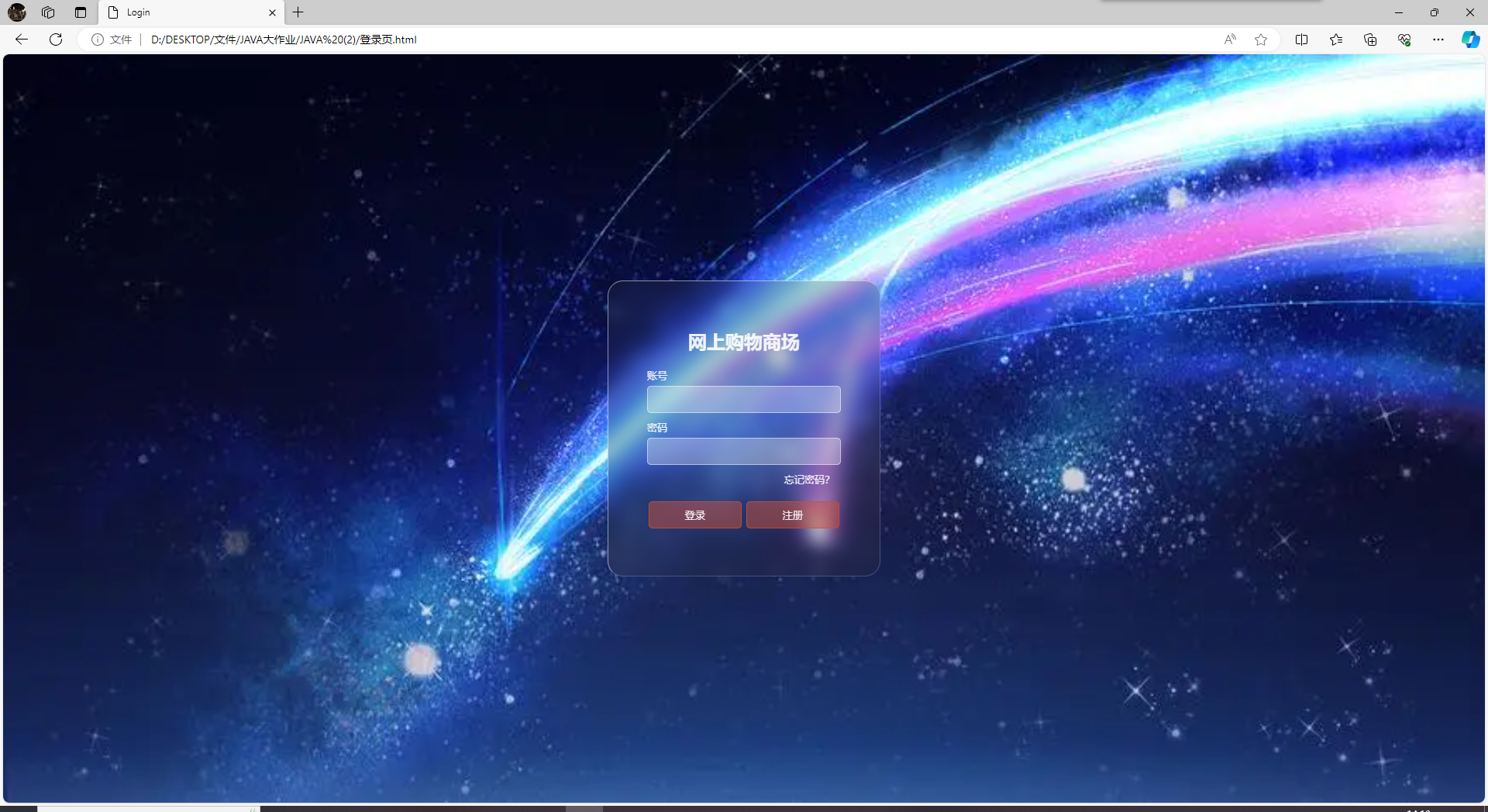
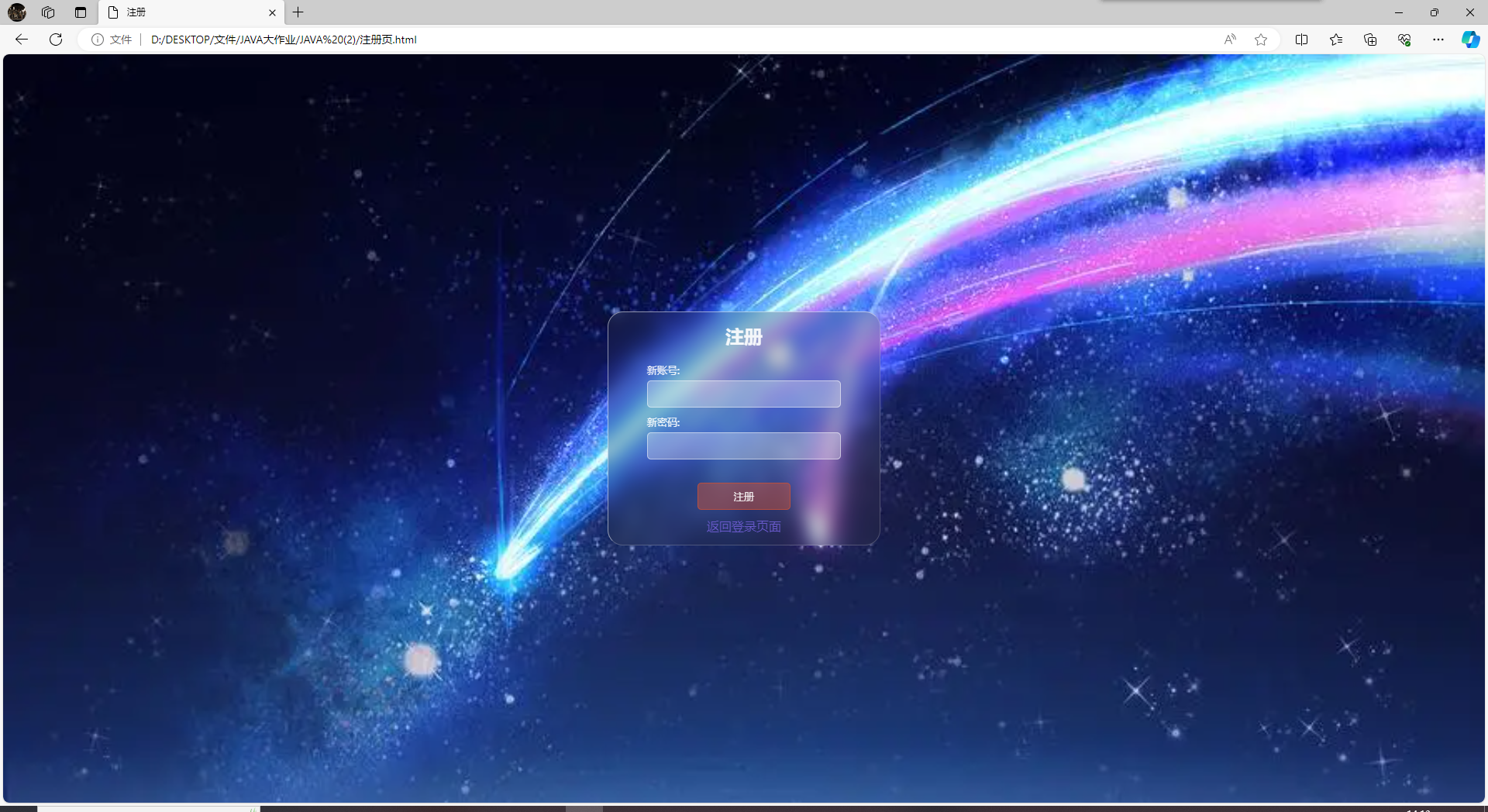
小结:
在本次优化中,我们对登录页面、注册页面和商品展示页进行了一系列改进。首先,在登录页面,我们添加了注册和忘记密码的按钮,并使其能够跳转到相应页面。然后,我们修改了注册页面和忘记密码页面的样式,使其与登录页面保持一致,并且添加了返回登录页面的接口。最后,在商品展示页,我们添加了返回登录页面的链接,提供了更好的用户体验。通过这些优化,页面间的导航更加清晰明了,用户可以更轻松地进行操作,提升了整体用户体验。

 浙公网安备 33010602011771号