
Java IO
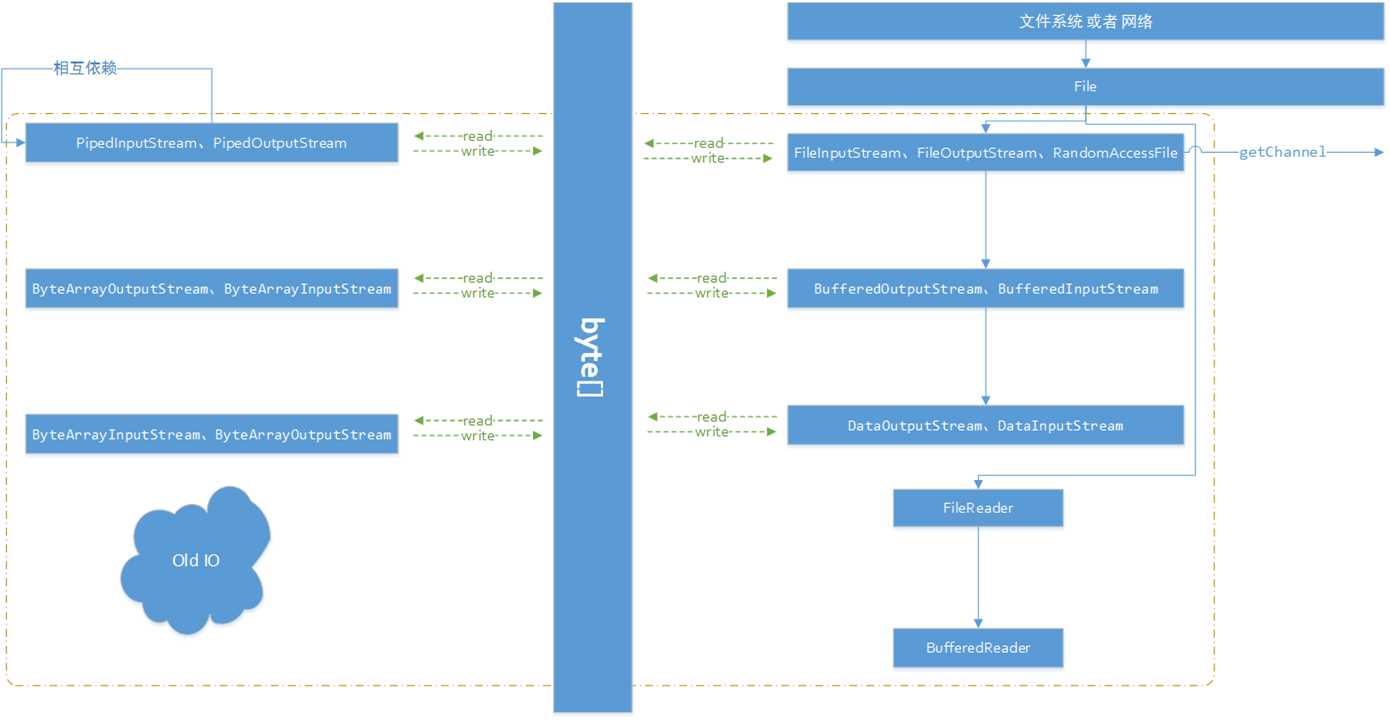
Java IO - File的要点,应该是
1、跨平台问题的解决
2、文件的安全
3、文件的检索方法
一、代码小引入
代请看一个简单的小demo:(ps:开源项目java-core-learning地址:https://github.com/JeffLi1993)
import java.io.File;
import java.util.Arrays;
/*
 * Copyright [2015] [Jeff Lee]
 *
 * Licensed under the Apache License, Version 2.0 (the "License");
 * you may not use this file except in compliance with the License.
 * You may obtain a copy of the License at
 *
 *   http://www.apache.org/licenses/LICENSE-2.0
 *
 * Unless required by applicable law or agreed to in writing, software
 * distributed under the License is distributed on an "AS IS" BASIS,
 * WITHOUT WARRANTIES OR CONDITIONS OF ANY KIND, either express or implied.
 * See the License for the specific language governing permissions and
 * limitations under the License.
 */

/**
 * @author Jeff Lee
 * @since 2015-7-13 07:58:56
 * 列出目录并排序
 */
public class DirListT {
    public static void main(String[] args) {
        // 获取当前目录
        File path =  new File( "." ); // .表示当前目录
        // 文件路径名数组
        String list[] = path.list();

        // 对String文件名进行排序
        Arrays.sort(list,String.CASE_INSENSITIVE_ORDER);

        // 打印
        for (String dirItem : list)
            System.out.println(dirItem);
    }
}
在eclipse中,右键run一下,可以得到如下的结果:

如图,很容易注意到了,其目录下的名字排序按字母并打印了。
先回顾下API知识吧,
首先构造函数 public File(String pathname)
通过将给定路径名字符串转换为抽象路径名来创建一个新
File实例。如果给定字符串是空字符串,那么结果是空抽象路径名。
- 参数:
pathname- 路径名字符串- 抛出:
NullPointerException- 如果pathname参数为null
- 二者,File实现了Comparator接口,以便对FileName进行排序。
static Comparator<String>CASE_INSENSITIVE_ORDER
一个对String对象进行排序的 Comparator,作用与compareToIgnoreCase相同。
三者, path.list()为什么会返回String[] filenams的数组呢?怎么不是List呢?
自问自答:这时候,我们应该去看看ArrayList的实现,ArrayList其实是动态的数组实现。动态,动态的弊端就是效率低。此时,返回一个固定的数组,而不是一个灵活的类容器,因为其目录元素是固定的。下面是ArrayList和数组Array的比较:

二、深入理解源码
File,File究竟是怎么构成的。顺着源码,知道了File有几个重要的属性:

1、static private FileSystem fs
FileSystem : 对本地文件系统的抽象
2、String path 文件路径名
3、内联枚举类
PathStatus 地址是否合法 ENUM类 private static enum PathStatus { INVALID, CHECKED };
4、prefixLength 前缀长度
- 如下,给出File相关核心的UML图:

其实操作的是 FileSystem : 对本地文件系统的抽象,真正操作的是 FileSytem的派生类。通过源码Ctrl+T发现如下:Win下操作的是 Win32FileSystem 和 WinNTFileSystem类。看来真正通过jvm,native调用系统的File是他们。
![clipboard[1]](http://www.bysocket.com/wp-content/uploads/2015/07/clipboard1.png)
那Linux呢?因此,下了个Linux版本的JDK,解压,找到rt.jar。然后java/io目录中,找到了UnixFileSystem类。真相大白了!
![clipboard[2]](http://www.bysocket.com/wp-content/uploads/2015/07/clipboard2.png)
所以可以小结File操作源码这样调用的:中间不同JDK,其实是不同的类调用本机native方法。

三、小demo再来一发
File 其实和我们在系统中看的的文件一样。就像我们右键,属性。可以看到很多File的信息。Java File也有。下面是一个文件的相关方法详情:
import java.io.File;
/*
 * Copyright [2015] [Jeff Lee]
 *
 * Licensed under the Apache License, Version 2.0 (the "License");
 * you may not use this file except in compliance with the License.
 * You may obtain a copy of the License at
 *
 *   http://www.apache.org/licenses/LICENSE-2.0
 *
 * Unless required by applicable law or agreed to in writing, software
 * distributed under the License is distributed on an "AS IS" BASIS,
 * WITHOUT WARRANTIES OR CONDITIONS OF ANY KIND, either express or implied.
 * See the License for the specific language governing permissions and
 * limitations under the License.
 */

/**
 * @author Jeff Lee
 * @since 2015-7-13 10:06:28
 * File方法详细使用
 */
public class FileMethodsT {

    private static void fileData(File f) {
        System.out.println(
            " 绝对路径:" + f.getAbsolutePath() +
            "\n 可读:" + f.canRead() +
            "\n 可写:" + f.canWrite() +
            "\n 文件名:" + f.getName() +
            "\n 上级目录:" + f.getParent() +
            "\n 相对地址:" + f.getPath() +
            "\n 长度:" + f.length() +
            "\n 最近修改时间:" + f.lastModified()
            );
        if (f.isFile())
            System.out.println( " 是一个文件" );
        else if (f.isDirectory())
            System.out.println( " 是一个目录" );
    }

    public static void main(String[] args) {
        // 获取src目录
        File file =  new File( "src" );
        // file详细操作
        fileData(file);
    }
}
在eclipse中,右键run一下,可以得到如下的结果:大家应该都明白了吧。

从上一篇 图解 Java IO : 一、File源码 并没有把所有File的东西讲完。这次讲讲FilenameFilter,关于过滤器文件《Think In Java》中写道:
更具体地说,这是一个策略模式的例子,因为list()实现了基本功能,而按着形式提供了这个策略,完善list()提供服务所需的算法。
java.io.FilenameFilter是文件名过滤器接口,即过滤出符合规则的文件名组。
一、FilenameFilter源码

从IO的UML可以看出,FilenameFilter接口独立,而且没有它的实现类。下面就看看它的源码:
public interface FilenameFilter {
    /**
     * 测试指定文件是否应该包含在某一文件列表中。
     *
     * @param   被找到的文件所在的目录。
     * @param   文件的名称
     */
    boolean accept(File dir, String name);
}
从JDK1.0就存在了,功能也很简单:就是为了过滤文件名。只要在accept()方法中传入相应的目录和文件名即可。
深度分析:接口要有真正的实现才能算行为模式中真正实现。所以这里使用的是策略模式,涉及到三个角色:
环境(Context)角色
抽象策略(Strategy)角色
具体策略(Context Strategy)角色
结构图如下:

其中,FilenameFiler Interface 就是这里的抽象策略角色。其实也可以用抽象类实现。
但是,装饰器模式也有缺点:在编写程序的时候,它提供了相当多的灵活性(容易混合和匹配属性),同时也增加了代码的复杂性。
二、使用方法

如图 FilenameFiler使用如图所示。上代码吧:(small 广告是要的,代码都在 开源项目java-core-learning。地址:https://github.com/JeffLi1993)
package org.javacore.io;

import java.io.File;
import java.io.FilenameFilter;
/*
 * Copyright [2015] [Jeff Lee]
 *
 * Licensed under the Apache License, Version 2.0 (the "License");
 * you may not use this file except in compliance with the License.
 * You may obtain a copy of the License at
 *
 *   http://www.apache.org/licenses/LICENSE-2.0
 *
 * Unless required by applicable law or agreed to in writing, software
 * distributed under the License is distributed on an "AS IS" BASIS,
 * WITHOUT WARRANTIES OR CONDITIONS OF ANY KIND, either express or implied.
 * See the License for the specific language governing permissions and
 * limitations under the License.
 */

/**
 * @author Jeff Lee
 * @since 2015-7-20 13:31:41
 * 类名过滤器的使用
 */
public class FilenameFilterT {

    public static void main(String[] args) {
        // IO包路径
        String dir =  "src" + File.separator +
                "org" + File.separator +
                "javacore" + File.separator +
                "io" ;
        File file =  new File(dir);
        // 创建过滤器文件
        MyFilter filter =  new MyFilter( "y.java" );
        // 过滤
        String files[] = file.list(filter);

        // 打印
        for (String name : files) {
            System.err.println(name);
        }
    }

    /**
     *  内部类实现过滤器文件接口
     */
    static class MyFilter  implements FilenameFilter {

        private String type;

        public MyFilter (String type) {
            this .type = type;
        }

        @Override
        public boolean accept(File dir, String name) {
            return name.endsWith(type); // 以Type结尾
        }

    }
}
其中我们用内部类的实现,实现了FilenameFilter Interface。所以当我们File list调用接口方法时,传入MyFilter可以让文件名规则按我们想要的获得。
右键 Run 下,可以看到如图所示的输出:

补充:
String[] fs = f.list()
File[] fs = f.listFiles()
String []fs = f.list(FilenameFilter filter);;
File[]fs = f.listFiles(FilenameFilter filter);

一、InputStream
InputStream是一个抽象类,即表示所有字节输入流实现类的基类。它的作用就是抽象地表示所有从不同数据源产生输入的类,例如常见的FileInputStream、FilterInputStream等。那些数据源呢?比如:
1) 字节数组(不代表String类,但可以转换)
2) String对象
3) 文件
4) 一个其他种类的流组成的序列化 (在分布式系统中常见)
5) 管道(多线程环境中的数据源)
等等
二者,注意它是属于字节流部分,而不是字符流(java.io中Reader\Writer,下面会讲到)。
FilterInputStream是为各种InputStream实现类提供的“装饰器模式”的基类。因此,可以分为原始的字节流和“装饰”过的功能封装字节流。
二、细解InputStream源码的核心
源码如下:
/**
 * 所有字节输入流实现类的基类
 */
public abstract class SInputStream {

    // 缓存区字节数组最大值
    private static final int MAX_SKIP_BUFFER_SIZE =  2048 ;

    // 从输入流中读取数据的下一个字节,以int返回
    public abstract int read()  throws IOException;

    // 从输入流中读取数据的一定数量字节,并存储在缓存数组b
    public int read( byte b[])  throws IOException {
        return read(b,  0 , b.length);
    }

    // 从输入流中读取数据最多len个字节,并存储在缓存数组b
    public int read( byte b[],  int off,  int len)  throws IOException {
        if (b ==  null ) {
            throw new NullPointerException();
        }  else if (off <  0 || len <  0 || len > b.length - off) {
            throw new IndexOutOfBoundsException();
        }  else if (len ==  0 ) {
            return 0 ;
        }

        int c = read();
        if (c == - 1 ) {
            return - 1 ;
        }
        b[off] = ( byte )c;

        int i =  1 ;
        try {
            for (; i < len ; i++) {
                c = read();
                if (c == - 1 ) {
                    break ;
                }
                b[off + i] = ( byte )c;
            }
        }  catch (IOException ee) {
        }
        return i;
    }

    // 跳过输入流中数据的n个字节
    public long skip( long n)  throws IOException {

        long remaining = n;
        int nr;

        if (n <=  0 ) {
            return 0 ;
        }

        int size = ( int )Math.min(MAX_SKIP_BUFFER_SIZE, remaining);
        byte [] skipBuffer =  new byte [size];
        while (remaining >  0 ) {
            nr = read(skipBuffer,  0 , ( int )Math.min(size, remaining));
            if (nr <  0 ) {
                break ;
            }
            remaining -= nr;
        }

        return n - remaining;
    }

    // 返回下一个方法调用能不受阻塞地从此读取(或者跳过)的估计字节数
    public int available()  throws IOException {
        return 0 ;
    }

    // 关闭此输入流,并释放与其关联的所有资源

    public void close()  throws IOException {}

    // 在此输出流中标记当前位置
    public synchronized void mark( int readlimit) {}

    // 将此流重新定位到最后一次对此输入流调用 mark 方法时的位置。
    public synchronized void reset()  throws IOException {
        throw new IOException( "mark/reset not supported" );
    }

    // 测试此输入流是否支持 mark 和 reset 方法
    public boolean markSupported() {
        return false ;
    }

}
其中,InputStream下面三个read方法才是核心方法:
public abstract int read()
抽象方法,没有具体实现。因为子类必须实现此方法的一个实现。这就是输入流的关键方法。
二者,可见下面两个read()方法都调用了这个方法子类的实现来完成功能的。
public int read( byte b[])
该方法是表示从输入流中读取数据的一定数量字节,并存储在缓存字节数组b。其效果等同于调用了下面方法的实现:
read(b, 0 , b.length)
如果b的长度为 0,则不读取任何字节并返回 0;否则,尝试读取至少 1 字节。如果因为流位于文件末尾而没有可用的字节,则返回值 -1;否则,至少读取一个字节并将其存储在 b 中。
思考:这时候,怪不得很多时候, b != –1 或者 b != EOF
public int read( byte b[], int off, int len)
在输入数据可用、检测到流末尾或者抛出异常前,此方法一直阻塞。
该方法先进行校验,然后校验下个字节是否为空。如果校验通过后,
如下代码:
int i =  1 ;
try {
    for (; i < len ; i++) {
        c = read();
        if (c == - 1 ) {
            break ;
        }
        b[off + i] = ( byte )c;
    }
}  catch (IOException ee) {
}
将读取的第一个字节存储在元素 b[off] 中,下一个存储在 b[off+1] 中,依次类推。读取的字节数最多等于 len。设 k 为实际读取的字节数;这些字节将存储在 b[off] 到 b[off+k-1] 的元素中,不影响 b[off+k] 到 b[off+len-1] 的元素。
因为有上面两个read的实现,所以这里InputStream设计为抽象类。
一、前言
上一篇《Java IO 之 InputStream源码》,说了InputStream。JDK1.0中就有了这传统的IO字节流,也就是 InputStream 和 OutputStream。梳理下两者的核心:
InputStream中有几个 read() 方法和 OutputStream中有几个 write() 方法。它们是一一对应的,而核心的是read()和write()方法。它们都没实现,所有本质调用是各自实现类实现的该两个方法。
read() 和 write() ,对应着系统的Input和Output,即系统的输出输入。
二、OutputStream
也是一个抽象类,即表示所有字节输入流实现类的基类。它的作用就是抽象地表示所有要输出到的目标,例如常见的FileOutStream、FilterOutputStream等。它实现了java.io.Closeable和java.io.Flushable两个接口。其中空实现了flush方法,即拥有刷新缓存区字节数组作用。
那些输出目标呢?比如:
1) 字节数组(不代表String类,但可以转换)
2) 文件
3) 管道(多线程环境中的数据源)
等等
FilterOutputStream是为各种OutputStream实现类提供的“装饰器模式”的基类。将属性或者有用的接口与输出流连接起来。
三、细解OutputStream源码的核心
一样的,先看源码:
/**
 * 所有字节输出流实现类的基类
 */
public abstract class SOutputStream  implements Closeable, Flushable {

    // 将指定的字节写入输出流
    public abstract void write( int b)  throws IOException;

    // 将指定的byte数组的字节全部写入输出流
    public void write( byte b[])  throws IOException {
        write(b,  0 , b.length);
    }

    // 将指定的byte数组中从偏移量off开始的len个字节写入输出流
    public void write( byte b[],  int off,  int len)  throws IOException {
        if (b ==  null ) {
            throw new NullPointerException();
        }  else if ((off <  0 ) || (off > b.length) || (len <  0 ) ||
                   ((off + len) > b.length) || ((off + len) <  0 )) {
            throw new IndexOutOfBoundsException();
        }  else if (len ==  0 ) {
            return ;
        }
        for ( int i =  0 ; i < len ; i++) {
            write(b[off + i]);
        }
    }

    // 刷新输出流,并强制写出所有缓冲的输出字节
    public void flush()  throws IOException {
    }

    // 关闭输出流,并释放与该流有关的所有资源
    public void close()  throws IOException {
    }

}
其中三个核心的write()方法,对应着三个InputStream的read()方法:
1. abstract void write(int b) 抽象方法
public abstract void write( int b) throws IOException;
对应着,InputStream的read()方法,此方法依旧是抽象方法。因为子类必须实现此方法的一个实现。这就是输入流的关键方法。
二者,下面两个write方法中调用了此核心方法。
可见,核心的是read()和write()方法在传统的IO是多么重要。
2. void write(byte b[]) 方法
public void write( byte b[]) throws IOException
将指定的byte数组的字节全部写入输出流。该效果实际上是由下一个write方法实现的,只是调用的额时候指定了长度:
3. void write(byte b[], int off, int len) 方法
public void write( byte b[], int off, int len) throws IOException
将指定的byte数组中从偏移量off开始的len个字节写入输出流。代码详细流程解读如下:
a. 如果
b为null,则抛出NullPointerException。b. 如果
off为负,或len为负,或者off+len大于数组b的长度,则抛出 IndexOutOfBoundsException。c. 将数组
b中的某些字节按顺序写入输出流;元素b[off]是此操作写入的第一个字节,b[off+len-1]是此操作写入的最后一个字节。
四、小结
重要的事情说三遍:
OutputStream 解读对照着 InputStream来看!注意 一个write对应一个read
OutputStream 解读对照着 InputStream来看!注意 一个write对应一个read
OutputStream 解读对照着 InputStream来看!注意 一个write对应一个read
一、引子
文件,作为常见的数据源。关于操作文件的字节流就是 --- FileInputStream & FileOutputStream。它们是Basic IO字节流中重要的实现类。
二、FileInputStream源码分析
FileInputStream源码如下:
/**
 * FileInputStream 从文件系统的文件中获取输入字节流。文件取决于主机系统。
 *  比如读取图片等的原始字节流。如果读取字符流,考虑使用 FiLeReader。
 */
public class SFileInputStream  extends InputStream
{
    /* 文件描述符类---此处用于打开文件的句柄 */
    private final FileDescriptor fd;

    /* 引用文件的路径 */
    private final String path;

    /* 文件通道,NIO部分 */
    private FileChannel channel =  null ;

    private final Object closeLock =  new Object();
    private volatile boolean closed =  false ;

    private static final ThreadLocal runningFinalize =
        new ThreadLocal<>();

    private static boolean isRunningFinalize() {
        Boolean val;
        if ((val = runningFinalize.get()) !=  null )
            return val.booleanValue();
        return false ;
    }

    /* 通过文件路径名来创建FileInputStream */
    public FileInputStream(String name)  throws FileNotFoundException {
        this (name !=  null ?  new File(name) :  null );
    }

    /* 通过文件来创建FileInputStream */
    public FileInputStream(File file)  throws FileNotFoundException {
        String name = (file !=  null ? file.getPath() :  null );
        SecurityManager security = System.getSecurityManager();
        if (security !=  null ) {
            security.checkRead(name);
        }
        if (name ==  null ) {
            throw new NullPointerException();
        }
        if (file.isInvalid()) {
            throw new FileNotFoundException( "Invalid file path" );
        }
        fd =  new FileDescriptor();
        fd.incrementAndGetUseCount();
        this .path = name;
        open(name);
    }

    /* 通过文件描述符类来创建FileInputStream */
    public FileInputStream(FileDescriptor fdObj) {
        SecurityManager security = System.getSecurityManager();
        if (fdObj ==  null ) {
            throw new NullPointerException();
        }
        if (security !=  null ) {
            security.checkRead(fdObj);
        }
        fd = fdObj;
        path =  null ;
        fd.incrementAndGetUseCount();
    }

    /* 打开文件,为了下一步读取文件内容。native方法 */
    private native void open(String name)  throws FileNotFoundException;

    /* 从此输入流中读取一个数据字节 */
    public int read()  throws IOException {
        Object traceContext = IoTrace.fileReadBegin(path);
        int b =  0 ;
        try {
            b = read0();
        }  finally {
            IoTrace.fileReadEnd(traceContext, b == - 1 ?  0 :  1 );
        }
        return b;
    }

    /* 从此输入流中读取一个数据字节。native方法 */
    private native int read0()  throws IOException;

    /* 从此输入流中读取多个字节到byte数组中。native方法 */
    private native int readBytes( byte b[],  int off,  int len)  throws IOException;

    /* 从此输入流中读取多个字节到byte数组中。 */
    public int read( byte b[])  throws IOException {
        Object traceContext = IoTrace.fileReadBegin(path);
        int bytesRead =  0 ;
        try {
            bytesRead = readBytes(b,  0 , b.length);
        }  finally {
            IoTrace.fileReadEnd(traceContext, bytesRead == - 1 ?  0 : bytesRead);
        }
        return bytesRead;
    }

    /* 从此输入流中读取最多len个字节到byte数组中。 */
    public int read( byte b[],  int off,  int len)  throws IOException {
        Object traceContext = IoTrace.fileReadBegin(path);
        int bytesRead =  0 ;
        try {
            bytesRead = readBytes(b, off, len);
        }  finally {
            IoTrace.fileReadEnd(traceContext, bytesRead == - 1 ?  0 : bytesRead);
        }
        return bytesRead;
    }


    public native long skip( long n)  throws IOException;

    /* 返回下一次对此输入流调用的方法可以不受阻塞地从此输入流读取(或跳过)的估计剩余字节数。 */
    public native int available()  throws IOException;

    /* 关闭此文件输入流并释放与此流有关的所有系统资源。 */
    public void close()  throws IOException {
        synchronized (closeLock) {
            if (closed) {
                return ;
            }
            closed =  true ;
        }
        if (channel !=  null ) {
           fd.decrementAndGetUseCount();
           channel.close();
        }

        int useCount = fd.decrementAndGetUseCount();

        if ((useCount <=  0 ) || !isRunningFinalize()) {
            close0();
        }
    }

    public final FileDescriptor getFD()  throws IOException {
        if (fd !=  null )  return fd;
        throw new IOException();
    }

    /* 获取此文件输入流的唯一FileChannel对象 */
    public FileChannel getChannel() {
        synchronized ( this ) {
            if (channel ==  null ) {
                channel = FileChannelImpl.open(fd, path,  true ,  false ,  this );
                fd.incrementAndGetUseCount();
            }
            return channel;
        }
    }

    private static native void initIDs();

    private native void close0()  throws IOException;

    static {
        initIDs();
    }

    protected void finalize()  throws IOException {
        if ((fd !=  null ) &&  (fd != FileDescriptor.in)) {
            runningFinalize.set(Boolean.TRUE);
            try {
                close();
            }  finally {
                runningFinalize.set(Boolean.FALSE);
            }
        }
    }
}
1. 三个核心方法
三个核心方法,也就是Override(重写)了抽象类InputStream的read方法。
int read() 方法,即
public int read() throws IOException
代码实现中很简单,一个try中调用本地native的read0()方法,直接从文件输入流中读取一个字节。IoTrace.fileReadEnd(),字面意思是防止文件没有关闭读的通道,导致读文件失败,一直开着读的通道,会造成内存泄露。
int read(byte b[]) 方法,即
public int read( byte b[]) throws IOException
代码实现也是比较简单的,也是一个try中调用本地native的readBytes()方法,直接从文件输入流中读取最多b.length个字节到byte数组b中。
int read(byte b[], int off, int len) 方法,即
public int read( byte b[], int off, int len) throws IOException
代码实现和 int read(byte b[])方法 一样,直接从文件输入流中读取最多len个字节到byte数组b中。
可是这里有个问答:
Q: 为什么 int read(byte b[]) 方法需要自己独立实现呢? 直接调用 int read(byte b[], int off, int len) 方法,即read(b , 0 , b.length),等价于read(b)?
A:待完善,希望路过大神回答。。。。向下兼容?? Finally??
2. 值得一提的native方法
上面核心方法中为什么实现简单,因为工作量都在native方法里面,即JVM里面实现了。native倒是不少一一列举吧:
native void open(String name) // 打开文件,为了下一步读取文件内容
native int read0() // 从文件输入流中读取一个字节
native int readBytes(byte b[], int off, int len) // 从文件输入流中读取,从off句柄开始的len个字节,并存储至b字节数组内。
native void close0() // 关闭该文件输入流及涉及的资源,比如说如果该文件输入流的FileChannel对被获取后,需要对FileChannel进行close。
其他还有值得一提的就是,在jdk1.4中,新增了NIO包,优化了一些IO处理的速度,所以在FileInputStream和FileOutputStream中新增了FileChannel getChannel()的方法。即获取与该文件输入流相关的 java.nio.channels.FileChannel对象。
三、FileOutputStream 源码分析
FileOutputStream 源码如下:
/**
 * 文件输入流是用于将数据写入文件或者文件描述符类
 *  比如写入图片等的原始字节流。如果写入字符流,考虑使用 FiLeWriter。
 */
public class SFileOutputStream  extends OutputStream
{
    /* 文件描述符类---此处用于打开文件的句柄 */
    private final FileDescriptor fd;

    /* 引用文件的路径 */
    private final String path;

    /* 如果为 true,则将字节写入文件末尾处,而不是写入文件开始处 */
    private final boolean append;

    /* 关联的FileChannel类,懒加载 */
    private FileChannel channel;

    private final Object closeLock =  new Object();
    private volatile boolean closed =  false ;
    private static final ThreadLocal runningFinalize =
        new ThreadLocal<>();

    private static boolean isRunningFinalize() {
        Boolean val;
        if ((val = runningFinalize.get()) !=  null )
            return val.booleanValue();
        return false ;
    }

    /* 通过文件名创建文件输入流 */
    public FileOutputStream(String name)  throws FileNotFoundException {
        this (name !=  null ?  new File(name) :  null ,  false );
    }

    /* 通过文件名创建文件输入流,并确定文件写入起始处模式 */
    public FileOutputStream(String name,  boolean append)
        throws FileNotFoundException
    {
        this (name !=  null ?  new File(name) :  null , append);
    }

    /* 通过文件创建文件输入流,默认写入文件的开始处 */
    public FileOutputStream(File file)  throws FileNotFoundException {
        this (file,  false );
    }

    /* 通过文件创建文件输入流,并确定文件写入起始处  */
    public FileOutputStream(File file,  boolean append)
        throws FileNotFoundException
    {
        String name = (file !=  null ? file.getPath() :  null );
        SecurityManager security = System.getSecurityManager();
        if (security !=  null ) {
            security.checkWrite(name);
        }
        if (name ==  null ) {
            throw new NullPointerException();
        }
        if (file.isInvalid()) {
            throw new FileNotFoundException( "Invalid file path" );
        }
        this .fd =  new FileDescriptor();
        this .append = append;
        this .path = name;
        fd.incrementAndGetUseCount();
        open(name, append);
    }

    /* 通过文件描述符类创建文件输入流 */
    public FileOutputStream(FileDescriptor fdObj) {
        SecurityManager security = System.getSecurityManager();
        if (fdObj ==  null ) {
            throw new NullPointerException();
        }
        if (security !=  null ) {
            security.checkWrite(fdObj);
        }
        this .fd = fdObj;
        this .path =  null ;
        this .append =  false ;

        fd.incrementAndGetUseCount();
    }

    /* 打开文件,并确定文件写入起始处模式 */
    private native void open(String name,  boolean append)
        throws FileNotFoundException;

    /* 将指定的字节b写入到该文件输入流,并指定文件写入起始处模式 */
    private native void write( int b,  boolean append)  throws IOException;

    /* 将指定的字节b写入到该文件输入流 */
    public void write( int b)  throws IOException {
        Object traceContext = IoTrace.fileWriteBegin(path);
        int bytesWritten =  0 ;
        try {
            write(b, append);
            bytesWritten =  1 ;
        }  finally {
            IoTrace.fileWriteEnd(traceContext, bytesWritten);
        }
    }

    /* 将指定的字节数组写入该文件输入流,并指定文件写入起始处模式 */
    private native void writeBytes( byte b[],  int off,  int len,  boolean append)
        throws IOException;

    /* 将指定的字节数组b写入该文件输入流 */
    public void write( byte b[])  throws IOException {
        Object traceContext = IoTrace.fileWriteBegin(path);
        int bytesWritten =  0 ;
        try {
            writeBytes(b,  0 , b.length, append);
            bytesWritten = b.length;
        }  finally {
            IoTrace.fileWriteEnd(traceContext, bytesWritten);
        }
    }

    /* 将指定len长度的字节数组b写入该文件输入流 */
    public void write( byte b[],  int off,  int len)  throws IOException {
        Object traceContext = IoTrace.fileWriteBegin(path);
        int bytesWritten =  0 ;
        try {
            writeBytes(b, off, len, append);
            bytesWritten = len;
        }  finally {
            IoTrace.fileWriteEnd(traceContext, bytesWritten);
        }
    }

    /* 关闭此文件输出流并释放与此流有关的所有系统资源 */
    public void close()  throws IOException {
        synchronized (closeLock) {
            if (closed) {
                return ;
            }
            closed =  true ;
        }

        if (channel !=  null ) {
            fd.decrementAndGetUseCount();
            channel.close();
        }

        int useCount = fd.decrementAndGetUseCount();

        if ((useCount <=  0 ) || !isRunningFinalize()) {
            close0();
        }
    }

     public final FileDescriptor getFD()   throws IOException {
        if (fd !=  null )  return fd;
        throw new IOException();
     }

    public FileChannel getChannel() {
        synchronized ( this ) {
            if (channel ==  null ) {
                channel = FileChannelImpl.open(fd, path,  false ,  true , append,  this );

                fd.incrementAndGetUseCount();
            }
            return channel;
        }
    }

    protected void finalize()  throws IOException {
        if (fd !=  null ) {
            if (fd == FileDescriptor.out || fd == FileDescriptor.err) {
                flush();
            }  else {

                runningFinalize.set(Boolean.TRUE);
                try {
                    close();
                }  finally {
                    runningFinalize.set(Boolean.FALSE);
                }
            }
        }
    }

    private native void close0()  throws IOException;

    private static native void initIDs();

    static {
        initIDs();
    }

}
1. 三个核心方法
三个核心方法,也就是Override(重写)了抽象类OutputStream的write方法。
void write(int b) 方法,即
public void write( int b) throws IOException
代码实现中很简单,一个try中调用本地native的write()方法,直接将指定的字节b写入文件输出流。IoTrace.fileReadEnd()的意思和上面FileInputStream意思一致。
void write(byte b[]) 方法,即
public void write( byte b[]) throws IOException
代码实现也是比较简单的,也是一个try中调用本地native的writeBytes()方法,直接将指定的字节数组写入该文件输入流。
void write(byte b[], int off, int len) 方法,即
public void write( byte b[], int off, int len) throws IOException
代码实现和 void write(byte b[]) 方法 一样,直接将指定的字节数组写入该文件输入流。
2. 值得一提的native方法
上面核心方法中为什么实现简单,因为工作量都在native方法里面,即JVM里面实现了。native倒是不少一一列举吧:
native void open(String name) // 打开文件,为了下一步读取文件内容
native void write(int b, boolean append) // 直接将指定的字节b写入文件输出流
native native void writeBytes(byte b[], int off, int len, boolean append) // 直接将指定的字节数组写入该文件输入流。
native void close0() // 关闭该文件输入流及涉及的资源,比如说如果该文件输入流的FileChannel对被获取后,需要对FileChannel进行close。
相似之处:
其实到这里,该想一想。两个源码实现很相似,而且native方法也很相似。其实不能说“相似”,应该以“对应”来概括它们。
它们是一组,是一根吸管的两个孔的关系:“一个Input一个Output”。
休息一下吧~ 看看小广告:
开源代码都在我的gitHub上哦 — https://github.com/JeffLi1993 作者留言“请手贱,点项目star,支持支持拜托拜托”
四、使用案例
下面先看代码:
package org.javacore.io;

import java.io.File;
import java.io.FileInputStream;
import java.io.FileOutputStream;
import java.io.IOException;

/*
 * Copyright [2015] [Jeff Lee]
 *
 * Licensed under the Apache License, Version 2.0 (the "License");
 * you may not use this file except in compliance with the License.
 * You may obtain a copy of the License at
 *
 *   http://www.apache.org/licenses/LICENSE-2.0
 *
 * Unless required by applicable law or agreed to in writing, software
 * distributed under the License is distributed on an "AS IS" BASIS,
 * WITHOUT WARRANTIES OR CONDITIONS OF ANY KIND, either express or implied.
 * See the License for the specific language governing permissions and
 * limitations under the License.
 */

/**
 * @author Jeff Lee
 * @since 2015-10-8 20:06:03
 * FileInputStream&FileOutputStream使用案例
 */
public class FileIOStreamT {
    private static final String thisFilePath =
            "src" + File.separator +
            "org" + File.separator +
            "javacore" + File.separator +
            "io" + File.separator +
            "FileIOStreamT.java" ;
    public static void main(String[] args)  throws IOException {
        // 创建文件输入流
        FileInputStream fileInputStream =  new FileInputStream(thisFilePath);
        // 创建文件输出流
        FileOutputStream fileOutputStream =   new FileOutputStream( "data.txt" );

        // 创建流的最大字节数组
        byte [] inOutBytes =  new byte [fileInputStream.available()];
        // 将文件输入流读取,保存至inOutBytes数组
        fileInputStream.read(inOutBytes);
        // 将inOutBytes数组,写出到data.txt文件中
        fileOutputStream.write(inOutBytes);

        fileOutputStream.close();
        fileInputStream.close();
    }
}
运行后,会发现根目录中出现了一个“data.txt”文件,内容为上面的代码。
1. 简单地分析下源码:
1、创建了FileInputStream,读取该代码文件为文件输入流。
2、创建了FileOutputStream,作为文件输出流,输出至data.txt文件。
3、针对流的字节数组,一个 read ,一个write,完成读取和写入。
4、关闭流
2. 代码调用的流程如图所示:

3. 代码虽简单,但是有点小问题:
FileInputStream.available() 是返回流中的估计剩余字节数。所以一般不会用此方法。
一般做法,比如创建一个 byte数组,大小1K。然后read至其返回值不为-1,一直读取即可。边读边写。
五、思考与小结
FileInputStream & FileOutputStream 是一对来自 InputStream和OutputStream的实现类。用于本地文件读写(二进制格式按顺序读写)。
本文小结:
1、FileInputStream 源码分析
2、FileOutputStream 资源分析
3、FileInputStream & FileOutputStream 使用案例
4、其源码调用过程

 浙公网安备 33010602011771号