内网代理高德地图
主要思路:高德地图涉及到的域名地址全部用nginx代理
1、初步分析:
script标签加载高德api的方式,<script src="https://webapi.amap.com/maps?v=1.4.15&key=您申请的key值"></script>,只需要将https://webapi.amap.com/maps换成我们代理后的地址,nginx配置如下:
location /maps {
                proxy_pass https://webapi.amap.com/maps;
            }
其他的资源请求都是此j文件发起的,内部涉及到的部分域名如截图,其他的一些可以在F12里自己找找,不一一列出来了。
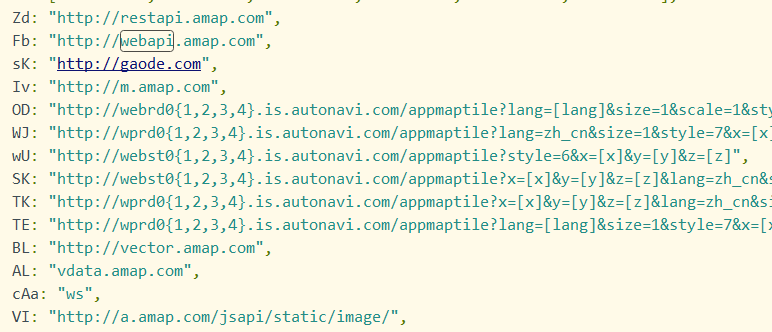
注意:2.0版本和1.4.15版本的地图涉及到的域名有区别,用的时候要分清楚。那怎么换成我们代理的地址呢???
2、替换相关域名
nginx的sub_filter可以做到这一点
        location /maps {
            proxy_set_header Accept-Encoding ""; #返回的js api文件不压缩,以便替换其中内容;
            proxy_pass https://webapi.amap.com/maps;
            sub_filter_types *; #所有文件类型
            sub_filter_once off; #所有匹配到的都替换
            sub_filter 'http://webapi.amap.com' 'http://代理服务器ip/webapi'; #中间为被替换内容(即js文件中原始地址),后面为替换后内容(即内网代理服务器地址)
       #1.4.15版本的maps.js中有正则替换webapi.amap.com
       sub_filter 'replace(/webapi.amap.com/gi' 'replace(/代理服务器ip\/gd\/amap\/webapi/gi';
}
这里只写了一个例子,所有的域名都需要替换,不一一赘述。
3、注意项
1.4.15版本中有2个图片资源暂时没有找到源头,只能在js中进行捕捉,代码如下:
*全局拦截Image的图片代理高德
 *
 */
function hookImg() {
  const property = Object.getOwnPropertyDescriptor(Image.prototype, 'src')
  const nativeSet = property.set

  function customiseSrcSet(url) {
    // 1.4.15版本的地图,这两个图片找不到来源,只能在这里捕获代理
    if (url.toString().search('http://vdata.amap.com/style_icon/icon-normal-small.png') !== -1) {
      url = 代理地址ip+ '/style_icon/icon-normal-small.png'
    } else if (url.toString().search('http://vdata.amap.com/style_icon/icon-biz-small.png') !== -1) {
      url = 代理地址ip+ '/style_icon/icon-biz-small.png'
    } else if (url.toString().search('https://vdata.amap.com/style_icon/icon-normal-small.png') !== -1) {
      url = 代理地址ip+ '/style_icon/icon-normal-small.png'
    } else if (url.toString().search('https://vdata.amap.com/style_icon/icon-biz-small.png') !== -1) {
      url = 代理地址ip+ '/style_icon/icon-biz-small.png'
    }

    nativeSet.call(this, url)
  }
  // eslint-disable-next-line
	Object.defineProperty(Image.prototype, 'src', {
    set: customiseSrcSet
  })
}
在2.0版本中没有这个问题。
4、Vue中如何代理
Vue中是使用npm包的形式加载高德资源,这就需要捕获请求的js
npm i @amap/amap-jsapi-loader --save
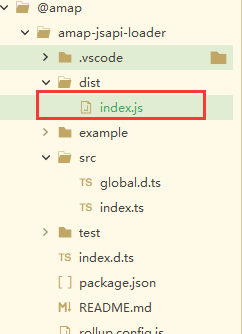
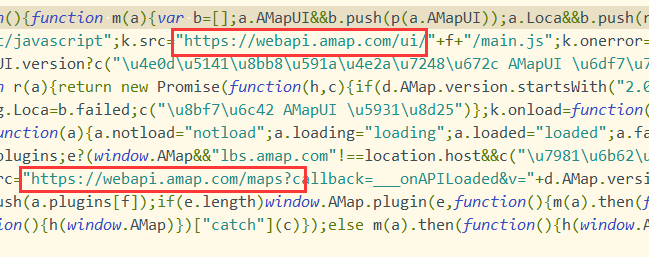
找到amap-jsapi-loader/dist/index.js文件,里面有相关的域名,将其全部替换掉,代码在下面:
/**
 *全局拦截Srcipt代理高德
 *
 */
function hookSrcipt() {
const mapsUrl = 'https://webapi.amap.com/maps'
const webapiHttpsUrl = 'https://webapi.amap.com'
  const property = Object.getOwnPropertyDescriptor(HTMLScriptElement.prototype, 'src')
  const nativeSet = property.set

  function customiseSrcSet(url) {
    // do something
    if (url.toString().search(mapsUrl) !== -1) {
      url = 代理地址+ `/maps` + url.split(mapsUrl)[1]
    } else if (url.toString().search(webapiHttpsUrl) !== -1) {
      url = 代理地址 + url.split(webapiHttpsUrl)[1]
    }

    nativeSet.call(this, url)
  }
  // eslint-disable-next-line
	Object.defineProperty(HTMLScriptElement.prototype, 'src', {
    set: customiseSrcSet
  })
}
到此就完成了!
具体是参考这位大佬的,地址奉上:https://blog.csdn.net/cbb0201/article/details/111143619

 浙公网安备 33010602011771号