
[Winform]实现简单仪表控件<Meter>
实现效果如图:
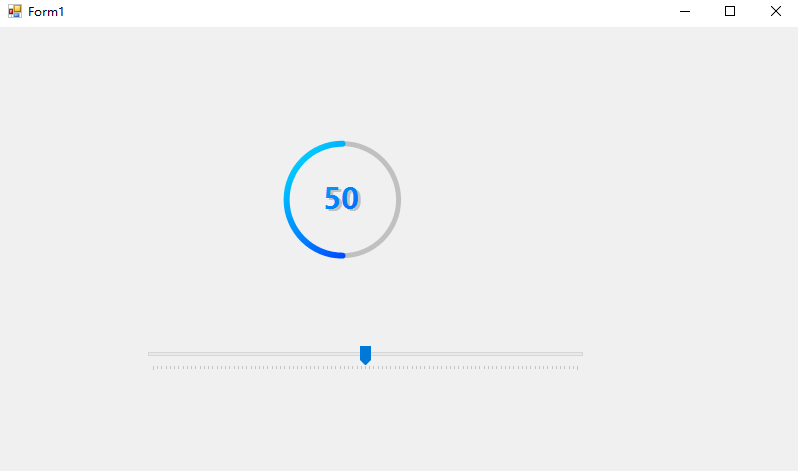
下面是代码.
public class Meter:Control
{
public Meter()
{
//设置默认值
this.Width = 200;
this.Height = 160;
BackColor = Color.CadetBlue;
MeterBackColor = Color.Gray;
StartColor = Color.Aqua;
EndColor = Color.Blue;
//设置双缓冲,防止闪烁
this.SetStyle(ControlStyles.DoubleBuffer,true);
this.SetStyle(ControlStyles.UserPaint,true);
this.SetStyle(ControlStyles.AllPaintingInWmPaint,true);
this.Disposed += Meter_Disposed;
}
private double _value;
public double Value
{
get => _value;
set
{
_value = value;
this.Invalidate();
}
}
public double MaxValue { get; set; }
public double MinValue { get; set; }
public Color MeterBackColor { get; set; }
public Color StartColor { get; set; }
public Color EndColor { get; set; }
protected override void OnPaint(PaintEventArgs e)
{
base.OnPaint(e);
var ownerrect = this.ClientRectangle;
float w = ownerrect.Width * 0.8f;
float h = ownerrect.Height * 0.8f;
var g = e.Graphics;
var mode = g.SmoothingMode;
g.SmoothingMode = SmoothingMode.HighQuality;
float angle = (float)(Value / (MaxValue - MinValue) * 360 );
using ( var brush = new LinearGradientBrush(new Point(0,0) , new Point(ownerrect.Width , ownerrect.Height) , StartColor, EndColor) )
using ( Pen p = new Pen(brush , 6) )
{
p.Alignment = PenAlignment.Center;
p.StartCap = LineCap.Round;
p.EndCap = LineCap.Round;
g.DrawArc(p , ( ownerrect.Width - w ) / 2.0f , ( ownerrect.Height - h ) / 2.0f , w , h , 90 , angle);
}
using (Font font = new Font("微软雅黑", 22, FontStyle.Bold))
{
using (Brush brush = new LinearGradientBrush(new Point(0 , 0) , new Point(ownerrect.Width,ownerrect.Height) , StartColor ,EndColor))
{
var size = e.Graphics.MeasureString(_value.ToString() , font);
var shade = new SolidBrush(Color.FromArgb(88,88,88,88));
g.DrawString(Value.ToString() , font , shade , (float) ( ( ownerrect.Width - size.Width ) / 2 + 2.5 ) , (float) ( ( ownerrect.Height - size.Height ) / 2 + 2.5));
shade.Dispose();
g.DrawString(Value.ToString() , font , brush , (float) ( ( ownerrect.Width - size.Width ) / 2 ) , (float) ( ( ownerrect.Height - size.Height ) / 2 ));
}
}
g.SmoothingMode = mode;
}
protected override void OnPaintBackground(PaintEventArgs pevent)
{
base.OnPaintBackground(pevent);
var ownerrect = this.ClientRectangle;
float w = ownerrect.Width * 0.8f;
float h = ownerrect.Height * 0.8f;
var g = pevent.Graphics;
var mode = g.SmoothingMode;
g.SmoothingMode = SmoothingMode.HighQuality;
using (Pen p = new Pen(MeterBackColor , 5))
{
g.DrawArc(p , ( ownerrect.Width - w ) / 2.0f, ( ownerrect.Height - h ) / 2.0f , w , h , 0 , 360);
}
g.SmoothingMode = mode;
}
}

 浙公网安备 33010602011771号