

Introduction
This article and its code provides a way for developers to put barcodes into their applications. It allows for the generation of barcode images without the use of "barcode fonts". This need arose out of the necessity for one of my own projects to use barcodes and the lack of free libraries on the web to do the job.
To give an idea of what happens in this library: it first turns the data into a series of 1s and 0s representing equal-width bars and spaces. This string of binary information is then sent to a drawing function that converts it to an image representing the desired barcode. This approach allows for one common drawing method to be used on all symbologies.
Supported Encoding Types
| Code 128 | Code11 | Code 39 (Extended / Full ASCII) |
| Code 93 | EAN-8 | EAN-13 |
| UPC-A | UPC-E | JAN-13 |
| MSI | ISBN | Standard 2 of 5 |
| Interleaved 2 of 5 | PostNet | UPC Supplemental 2 |
| UPC Supplemental 5 | Codabar | ITF-14 |
| Telepen |
** Keep in mind that some symbologies go by more than one name, so make sure the one you are using isn't listed above by a different name before contacting me to add it. If it isn't listed above and you would like me to look at adding it to this library, please post a comment below, and I will take a look at it as soon as possible. (Bugs are always a priority, so please send me bug reports.)
Using the Code
The library contains a class called BarcodeLib. There are three constructors:
Barcode();Barcode(string);Barcode (string, BarcodeLib.TYPE);
If you decide to create an instance with parameters, the parameters are as follows: The string is the data to be encoded into the barcode, and the BarcodeLib.TYPE is the symbology to encode the data with. If you do not choose to specify the data and type at the time the instance is created, you may specify them through the appropriate property later on (but before you encode).
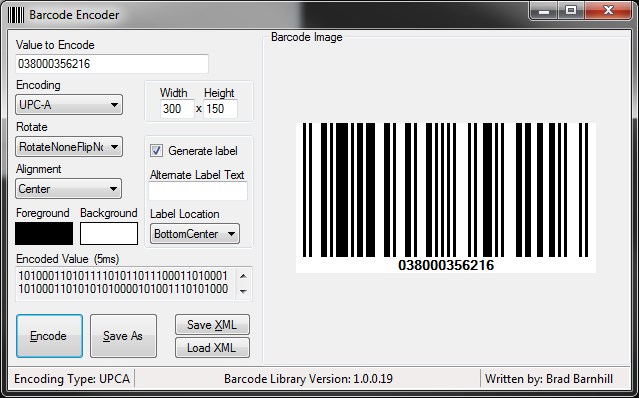
BarCodeLib.Barcode b = new BarCodeLib.Barcode(BarCodeLib.TYPE.UPCA, "038000356216", Color.Black, Color.White, 300, 150);
To get the image representing the data generated, you must then call one of the many Encode functions.
 Collapse
 Copy Code
 代码
代码

public Image Encode(TYPE iType, string StringToEncode, int Width,
 int Height)
public Image Encode(TYPE iType, string StringToEncode, Color
 ForeColor, Color BackColor, int Width, int Height)
public Image Encode(TYPE iType, string StringToEncode, Color
 ForeColor, Color BackColor)
public Image Encode(TYPE iType, string
 StringToEncode)
Encode(TYPE iType)
Encode()
The resulting Image contains the barcode in image format. More functionality has been added, so you can save the Image once it is encoded.
public void SaveImage(string Filename, SaveTypes FileType)
This function can be used by specifying the full path (filename included) of the location you would like to save the image to as a string. The second parameter is an enumerator (BarcodeLib.SaveTypes) that represents the supported types (JPG, BMP, PNG, GIF, TIFF) of files you can save. Functionality has been added so that you can now set the IncludeLabel parameter to allow it to draw the data that's encoded in the barcode, below the image, as a label. Keep in mind that this will take up some of the space you specify for the size of the image.
b.IncludeLabel = true;
This is used to put the data encoded at the bottom of the image. If you do not set this parameter, it will just generate the barcode without the data at the bottom.
Points of Interest
Writing this library offered me the chance to become intimately familiar with how barcode symbologies work and how the symbologies differ from one another.
A new property has been added to allow exportation of the image and properties in XML format. Keep in mind that the barcode must be encoded first before this property is read, otherwise an error will be thrown to notify you of this mistake.
b.XML
History
- October 10th, 2007 - Initial release (bugs most certainly exist, and a couple of symbologies need to be modified/implemented).
- October 16th, 2007 - Updated
Encode_Code39()to fix a bug that didn't include inter-character spaces. Also updated the functionGenerate_Image(Color, Color), and replaced the section usingSetPixelwith the following:using (Graphics g = Graphics.FromImage(b)){ g.DrawLine(new Pen(c), x, 0, x, b.Height); g.DrawLine(new Pen(c), x + 1, 0, x + 1, b.Height);}//using
- October 17th, 2007 - Changed the
Generate_Image(Color, Color)function again to be a little more efficient. Instead of drawing two lines, it just uses a 2px-wide pen now. Thanks for the comments; they continue to make this library better.using (Graphics g = Graphics.FromImage(b)){ g.DrawLine(new Pen(c, (float)2), new Point(x, 0), new Point(x, b.Height));}//using
Also, functionality was added so that if you call
BarcodeLib.Generate_Labels(Image), it will add the label showing the data encoded at the bottom of the barcode.Fixed a bug in the Test application where, if you encoded with
PostNetas the type, it would automatically try to put the label at the bottom and labels aren't available on PostNet images. This caused it to throw an error that atry{}catch{}can handle for now.Took c0ax_lx's advice and moved...
using (Graphics g = Graphics.FromImage(b))... outside the
whileloop to improve resource usage. - October 26th, 2007 - Article edited and moved to the main CodeProject article base.
- November 1st, 2007 - Complete restructuring of the library to abstract portions of it. Should be much cleaner to look at. An interface was added to force any updates to adhere to the structure. There were some bugs that were fixed in this release. Some of the encoding types on the menu were encoding with a different type than they said. Changed
CheckNumericOnly()to be 1 line of code instead of a massive O^2 complicated take. (Thanks, Pete!) - December 9th, 2007 - Bug fixed in UPC-E encoding that would cause an index-out-of-range exception to be thrown. (Thanks Luca Z.)
int pos = 0;
This library is getting better with the help of people like Luca and Pete. Keep up the good work, friends.
- April 16th, 2008 - Code 128 support is here. It is still very much in the beta phase (the FNC* chars are still not encoding right... I have to figure that out), but ... it's at least here for your trial and for your comments. Also, there were a few country codes left out of the EAN-13 assigning country lookup. I added what I could find that I left out. If you find any more, just let me know. Thanks again for your support and help.
I also had to change the
CheckNumericOnly()back to a more complex task because some data being encoded was longer than whatInt64.TryParse(string, out)could handle ... so back to a more complex, but still a faster, task than comparing eachchar. Now, I break thestringinto pieces and test each piece. - May 3rd, 2008 - Code 128 had some bug fixes added. One was present in
InsertStartandCodeCharacters(). The other was when trying to encode an apostrophe, it needed an escape character when selecting the data for it from the dataset. This should fix all the bugs for now ... if you find any more, let me know so I can try to track them down. Thanks again for your support. - May 27th, 2008 - PostNet now supports 5, 6, 9, 11 digit data. Also, a bug with the check-digit for PostNet is fixed. Code 128 now supports specifying and locking the encoding to a specific type (Code A, B, C). Code 39 Extended (Full ASCII) is now supported.
- May 29th, 2008 - Bug fixed (thanks Koru.nl) in
Bitmap Generate_Image(Color DrawColor, Color BackColor)that caused the drawing to be off by one horizontal pixel. This caused the drawing to cut 1 pixel width off the first bar that was drawn if it was drawn up against the edge of the image. The drawing function also changed a bit to eliminate the variableint x;from the function. All positions are now calculated off the variableint pos;which cuts out one unnecessary and confusing variable. - July 30th, 2008 - Bug fixed (thanks Kazna4ey and WolfgangRoth) in
init_Code128()that caused.Select(string filterExpression)to return the wrong rows due to case insensitivity. So, the following was added:this.C128_Code.CaseSensitive = true;
Another function
byte[] GetImageData(SaveTypes savetype)was added so that users may request the bytes of the image easily. (Useful if using Crystal Reports, etc.) - August 26th, 2008 - Bug fixed (thanks JackyWu2005) in Code128.cs that was preventing the proper start characters from being inserted. This only happened when switching back to A from any other encoding type.
- October 20th, 2008 - Added ITF-14 and Code93. Fixed a bug in Save As functionality that was not saving files in the selected format. Labels now show checksums except in C128 and C11.
- December 3rd, 2008 - Can now specify image size before encoding. Complete overhaul of the drawing function to allow for dynamic drawing size. Now calculates the bar width based on the specified image size. Removed resize functions due to inaccuracy of the resizing method. The encoding functions have been revamped to reflect these changes (removed some of the overloaded functions referencing the resize functions). Also removed a majority of the
casestatements from theGenerate_Image()to simplify it. Updated the article to reflect the changes to theEncodefunctions and the changes to the drawing functions. There may be some bugs due to the size of the changes made in this version. Please report any you find, in the comments below. - February 11th, 2009 - Fixed bug in Code 128C that would not insert a 0 in front of an odd length string of raw data. Fixed a bug (thanks Shaihan Murshed) in Code 39 that let the user encode * in the string of data. This should only be used for starting characters, and is now handled. Fixed a bug in Code 39 that was inserting an extra 0 at the end of the encoded string. This did not affect the validity of the barcodes, it was just not supposed to be there. Added a new property to the library called
FormattedData. This value is what is actually encoded. It is formatted for certain types of barcodes, for example, Code 39 requires * in front and behind the barcode. - June 4th, 2009 (1.0.0.6)
- Fixed a bug in Code128-A and Code128-B that would cause it to encode incorrectly due to incorrectly trying to compact the barcode for Code128-C. This functionality is now bypassed if Code128-A or Code128-B is selected.
- Removed a useless variable
bEncodedfrom BarcodeLib.cs Staticmethods now support generating the data label (required addition of a parameter to 3 of the 5staticmethods used to encode).- Property now available to retrieve the amount of time (
EncodingTime) it took to encode and generate the image. (Might be helpful for diagnostics) - Modified a few error messages to be more descriptive about correcting the problem with data length.
Barcodeclass now inherits fromIDisposable- XML export functionality added toBarcodeLibto allow the data, encoded data and other properties to be exported in XML along with the Image inBase64Stringformat. This includes functionality toGetXML()andGetImageFromXML(BarcodeXML).- To go along with the XML functionality, there is now a dataset included that has the basic layout of the XML data to make importing and exporting easy.
ImageFormatis now a property to set to select what type of image you want returned (JPEG is default). This can help speed of transferring data if using a webservice.- ITF-14 now draws the label with the proper background color instead of always being white.
- August 16th, 2009 (1.0.0.7)
- Fixed a bug that allowed non-numeric data to be encoded with Code128-C, a check has been put in place to handle this. It throws an error EC128-6 now if found to contain something that isn't in Code128-C.
- Fixed a bug in
GetEncoding()for C128. This would allow Code128-B to switch and dynamically use Code128-A if it couldn't find a char in its set.
- November 2nd, 2009 (1.0.0.8)
- Changed the use of a
Penobject that was not disposed of. This was not causing a problem, just bad technique. - Fixed an encoding issue with C128-B that had a wrong character in its encoding set at one point (U instead of Z in codeset B).
- Changed the use of a
- January 4th, 2010 (1.0.0.9)
- The UPC-A check digit is now calculated every time whether 11 or 12 digits are passed in. If 12 is passed in and it has got an incorrect check digit, then it is replaced with the correct check digit. This prevents an unscannable barcode from being generated.
- The EAN13 check digit is now calculated every time whether 12 or 13 digits are passed in. If 13 is passed in and it has got an incorrect check digit, then it is replaced with the correct check digit. This prevents an unscannable barcode from being generated.
- All errors can be accessed via the
BarcodeLib.Errorsproperties which is a list of separate errors encountered. - All symbologies were moved to the
BarcodeLib.Symbologiesnamespace for better organization. FormattedDataproperty was not being used, so it was removed.Versionproperty was added toBarcodeLibto allow reading the libraries version number.
- April 28th, 2010 (1.0.0.10)
- Fixed a bug in Code 39 extended that was erasing the start and stop characters if extended was used.
- Fixed a bug that if barcodes were aligned left or right, they would cut off a part of the starting or ending bar which was a drawing bug that's been present since 1.0.0.0
- Fixed a bug in Code 128C that checked for numeric data, if it was bigger than Int64 and was numeric it would throw an exception saying it was non-numeric data.
- Fixed a bug in UPC-A that encoded with the same sets as EAN-13 and only
CodeAandCodeCshould have been used. - Made the
Versionpropertystaticso it can be read without creating an instance. - Added a
LabelFontproperty to allow the labels font to be changed. - Restructured the label drawing functions to take font height and use that to determine the height of the label.
- Created an
IsNumericfunction in C128-C to better separate that functionality. ReplacedInt64withInt32to better allow compatibility with x86 processors. EncodingTimenow includes the time to draw the image and not just the encoding.- Alignment property added to allow aligning the barcode in the image given if the image space is wider than the drawn barcode. (Default is centered.)
- Postnet drawing is incorporated into the default drawing case now, which shortens the code and gets rid of some redundant code.
- Telepen symbology added.

 浙公网安备 33010602011771号