
python 爬取豆瓣书籍信息
继爬取 猫眼电影TOP100榜单 之后,再来爬一下豆瓣的书籍信息(主要是书的信息,评分及占比,评论并未爬取)。原创,转载请联系我。
需求:爬取豆瓣某类型标签下的所有书籍的详细信息及评分
语言:python
支持库:
- 正则、解析和搜索:re、requests、bs4、lxml (后三者需要安装)
- 随机数:time、random
步骤:三步走
- 访问标签页面,获取该标签下的所有书籍的链接
- 逐一访问书籍链接,爬取书籍信息和评分
- 持久化存储书籍信息(这里用了excel,可以使用数据库)
一、访问标签页面,获取该标签下的所有书籍的链接
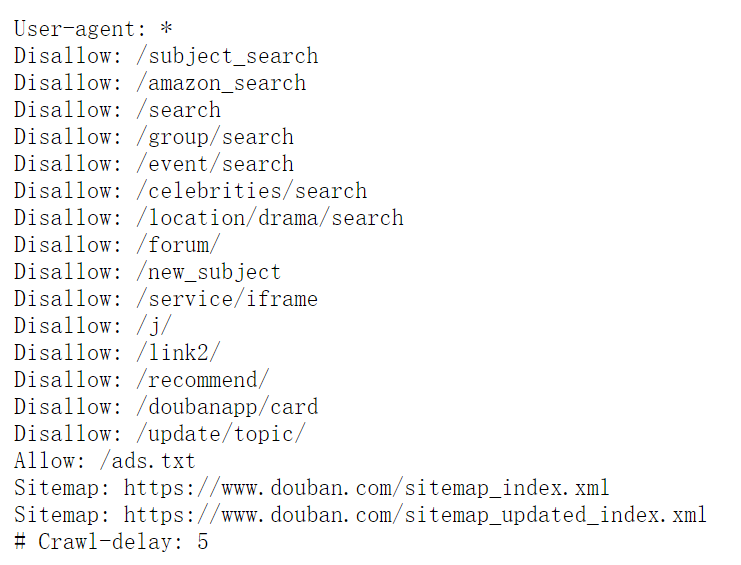
照例,我们先看一下豆瓣的Robots.txt , 不能爬取禁止的内容。
我们这一步要爬取的标签页面,以小说为例 https://book.douban.com/tag/%E5%B0%8F%E8%AF%B4
先去看看它的HTML结构
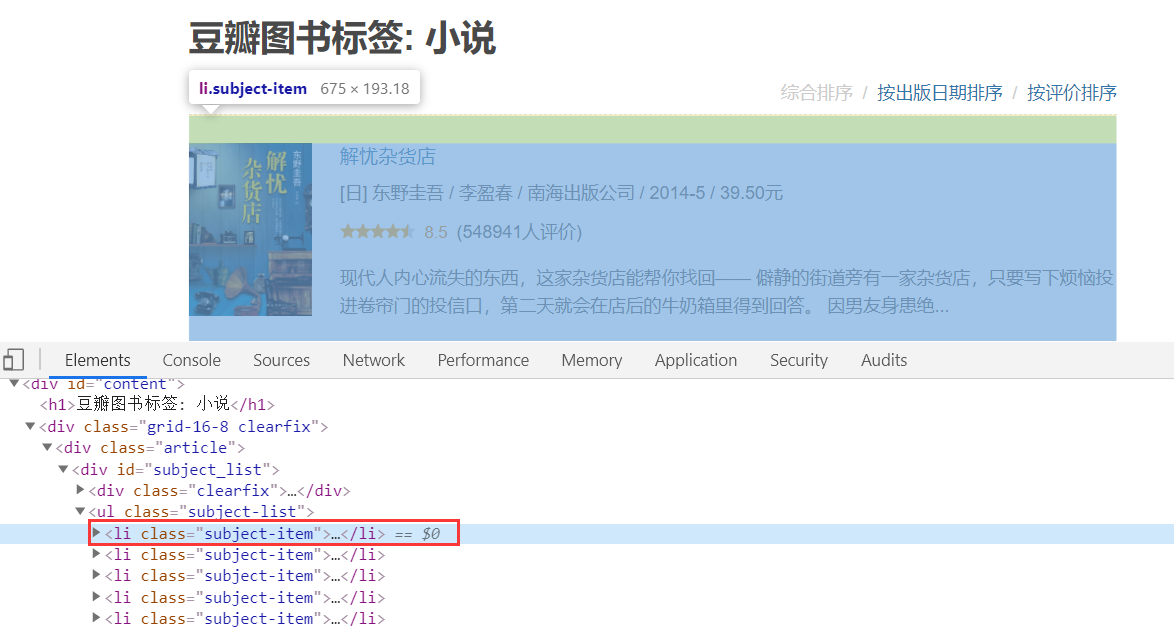
发现,每一本书,都在一个<li>标签当中,而我们需要的只是那张图片的链接(就是书籍页面的链接)

这样,就可以写正则或者是利用bs4(BeatuifulSoup)来获取书籍的链接。
可以看到,每一页只显示了20本书,所以需要遍历访问所有的页面,它的页面链接也是有规律的。
第二页:https://book.douban.com/tag/%E5%B0%8F%E8%AF%B4?start=20&type=T
第三页:https://book.douban.com/tag/%E5%B0%8F%E8%AF%B4?start=40&type=T
即:start每次递增20就好了。
下面来看代码:

 1 # -*- coding: utf-8 -*-
 2 # @Author  : yocichen
 3 # @Email   : yocichen@126.com
 4 # @File    : labelListBooks.py
 5 # @Software: PyCharm
 6 # @Time    : 2019/11/11 20:10
 7
 8 import re
 9 import openpyxl
10 import requests
11 from requests import RequestException
12 from bs4 import BeautifulSoup
13 import lxml
14 import time
15 import random
16
17 src_list = []
18
19 def get_one_page(url):
20     '''
21     Get the html of a page by requests module
22     :param url: page url
23     :return: html / None
24     '''
25     try:
26         head = ['Mozilla/5.0', 'Chrome/78.0.3904.97', 'Safari/537.36']
27         headers = {
28             'user-agent':head[random.randint(0, 2)]
29         }
30         response = requests.get(url, headers=headers, proxies={'http':'171.15.65.195:9999'}) # 这里的代理,可以设置也可以不加,如果失效,不加或者替换其他的即可
31         if response.status_code == 200:
32             return response.text
33         return None
34     except RequestException:
35         return None
36
37 def get_page_src(html, selector):
38     '''
39     Get book's src from label page
40     :param html: book
41     :param selector: src selector
42     :return: src(list)
43     '''
44     # html = get_one_page(url)
45     if html is not None:
46         soup = BeautifulSoup(html, 'lxml')
47         res = soup.select(selector)
48         pattern = re.compile('href="(.*?)"', re.S)
49         src = re.findall(pattern, str(res))
50         return src
51     else:
52         return []
53
54 def write_excel_xlsx(items, file):
55     '''
56     Write the useful info into excel(*.xlsx file)
57     :param items: book's info
58     :param file: memory excel file
59     :return: the num of successful item
60     '''
61     wb = openpyxl.load_workbook(file)
62     ws = wb.worksheets[0]
63     sheet_row = ws.max_row
64     item_num = len(items)
65     # Write film's info
66     for i in range(0, item_num):
67         ws.cell(sheet_row+i+1, 1).value = items[i]
68     # Save the work book as *.xlsx
69     wb.save(file)
70     return item_num
71
72 if __name__ == '__main__':
73     total = 0
74     for page_index in range(0, 50): # 这里为什么是50页?豆瓣看起来有很多页,其实访问到后面就没有数据了,目前是只有50页可访问。
75         # novel label src : https://book.douban.com/tag/%E5%B0%8F%E8%AF%B4?start=
76         # program label src : https://book.douban.com/tag/%E7%BC%96%E7%A8%8B?start=
77         # computer label src : https://book.douban.com/tag/%E8%AE%A1%E7%AE%97%E6%9C%BA?start=
78         # masterpiece label src : https://book.douban.com/tag/%E5%90%8D%E8%91%97?start=
79         url = 'https://book.douban.com/tag/%E5%90%8D%E8%91%97?start='+str(page_index*20)+'&type=T' # 你要做的就是把URL前面的部分替换成你所有爬的那个标签的对应部分,确切的来说是红色加粗的文字部分。
80         one_loop_done = 0
81         # only get html page once
82         html = get_one_page(url)
83         for book_index in range(1, 21):
84             selector = '#subject_list > ul > li:nth-child('+str(book_index)+') > div.info > h2'
85             src = get_page_src(html, selector)
86             row = write_excel_xlsx(src, 'masterpiece_books_src.xlsx') # 要存储的文件,需要先创建好
87             one_loop_done += row
88         total += one_loop_done
89         print(one_loop_done, 'done')
90     print('Total', total, 'done')
注释比较清楚了,先获取页面HTML,正则或者bs4遍历获取每一页当中的书籍链接,存到excel文件中。
注意:如果需要直接使用我的代码,你只需要去看一下那个标签页面的链接,而后把红色加粗部分(中文标签编码)替换即可,以及先创建一个excel文件,用以存储爬到的书籍链接。
二、逐一访问书籍链接,爬取书籍信息和评分
上一步我们已经爬到了,小说标签下的所有书籍的src,这一步,就是要逐一去访问书籍的src,然后爬取书籍的具体信息。
先看看要爬的信息的HTML结构
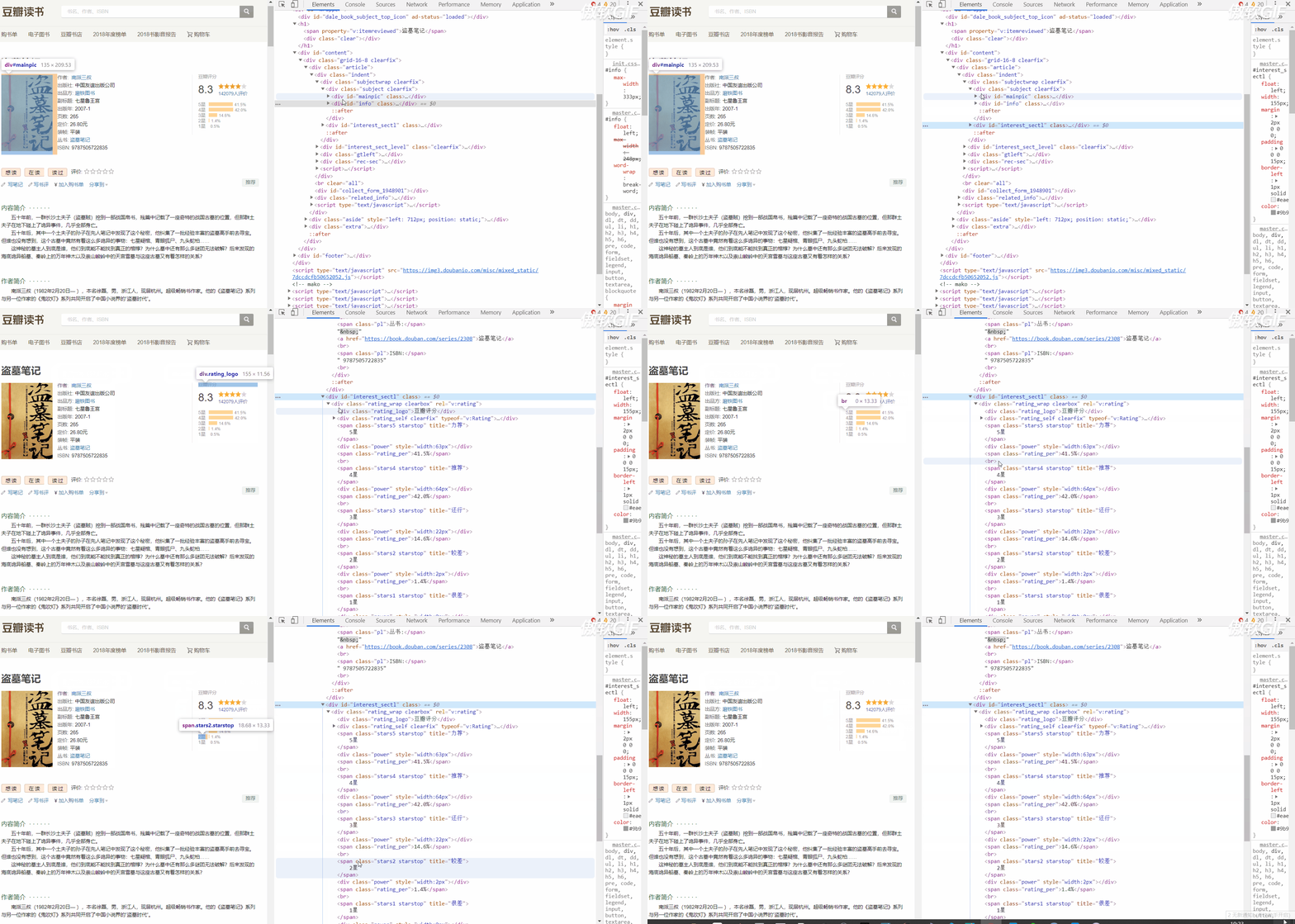
下面是书籍信息页面结构
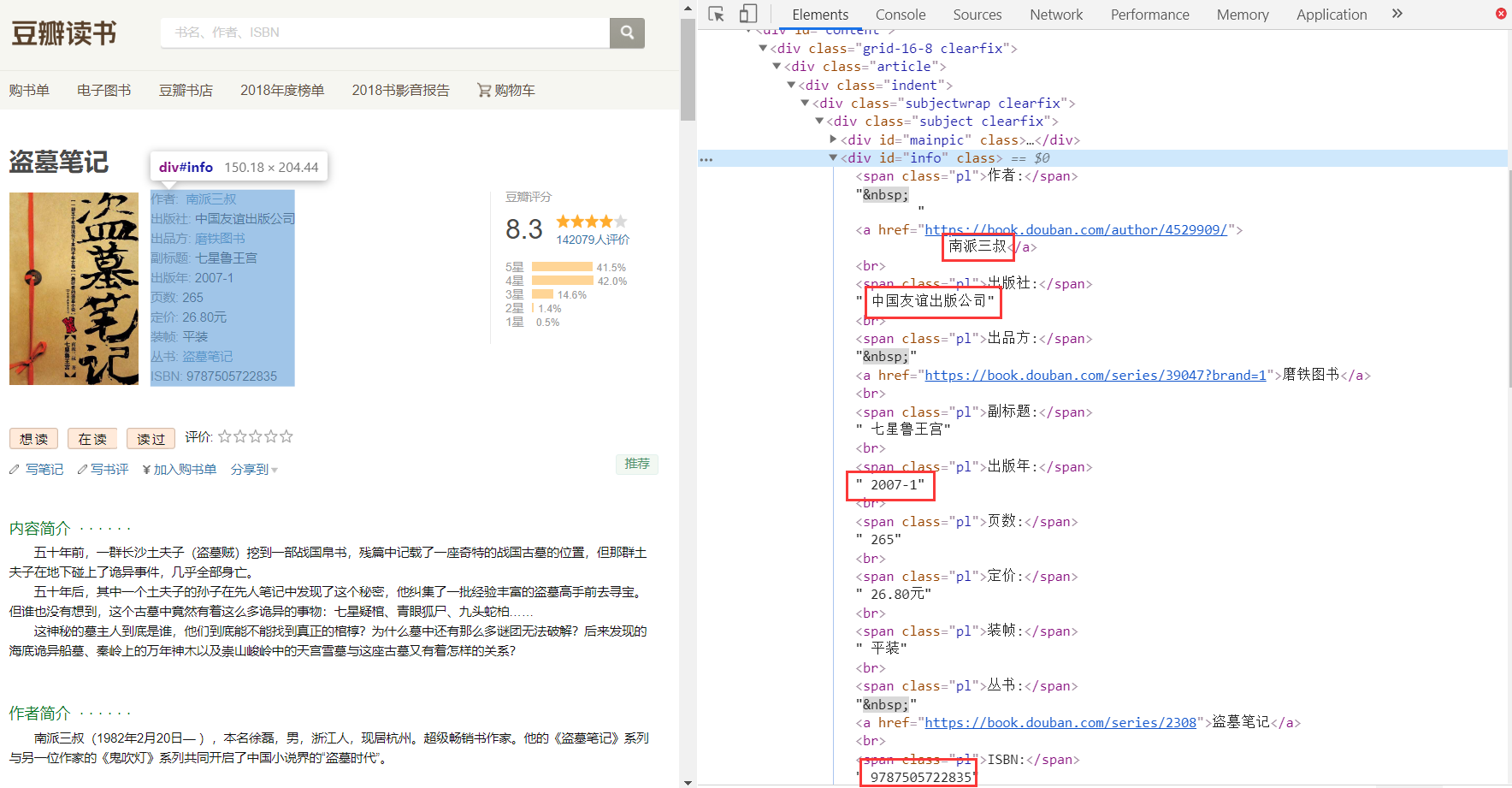
再是评分页面结构
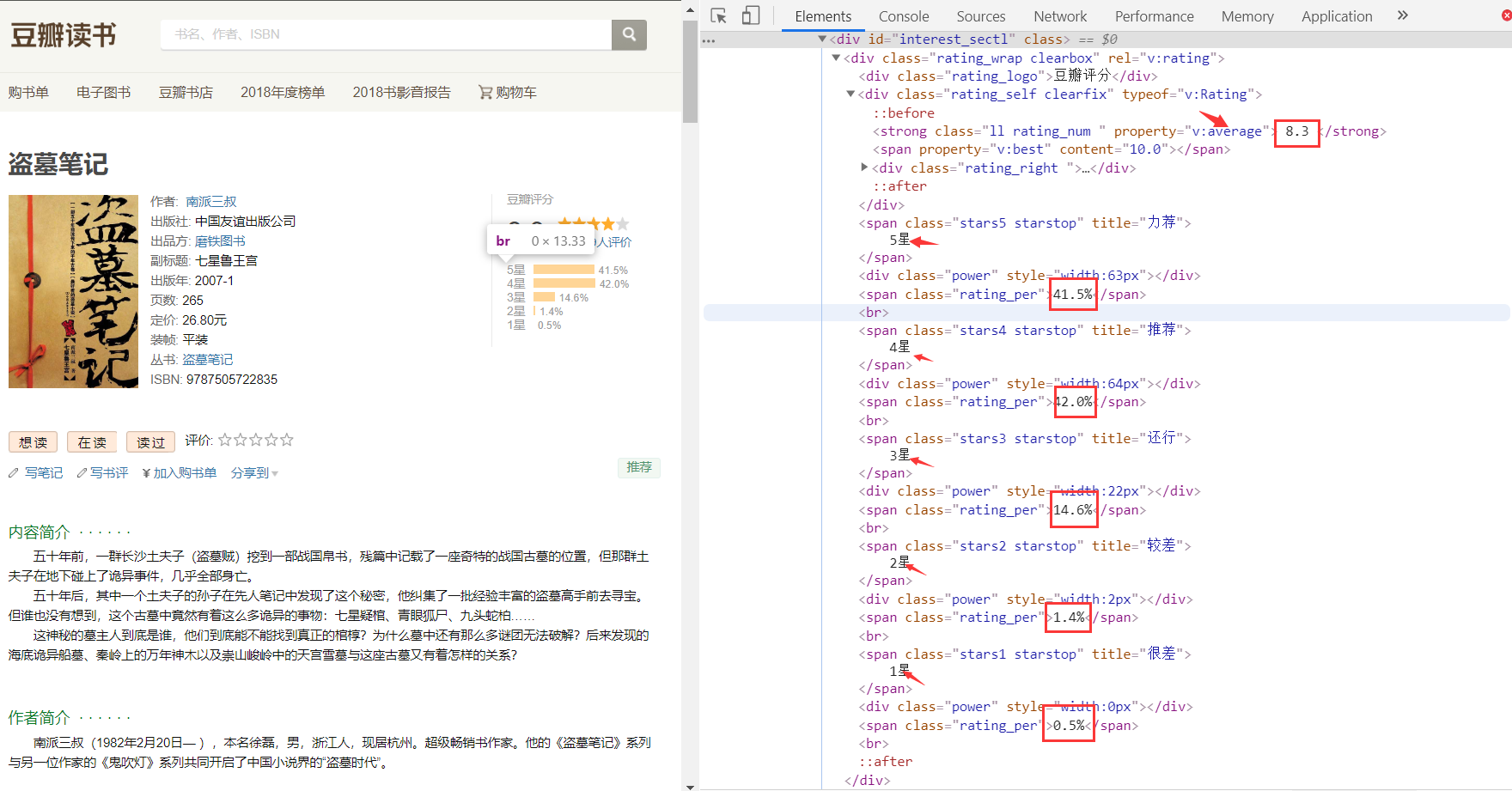
这样就可以利用正则表达式和bs4库来匹配到我们所需要的数据了。(试了试纯正则,比较难写,行不通)
下面看代码
  1 # -*- coding: utf-8 -*-
  2 # @Author  : yocichen
  3 # @Email   : yocichen@126.com
  4 # @File    : doubanBooks.py
  5 # @Software: PyCharm
  6 # @Time    : 2019/11/9 11:38
  7
  8 import re
  9 import openpyxl
 10 import requests
 11 from requests import RequestException
 12 from bs4 import BeautifulSoup
 13 import lxml
 14 import time
 15 import random
 16
 17 def get_one_page(url):
 18     '''
 19     Get the html of a page by requests module
 20     :param url: page url
 21     :return: html / None
 22     '''
 23     try:
 24         head = ['Mozilla/5.0', 'Chrome/78.0.3904.97', 'Safari/537.36']
 25         headers = {
 26             'user-agent':head[random.randint(0, 2)]
 27         }
 28         response = requests.get(url, headers=headers) #, proxies={'http':'171.15.65.195:9999'}
 29         if response.status_code == 200:
 30             return response.text
 31         return None
 32     except RequestException:
 33         return None
 34
 35 def get_request_res(pattern_text, html):
 36     '''
 37     Get the book info by re module
 38     :param pattern_text: re pattern
 39     :param html: page's html text
 40     :return: book's info
 41     '''
 42     pattern = re.compile(pattern_text, re.S)
 43     res = re.findall(pattern, html)
 44     if len(res) > 0:
 45         return res[0].split('<', 1)[0][1:]
 46     else:
 47         return 'NULL'
 48
 49 def get_bs_res(selector, html):
 50     '''
 51     Get the book info by bs4 module
 52     :param selector: info selector
 53     :param html: page's html text
 54     :return: book's info
 55     '''
 56     soup = BeautifulSoup(html, 'lxml')
 57     res = soup.select(selector)
 58     # if res is not None or len(res) is not 0:
 59     #     return res[0].string
 60     # else:
 61     #     return 'NULL'
 62     if res is None:
 63         return 'NULL'
 64     elif len(res) == 0:
 65         return 'NULL'
 66     else:
 67         return res[0].string
 68
 69 # Get other info by bs module
 70 def get_bs_img_res(selector, html):
 71     soup = BeautifulSoup(html, 'lxml')
 72     res = soup.select(selector)
 73     if len(res) is not 0:
 74         return str(res[0])
 75     else:
 76         return 'NULL'
 77
 78 def parse_one_page(html):
 79     '''
 80     Parse the useful info of html by re module
 81     :param html: page's html text
 82     :return: all of book info(dict)
 83     '''
 84     book_info = {}
 85     book_name = get_bs_res('div > h1 > span', html)
 86     # print('Book-name', book_name)
 87     book_info['Book_name'] = book_name
 88     # info > a:nth-child(2)
 89     author = get_bs_res('div > span:nth-child(1) > a', html)
 90     if author is None:
 91         author = get_bs_res('#info > a:nth-child(2)', html)
 92     # print('Author', author)
 93     author = author.replace(" ", "")
 94     author = author.replace("\n", "")
 95     book_info['Author'] = author
 96
 97     publisher = get_request_res(u'出版社:</span>(.*?)<br/>', html)
 98     # print('Publisher', publisher)
 99     book_info['publisher'] = publisher
100
101     publish_time = get_request_res(u'出版年:</span>(.*?)<br/>', html)
102     # print('Publish-time', publish_time)
103     book_info['publish_time'] = publish_time
104
105     ISBN = get_request_res(u'ISBN:</span>(.*?)<br/>', html)
106     # print('ISBN', ISBN)
107     book_info['ISBN'] = ISBN
108
109     img_label = get_bs_img_res('#mainpic > a > img', html)
110     pattern = re.compile('src="(.*?)"', re.S)
111     img = re.findall(pattern, img_label)
112     if len(img) is not 0:
113         # print('img-src', img[0])
114         book_info['img_src'] = img[0]
115     else:
116         # print('src not found')
117         book_info['img_src'] = 'NULL'
118
119     book_intro = get_bs_res('#link-report > div:nth-child(1) > div > p', html)
120     # print('book introduction', book_intro)
121     book_info['book_intro'] = book_intro
122
123     author_intro = get_bs_res('#content > div > div.article > div.related_info > div:nth-child(4) > div > div > p', html)
124     # print('author introduction', author_intro)
125     book_info['author_intro'] = author_intro
126
127     grade = get_bs_res('div > div.rating_self.clearfix > strong', html)
128     if len(grade) == 1:
129         # print('Score no mark')
130         book_info['Score'] = 'NULL'
131     else:
132         # print('Score', grade[1:])
133         book_info['Score'] = grade[1:]
134
135     comment_num = get_bs_res('#interest_sectl > div > div.rating_self.clearfix > div > div.rating_sum > span > a > span', html)
136     # print('commments', comment_num)
137     book_info['commments'] = comment_num
138
139     five_stars = get_bs_res('#interest_sectl > div > span:nth-child(5)', html)
140     # print('5-stars', five_stars)
141     book_info['5_stars'] = five_stars
142
143     four_stars = get_bs_res('#interest_sectl > div > span:nth-child(9)', html)
144     # print('4-stars', four_stars)
145     book_info['4_stars'] = four_stars
146
147     three_stars = get_bs_res('#interest_sectl > div > span:nth-child(13)', html)
148     # print('3-stars', three_stars)
149     book_info['3_stars'] = three_stars
150
151     two_stars = get_bs_res('#interest_sectl > div > span:nth-child(17)', html)
152     # print('2-stars', two_stars)
153     book_info['2_stars'] = two_stars
154
155     one_stars = get_bs_res('#interest_sectl > div > span:nth-child(21)', html)
156     # print('1-stars', one_stars)
157     book_info['1_stars'] = one_stars
158
159     return book_info
160
161 def write_bookinfo_excel(book_info, file):
162     '''
163     Write book info into excel file
164     :param book_info: a dict
165     :param file: memory excel file
166     :return: the num of successful item
167     '''
168     wb = openpyxl.load_workbook(file)
169     ws = wb.worksheets[0]
170     sheet_row = ws.max_row
171     sheet_col = ws.max_column
172     i = sheet_row
173     j = 1
174     for key in book_info:
175         ws.cell(i+1, j).value = book_info[key]
176         j += 1
177     done = ws.max_row - sheet_row
178     wb.save(file)
179     return done
180
181 def read_booksrc_get_info(src_file, info_file):
182     '''
183     Read the src file and access each src, parse html and write info into file
184     :param src_file: src file
185     :param info_file: memory file
186     :return: the num of successful item
187     '''
188     wb = openpyxl.load_workbook(src_file)
189     ws = wb.worksheets[0]
190     row = ws.max_row
191     done = 0
192     for i in range(868, row+1):
193         src = ws.cell(i, 1).value
194         if src is None:
195             continue
196         html = get_one_page(str(src))
197         book_info = parse_one_page(html)
198         done += write_bookinfo_excel(book_info, info_file)
199         if done % 10 == 0:
200             print(done, 'done')
201     return done
202
203 if __name__ == '__main__':
204     # url = 'https://book.douban.com/subject/1770782/'
205     # html = get_one_page(url)
206     # # print(html)
207     # book_info = parse_one_page(html)
208     # print(book_info)
209     # res = write_bookinfo_excel(book_info, 'novel_books_info.xlsx')
210     # print(res, 'done')
211     res = read_booksrc_get_info('masterpiece_books_src.xlsx', 'masterpiece_books_info.xlsx') # 读取的src文件,要写入书籍信息的存储文件
212     print(res, 'done')
注意:如果要直接使用的话,需要做的只是给参数而已,第一个是上一步获取的src文件,第二个是需要存储书籍信息的文件(需要事先创建一下)
三、持久化存储书籍信息(Excel)
使用excel存储书籍的src列表和书籍的具体信息,需要使用openpyxl库进行读写excel。代码在上面write_*/read_*函数中。
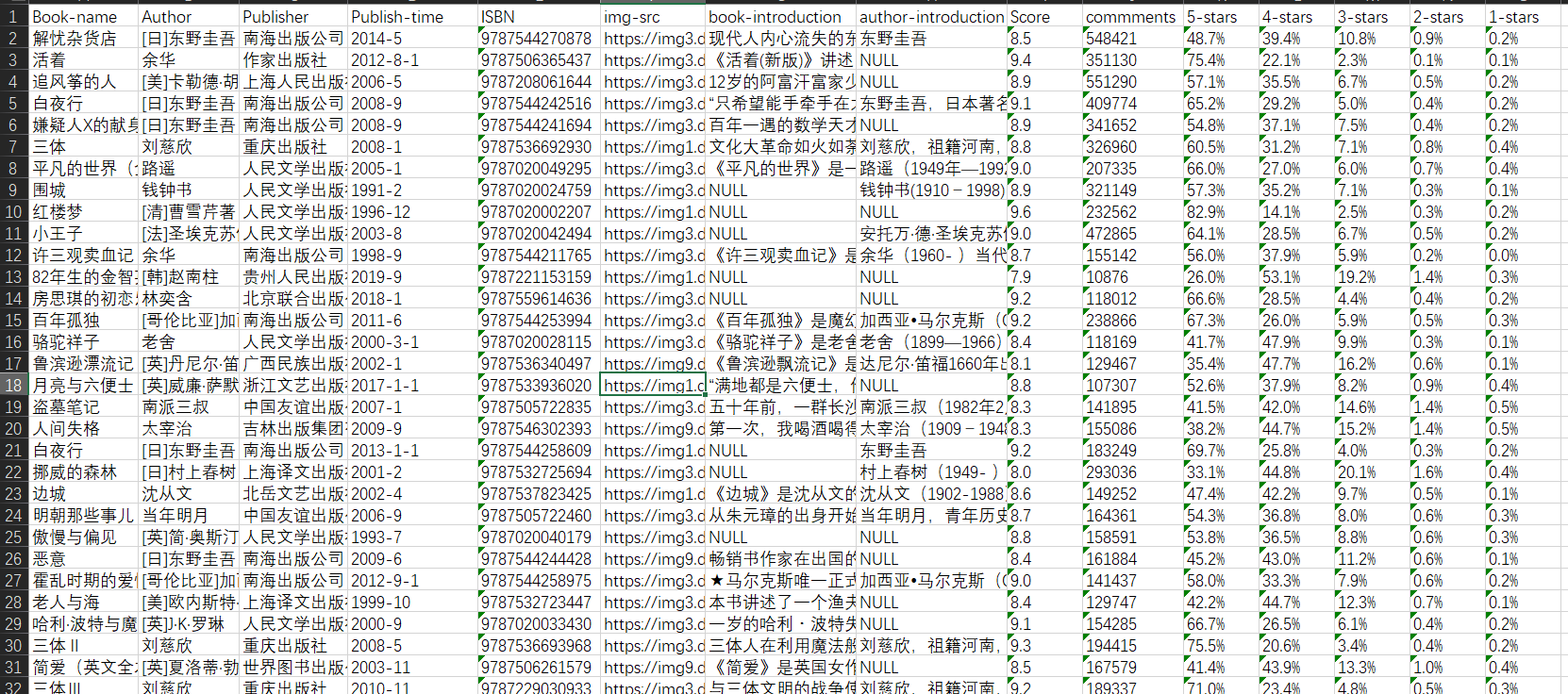
效果
爬到的小说类书籍的src

爬到的书籍详细信息
后记
写这个前后大概花了有两整天吧,爬虫要做的工作还是比较细致的,需要分析HTML页面还要写正则表达式。话说,使用bs4真的是很简单,只需要copy一下selector就ok了,较正则可以大大提高效率。另外,单线程爬虫是比较蠢的。还有很多不足(诸如代码不规整,不够健壮),欢迎指正。
参考资料
【1】豆瓣robots.txt https://www.douban.com/robots.txt
【2】https://blog.csdn.net/jerrygaoling/article/details/81051447
【3】https://blog.csdn.net/zhangfn2011/article/details/7821642
【4】https://www.kuaidaili.com/free

 浙公网安备 33010602011771号