
获取前端数据
3.获取前端数据
本篇的主要内容:
- hello world
- 字符编码过滤器
- Spring Bean 作用域(自学)
- 映射请求
- 获取一般参数
- rest client
- 参数格式处理
- 获取特殊参数(自学)
- 实体对象属性验证
helloworld
使用 spring mvc 主要解决之前 Servlet 冗余的问题,通常使用 maven 的 web 项目,并导入相关依赖。
关于 MVC 模式代表 Model-View-Controller(模型-视图-控制器) 模式。这种模式用于应用程序的分层开发。
Model(模型)- 模型代表一个存取数据的对象或 JAVA POJO(entity)。它也可以带有逻辑,在数据变化时更新控制器。
View(视图) - 视图代表模型包含的数据的可视化。
Controller(控制器) - 控制器作用于模型和视图上。它控制数据流向模型对象,并在数据变化时更新视图。它使视图与模型分离开。
1.加入依赖
<dependency>
    <groupId>org.springframework</groupId>
    <artifactId>spring-webmvc</artifactId>
    <version>5.2.12.RELEASE</version>
</dependency>
<dependency>
    <groupId>com.fasterxml.jackson.core</groupId>
    <artifactId>jackson-databind</artifactId>
    <version>2.12.3</version>
</dependency>注意:jackson 是全世界现今非常主流且性能非常好的对象序列化 json 与反序列化类库。与国内的阿里巴巴的 fastjson 相媲美。
2.在 web.xml 配置 DispatcherServlet,用来匹配所有请求,并指定它的创建时机为 web 应用启动时。
<servlet>
    <servlet-name>springDispatcherServlet</servlet-name>
    <servlet-class>org.springframework.web.servlet.DispatcherServlet</servlet-class>
    <init-param>
        <param-name>contextConfigLocation</param-name>
        <param-value>classpath:spring-mvc.xml</param-value>
    </init-param>
    <load-on-startup>1</load-on-startup>
</servlet>
<servlet-mapping>
    <servlet-name>springDispatcherServlet</servlet-name>
    <url-pattern>/</url-pattern>
</servlet-mapping>
3.在 resource 下创建 spring-mvc.xml 文件,内容如下:
<?xml version="1.0" encoding="UTF-8"?> <beans xmlns="http://www.springframework.org/schema/beans" xmlns:xsi="http://www.w3.org/2001/XMLSchema-instance" xmlns:context="http://www.springframework.org/schema/context" xmlns:mvc="http://www.springframework.org/schema/mvc" xsi:schemaLocation="http://www.springframework.org/schema/beans http://www.springframework.org/schema/beans/spring-beans.xsd http://www.springframework.org/schema/context http://www.springframework.org/schema/context/spring-context.xsd http://www.springframework.org/schema/mvc http://www.springframework.org/schema/mvc/spring-mvc.xsd"><!-- 控制器在哪个包 --> <context:component-scan base-package="cn.hxzy.springmvc.controller" /> <!-- 当请求找不到 requestMapping 时去找静态资源 --> <mvc:default-servlet-handler /> <!-- 开启注解驱动--> <mvc:annotation-driven /> <!-- 视图解析 --> <bean class="org.springframework.web.servlet.view.InternalResourceViewResolver" id="internalResourceViewResolver"> <!-- 前缀 --> <property name="prefix" value="/WEB-INF/jsp/" /> <!-- 后缀 --> <property name="suffix" value=".jsp" /> </bean>
</beans>
4编写控制器
import org.springframework.stereotype.Controller;
import org.springframework.web.bind.annotation.RequestMapping;@Controller
public class IndexController {@RequestMapping("/index") public String index() { System.out.println("index"); return "index"; }
}
注意:包扫描也可以使用如下方式扫描指定的注解。凡是 Controller 与 ControllerAdvice 注解的都扫描为 spring mvc 的
<context:component-scan base-package="cn.hxzy.springmvc">

<context:include-filter type="annotation"

expression="org.springframework.stereotype.Controller"/>

<context:include-filter type="annotation"

expression="org.springframework.web.bind.annotation.ControllerAdvice"/>

</context:component-scan>
如上操作即可完成 spring mvc 的配置,当浏览器客户端发送请求时,会被 web.xml 中的 springDispatcherServlet 匹配上,请求就进入 spring mvc 内部,内部会将所有的 RequestMapping 的路径与请求路径匹配,如果匹配便会调用方法,最后获取方法的返回值与 internalResourceViewResolver 的前缀和后缀拼接,转发到对应视图,将视图返回浏览器客户端。
在 spring mvc 中重定向非常简单只需要在返回字符串前拼接 redirect 关键字即可,如果没有该关键字就是转发。
@GetMapping("aa/bb")

public String index() {

return "redirect:/index";

}
练习:
1.创建项目 demo1,加入三个页面 index.jsp、login.jsp、register.jsp、并使用 @RequestMapper 对他们进行转发,使他们能够正常跳转。
参考代码:
import org.springframework.stereotype.Controller;
import org.springframework.web.bind.annotation.RequestMapping;@Controller
public class PublicController {@RequestMapping("/index") public String index() { return "index"; } @RequestMapping("/login") public String login() { return "login"; } @RequestMapping("/register") public String register() { return "register"; }
}
字符编码过滤器
在前面的 jsp Servlet 开发中遇到中文乱码时比较实用的解决办法是使用过滤器统一编码,使用过滤器可以解决服务端和客户端之间的中文字符编码不统一的问题。在 web.xml 中加入由 spring-mvc 提供的字符编码过滤器器 CharacterEncodingFilter,并为该拦截器配置初始化参数 encoding 为 utf-8 即可使所有的请求和响应都以 utf-8 的编码传输。
<filter>

<filter-name>characterEncodingFilter</filter-name>

<filter-class>org.springframework.web.filter.CharacterEncodingFilter</filter-class>

<init-param>

<param-name>encoding</param-name>

<param-value>UTF-8</param-value>

</init-param>

</filter>

<filter-mapping>

<filter-name>characterEncodingFilter</filter-name>

<url-pattern>/</url-pattern>

</filter-mapping>
如上便为字符编码过滤器,从源码可以看出,该过滤器可以兼容多种字符编码,开发人员需要将本网站使用的字符编码传入过滤器的初始化参数即可。
Spring Bean 作用域(自学)
在 Spring 中介绍过 bean 的作用域有单例和多例,为了适应 web 开发 Spring mvc 对其进行了扩展。将 Bean 定义了 5 中作用域,分别为 singleton(单例)、prototype(原型)、
request、session 和 global session,5 种作用域。
1. singleton:单例模式,Spring IoC 容器中只会存在一个共享的 Bean 实例,无论有多少个
Bean 引用它,始终指向同一对象。该模式在多线程下是不安全的。Singleton 作用域是
Spring 中的默认的作用域。
2. prototype:原型模式,每次通过 Spring 容器获取 prototype 定义的 bean 时,容器都将创建
一个新的 Bean 实例,每个 Bean 实例都有自己的属性和状态,而 singleton 全局只有一个对
象。根据经验,对有状态的bean使用prototype作用域,而对无状态的bean使用singleton
作用域。
3. request:在一次 Http 请求中,容器会返回该 Bean 的同一实例。而对不同的 Http 请求则会
产生新的 Bean,而且该 bean 仅在当前 Http Request 内有效,当前 Http 请求结束,该 bean
实例也将会被销毁。<bean id="..." class="..." scope="request"/>
4. session:在一次 Http Session 中,容器会返回该 Bean 的同一实例。而对不同的 Session 请求则会创建新的实例,该 bean 实例仅在当前 Session 内有效。同 Http 请求相同,每一次
session 请求创建新的实例,而不同的实例之间不共享属性,且实例仅在自己的 session 请求内有效,请求结束,则实例将被销毁。<bean id="..." class="..." scope="session"/>
5. global Session:在一个全局的 Http Session 中,容器会返回该 Bean 的同一个实例,仅在使用 portlet context 时有效。
映射请求
在 spring mvc 中使用 @RequestMapping 注解用来映射对应的请求路径,与 servlet 中注解的地址作用相同。该注解可以修饰类和方法,但是它没有 servlet 地址那么严格需要以斜杠开头。
修饰类:提供初步的请求映射信息,也就是请求的父路径。
方法处:提供进一步的细分映射信息。叠加类定义处的 URL。若类定义处未标注则是自己的 URL。
使用 method 属性来指定请求方式,也可以简写使用 @PostMapping,与下面的等效。
@RequestMapping(value = "/testMethod", method = RequestMethod.POST)可以使用 params 和 headers 来更加精确的映射请求。params 和 headers 支持简单的表达式。
@RequestMapping(value = "testParamsAndHeaders", params = { "username","age!=10" }, headers = { "Accept-Language=en-US,zh;q=0.8" })请求参数和请求头必须满足对应的要求才能调用,否则将不能调用该接口。
@RequestMapping 中支持通配符
@RequestMapping("/testAntPath//abc")
? 匹配一个字符
* 匹文件名中任意字符串(但不包括/)
** 匹配多层路径
注意:spring MVC 接口方法参数支持 servlet 中的常用对象,如 request、response、session 等,框架会自动从 Tomcat 容器中获取该对象注入到形参的位置。
- HttpServletRequest
- HttpServletResponse
- HttpSession
- java.security.Principal
- Locale
- InputStream
- OutputStream
- Reader
- Writer
public void testServletAPI(Writer out) throws IOException {

out.write("hello springmvc");

}
练习:
1.使用 spring mvc 创建一个接口,客户端浏览器调用该接口自动往 session 中加入一个键为 number 的 0-100 的随机整数。并转发到 index 页面显示该随机数。
参考代码:
控制器:
import org.springframework.stereotype.Controller;
import org.springframework.web.bind.annotation.RequestMapping;
import javax.servlet.http.HttpServletRequest;
import javax.servlet.http.HttpServletResponse;
import javax.servlet.http.HttpSession;
import java.io.IOException;@Controller
public class PublicController {@RequestMapping("/index") public String index() { return "index"; } @RequestMapping("/test") public void register(HttpSession session, HttpServletResponse response) throws IOException { session.setAttribute("number", (int) (Math.random() * 101)); response.sendRedirect("index"); }
}
页面:
<%@ page contentType="text/html;charset=UTF-8" language="java" %>

<html>

<head>

<title>生成随机数</title>

</head>

<body>

随机数:${number}

<br>

<a href="${pageContext.request.contextPath}/test">生成</a>

</body>

</html>
获取一般参数
spring MVC 极大的简化获取客户端浏览器参数的方式,开发人员不在需要 request 对象获取参数,一般的,只需要用户的方法参数名和前端传入的参数名对应,即可自动接收到对应参数,如果在参数名不一致时可以使用 RequestParam 注解进行映射,同时还可以使用该注解设置该参数必传且不为空,设置默认值等。
1.@RequestParam
如果方法的参数名与请求里面的键相同时可以省略。
@RequestMapping

public String testRequestParam(

@RequestParam(value = "username") String un,

@RequestParam(value = "age", defaultValue = "0") int age) {

return "index";

}
@RequestParam 来映射请求参数.
value 值即请求参数的参数名
required 该参数是否必须,默认为 true
defaultValue 请求参数的默认值,如果参数有默认值,则 required 自动变为 false
还可以使用对象接受参数,spring MVC 会自动创建对象并将客户端参数设置到对应的对象中。
@RequestMapping

public String testPojo(User user) {

return "success";

}
并且支持级联属性如:role.id、dept.address 等,该值会自动注入 user 里面的 role 和 dept 里面。
2.@PathVariable
在很多主流应用中,简单和少量的参数一般不采用问号拼接,而是直接拼接在接口的末尾。使用 @PathVariable 注解可以用来映射 URL 中的占位符到目标方法的参数。需要注意的是使用 @PathVariable 修饰的参数的方法在映射时优先级低于精确匹配的优先级。
@RequestMapping("/index/{id}")

public String testPathVariable(@PathVariable("id") Integer id) {

System.out.println("testPathVariable: " + id);

}
注意:在使用 @PathVariable 注解时虽然优先级低于精确匹配但它的优先级会高于静态资源如静态资源为 /css/style.css 会被 @RequestMapping("{path}/{name}")映射,所以一般使用 @PathVariable 是都只获取最后一个测试即可。
rest client
在实际开发中为了数据安全通常会使用 post 方式设计数据接收接口,在实际开发中可能来不及写页面与 ajax 验证接口的可用性,这时就需要一款工具软件来测试相关接口。常用的接口调试工具有 postman、soap ui、restTemplate 等,idea 为了开发人员为了调试方便,默认安装并开启 rest client 插件用于调试接口。
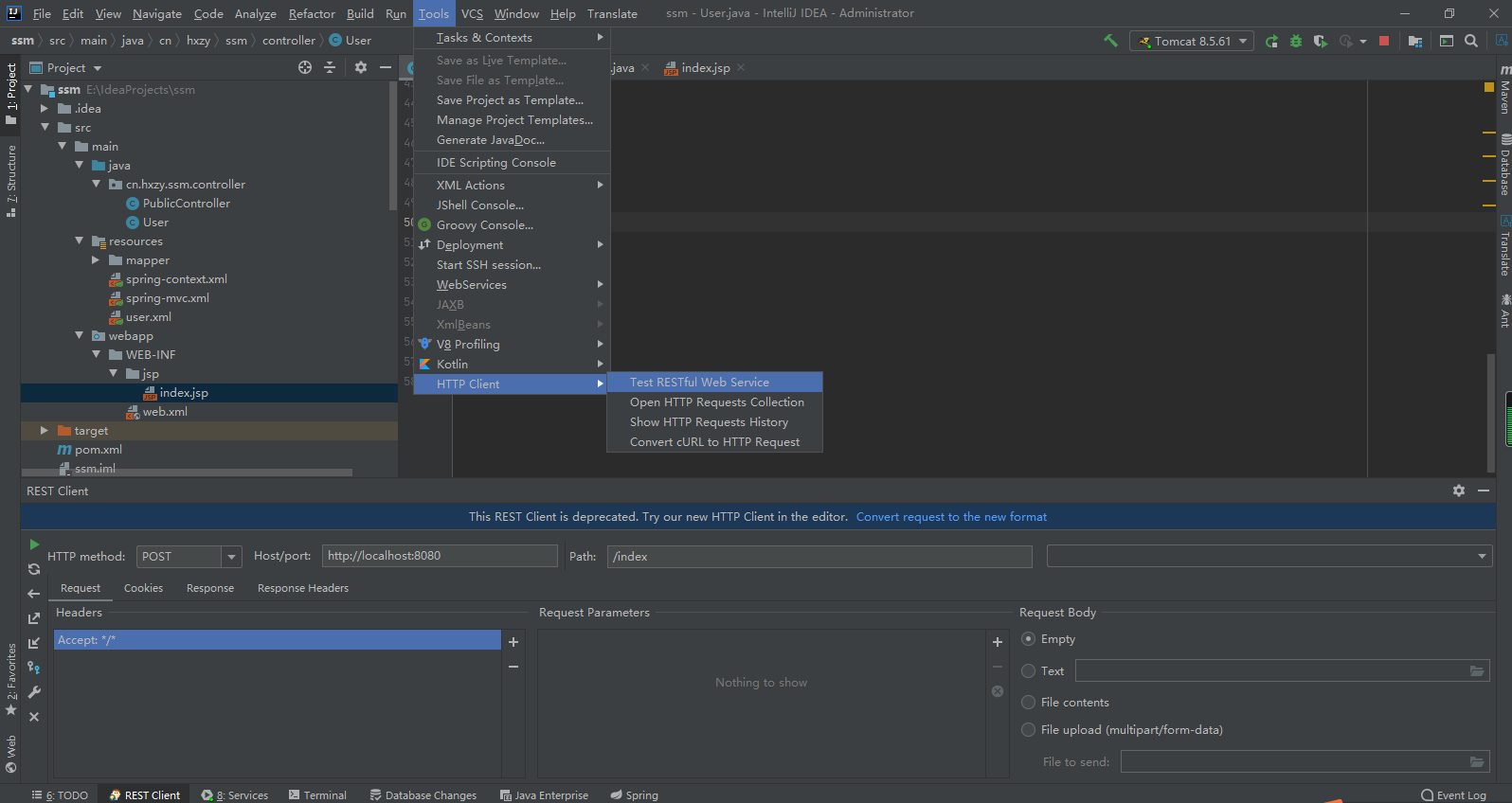
1.HTTP method 用于指定请求方式,常用的请求方式有 GET 和 POST 方式
2.host/port 主要配置请求的协议、主机和端口,具体的接口路径由 Path 指定
3.Headers 用于指定请求头,详情请参照笔记章节的请求头详解。
4.Request Parameters 可以添加普通请求参数。
5.Request Body 用于指定请求时的文件,原生 json 请求等。
参数格式处理
在前后端开发中,参数格式一直都是一个比较头疼的问题,就时间来说有使用 2021-1-28 17:33:16、2021/1/28、2021-1-28,使用 DateTimeFormat 注解可以很好的为前端数据注入时间指定对应的格式。同理在数学上有时数字会使用每隔 3 位加一个逗号等情况,使用 NumberFormat 注解完成数据格式处理。
案例:
@DateTimeFormat(pattern="yyyy-MM-dd")

private Date birth;
案例:
1,456,333.5

@NumberFormat(pattern="#,###,###.#")

private Float salary;
指定前端时间注入格式还有另一种解决办法,使用 InitBinder 注解可以使整个类中的时间格式全部使用指定格式。
@RequestMapping("date")

public String date(Date date){

System.out.println(date);

return "hello";

}
@InitBinder

public void initBinder(ServletRequestDataBinder binder){

binder.registerCustomEditor(Date.class, new CustomDateEditor(new SimpleDateFormat("yyyy-MM-dd"),

true));

}
练习:
1.按照设计图完成部门日程的操作,要求提交的数据能被后端接收并打印。
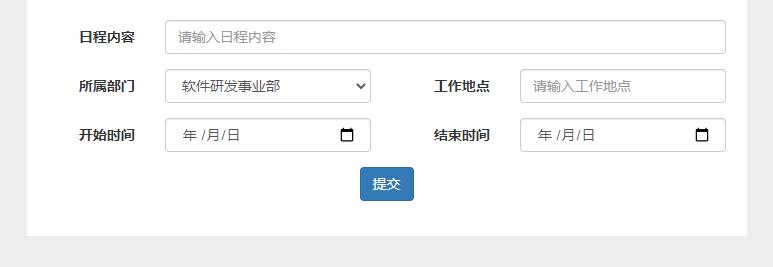
参考代码:
jsp
<%@ page contentType="text/html;charset=UTF-8" language="java" %>

<html>

<head>

<title>新增部门日程</title>

<link rel="stylesheet" href="${pageContext.request.contextPath}/css/bootstrap.min.css">

</head>

<body style="background-color: #eee">

<div class="container">

<form class="form-horizontal" style="padding: 20px;background-color:white" action="addData" method="post">

<div class="form-group">

<label class="col-sm-2 control-label">日程内容</label>

<div class="col-sm-10">

<input type="text" class="form-control" name="content" placeholder="请输入日程内容">

</div>

</div>

<div class="form-group">

<label class="col-sm-2 control-label">所属部门</label>

<div class="col-sm-4">

<select class="form-control" name="deptId">

<option value="1">软件研发事业部</option>

<option value="2">网络宣传事业部</option>

</select>

</div>

<label class="col-sm-2 control-label">工作地点</label>

<div class="col-sm-4">

<input class="form-control" name="address" placeholder="请输入工作地点">

</div>

</div>

<div class="form-group">

<label class="col-sm-2 control-label">开始时间</label>

<div class="col-sm-4">

<input class="form-control" name="startDate" type="date">

</div>

<label class="col-sm-2 control-label">结束时间</label>

<div class="col-sm-4">

<input class="form-control" name="endDate" type="date">

</div>

</div>

<div class="form-group">

<div class="text-center">

<button type="submit" class="btn btn-primary">提交</button>

</div>

</div>

</form>

</div>

</body>

</html>
控制器:
import org.springframework.format.annotation.DateTimeFormat;
import org.springframework.stereotype.Controller;
import org.springframework.web.bind.annotation.PostMapping;
import org.springframework.web.bind.annotation.RequestMapping;
import org.springframework.web.bind.annotation.RequestParam;
import java.util.Date;@Controller
public class IndexController {@RequestMapping("/") public String index() { return "index"; } @PostMapping("/addData") public String addData(@RequestParam String content, @RequestParam(defaultValue = "1") Integer deptId, @RequestParam String address, @DateTimeFormat(pattern = "yyyy-MM-dd") Date startDate, @DateTimeFormat(pattern = "yyyy-MM-dd") Date endDate) { System.out.println(content); System.out.println(deptId); System.out.println(address); System.out.println(startDate); System.out.println(endDate); return "index"; }
}
获取特殊参数(了解)
在实际开发中经常会获取客户端浏览器请求头里面的某些参数,比较原始的方法是在接口方法参数中注入 request 对象,通过 request 对象获取请求头里面的参数。当然还可以通过注解 RequestHeader 获取请求头里面的参数。@RequestHeader 用法与 @RequestParam 类似,只是@RequestHeader 不能省略。
public String testRequestHeader(@RequestHeader(value = "Accept-Language") String al) {

return SUCCESS;

}
@CookieValue 可以获取请求头里面的一个 Cookie 值。用法与 @RequestParam 类似,只是 @CookieValue 也不能省略。
public String testCookieValue(@CookieValue("JSESSIONID") String sessionId) {

return SUCCESS;

}
练习:
1.在请求头中包含客户端浏览器及系统的相关参数,并在首页显示操作系统版本,浏览器种类等信息。
参考代码:
@Controller
public class IndexController {@RequestMapping("index") public String index(@RequestHeader(value = "User-Agent") String userAgent, HttpServletRequest request) { if (userAgent.contains("Windows NT 10.0")) { request.setAttribute("system", "Windows 10"); } if (userAgent.contains("Chrome")) { request.setAttribute("browser", "谷歌"); } if (userAgent.contains("Firefox")) { request.setAttribute("browser", "火狐"); } return "index"; }
}
jsp
<%@ page contentType="text/html;charset=UTF-8" language="java" %>

<html>

<head>

<title></title>

<link rel="stylesheet" href="${pageContext.request.contextPath}/css/bootstrap.min.css">

</head>

<body style="background-color: #eee">

<div class="container">

<div class="row">

<label class="col-sm-2 text-right">系统版本</label>

<div class="col-sm-4">

<input class="form-control" name="system" value="${system}" readonly>

</div>

<label class="col-sm-2 text-right">浏览器</label>

<div class="col-sm-4">

<input class="form-control" name="browser" value="${browser}" readonly>

</div>

</div>

</div>

</body>

</html>
实体对象属性校验
在实际开发中,用户参数校验是一项必不可少的开发逻辑,不但需要做到前端校验(使用 JavaScript 进行参数校验),后端获取到参数后也要做相应的校验。其中比较常用的一种是使用 hibernate 提供的一种通用的校验规范,在后面学习的 Springboot 框架中便是使用这一校验规则。
导入相关依赖
<dependency>

<groupId>org.hibernate</groupId>

<artifactId>hibernate-validator</artifactId>

<version>6.1.0.Final</version>

</dependency>
实体上加入校验注解
@NotEmpty
private String lastName;
private String email;
@Past//当前时间的前面
@DateTimeFormat(pattern="yyyy-MM-dd")
private Date birth;
在需要校验的接口方法参数上加入校验注解,前端数据过来时就会自动校验。
@GetMapping(value = "/")

public String index2(@Validated User user, Errors result) {

System.out.println("我被调用了" + user);

for (FieldError error : result.getFieldErrors()) {

System.out.println(error.getField() + ":" + error.getDefaultMessage());

}

return "hello";

}
章节练习:
1.创建项目 demo1 并完成注册登录的校验逻辑,并在后端代码上加入相应的参数校验(登录时账号密码不为空,注册时所有属性不为空),同时使用 bootstrap 对所写的页面进行美化。
2.在一个高并发系统中对流量的把控是非常重要的,当巨大的流量直接请求到我们的服务器上没多久就可能造成接口不可用,不处理的话甚至会造成整个应用不可用。
那就需要限流,顾名思义,限流就是限制流量。通过限流,我们可以很好地控制系统的 qps,从而达到保护系统的目的。请使用 AOP 横切所有 rest 接口完成每秒 2 次即 2qps 的限流逻辑。
参考代码:
import org.springframework.stereotype.Controller;
import org.springframework.validation.annotation.Validated;
import org.springframework.web.bind.annotation.GetMapping;
import org.springframework.web.bind.annotation.PostMapping;
import javax.validation.constraints.NotBlank;
import javax.validation.constraints.NotNull;@Controller
public class PublicController {@GetMapping("/index") public String index() { return "index"; } @PostMapping("login") public String login(@Validated(User.Login.class) User user) { System.out.println(user); return "index"; } @PostMapping("register") public String register(@Validated(User.Register.class) User user) { System.out.println(user); return "index"; }}
class User{
private Integer id;
@NotBlank(groups = Register.class)
private String name;
@NotBlank(groups = {Register.class,Login.class})
private String loginName;
@NotBlank(groups = {Register.class,Login.class})
private String loginPassword;
@NotNull(groups = Register.class)
private Integer classId;interface Register{} interface Login{} public Integer getId() { return id; } public void setId(Integer id) { this.id = id; } public String getName() { return name; } public void setName(String name) { this.name = name; } public String getLoginName() { return loginName; } public void setLoginName(String loginName) { this.loginName = loginName; } public String getLoginPassword() { return loginPassword; } public void setLoginPassword(String loginPassword) { this.loginPassword = loginPassword; } public Integer getClassId() { return classId; } public void setClassId(Integer classId) { this.classId = classId; } @Override public String toString() { return "User{" + "id=" + id + ", name='" + name + '\'' + ", loginName='" + loginName + '\'' + ", loginPassword='" + loginPassword + '\'' + ", classId=" + classId + '}'; }
}

 浙公网安备 33010602011771号