

在Visual Studio中为Javascript注释提供折叠功能
现在写Javascipt代码也开始跟国际接轨了,为每个函数添加XML注释,标明函数的作用,参数类型,返回值等。这样做的好处确实多多,不过副作用也随之而来:阅读信息量增加的太多了,尤其是帮别人做Code Review的时候,想查看一个函数的代码,往往要滚屏半天才能找到。于是动手写个宏为Visual Studio提供Javascript注释折叠功能:
'-----------------------------------------------------------------------------------
' Macro for outlining Javascript codes that enclosed by "//#region" and "//#endregion"
'-----------------------------------------------------------------------------------
Sub OutlineRegions()
DTE.UndoContext.Open("Outline Javascript regions")
Try
TryOutline("\/^2:Wh*\#region", "\/^2:Wh*\#endregion")
Finally
DTE.UndoContext.Close()
End Try
End Sub
'----------------------------------------------------------------
' Macro for outlinling all XML comments in a Javascript file
'----------------------------------------------------------------
Sub OutlineXmlComments()
DTE.UndoContext.Open("Outline Javascript XML comments")
Try
TryOutline("\/^3:Wh*\<summary\>", "\/^3:Wh\<.@\/.@\>~(:Wh+\/^3)")
Finally
DTE.UndoContext.Close()
End Try
End Sub
Private Sub TryOutline(ByVal startToken As String, ByVal endToken As String)
Dim selection As EnvDTE.TextSelection = DTE.ActiveDocument.Selection
Dim startTokenFound As Boolean = selection.FindPattern(startToken, vsFindOptions.vsFindOptionsFromStart
Or vsFindOptions.vsFindOptionsRegularExpression)
While startTokenFound
Dim startLine As Long = selection.TopPoint.Line
Dim startColumn As Long = selection.TopPoint.LineCharOffset
If selection.FindPattern(endToken, vsFindOptions.vsFindOptionsRegularExpression) Then
selection.SwapAnchor()
selection.MoveToLineAndOffset(startLine, startColumn, True)
selection.OutlineSection()
selection.LineDown()
End If
startTokenFound = selection.FindPattern(startToken, vsFindOptions.vsFindOptionsRegularExpression)
End While
End Sub
' Macro for outlining Javascript codes that enclosed by "//#region" and "//#endregion"
'-----------------------------------------------------------------------------------
Sub OutlineRegions()
DTE.UndoContext.Open("Outline Javascript regions")
Try
TryOutline("\/^2:Wh*\#region", "\/^2:Wh*\#endregion")
Finally
DTE.UndoContext.Close()
End Try
End Sub
'----------------------------------------------------------------
' Macro for outlinling all XML comments in a Javascript file
'----------------------------------------------------------------
Sub OutlineXmlComments()
DTE.UndoContext.Open("Outline Javascript XML comments")
Try
TryOutline("\/^3:Wh*\<summary\>", "\/^3:Wh\<.@\/.@\>~(:Wh+\/^3)")
Finally
DTE.UndoContext.Close()
End Try
End Sub
Private Sub TryOutline(ByVal startToken As String, ByVal endToken As String)
Dim selection As EnvDTE.TextSelection = DTE.ActiveDocument.Selection
Dim startTokenFound As Boolean = selection.FindPattern(startToken, vsFindOptions.vsFindOptionsFromStart
Or vsFindOptions.vsFindOptionsRegularExpression)
While startTokenFound
Dim startLine As Long = selection.TopPoint.Line
Dim startColumn As Long = selection.TopPoint.LineCharOffset
If selection.FindPattern(endToken, vsFindOptions.vsFindOptionsRegularExpression) Then
selection.SwapAnchor()
selection.MoveToLineAndOffset(startLine, startColumn, True)
selection.OutlineSection()
selection.LineDown()
End If
startTokenFound = selection.FindPattern(startToken, vsFindOptions.vsFindOptionsRegularExpression)
End While
End Sub
这些都是Visual Studio宏代码,用法没什么好说的。
运行效果如下:
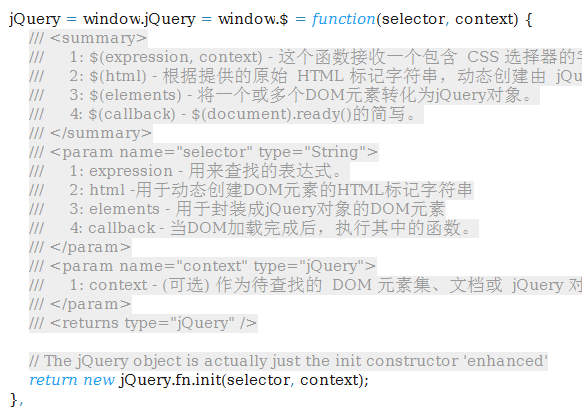
运行OutlineXmlComments宏前是这个样子地:
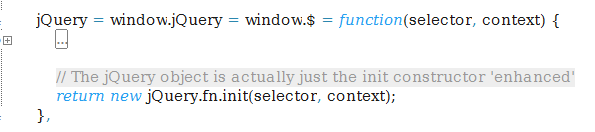
运行OutlineXmlComments宏后世界清静了:
从理论上说,只要写出正确的正则表达式作为startToken/endToken,利用上面的TryOutline函数,基本上可以将任意文件类型的任意代码折叠,比如 那个OutlineRegions宏,实现的功能是将在"// #region"和"// #endregion"之间的JS代码折叠。类似:
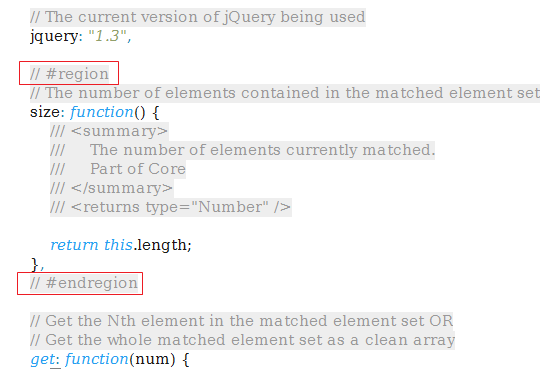
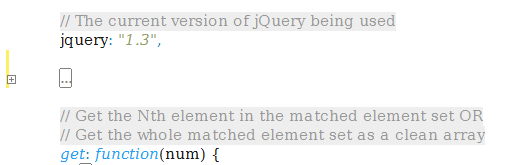
会被折叠为:


 浙公网安备 33010602011771号