


关于web.config的读写管理
web.config是xml格式的,用xml的通用方式来读写,当然没有任何问题,但有点麻烦。
后在网上查找,并经过验证,发现用Configuration类和AppSettingsSection类可以直接实现。
下面是管理web.config页面的HTML代码:

 Code
Code1
 <form id="form1" runat="server">
2
<div>3
<asp:Label ID="Label1" runat="server" Text="上传模型年份最小值:"></asp:Label>4
<asp:TextBox ID="TextBox1" runat="server"></asp:TextBox><br />5
<asp:Label ID="Label2" runat="server" Text="上传模型年份最大值:"></asp:Label><asp:TextBox6
ID="TextBox2" runat="server"></asp:TextBox><br />7
<asp:Label ID="Label3" runat="server" Text="页面表格每页显示行数:"></asp:Label><asp:TextBox8
ID="TextBox3" runat="server"></asp:TextBox><br />9
<asp:Label ID="lbTime" runat="server" Text="用户登录有效时间:"></asp:Label> 10
<asp:TextBox ID="tbTime" runat="server"></asp:TextBox>11
<asp:Label ID="lbTimeUnit" runat="server" Text="秒"></asp:Label>12
<asp:CustomValidator ID="CustomValidator1" runat="server" ControlToValidate="tbTime"13
Display="Dynamic" ErrorMessage="用户登录有效时间必须填写数字" ValidationGroup="group1"></asp:CustomValidator><br />14
<br />15
<br />16
<asp:Label ID="lbAdminEmail" runat="server" Text="系统管理员邮箱:"></asp:Label>17
<asp:TextBox ID="tbAdminEmail" runat="server" Width="246px"></asp:TextBox>18
19
20
<br />21
<br />22
<table style="width: 348px">23
<tr>24
<td rowspan="2">25
<asp:DropDownList ID="DDLRoleSource" runat="server" Width="100px">26
</asp:DropDownList></td>27
<td>28
<asp:Button ID="btnRoleSelect" runat="server" Text="==>" OnClick="btnRoleSelect_Click" /></td>29
<td rowspan="2">30
<asp:DropDownList ID="DDLRoleTarget" runat="server" Width="100px">31
</asp:DropDownList></td>32
</tr>33
<tr>34
<td>35
<asp:Button ID="btnRoleDSelect" runat="server" Text="<==" OnClick="btnRoleDSelect_Click" /></td>36
</tr>37
</table>38
<br />39
</div>40
<asp:Button ID="Button1" runat="server" OnClick="Button1_Click" Text="保存" />41
</form>下面是页面的design视图:
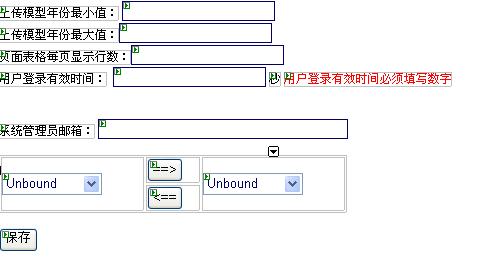
下面是后台改变系统管理员邮箱配置的相关代码:
Code1
using System;2
using System.Data;3
using System.Configuration;4
using System.Collections;5
using System.Web;6
using System.Web.Security;7
using System.Web.UI;8
using System.Web.UI.WebControls;9
using System.Web.UI.WebControls.WebParts;10
using System.Web.UI.HtmlControls;11
12
using System.Web.Configuration;13
14
using System.Text;15
16
namespace APSMMS.SystemConfig17
 {
{18
 using APSMMSLib.Business;
19
public partial class SystemConfigPage : System.Web.UI.Page20

 {
{21
Configuration config;22
AppSettingsSection appSection;23
24
protected void ConfigInit()25
{26
config = WebConfigurationManager.OpenWebConfiguration("~");27
appSection = (AppSettingsSection)config.GetSection("appSettings");28
 }
}29
30
protected void Page_Load(object sender, EventArgs e)31
{32
ConfigInit();33
if(!IsPostBack)34
BindData();35
}36
37
protected void BindData()38
{39
tbAdminEmail.Text = appSection.Settings["AdminEmail"].Value;40
}41
42
protected void Button1_Click(object sender, EventArgs e)43
{44
appSection.Settings["AdminEmail"].Value = tbAdminEmail.Text.Trim();45
config.Save();46
}47
}48
 }
}49
注意:
网站发布以后,注意在web.config文件的权限中添加asp.net相应用户的写权限。
用vss的开发的话,一定要保证web.config签出,才能正确运行。(如没有签出,则不可写)。

 浙公网安备 33010602011771号