
Sringboot 自定义启动器
开门见山:
1、创建项目:
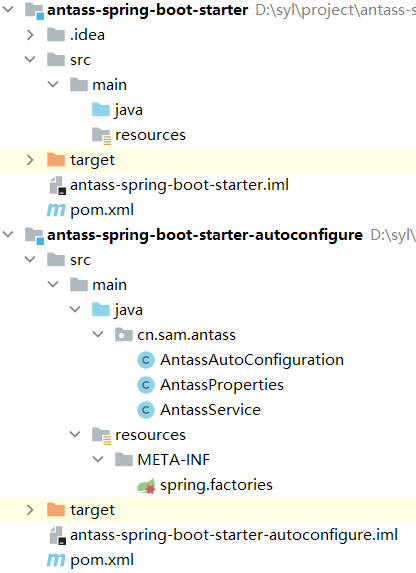
2、配置pom文件
autoconfigure模块:(引入starter和processor依赖)
<?xml version="1.0" encoding="UTF-8"?>
<project xmlns="http://maven.apache.org/POM/4.0.0"
         xmlns:xsi="http://www.w3.org/2001/XMLSchema-instance"
         xsi:schemaLocation="http://maven.apache.org/POM/4.0.0 http://maven.apache.org/xsd/maven-4.0.0.xsd">
    <modelVersion>4.0.0</modelVersion>

    <groupId>cn.sam.antass</groupId>
    <artifactId>antass-spring-boot-starter-autoconfigure</artifactId>
    <version>1.0-SNAPSHOT</version>

    <parent>
        <groupId>org.springframework.boot</groupId>
        <artifactId>spring-boot-starter-parent</artifactId>
        <version>2.3.2.RELEASE</version>
        <relativePath/>
    </parent>

    <dependencies>
        <dependency>
            <groupId>org.springframework.boot</groupId>
            <artifactId>spring-boot-starter</artifactId>
        </dependency>
        <dependency>
            <groupId>org.springframework.boot</groupId>
            <artifactId>spring-boot-configuration-processor</artifactId>
        </dependency>
    </dependencies>

</project>
starter模块:(引入“antass-spring-boot-starter-autoconfigure”依赖)
<?xml version="1.0" encoding="UTF-8"?>
<project xmlns="http://maven.apache.org/POM/4.0.0"
         xmlns:xsi="http://www.w3.org/2001/XMLSchema-instance"
         xsi:schemaLocation="http://maven.apache.org/POM/4.0.0 http://maven.apache.org/xsd/maven-4.0.0.xsd">
    <modelVersion>4.0.0</modelVersion>

    <groupId>cn.sam.antass</groupId>
    <artifactId>antass-spring-boot-starter</artifactId>
    <version>1.0-SNAPSHOT</version>

    <dependencies>
        <dependency>
            <groupId>cn.sam.antass</groupId>
            <artifactId>antass-spring-boot-starter-autoconfigure</artifactId>
            <version>1.0-SNAPSHOT</version>
        </dependency>
    </dependencies>

</project>
3、项目文件:
AntassProperties:
@ConfigurationProperties(prefix = "antass.config")
public class AntassProperties {
    private Boolean enable;

    public Boolean getEnable() {
        return enable;
    }

    public void setEnable(Boolean enable) {
        this.enable = enable;
    }
}
AntassService:
public class AntassService {
    AntassProperties properties;

    public Boolean config() {
        return properties.getEnable();
    }

    public AntassProperties getProperties() {
        return properties;
    }

    public void setProperties(AntassProperties properties) {
        this.properties = properties;
    }
}
AntassAutoConfiguration:
@Configuration
@ConditionalOnWebApplication
@EnableConfigurationProperties(AntassProperties.class)
public class AntassAutoConfiguration {
    @Autowired
    private AntassProperties properties;

    @Bean
    public AntassService antassService() {
        AntassService service = new AntassService();
        service.setProperties(properties);
        return service;
    }
}
3、新建META文件(resources\META-INF\spring.factories),配置自动加载类
# Auto Configure
org.springframework.boot.autoconfigure.EnableAutoConfiguration=\
cn.sam.antass.AntassAutoConfiguration
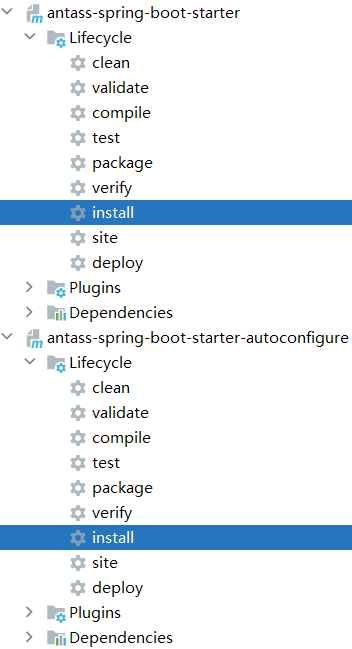
4、将antass-spring-boot-starter-autoconfigure和antass-spring-boot-starter模块按顺序安装进maven仓库
5、再其它项目中引入:
<dependency>
        <groupId>cn.sam.antass</groupId>
        <artifactId>antass-spring-boot-starter</artifactId>
        <version>1.0-SNAPSHOT</version>
</dependency>
6、配置:(application.yml)
antass:
  config:
    enable: false
7、使用:
@Autowired
private AntassService antassService;
8、测试:
@GetMapping("/antass")
public String testAntass() {
    return String.valueOf(antassService.config());
}
知止而后有定;定而后能静;静而后能安;安而后能虑;虑而后能得。

 浙公网安备 33010602011771号