
数据库的简单操作
一,数据库
二,数据库的表,列,字段,数据之间的联系
三,数据库增、删、查、改的简单操作
一,数据库(电子化的文件柜/Data)
数据库“按照数据结构来组织、存储和管理数据的仓库”。是一个长期存储在计算机内的、有组织的、可共享的、统一管理的大量数据的集合。
二,数据库的表,列,字段,数据之间的联系
表:记录的组合 表示同一类事物的组合。(表是数据库最基本的对象,用于存储用户数据,关系数据库的所有操作最终都是围绕数据表运行的)
字段:某一个事物的一个特征,或者说是属性。
列:大部分情况下,列和字段是相同的,但是数据中实际存在的表的列就成为列,在运行时创建的搜索的不存在与实际表中的列就是字段。
数据:即所要储存的。
联系:数据库就是大仓库,表就是仓库中相同属性物品的归类,数据即物品。
三,数据库增、删、查、改的简单操作
连接数据库:mysql> mysql -u<username> -p<password>;
显示所有数据库:mysql> show databases;
选择数据库:mysql> use <database name>;
创建一个数据库:mysql> create database <database name> [charset <charset>];
删除一个数据库:mysql> drop database <database name>;
修改数据库名:mysql无法直接修改数据库名!
显示所有表:mysql> show tables;
删除一张表:mysql> drop table <table name>;
修改表名:mysql> rename table <table name> to <new table name>;
清空表:mysql> truncate <table name>;
3.1 登入 密码默认为root
mysql -uroot -p
root
D:\installationpath\phpstudy>mysql -uroot -p
Enter password: ****
Welcome to the MySQL monitor.  Commands end with ; or \g.
Your MySQL connection id is 3
Server version: 5.5.53 MySQL Community Server (GPL)
Copyright (c) 2000, 2016, Oracle and/or its affiliates. All rights reserved.
Oracle is a registered trademark of Oracle Corporation and/or its
affiliates. Other names may be trademarks of their respective
owners.
Type 'help;' or '\h' for help. Type '\c' to clear the current input statement.

3.2 增
create database 库名;

3.2 删
drop+库名;

3.3 查
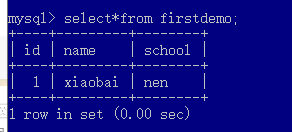
select*from 名称;
3.4 改
update hero set 表中的属性 = 改动数据 where id = 1;


 浙公网安备 33010602011771号